
Recipes Template
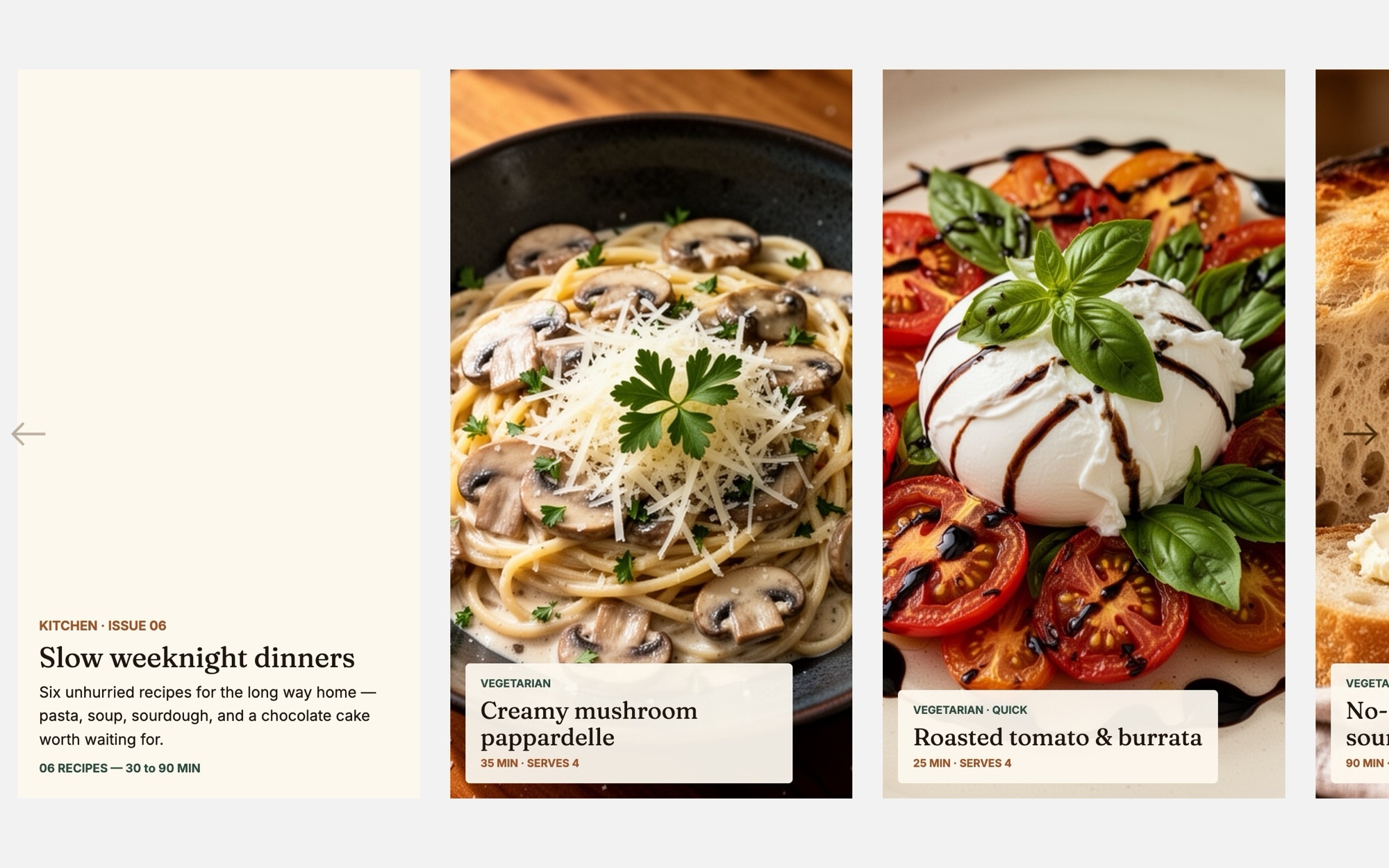
A recipe carousel that feels closer to a printed cookbook spread than a generic food grid. Each card pairs a single hero food shot with the recipe name set in italic Fraunces, a cook time, a serving count, and small dietary badges - so readers can scan a row of dishes and pick what fits the night. The default sequence covers a header slide and six weeknight-friendly dinners, from creamy mushroom pasta to chocolate olive oil cake.
The cream background, espresso text, and terracotta and deep-green accents create a warm editorial mood that lets food photography do the talking. Open it in Swiper Studio, drop in your own dishes, and the carousel becomes a polished section for a food blog homepage, a meal-plan landing page, or a newsletter archive.
#What Makes This Template Stand Out
Editorial Recipe Card Layout
Each card combines a single hero food photo with recipe name, cook time, serves count, and small badges in a tight, scannable hierarchy. Readers get everything they need to decide on dinner without expanding the card.
Warm Cream and Terracotta Palette
Cream, espresso, terracotta, and deep green carry the full carousel. The palette flatters food photography across cuisines - pasta, baked goods, salads, soups - and stays editorial without feeling clinical or overly styled.
Fraunces Italic For Recipe Names
Recipe titles use Fraunces 600 italic to evoke a cookbook or food magazine. Inter handles cook times, badges, and supporting copy with clean modern legibility - a pairing that has become a quiet standard for food editorial on the web.
Multi-Card Layout For Quick Browsing
The carousel shows roughly one card on mobile, two on tablet, and three on desktop with 28px spacing. Readers can sweep through six recipes in a single horizontal motion instead of scrolling a tall grid, which reads more like flipping through a magazine.
Dietary And Time Badges Built In
Each card has space for small badges like vegetarian, quick, one-pan, or under 30 minutes. They are real text elements you can rename or restyle, so the same template works whether your audience cares about plant-based eating, weeknight speed, or kid-friendly meals.
#Who Should Use This Template
This template is built for food bloggers, recipe writers, and cookbook authors who want their site to feel like a well-art-directed publication instead of a stock food grid. The card-based carousel works as a homepage hero, a category landing page (weeknight dinners, baking, vegetarian), or a roundup section inside a longer post. Drop in your own dish photography and the editorial pacing does most of the styling work for you.
Meal kit services, recipe boxes, and direct-to-consumer food brands can use the same structure to feature this week's menu, a curated collection, or a seasonal lineup. The cook time and serves fields read naturally as portion and prep info, and the badges easily become "new", "popular", or "chef's pick" tags for a commerce-flavored feel.
Food media teams, editorial agencies, and content marketers building newsletters or sponsored content can drop this into a Webflow project, a WordPress site, or a Substack landing page in minutes. Customize the palette and fonts to a client's brand, swap photography, and you have a production-ready section without writing a line of carousel code.
#Best Use Cases
- ✓Food blog homepages featuring this week's recipes or seasonal collections
- ✓Recipe roundups inside longer editorial posts - weeknight dinners, holiday baking, vegetarian sets
- ✓Meal kit and recipe box landing pages showcasing the upcoming menu
- ✓Cookbook author sites highlighting featured dishes from a new release
- ✓Food newsletter archives organized by week, season, or theme
- ✓Restaurant and cafe sites surfacing signature dishes or chef recommendations
- ✓Recipe app marketing pages previewing what is inside the product
- ✓Brand content hubs for pantry brands, kitchen tools, or grocery retailers
#How to Customize
- Open the Recipes template in Swiper Studio by clicking 'Use This Template' above to load the header slide and six recipe cards into the editor1
- Replace the header slide copy with your own collection name - "Slow weeknight dinners", "Bakery week", or whatever fits the section2
- Swap each recipe hero image with your own food photography - overhead bowls, plated mains, and styled flat lays all fit the card frame3
- Update each card's text - recipe name in Fraunces italic, cook time, serves count, and small dietary or speed badges4
- Add or remove cards to match the number of recipes you want to feature - duplicate a card for consistent styling, then change the content5
- Customize the palette - keep the cream and terracotta for warmth, or shift to your own brand colors using the editor color pickers6
- Tune the carousel behavior - adjust slides per view, spacing, autoplay, and pagination from the project params panel7
- Preview each breakpoint, fine-tune type sizes for mobile, then export to HTML, React, Vue, Next.js, Web Component, or Webflow - or publish to CDN for instant embedding8
#Frequently Asked Questions
- Can I replace the food photos with my own recipe images?
- Yes. Every hero photo on every recipe card is fully editable. Click any image to upload your own food photography, or pick from the built-in demo image library. The card layout adapts to whatever you drop in - overhead bowls, plated dishes, baked goods, or styled flat lays all sit cleanly inside the same frame.
- How do I swap the recipe names, cook times, and dietary badges?
- Click any text element on a card and edit it inline. Recipe titles use Fraunces italic for an editorial feel, while cook time, serving count, and badges like "vegetarian" or "quick" use Inter for clean readability. You can rename, restyle, or remove any of these labels per card without touching code.
- Does this template work well on phones and tablets?
- Yes. The template ships with mobile, tablet, and desktop breakpoints showing roughly 1.1, 2.2, and 3.2 cards per view. You can adjust the count, spacing, and font sizes independently at each breakpoint so the recipes feel right whether someone is browsing on a phone in the kitchen or on a laptop at their desk.
- Can I match the colors and fonts to my food brand?
- Absolutely. The default palette - cream, espresso, terracotta, and deep green - reads as warm and editorial, but every color is editable. Swap the Fraunces and Inter pairing for any Google Font in the editor, and the whole carousel inherits your brand without breaking the layout.
- How do I embed the recipe carousel on my food blog?
- Once the recipes are styled the way you want, publish the project to CDN from Swiper Studio. You will get an embed snippet you can paste into a WordPress block, a Substack post, a Webflow embed, or a Shopify section. You can also export clean code as React, Vue, HTML, Next.js, or a Web Component.
#Related Templates

#Related Resources
- Swiper Studio for WordPress
- Swiper Studio for Webflow
- Swiper Studio for Small Businesses
- Swiper Studio for Marketers
Ready to Build Your Slider?
Pick a template, customize it visually, and export production-ready code to React, Vue, Next.js, HTML, Webflow, and more. No coding required.








