
Testimonials Carousel - Dark
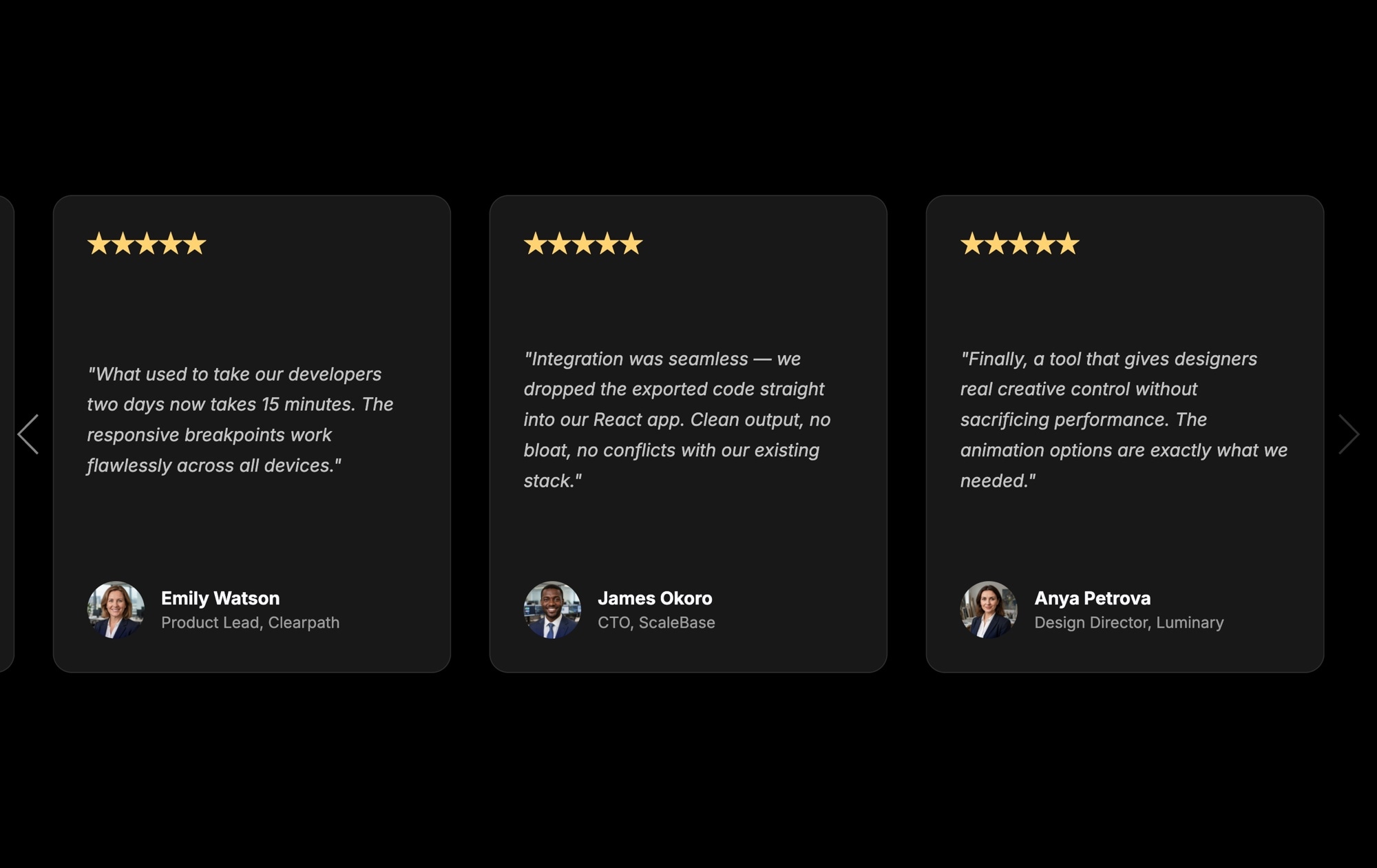
A dark testimonial carousel commands attention. The contrast between a dark background and light text makes customer quotes pop, drawing visitors directly to the social proof that drives conversions. This template gives you a polished, ready-to-use review slider with star ratings, customer quotes, avatars, and navigation arrows - all against a sleek dark backdrop.
Each card displays five gold stars at the top, an italic quote in the center, the reviewer's name and title below, and a circular avatar photo at the bottom. Three cards are visible at once on desktop, and side arrows let visitors browse through additional reviews at their own pace. The dark aesthetic works especially well on landing pages, SaaS marketing sites, and portfolios where a premium, modern feel matters.
#What Makes This Template Stand Out
Dark Background With High-Contrast Typography
Light text on a dark background creates instant visual hierarchy. Customer quotes stand out without competing with other page elements, and the dark aesthetic signals a modern, premium brand.
Gold Star Ratings on Every Card
Five gold stars at the top of each card immediately communicate positive sentiment. Visitors register the rating before they even read the quote, reinforcing trust at a glance.
Three-Card Desktop Layout With Navigation
Three testimonials are visible simultaneously on desktop, giving visitors a wall of social proof. Side navigation arrows let them browse additional reviews without scrolling the page.
Complete Reviewer Identity
Each card includes the reviewer's name, job title, company, and avatar photo. Full identity details add credibility - visitors trust named, identifiable people more than anonymous quotes.
Responsive and Export-Ready
The template adapts from three cards on desktop to one on mobile. Export to HTML, React, Vue, Next.js, Web Component, or Webflow, or publish to CDN and embed it anywhere with a single line of code.
#Who Should Use This Template
This template is built for teams that want their testimonials to feel intentional, not like an afterthought. If your website uses a dark color scheme or you want the social proof section to create a visual break from lighter content above and below, the dark variant delivers that contrast without any design work.
Marketing teams and agencies will get the most immediate value. Drop in real customer quotes, swap the placeholder avatars for actual headshots, adjust the star ratings, and publish. The visual editor handles all the styling, so there is no need to involve a developer for content updates. When a new five-star review comes in, adding it to the carousel takes minutes.
SaaS companies, digital agencies, freelancers, and ecommerce brands all benefit from a testimonial section that feels premium. The dark background pairs naturally with product demos, hero sections, and pricing tables, making it a strong choice for landing pages and conversion-focused layouts.
#Best Use Cases
- ✓SaaS landing pages that need social proof above the fold or near a pricing section
- ✓Agency portfolio sites showcasing client feedback alongside case studies
- ✓Ecommerce product pages displaying customer reviews next to purchase buttons
- ✓Freelancer websites featuring client testimonials to build credibility
- ✓Startup pitch pages where investor or early adopter quotes reinforce the value proposition
- ✓Dark-themed websites and portfolios where a light testimonial section would clash with the design
- ✓Event and conference sites highlighting speaker or attendee feedback
#How to Customize
- Click "Use This Template" to open the project in Swiper Studio's visual editor1
- Replace the placeholder quotes with real customer testimonials - click any text element to edit it inline2
- Swap avatar images by clicking the photo element and uploading your own customer headshots3
- Update names, job titles, and company names on each card to match your real reviewers4
- Adjust the star rating text if a review is less than five stars, or remove the rating element entirely5
- Change the background color, card styling, or font choices to align with your brand palette6
- Set responsive breakpoints to control how many cards appear on mobile, tablet, and desktop7
- Enable autoplay if you want the carousel to rotate automatically, and configure pause on hover8
- Export to your preferred format - HTML, React, Vue, Webflow - or publish to CDN for instant embed9
#Frequently Asked Questions
- Can I change the dark background color to match my brand?
- Yes. The dark background is fully customizable in the visual editor. Change the background color of the slider container and individual slide cards to any hex value, including semi-transparent colors. You can match your exact brand palette without writing any CSS.
- How many testimonial cards are visible at once?
- The template defaults to three visible cards on desktop. You can change the slides per view setting at each responsive breakpoint - for example, three on desktop, two on tablet, and one on mobile - so the layout adapts to every screen size.
- Can I add or remove the star ratings?
- Absolutely. The star ratings are text elements on each slide. You can change the number of stars, adjust their color and size, or remove them entirely. You can also replace them with a numeric rating, a custom image, or any other element.
- Does this template work with autoplay?
- Yes. Enable autoplay in the parameters panel and set the delay between transitions. You can also activate pause on hover so visitors have time to read longer testimonials before the slider advances.
- What export formats does this template support?
- All Swiper Studio export formats are available: HTML, React, Vue, Next.js, Web Component, and Webflow. You can also publish to CDN for instant iframe or script embed on any website, including WordPress and Shopify.
- Can I use real customer photos as avatars?
- Yes. Click any avatar image element in the editor and replace it with your own image. Upload photos from your computer or use the built-in asset library. The circular crop and sizing are handled automatically by the template styling.
#Related Templates

#Related Resources
- Swiper Studio for Testimonials
- Swiper Studio for Agencies
- Swiper Studio for Marketers
- Swiper Studio for Landing Pages
Ready to Build Your Slider?
Pick a template, customize it visually, and export production-ready code to React, Vue, Next.js, HTML, Webflow, and more. No coding required.








