
Hero Banner Slider Template
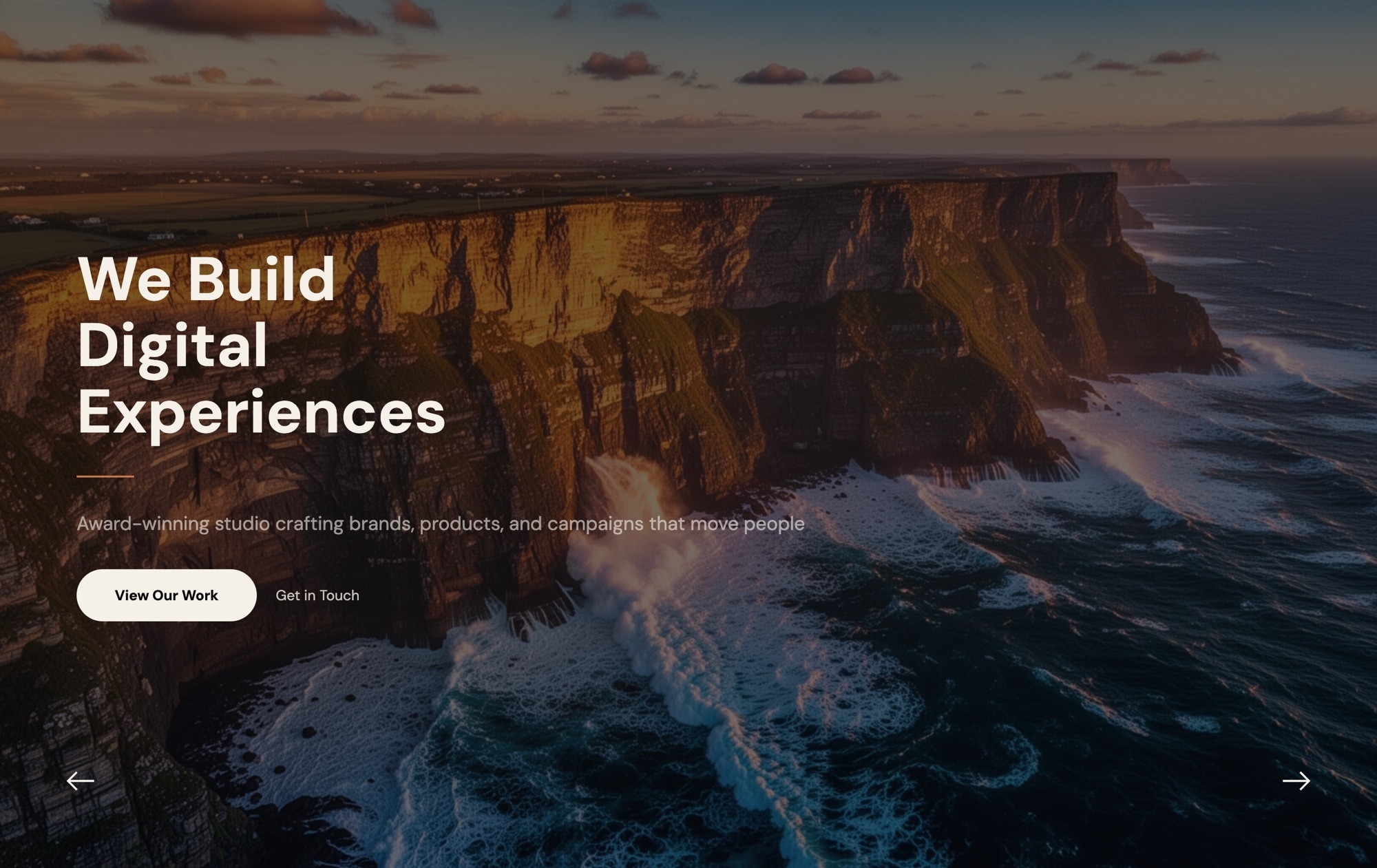
A bold, full-screen hero slider designed to make an immediate impression. This template features a dramatic landscape background, a large headline ("We Build Digital Experiences"), a supporting subtitle, two call-to-action buttons, and navigation arrows — everything you need for a high-impact above-the-fold section. Open it in Swiper Studio, swap in your own content, and have a production-ready hero banner in minutes.
#What Makes This Template Stand Out
Full-Screen Impact
The slider fills the entire viewport, creating an immersive first impression that commands attention the moment a visitor lands on your page. No wasted space, no distractions — just your message front and center.
Headline and CTA Layout
Pre-configured with a large headline, subtitle text, and two side-by-side CTA buttons ('View Our Work' and 'Get in Touch'). The layout is balanced and conversion-focused, guiding visitors toward action without feeling pushy.
Navigation Arrows Built In
Sleek left and right navigation arrows let visitors browse slides at their own pace. Arrow styling, positioning, and visibility are all customizable through the editor — no CSS required.
Cinematic Background Imagery
The template ships with a stunning ocean cliff landscape that demonstrates how full-bleed photography elevates a hero section. Replace it with your own visuals — images or video — and the layout adapts automatically.
Responsive by Default
Breakpoints for mobile, tablet, laptop, and desktop are already configured. Text scales down gracefully, buttons stack on smaller screens, and the background image crops intelligently. Customize any breakpoint further in the visual editor.
#Who Should Use This Template
This hero banner template is built for anyone who needs a polished, full-screen opening section on their website — and needs it fast. If you are a web designer building a client site, this gives you a professional starting point that you can customize to match any brand in minutes. Swap the colors, update the typography, drop in client photography, and you have a bespoke hero section without starting from scratch.
Marketing teams and agencies will find this template particularly useful for campaign landing pages, product launch sites, and corporate homepages. The dual CTA button layout is designed for conversion — one primary action and one secondary action — so you can drive signups, demo requests, or portfolio views right from the hero. The visual editor means marketers can make updates themselves without waiting on developers.
Freelancers, startups, and small businesses benefit from the template's turnkey quality. You do not need to hire a designer or developer to get a hero section that looks like it belongs on a premium website. Pick the template, add your content, export to your platform of choice, and ship it.
#Best Use Cases
- ✓Corporate and agency homepages that need a strong visual introduction with clear calls to action
- ✓Product and service landing pages where the hero section drives conversions
- ✓Portfolio websites showcasing creative work with full-screen imagery and project navigation
- ✓Startup launch pages that need to communicate a value proposition quickly and memorably
- ✓Event and conference websites featuring keynote visuals, dates, and registration buttons
- ✓Real estate and travel sites where large landscape photography creates emotional impact
#How to Customize
- Open the Hero Banner template in Swiper Studio — click 'Use This Template' above to load it directly into the editor1
- Replace the background image with your own photo or video by selecting the slide and uploading new media in the background panel2
- Edit the headline and subtitle text — click on each text element to update the copy, adjust font size, weight, and color3
- Customize the CTA buttons — change labels, link URLs, background colors, border radius, and hover states to match your brand4
- Add element animations to the headline and buttons — choose from fade, typewriter, pop, blur, or 20+ other animation types with custom delays5
- Switch to mobile and tablet previews to fine-tune responsive layouts — adjust text sizes, spacing, and element visibility per breakpoint6
- Export to your preferred format (HTML, React, Vue, Next.js, Web Component, or Webflow) or publish to CDN for instant embedding7
#Frequently Asked Questions
- Can I try the hero banner template before buying?
- Yes. You can open the template in Swiper Studio, customize it, and preview it in the demo editor. Exporting production-ready code requires a paid plan, but you can test-drive the full editor and all template features before committing.
- Can I change the background images and text?
- Absolutely. Every element in the template is fully editable. Replace the background landscape photo with your own image or video, update the headline and subtitle text, change button labels and link targets, and adjust colors and fonts — all from the visual editor without writing any code.
- Does this template work on mobile devices?
- Yes. The hero banner template is fully responsive out of the box. It includes breakpoint settings for mobile, tablet, laptop, and desktop so text sizes, spacing, and layout adjust automatically. You can further customize each breakpoint independently in the editor.
- What export formats does this template support?
- You can export the hero banner as standalone HTML, a React component, a Vue component, a Next.js project, a Web Component, or a native Webflow element. You can also publish to CDN for instant iframe embedding on any platform.
- Can I add animations to the headline and buttons?
- Yes. Swiper Studio includes over 20 element animations — fade, blur, typewriter, letter fade, pop, bounce, drop, and more. You can apply different animations to the headline, subtitle, and each CTA button, with independent delay and duration settings for sequenced reveals.
#Related Templates
#Related Resources
- Swiper Studio for Hero Sections
- Swiper Studio for Landing Pages
- Swiper Studio for Web Designers
- Swiper Studio for Agencies
Ready to Build Your Slider?
Pick a template, customize it visually, and export production-ready code to React, Vue, Next.js, HTML, Webflow, and more. No coding required.








