
Music Albums Template
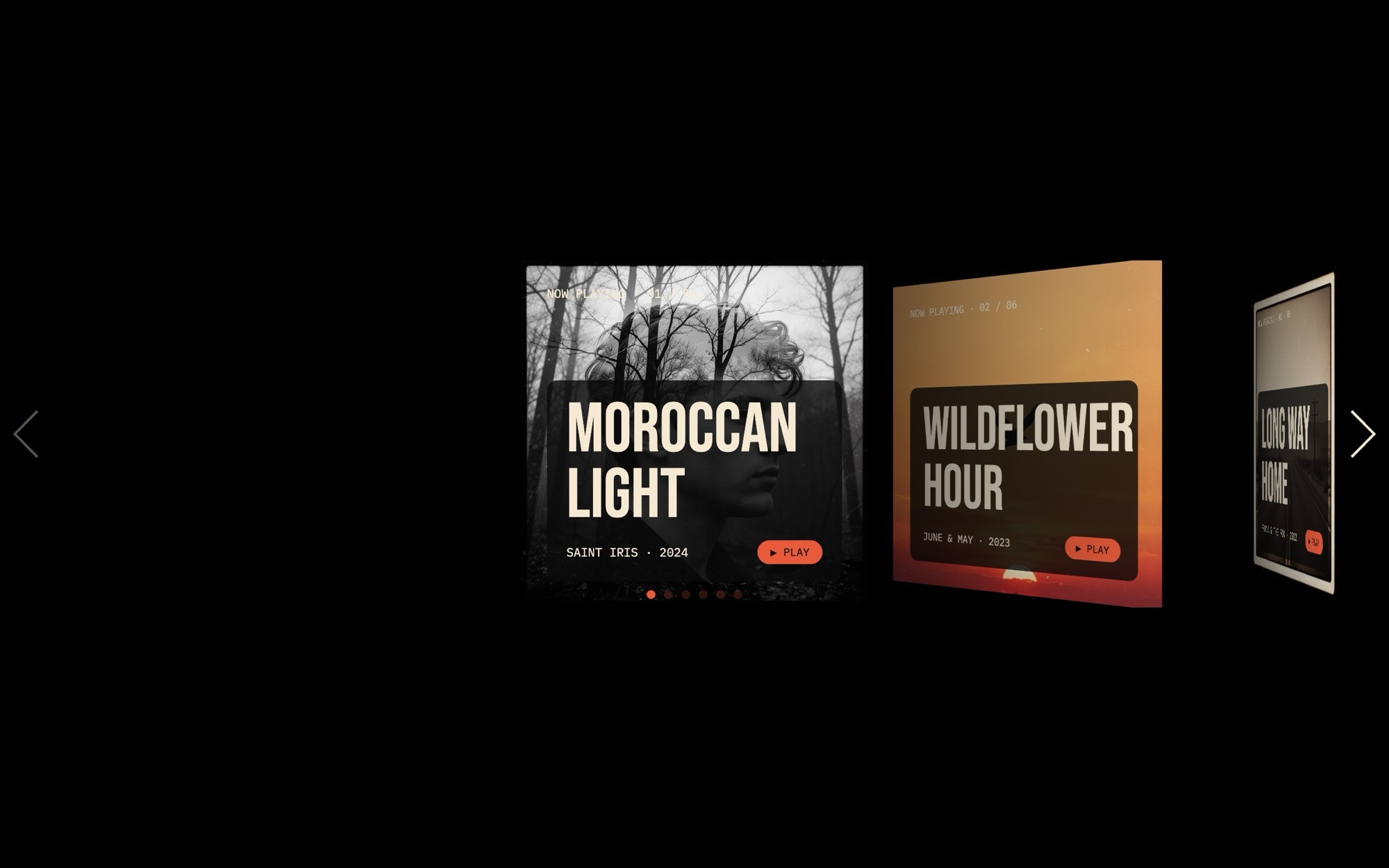
A stacked album browse carousel that feels like flipping through a record crate one cover at a time. Six albums sit in a deck, with each slide showing a square cover, the album title in Bebas Neue display caps, the artist name in IBM Plex Mono, the release year, and a small play link. Swipe or drag and the next cover slides forward in a Tinder-like cards effect that turns a music catalog into something visitors actually want to flick through.
The jet background, parchment type, and warm vermilion accent give the whole thing a vinyl-era feel without leaning on nostalgia tropes. Open the Music Albums template in Swiper Studio, swap in your own cover art, and the deck becomes a featured-releases section for an artist site, a label catalog, or a curated playlist landing page.
#What Makes This Template Stand Out
Tinder-Style Cards Effect For Browsing
The slider uses Swiper's cards effect to stack album covers on top of each other. Visitors swipe through the deck the way they would on a discovery app - one cover at a time, with a peek at the next release behind it. It turns passive scrolling into an active, tactile browse.
Vinyl-Era Bebas Neue And Plex Mono Pairing
Album titles use Bebas Neue 400 display caps for the bold marquee feel of a record sleeve, while artist names, years, and specs use IBM Plex Mono. The pairing references both the analog era of vinyl typography and the editorial restraint of modern indie music sites.
Jet, Parchment, And Vermilion Palette
A jet-black background with parchment text and a warm vermilion accent - colors lifted from classic record packaging. The palette flatters cover art across genres, from moody black-and-white indie portraits to neon synthwave gradients to minimal pastel folk.
Six Mixed-Genre Album Covers Out Of The Box
The template ships with six covers spanning indie, Americana, jazz, synthwave, and folk - so the carousel reads as a real catalog from the start. Replace them with your own releases or curated picks without redesigning a single slide.
Touch-Native Swipe Interaction
The cards effect is built for swipe gestures, which makes the template feel right at home on phones and tablets. Drag, flick, or use pagination dots - the deck always responds the way visitors expect from a modern music or streaming app.
#Who Should Use This Template
This template is built for musicians, bands, and recording artists who want a featured-releases or back-catalog section that feels less like a press kit and more like an actual music app. Whether you are launching a single, releasing an EP, or surfacing your full discography, the stacked deck makes browsing covers genuinely fun. Drop in your artwork, set the titles, and the carousel becomes an on-brand piece for your homepage or tour landing page.
Independent labels, music collectives, and record stores can use the cards effect to showcase a season's releases, a curated genre playlist, or a top-picks section. The mixed-genre out-of-the-box covers prove the template handles visual variety - whatever your roster looks like, the deck stays cohesive thanks to the typography and palette doing the editorial heavy lifting.
Streaming platforms, music apps, and playlist curators building marketing sites can use this as a hero section that actually demonstrates what the product feels like. Instead of a static screenshot of a UI, visitors get a live, swipeable preview - an instant signal that the product respects how people really browse music in 2026.
#Best Use Cases
- ✓Artist and band homepages featuring latest releases or full discographies
- ✓Record label catalog pages organized by season, genre, or signing
- ✓Album launch landing pages with single, EP, or full-length cover art
- ✓Streaming app and music product marketing sites demonstrating browse feel
- ✓Playlist curator and music newsletter sites highlighting weekly picks
- ✓Record store and merch storefronts showcasing in-stock vinyl or limited pressings
- ✓Music festival lineup pages where each card represents a featured artist or release
- ✓Podcast and audio show sites adapted to feature episode artwork as a stack
#How to Customize
- Open the Music Albums template in Swiper Studio by clicking 'Use This Template' above to load the six-album deck into the editor1
- Replace each album cover image with your own square artwork - real releases, single covers, playlist art, or generated visuals all work inside the cards effect2
- Update each card's text - album title in Bebas Neue display, artist name in Plex Mono, year, and the small play link copy3
- Link each play element to your streaming destination - Spotify, Apple Music, Bandcamp, SoundCloud, or your own player page4
- Add or remove cards to match the number of releases you want in the deck - duplicate an existing card for consistent styling, then swap content5
- Tune the cards effect parameters - rotation, slide shadows, per-slide offset - from the project params panel for a tighter or looser stack feel6
- Adjust the palette and fonts if your label or release calls for a different mood - every color and font is editable from the visual editor7
- Preview at mobile, tablet, and desktop, then export to HTML, React, Vue, Next.js, Web Component, or Webflow - or publish to CDN for an instant embed8
#Frequently Asked Questions
- Can I replace the album cover art with my own releases?
- Yes. Each card uses a square cover image you can swap from the media panel. Upload your own album artwork, single covers, or playlist art - the cards effect and stacked layout adapt automatically. The other text fields (album title, artist, year, play link) are all editable inline.
- How does the cards effect work for browsing albums?
- The template uses Swiper's cards effect, which stacks the slides on top of each other and lets visitors flick through them like a deck. It is the same browse pattern people know from dating and discovery apps, applied to music - one big cover at a time, with a glimpse of the next album behind it. Visitors can swipe, drag, or use pagination to advance.
- Does the stacked card layout look good on mobile?
- Especially well. The cards effect is touch-native and feels right at home on phones, where the swipe gesture is the primary interaction. The template includes mobile, tablet, and desktop breakpoints so the cover size, type scale, and stack offset stay balanced across screens.
- Can I customize the typography for a different music genre or era?
- Yes. The default pairing - Bebas Neue display with IBM Plex Mono specs - reads vinyl-era and indie. You can swap to any Google Font from the editor: Playfair for classical, Space Grotesk for electronic, Archivo Black for hip hop. Colors are also fully editable, so the warm vermilion accent can become whatever fits your label or release.
- Where can I embed this album carousel?
- Anywhere you can paste an embed snippet. After publishing to CDN from Swiper Studio, drop the snippet into an artist site, a label catalog page, a Bandcamp link page, a Webflow project, a WordPress post, or a Shopify merch storefront. You can also export the carousel as React, Vue, Next.js, Web Component, or static HTML.
#Related Templates
#Related Resources
- Swiper Studio for Portfolios
- Swiper Studio for Landing Pages
- Swiper Studio for Web Designers
- Swiper Studio for React
Ready to Build Your Slider?
Pick a template, customize it visually, and export production-ready code to React, Vue, Next.js, HTML, Webflow, and more. No coding required.








