
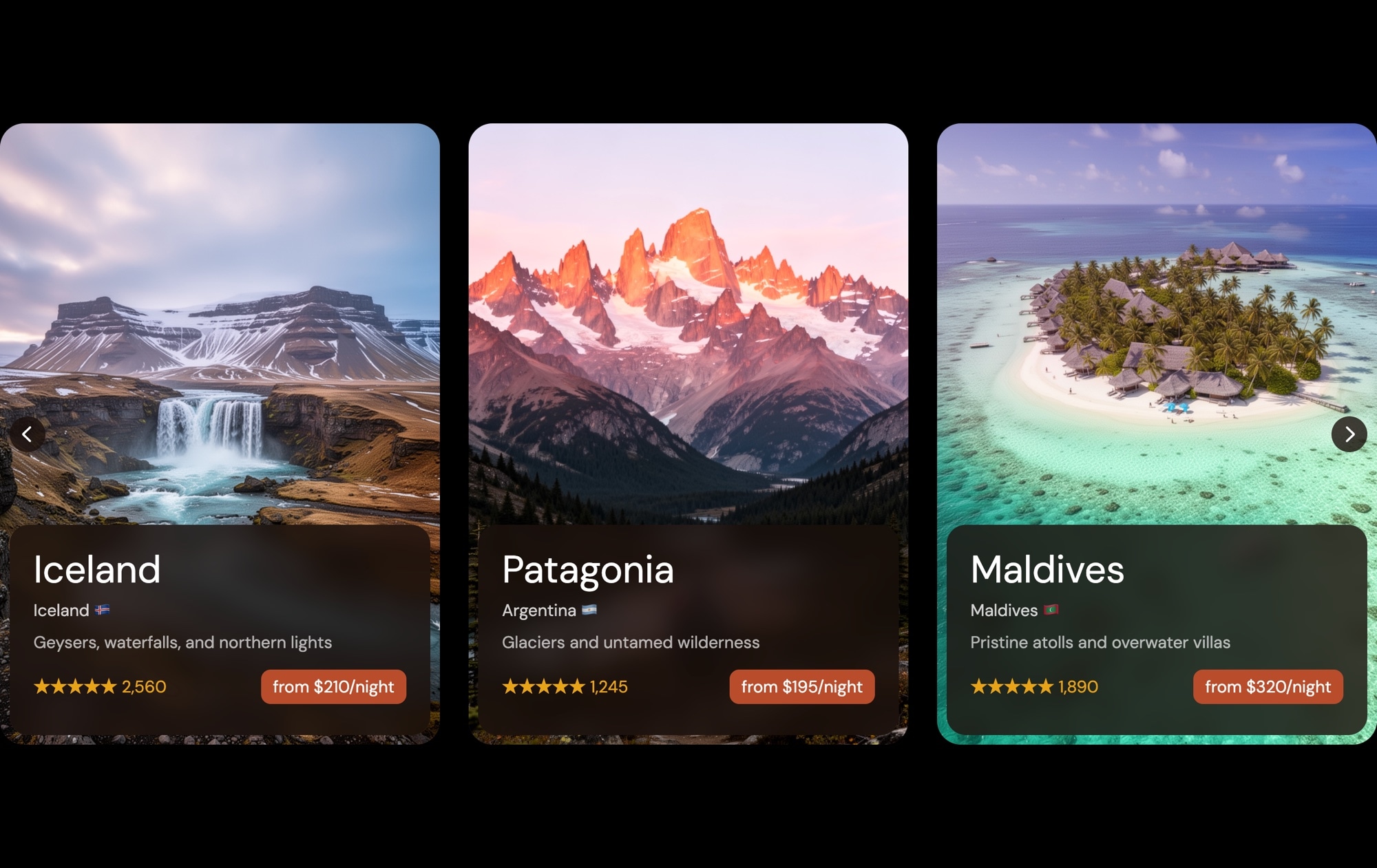
Travel Destination Cards Slider Template
A sleek, dark-themed card carousel showcasing travel destinations with stunning landscape photography, location details, star ratings, review counts, and per-night pricing. Each card features destinations like Iceland, Patagonia, and the Maldives — complete with country flags and short descriptions that invite exploration. This template is ready to drop into any travel, hospitality, or booking site and start converting browsers into travelers.
#What Makes This Template Stand Out
Rich Information Cards
Each destination card packs a full story into a compact layout — a landscape hero photo, location name with country flag, a short description, star rating with review count, and a clear 'from $X/night' price. Visitors get everything they need to decide at a glance.
Dark Theme for Visual Impact
The dark background makes the destination photography pop. Colors appear more vivid, text is easy to read, and the overall feel is premium and modern — ideal for travel brands, luxury hospitality, and experience marketplaces.
Multi-Card Carousel Layout
Multiple cards are visible simultaneously, giving visitors a browsable overview of available destinations. The carousel encourages swiping and exploration, increasing engagement compared to a single static image or a long scrolling list.
Ratings and Social Proof Built In
Star ratings and review counts are part of every card, adding credibility and helping visitors compare options. This social proof pattern is proven to increase click-through rates on booking and e-commerce sites.
Pricing Displayed Up Front
The 'from $X/night' pricing on each card sets expectations early and qualifies interest before a click. Visitors who tap through are already primed to book, which means higher conversion rates and less friction in the booking funnel.
#Who Should Use This Template
This template is a natural fit for travel agencies, tour operators, and hospitality brands that need to showcase multiple destinations or properties in an engaging, browsable format. Instead of stacking listings vertically and hoping visitors scroll, the card carousel lets you present your top offerings side by side with rich details that drive clicks. It works on homepage sections, dedicated destination pages, or as a featured collection within a larger booking flow.
Hotel chains, vacation rental platforms, and experience marketplaces will benefit from the structured card layout. The combination of photography, ratings, reviews, and pricing mirrors what travelers expect from modern booking interfaces. Swap in your property photos, update the details, and you have a polished listings carousel that feels native to your platform — without building it from scratch.
Web designers and agencies working on travel and hospitality projects can use this template as a production-quality starting point. The dark theme, card structure, and information hierarchy are already designed to best practices. Customize the colors, typography, and card content to match your client's brand, export the code, and integrate it into any tech stack.
#Best Use Cases
- ✓Travel agency websites featuring top destinations with photos, ratings, and booking prices
- ✓Hotel and resort homepages showcasing properties across multiple locations
- ✓Vacation rental platforms displaying available listings with pricing and guest reviews
- ✓Tour operator landing pages highlighting popular packages and experience offerings
- ✓Restaurant and dining guide sites with venue cards, ratings, and price ranges
- ✓Real estate listing pages where property cards need photos, details, and pricing at a glance
#How to Customize
- Open the Travel Destination Cards template in Swiper Studio by clicking 'Use This Template' above1
- Replace the destination photos — select each slide and upload your own landscape images or choose from the built-in demo image library2
- Update the text content on each card — edit location names, country flags, descriptions, ratings, review counts, and pricing to match your offerings3
- Add or remove slides to match the number of destinations you want to feature — duplicate an existing card for consistent styling, then swap the content4
- Adjust the carousel settings — configure slides per view, spacing between cards, autoplay, loop behavior, and navigation controls from the editor panel5
- Fine-tune responsive breakpoints — set how many cards display on mobile (1), tablet (2), and desktop (3), and adjust font sizes and spacing for each6
- Export to your preferred format (HTML, React, Vue, Next.js, Web Component, or Webflow) or publish to CDN for instant embedding on your booking site7
#Frequently Asked Questions
- Can I change the destinations and pricing shown on the cards?
- Yes. Every element on each card is fully editable — location names, country flags, descriptions, star ratings, review counts, and pricing are all text and image elements you can update directly in the visual editor. Add, remove, or reorder slides to match your own destination catalog.
- Is this template suitable for non-travel websites?
- Absolutely. While the template is styled for travel destinations, the card layout works for any content that combines an image with structured details — hotel listings, restaurant guides, rental properties, experience marketplaces, or even product catalogs with ratings and pricing.
- How many destination cards can I add?
- There is no hard limit. You can add as many slides as your content requires. The carousel handles any number of cards smoothly, and you can configure how many cards are visible at each breakpoint — for example, three on desktop, two on tablet, and one on mobile.
- Can I change the dark theme to a light theme?
- Yes. The dark background, text colors, and card styling are all customizable. You can switch to a light background, adjust card colors, change text contrast, and modify any visual property through the editor to match your brand guidelines.
- What export formats are available?
- You can export this template as standalone HTML, a React component, a Vue component, a Next.js project, a Web Component, or a native Webflow element via Paste into Webflow. You can also publish directly to CDN for iframe embedding on any website.
#Related Templates



#Related Resources
- Swiper Studio for Image Galleries
- Swiper Studio for E-Commerce Stores
- Swiper Studio for Small Businesses
Ready to Build Your Slider?
Pick a template, customize it visually, and export production-ready code to React, Vue, Next.js, HTML, Webflow, and more. No coding required.








