
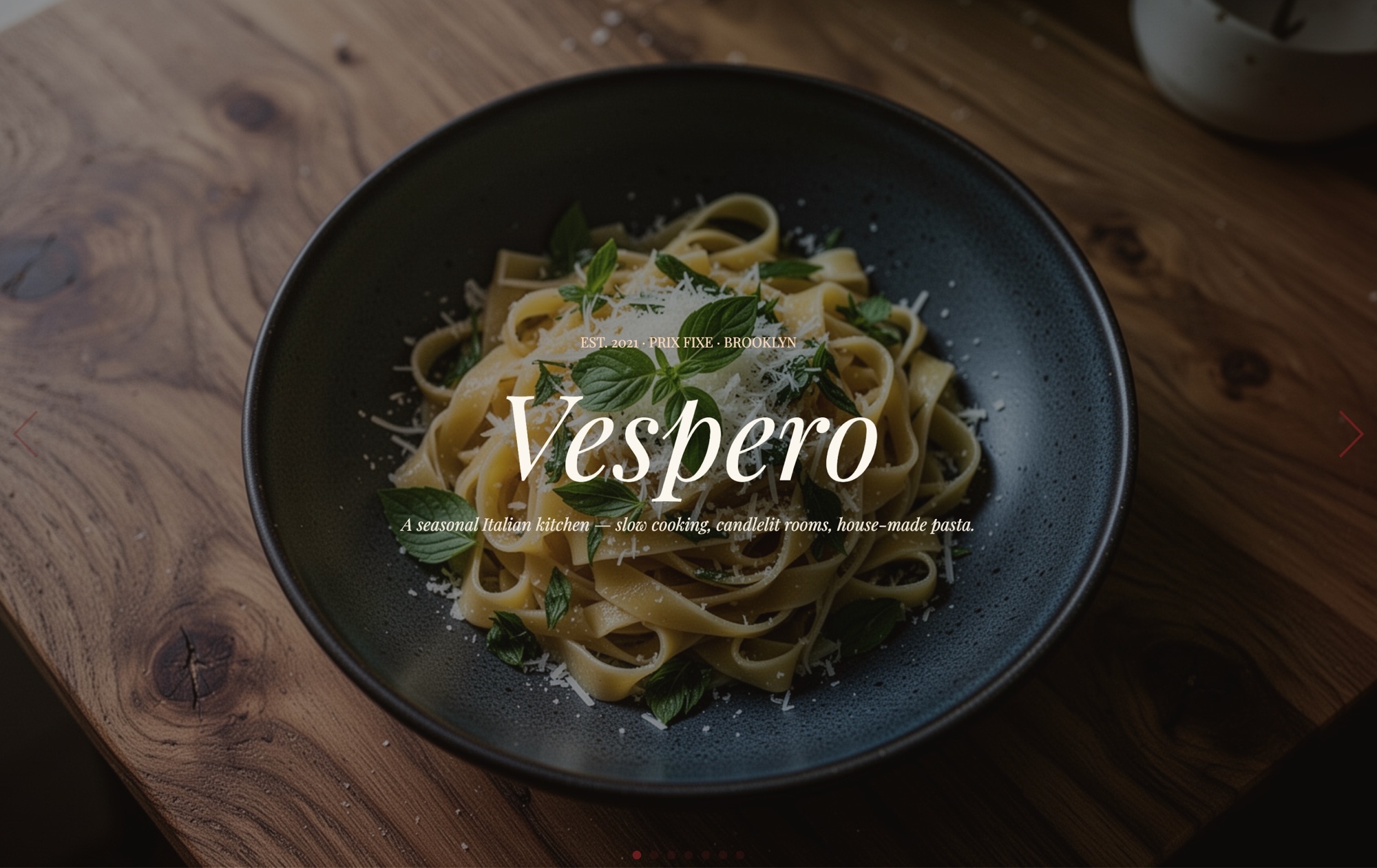
Editorial Restaurant Menu Slider Template
A warm, editorial restaurant menu carousel designed for farm-to-table and chef-driven hospitality brands. Seven slides take diners through the full experience: a cover panel with "NOCTURNE" set in Playfair Display italics over a moody dish photograph, a signature pasta course, craft cocktails, dessert with a wine pairing, a chef portrait and bio, a wine pour close-up, and a reservations slide with a "Book a Table" link. Cream, burgundy, olive, and warm-black tones give the whole story a printed-magazine feel. Open it in Swiper Studio, swap in your own menu and photography, and publish a digital menu that feels as considered as the kitchen behind it.
#What Makes This Template Stand Out
Editorial Food Photography Layout
The template is built around full-bleed dish imagery with restrained overlay typography. Every slide treats photography as the hero, the way a print food magazine would - no busy badges, no cluttered callouts, just the dish, the name, and a line of tasting copy.
Playfair Display Italic Typography
Course names, the restaurant wordmark, and pull-quotes are set in Playfair Display italic for a refined, hand-written feel. Inter handles UI text and body copy so small details stay crisp and readable on any screen size.
Warm Editorial Palette
Cream (#faf6ee), burgundy (#6b1d1d), olive (#6f7a3a), and warm black (#1a1612) combine into a palette that feels candle-lit rather than digital. The colors are applied to backgrounds, accents, and type, and you can reassign them globally in seconds.
Fade and Slide Effects Combined
Hero slides use a soft fade transition for a cinematic handoff between cover and signature dish, while menu cards use the classic slide effect with a generous 50px spaceBetween. The mix keeps the story-led opening feeling filmic and the menu-browsing section feeling tactile.
Reservations Slide With a Real Link
The closing slide uses a link block for the 'Book a Table' call to action, so it drops straight into OpenTable, Resy, Tock, or any booking URL. Change the destination, label, and hover state from the editor without touching code.
#Who Should Use This Template
This template is made for restaurateurs and chef-driven restaurants who want a digital menu that matches the craft of the room. If your brand sits somewhere between a neighborhood bistro and a tasting-menu destination, the editorial layout gives you a way to present signature dishes, wine program, and chef story without defaulting to a generic PDF menu or a plain hero image.
Hospitality brands and restaurant groups can adapt the template across multiple venues by swapping the cover wordmark, photography, and color accents per concept while keeping a consistent typographic system. It works equally well as the homepage hero on a restaurant site, a press-kit carousel, a seasonal menu reveal, or a lookbook for a new opening.
Food and beverage marketers, hotel F&B teams, and hospitality agencies will find the template useful for campaign landing pages around menu launches, chef collaborations, residencies, pop-ups, and wine dinners. Marketers can update copy, photography, and the reservations link themselves in the visual editor and export directly to React, Vue, HTML, or Webflow - no dev ticket required.
#Best Use Cases
- ✓Farm-to-table and chef-driven restaurant homepages that lead with photography and storytelling
- ✓Seasonal menu launches and tasting menu reveals presented as a scrollable editorial story
- ✓Hotel and resort restaurant pages showcasing signature dishes, cocktails, and wine programs
- ✓Chef residency, pop-up, and collaboration landing pages with bio, menu, and booking in one carousel
- ✓Wine bars and cocktail bars highlighting the drinks program alongside small plates and dessert pairings
- ✓Press and media kits that introduce a new opening through cover, menu highlights, and chef profile
- ✓Restaurant group brand sites that need a consistent editorial template across multiple venue concepts
- ✓Food and beverage campaign landing pages built around a specific dish, ingredient, or tasting event
#How to Customize
- Open the Editorial Restaurant Menu template in Swiper Studio - click 'Use This Template' above to load all seven slides into the editor1
- Replace the cover wordmark - update 'NOCTURNE' to your restaurant name, keeping the Playfair Display italic styling or switching to your own display font2
- Swap in your own food photography - upload dish, cocktail, dessert, and wine photos through the background panel on each slide, or start with the built-in demo image library3
- Update menu copy on each course slide - dish name, short description, price, and tasting notes are all editable text elements with their own breakpoint controls4
- Edit the chef portrait slide - replace the photo, update the chef's name and bio, and adjust the Playfair Display italic pull-quote to match the voice of your kitchen5
- Point the 'Book a Table' link to your reservation system - set the href to your OpenTable, Resy, Tock, or SevenRooms page, choose target behavior, and style the hover state6
- Fine-tune responsive layouts - switch to tablet and mobile previews and adjust headline sizes, spacing, and overlay positioning per breakpoint using the visual controls7
- Export to your preferred format - HTML, React, Vue, Next.js, Web Component, or Webflow - or publish directly to CDN for instant embedding on any restaurant site platform8
#Frequently Asked Questions
- Can I try the restaurant menu template before buying?
- Yes. You can open the template in Swiper Studio, customize every slide, and preview it in the demo editor. Exporting production-ready code or publishing to CDN requires a paid plan, but the full visual editor and all template features are available to test drive first.
- Can I replace the food photography with my own dishes?
- Absolutely. Every image in the template is fully editable. Upload your own editorial food photography, chef portraits, cocktail shots, and wine pour images directly in the background panel. The layout, overlays, and typography adapt automatically to whatever visuals you bring.
- How do I change the restaurant name and menu copy?
- Click any text element to edit it inline. Update the cover headline from "NOCTURNE" to your restaurant name, change dish titles, rewrite tasting notes, swap out the chef bio, and update reservation copy. Playfair Display italics, Inter UI text, colors, and sizes are all adjustable per element and per breakpoint.
- Does this template work well on mobile for diners browsing the menu?
- Yes. The template is fully responsive with pre-configured breakpoints for mobile, tablet, laptop, and desktop. Headline sizes scale down, spacing tightens for smaller screens, and the "Book a Table" link stays easy to tap. You can fine-tune any breakpoint independently in the editor.
- Can I link the reservations slide to my booking system?
- Yes. The "Book a Table" element is a link block, so you can point it to OpenTable, Resy, Tock, SevenRooms, a phone number, or any custom URL. You can also set the link target to open in a new tab and add hover states to match your brand.
#Related Templates
#Related Resources
- Swiper Studio for Small Businesses
- Swiper Studio for Marketers
- Swiper Studio for Landing Pages
- Swiper Studio for Hero Sections
Ready to Build Your Slider?
Pick a template, customize it visually, and export production-ready code to React, Vue, Next.js, HTML, Webflow, and more. No coding required.








