
Online Course Template
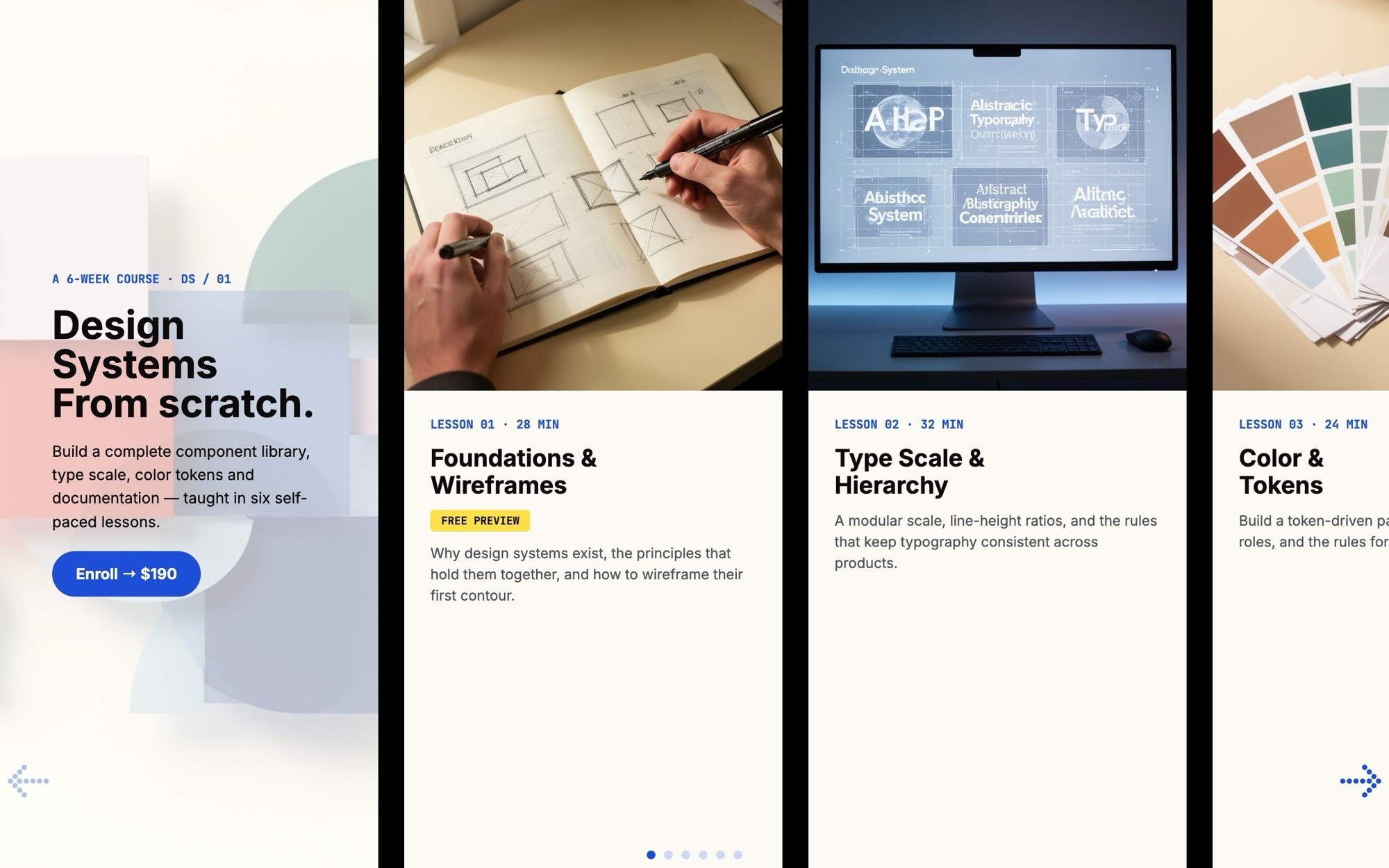
A lesson carousel built for course landing pages, learning platforms, and creator-led education sites. The header slide announces the course - "Design Systems - From scratch" by default - and six lesson cards line up after it, each with a thumbnail, lesson number, title, duration, and a free preview tag on the first card. The whole sequence ends with an enroll CTA, so visitors browse the curriculum and convert in the same swipe.
The off-white background, deep ink type, electric-blue accents, and highlight yellow create a warm, modern educational feel - more independent course creator than corporate LMS. Inter handles the lesson titles and body copy while JetBrains Mono lends a syllabus-like rhythm to lesson numbers and durations. Open it in Swiper Studio, drop in your own curriculum, and the carousel becomes a production-ready lesson preview for any course page.
#What Makes This Template Stand Out
Lesson Card Hierarchy Built For Curriculum Preview
Each card stacks a thumbnail, monospaced lesson number, lesson title, duration, and an optional free preview tag in a clear, scannable order. Visitors get a feel for the course shape and pacing without expanding any card or scrolling a long syllabus.
Course Cover Plus Six Lessons Plus Enroll CTA
The default eight slides cover the full landing page rhythm - cover, six lessons, conversion. The structure has been used by independent course creators for years because it works: preview the value, then ask for the enrollment in the same surface.
Inter And JetBrains Mono Pairing
Inter handles lesson titles and body copy with crisp legibility, while JetBrains Mono carries lesson numbers and durations. The pairing reads like a well-designed syllabus from a modern design or engineering bootcamp without feeling cold or institutional.
Free Preview Tag For Higher Conversion
The first lesson ships with a 'free preview' tag - a small but proven pattern for course pages. Visitors who can sample the first lesson convert at higher rates than those who only see a paywall. The tag is a regular editable text element you can move to any card or rename to 'sample', 'try it', or whatever fits your funnel.
Modern Educational Palette
Off-white, deep ink, electric blue, and highlight yellow create a clean, focused aesthetic that flatters both abstract educational visuals and real video stills. The palette reads modern and creator-led - closer to the look of an indie course platform than a corporate LMS.
#Who Should Use This Template
This template is built for independent course creators, educators, and creator economy teachers selling self-paced video courses. The lesson card carousel is exactly the section a course landing page needs between the hero and the buy box - a way to preview the actual curriculum so visitors understand what they are buying. Drop in your lesson titles, durations, and thumbnails, and the conversion path gets shorter.
Online learning platforms and edtech startups can use this as a featured-course section, a curriculum preview embedded in a marketing page, or a syllabus widget on a course detail screen. The flexible breakpoints and clean type system mean the same template handles a six-week bootcamp, a single-day workshop, or a 30-lesson masterclass.
Bootcamps, design schools, and developer education programs running course pages on Webflow, Next.js, or WordPress can use this in place of a custom-built syllabus carousel. Customize the palette to your brand, swap in your real lesson assets, and you have a polished curriculum section without writing carousel code.
#Best Use Cases
- ✓Self-paced course landing pages previewing curriculum to drive enrollment
- ✓Independent creator course sales pages on Teachable, Podia, Kajabi, or Thinkific
- ✓Bootcamp and design school marketing sites showcasing weekly modules
- ✓Edtech product pages featuring sample lessons and free previews
- ✓Coaching and cohort-based course pages with structured lesson breakdowns
- ✓Corporate training portals highlighting onboarding or upskilling tracks
- ✓Membership site dashboards previewing the next lessons inside a content library
- ✓Newsletter and creator sites pitching a paid course alongside free content
#How to Customize
- Open the Online Course template in Swiper Studio by clicking 'Use This Template' above to load the cover, six lesson cards, and enroll CTA into the editor1
- Replace the course cover slide copy and visual - your course title, tagline, and any hero treatment that signals the topic2
- Swap each lesson thumbnail with your own visuals - video stills, abstract educational graphics, illustrated covers, or branded compositions3
- Update each card's text - lesson number in JetBrains Mono, title in Inter, duration, and the free preview tag where it applies4
- Wrap each card in a link block pointing to your hosted lesson page - Teachable, Podia, Kajabi, a Next.js course app, or any URL5
- Customize the palette and fonts to match your platform brand - the editor color pickers and font menu update the entire carousel at once6
- Tune the carousel - slides per view, spacing, autoplay, navigation, and pagination - from the project params panel7
- Preview each breakpoint, fine-tune the lesson number scale on mobile, then export to HTML, React, Vue, Next.js, Web Component, or Webflow - or publish to CDN for an instant embed8
#Frequently Asked Questions
- Can I swap the lesson thumbnails for my own course visuals?
- Yes. Each lesson card has an editable thumbnail image you can replace with your own video stills, illustrated covers, or branded graphics. The template was designed around abstract educational visuals - design swatches, sketches, screen mocks - so even simple replacements look intentional.
- How do I update lesson numbers, titles, durations, and the free preview tag?
- Click any text element to edit it inline. Lesson numbers and durations use JetBrains Mono for that engineered, syllabus feel, while titles use Inter for clarity. The "free preview" tag on the first lesson is a standard text element - copy it onto any other card or remove it entirely with one click.
- Does the lesson carousel work well on mobile and tablet?
- Yes. The template ships with breakpoints showing roughly 1.2 lessons on mobile, 2.5 on tablet, and 3.5 on desktop with 24px spacing. Type sizes, thumbnail aspect ratios, and the lesson number style are all tunable per breakpoint, so the carousel feels native on any screen.
- Can I rebrand the colors and fonts to match my course or learning platform?
- Absolutely. The default palette - off-white, deep ink, electric blue, highlight yellow - reads modern and educational, but every color is editable from the visual editor. Swap Inter or JetBrains Mono for any Google Font, and the entire course carousel adopts your platform's brand without breaking the hierarchy.
- How do I link each lesson card to my actual course player?
- Wrap each card (or any element on it) in a link block pointing to your hosted lesson - Teachable, Podia, Kajabi, Thinkific, a custom Next.js app, anything with a URL. Once published to CDN from Swiper Studio, the embed works on any landing page that supports an embed snippet, or you can export clean React, Vue, or Next.js code.
#Related Templates

#Related Resources
- Swiper Studio for Landing Pages
- Swiper Studio for Marketers
- Swiper Studio for Next.js
- Swiper Studio for Webflow
Ready to Build Your Slider?
Pick a template, customize it visually, and export production-ready code to React, Vue, Next.js, HTML, Webflow, and more. No coding required.








