12 Days of Deals
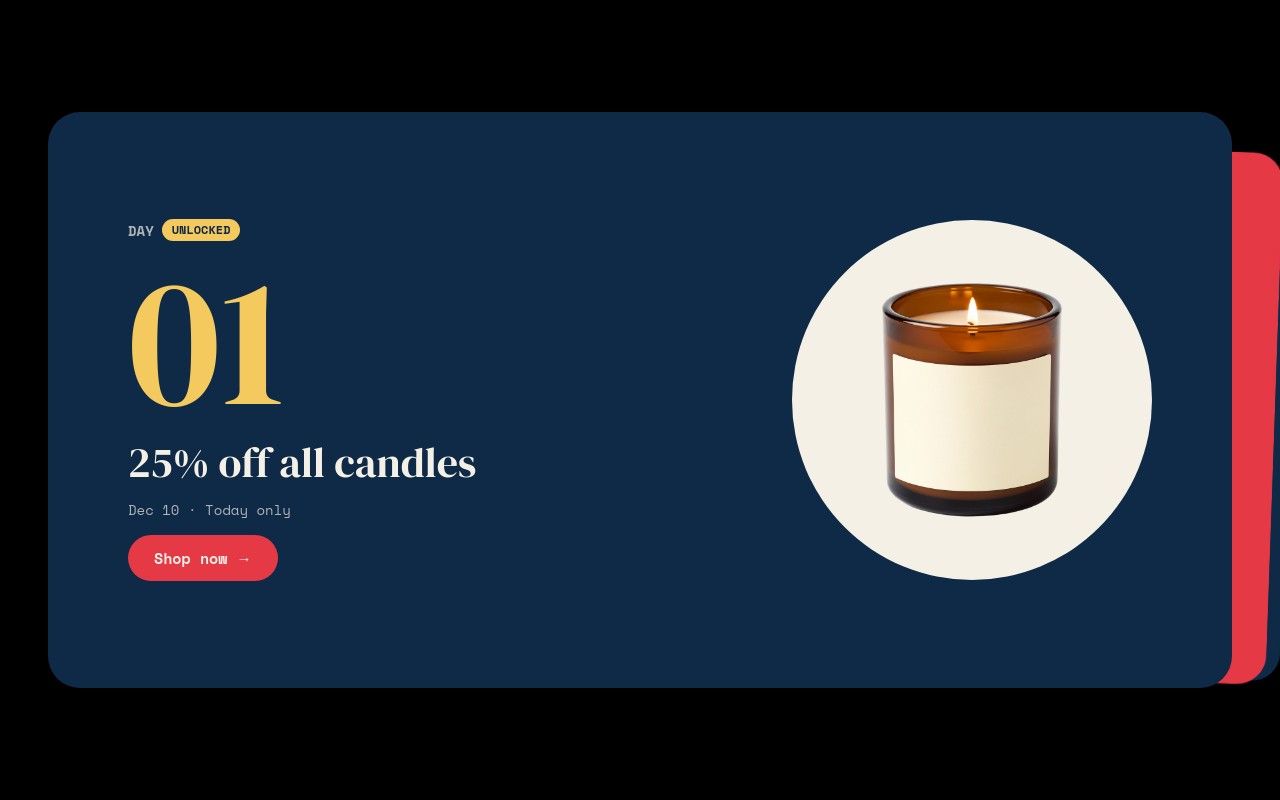
An advent-style holiday campaign with one deal per day for 12 days. Each card shows a mono "DAY" label with a status badge, a huge gold day numeral in DM Serif Display, the deal or teaser line, and a product cutout on a snow-colored circle. The first three days are unlocked - "25% off all candles" on Dec 10, "30% off knitwear" on Dec 11, and "Buy 2 toys, get 1 free" on Dec 12. Day 04 is a "Mystery deal" with a live "Unlocks in" countdown and a faded mug, and days 05 to 12 are locked teasers showing "Coming Dec 14" through "Coming Dec 21" with blurred products.
The cards use Swiper's cards effect with a slight rotation, 500ms transitions, and a "3 / 12" fraction counter, and they alternate between midnight navy #0e2a47 and candy red #e63946. Numerals are star gold #f4c95d, text and circles are snow #f5f0e6. Autoplay is off, so shoppers flip through the stack themselves. Each card has rounded 20px corners, and the stack keeps the next day peeking out behind the current one.
#What Makes This Template Stand Out
Three Card States in One Campaign
Unlocked cards show the deal, the date with "Today only", and a solid "Shop now →" button. The next-up card shows "Mystery deal", a live countdown, and the product at 35% opacity. Locked cards show a padlock "LOCKED" badge, the coming date, a blurred product, and an outlined "Remind me →" link. Moving a day from one state to the next is a few text and image edits.
Live Countdown to the Next Unlock
Day 04 counts down in days, hours, minutes, and seconds ({dd}d {hh}h {mm}m {ss}s) inside a navy pill. When it hits zero it changes to "Unlocked now", so the card never shows a stale timer. Set any date, time, and timezone in the editor, and it keeps ticking after publish.
Stacked Cards Effect With Fraction Counter
Swiper's cards effect stacks the 12 days like a deck, each card slightly rotated so the next day is always visible behind the current one. A '3 / 12' fraction pagination tells shoppers how far they are into the campaign, which suits a 12-slide sequence better than a row of bullets.
Big Day Numerals That Roll In
Each day numeral is 88px DM Serif Display in star gold and enters with number-roll, while the deal line enters with letter-fade and the product circle pops in. The numeral is the first thing a shopper reads, so the campaign structure is clear before they read the deal.
Responsive Card Proportions
Square 1:1 cards on mobile, 16:9 from 768px, and 2:1 from 1024px, with inner padding that grows at each breakpoint. On desktop the deal copy sits on the left and the product circle on the right; the layout holds on phones without extra work.
#Who Should Use This Template
This template is built for Shopify merchants and ecommerce brands running a daily-deal campaign in the run-up to Christmas. A 12-day sequence gives shoppers a reason to come back every day, and the locked cards build anticipation for the deals still to come.
Marketers planning holiday email and social campaigns can use the slider as the landing page that every daily email links to. The unlocked cards link to the live deal, and the "Remind me" links can point to a newsletter signup or SMS opt-in.
Agencies and Webflow designers get a reusable daily-reveal format that works beyond Christmas: an 8-night Hanukkah campaign, a Cyber Week countdown, a product launch week, or an advent calendar for a food or beauty brand.
#Best Use Cases
- ✓12 Days of Christmas daily deal campaigns from mid-December
- ✓Advent calendar promotions for beauty, food, and gift brands
- ✓Cyber Week or Black Friday week daily deal reveals
- ✓Eight nights of Hanukkah deals with one card per night
- ✓Daily-deal landing pages linked from holiday email campaigns
- ✓Mystery deal teasers that drive newsletter or SMS signups
- ✓Product launch weeks that reveal one item per day
- ✓Webflow and Shopify agency campaigns reused across several clients
#How to Customize
- Open the 12 Days of Deals template in Swiper Studio - you will see 12 cards: days 01-03 unlocked, day 04 next up with a countdown, and days 05-12 locked.1
- Set your campaign dates - update the "Dec 10 · Today only" lines on the unlocked cards and the "Coming Dec 14" to "Coming Dec 21" lines on the locked cards.2
- Write the deals - replace "25% off all candles", "30% off knitwear", and "Buy 2 toys, get 1 free", and plan the deals for the locked days.3
- Set the countdown on day 04 - enter the date, time, and timezone of the next unlock, and change the "Unlocked now" expiry text if you like.4
- Swap the product cutouts (candle, mittens, wooden train, mug, gift box, plush reindeer) in the media panel for your own transparent product images.5
- Point the "Shop now →" link blocks at each deal page and the "Remind me →" links at your newsletter or SMS signup.6
- Each day of the campaign, move the next card to unlocked: change its badge, add the deal copy, set image opacity back to full, remove the blur, and republish.7
- Publish to CDN and paste the embed snippet, add it to Shopify with the Swiper Studio app, use Paste into Webflow, or export to HTML, React, Vue, Next.js, or a Web Component.8
#Frequently Asked Questions
- How do the unlocked, next-up, and locked days work?
- Each of the 12 cards is one day. Days 01-03 are unlocked: a gold "UNLOCKED" badge, the deal ("25% off all candles", "30% off knitwear", "Buy 2 toys, get 1 free"), the date, and a "Shop now" button. Day 04 is "NEXT UP": a "Mystery deal" with a live "Unlocks in" countdown and a dimmed product. Days 05-12 are locked teasers with a blurred product, "Coming Dec 14" through "Coming Dec 21", and a "Remind me" link. Each morning, you move one card from locked to unlocked by editing its badge, copy, and image.
- Is the countdown on day 4 live?
- Yes. It is a live countdown text using {dd}d {hh}h {mm}m {ss}s, and when it reaches zero it switches to the custom text "Unlocked now". In the template it starts a few hours from when you open it; in the editor, set the real target date, time, and timezone of your next unlock. It keeps ticking after export or publish, with no code needed.
- Why is autoplay off?
- The cards effect stacks the days like a deck, and the campaign works best when shoppers flip through at their own pace to see what is live and what is coming. Autoplay is disabled, loop is off, and a fraction pagination ("3 / 12") shows where they are. Arrows appear from 768px up; on phones shoppers swipe through the stack.
- Can I run it on different dates or with fewer days?
- Yes. The default dates run from Dec 10 to Dec 21, 2026, but every date, deal, and badge is plain text. Start the campaign earlier, make it an 8-night Hanukkah run, or a 5-day Cyber Week, by deleting or duplicating cards. The navy and red backgrounds alternate, so keep that rhythm when you add or remove days.
- How do I publish it on Shopify or Webflow?
- On Shopify, install the official Swiper Studio Shopify app and add the published slider to any page as a native theme block from the theme editor. In Webflow, use "Paste into Webflow" to add it as native elements. Anywhere else, publish to CDN and paste the embed snippet, or export to HTML, React, Vue, Next.js, or a Web Component.
#Related Templates

#Related Resources
- Swiper Studio for Ecommerce Stores
- Swiper Studio for Shopify
- Swiper Studio for Marketers
- Swiper Studio for Landing Pages
Ready to Build Your Slider?
Pick a template, customize it visually, and export production-ready code to React, Vue, Next.js, HTML, Webflow, and more. No coding required.