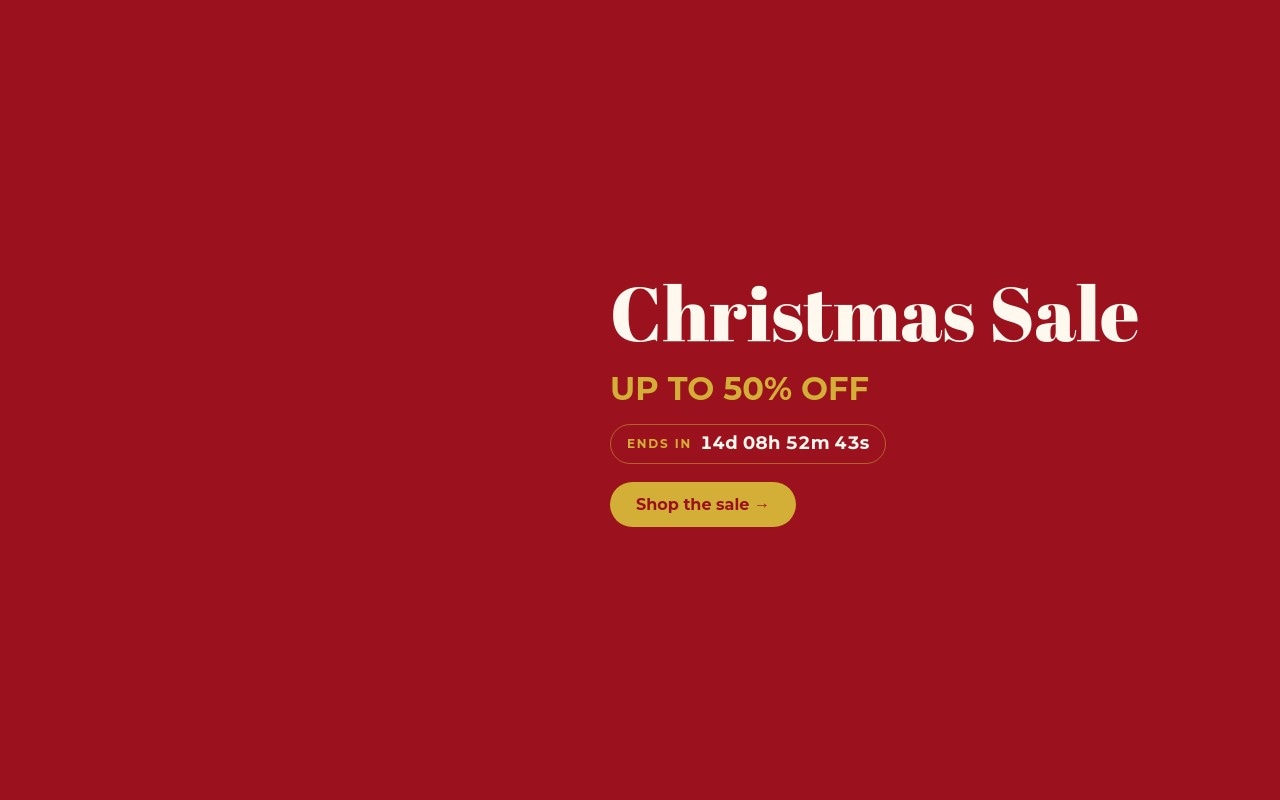
Christmas Sale Classic
The Christmas sale banner every store runs in December, done with care. The hero sets "Christmas Sale" in Abril Fatface on deep Christmas red, with three ornaments - a glossy red bauble, a matte gold one, and an emerald teardrop - hanging from thin gold strings at staggered heights. Below the headline: "UP TO 50% OFF" in gold, an "ENDS IN" pill with a live countdown, and a gold "Shop the sale →" button. Three more slides cover gifts under $25 on pine green, free shipping on orders over $50 on cream, and an extra 20% off with code MERRY20.
The palette is the classic one: Christmas red #9b111e, gold #d4af37, cream #fff8ef, and pine #0f3d2e for the second slide. Abril Fatface carries the headlines and Montserrat handles the offer lines, labels, and buttons. The slider moves with a 700ms slide transition, autoplays every 5 seconds, and pauses on hover. For 2026, set the countdown to Christmas Eve, Dec 24, and the banner runs from early December to the last minute.
#What Makes This Template Stand Out
Ornaments Hanging From Gold Strings
Three ornament cutouts hang from 2px gold string blocks of different lengths, so they sit at staggered heights like decorations on a garland. Each one drops in 200ms after the last. The free shipping slide repeats the idea with a single gold bauble on a longer string.
Live Countdown to Christmas Eve
The "ENDS IN" pill holds a live countdown that shows days, hours, minutes, and seconds ({d}d {hh}h {mm}m {ss}s). Set your target date, time, and timezone in the editor, and when it reaches zero the text changes to "Sale ended". It keeps ticking after export or publish, with no code.
Four Offers, Four Colorways
Red hero with the main discount, pine green slide for gifts under $25 with a rounded photo of wrapped gifts under tree lights, cream slide for free shipping until Dec 20, and a red closing slide for the promo code. Alternating backgrounds make each offer read as a new message.
Pulsing Promo Code Box
MERRY20 sits in a gold-bordered box with 0.12em letter spacing and a pulse animation, under a 'USE CODE AT CHECKOUT' label and above 'Valid through Dec 24 · one use per order'. Shoppers can read and remember the code at a glance.
Motion That Supports the Offer
Headlines enter with letter-scale, the discount figures (UP TO 50% OFF, Gifts under $25, ON ORDERS OVER $50, Extra 20% off) roll in with number-roll, and each CTA fades in last. The banner reads correctly even before the animations finish.
#Who Should Use This Template
This template is built for Shopify merchants and online stores running a December sale who want a banner that looks like Christmas without looking like clip art. The offer, the deadline, and the CTA are all visible on the first slide, which is what a holiday homepage banner needs to do.
Small businesses and local shops can use the four slides as a complete holiday promo: main sale, gift ideas under a price point, shipping deadline, and a code for returning customers. Change the numbers and dates and the banner is ready.
Marketers and agencies handling several stores in December get a banner that is quick to rebrand. Swap the red and gold for a client palette, replace the ornaments with product cutouts, and reuse the same layout for Boxing Day or a New Year clearance.
#Best Use Cases
- ✓Christmas sale homepage banners with a countdown to Christmas Eve
- ✓Stocking stuffer and gifts-under-a-price-point promotions
- ✓Free shipping deadline announcements before Christmas
- ✓Holiday promo code campaigns for returning customers
- ✓Boxing Day and after-Christmas clearance banners
- ✓Seasonal sale banners for gift shops, boutiques, and home stores
- ✓Holiday email landing pages that match a Christmas sale newsletter
- ✓Agency holiday campaigns reskinned across several client stores
#How to Customize
- Open the Christmas Sale Classic template in Swiper Studio - you will see four slides: the red Christmas Sale hero, Gifts under $25, Free shipping, and the MERRY20 code slide.1
- Set the countdown - select the countdown text on the hero and enter your sale end date, time, and timezone, for example Dec 24, 2026 at 11:59 PM. Change the "Sale ended" expiry text if you like.2
- Update the hero offer - change "UP TO 50% OFF" to your own discount and keep it short so it stays on one line.3
- Swap the ornament cutouts in the media panel for your own decorations or product cutouts. Transparent PNGs keep the hanging effect clean.4
- Edit the gifts slide - replace the wrapped gifts photo, the "STOCKING STUFFERS" label, and the "Gifts under $25" price point.5
- Update the shipping slide threshold ($50) and cutoff date (Dec 20), then change the promo code, discount, and "Valid through" line on the last slide.6
- Point each link block ("Shop the sale →", "Shop gifts →", "Start shopping →") at your sale collection or product pages.7
- Check the 768px and 1024px breakpoints, then publish to CDN, add it to Shopify with the Swiper Studio app, use Paste into Webflow, or export to HTML, React, Vue, Next.js, or a Web Component.8
#Frequently Asked Questions
- Is the countdown live, and how do I set it to my sale end?
- Yes, the "ENDS IN" countdown on the hero is a live countdown text. It uses the tokens {d}d {hh}h {mm}m {ss}s, and when the timer runs out it switches to the custom text "Sale ended". In the template it starts about two weeks from when you open it; in the editor, set your real target date, time, and timezone, for example Dec 24, 2026 at 11:59 PM. It keeps ticking after you export or publish, with no code needed.
- How are the hanging ornaments built?
- Each ornament is a thin 2px gold string block with a transparent ornament cutout underneath, grouped in a column. The strings have different lengths, so the three baubles hang at staggered heights, and each group enters with a drop animation 200ms after the last. Swap the cutouts for your own products or decorations in the media panel and keep transparent PNGs for the cleanest result.
- Can I change the discount, shipping threshold, and code?
- Yes. All offer copy is editable text: "UP TO 50% OFF" on the hero, "Gifts under $25" on the stocking stuffers slide, "ON ORDERS OVER $50" and "Until Dec 20" on the free shipping slide, and "Extra 20% off" with the MERRY20 code on the last slide. The number-roll animation re-runs with whatever numbers you type.
- What size is the banner on desktop and mobile?
- The slider is 4:5 on mobile, then switches to a fixed height of 400px from 768px and 480px from 1024px, with content laid out in a row. That keeps it a banner on desktop rather than a full-screen hero. Navigation arrows show from 768px up, and gold pagination bullets show at every size.
- How do I add it to my Shopify store?
- Install the official Swiper Studio Shopify app, then add the published slider to any page as a native theme block from the theme editor. In Webflow, use "Paste into Webflow" to add it as native elements. On Squarespace, Wix, WordPress, or any other site, publish to CDN and paste the embed snippet. You can also export to HTML, React, Vue, Next.js, or a Web Component.
#Related Templates

#Related Resources
- Swiper Studio for Ecommerce Stores
- Swiper Studio for Shopify
- Swiper Studio for Small Businesses
- Swiper Studio for Marketers
Ready to Build Your Slider?
Pick a template, customize it visually, and export production-ready code to React, Vue, Next.js, HTML, Webflow, and more. No coding required.