Doorbusters
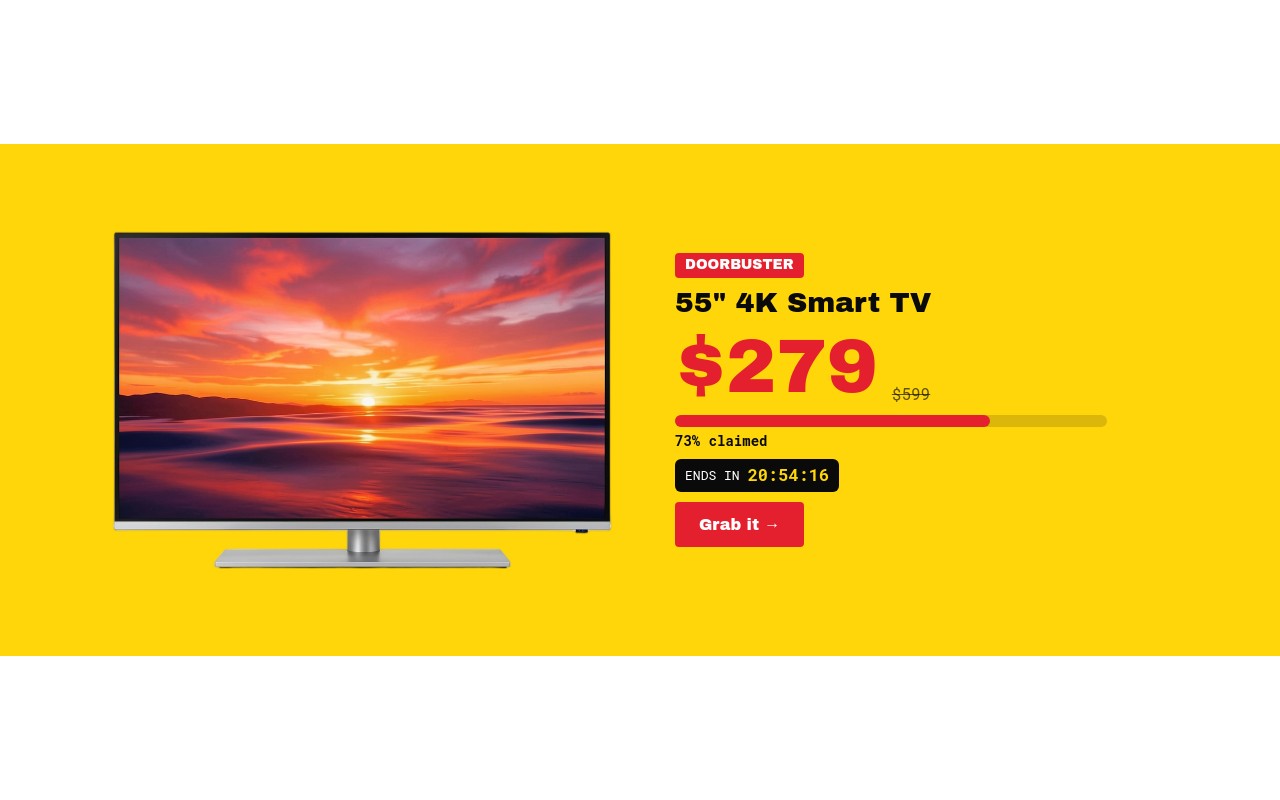
Hourly doorbuster deals with big-box retail energy: a bright yellow field, a red "DOORBUSTER" sticker, and one deal per slide. Each slide pairs a large product cutout with the product name, a huge red price next to the struck-through original, a red "claimed" stock bar, a black "ENDS IN" pill with its own live countdown, and a red "Grab it" button. The four example deals are a 55" 4K Smart TV at $279 (was $599), a 6 qt Digital Air Fryer at $49 (was $129), a Smart Robot Vacuum at $149 (was $349), and a Tilt-Head Stand Mixer at $199 (was $429).
Archivo Black carries the sticker, names, prices, and buttons, while Roboto Mono handles the old prices, "claimed" labels, and countdown digits. The palette is yellow #ffd60a, near-black #0a0a0a, doorbuster red #e5202e, and white. Slides move with a creative effect at 450ms - the next deal slides in from the right with a slight tilt - and autoplay every 4 seconds, pausing on hover.
#What Makes This Template Stand Out
A Separate Live Countdown per Deal
Every deal has its own 'ENDS IN {hh}:{mm}:{ss}' countdown in yellow mono digits on a black pill. Targets are independent, so you can schedule deals to end hour by hour. When one expires its text switches to 'SOLD OUT' automatically, on your live site, with no code.
Claimed Stock Bar
A rounded grey track with a red fill (73%, 62%, 48%, 81% claimed) sits under each price. It adds urgency the moment the slide appears and is built from two blocks, so changing the level is just changing the fill width and the label.
Stomp, Drop, and Number-Roll
The red DOORBUSTER sticker stomps in, the product cutout drops in, the price rolls up with number-roll, and the Grab it button fades in last. Four animated elements per slide, timed so the price and deadline are readable almost immediately.
Creative Tilt Transition
The creative effect brings each new deal in from the right with a 6 degree rotation while the old one slides back 30% and fades out, all in 450ms. It feels like flyers being slapped onto a board - fast, loud, and on-brand for doorbusters.
Big-Box Banner Proportions
4:5 on phones with the product above the deal details, 2:1 from 768px, and 5:2 from 1024px with the product on the left and the deal column on the right. Prices scale from 48px on mobile to 76px on desktop so the number is always the biggest thing on the slide.
#Who Should Use This Template
This template is built for electronics, appliance, and home goods stores running Black Friday doorbusters - limited-quantity, limited-time deals that change through the day. The per-deal countdown and claimed bar do the urgency work that a static "while stocks last" line cannot.
Shopify merchants with a handful of hero products can use it for any time-boxed promotion: a deal of the hour, a 24-hour drop, or a weekend special. Each slide is self-contained, so you can run two deals or ten.
Agencies and Webflow designers get a retail-flyer format that clients recognize instantly. After Black Friday it reskins for Cyber Monday, Boxing Day, or any flash promotion by changing the yellow and red, the products, and the countdown times.
#Best Use Cases
- ✓Black Friday hourly doorbuster banners with staggered countdowns
- ✓Deal of the hour or deal of the day homepage heroes
- ✓Electronics and appliance store limited-stock promotions
- ✓Shopify flash deal sections added as a theme block through the Swiper Studio app
- ✓Cyber Monday and Boxing Day limited-quantity offers
- ✓Weekend specials with one product per slide and a hard end time
- ✓Paid ad landing pages that push a single time-boxed deal
- ✓Agency retail campaigns that need a loud, flyer-style banner
#How to Customize
- Open the Doorbusters template in Swiper Studio - you will see four deal slides: 4K Smart TV, Digital Air Fryer, Smart Robot Vacuum, and Tilt-Head Stand Mixer.1
- Replace each product cutout with your own transparent product image in the media panel.2
- Retype the product name, the big red price, and the struck-through original price on each slide.3
- Set each deal countdown: select the {hh}:{mm}:{ss} text, open the Countdown setting, and pick the end time and timezone. Keep "SOLD OUT" as the expired text or change it.4
- Update the claimed bar on each slide - set the red fill block width and retype the "% claimed" label to match.5
- Point each "Grab it" link block at the product page or checkout link.6
- Adjust the yellow #ffd60a and red #e5202e to your brand if needed, and check the 4:5, 2:1, and 5:2 layouts in the responsive preview.7
- Publish to CDN and add it to Shopify with the Swiper Studio app, paste it into Webflow, or export to HTML, React, Vue, Next.js, or a Web Component.8
#Frequently Asked Questions
- Does each deal really have its own countdown?
- Yes. Each slide has a separate live countdown text reading {hh}:{mm}:{ss} inside a black "ENDS IN" pill, with its own target. In the template they are staggered 2, 4, 6, and 8 hours from when you open it, so the deals expire one after another. Set real times and a timezone in the Countdown setting - for example hourly doorbusters on Black Friday, November 27, 2026. They keep ticking after export or publish.
- What happens when a deal countdown runs out?
- Each countdown is set to swap its digits for "SOLD OUT" when it expires, so an ended deal reads as gone rather than showing 00:00:00. You can change the expired text, switch it to zeros, or hide the countdown per slide.
- Is the "claimed" stock bar live?
- No, it is a static visual. It is a grey track block with a red fill block set to a percentage width - 73%, 62%, 48%, and 81% in the template - plus a matching "claimed" label. Update the fill width and the label together when you edit a deal, or during the sale if you want to show stock moving.
- What does the slide transition look like?
- The slider uses the creative effect at 450ms: the next deal slides in from the right with a slight 6 degree tilt while the previous one drops back and fades out. Autoplay moves to the next deal every 4 seconds and pauses on hover. The DOORBUSTER sticker stomps in, the product drops in, and the price rolls up with number-roll on every slide.
- How do I add it to Shopify, Webflow, or another site?
- On Shopify, install the official Swiper Studio Shopify app and add the published slider to any page as a native theme block from the theme editor. In Webflow, use Paste into Webflow to add it as native elements. On WordPress, Squarespace, Wix, or any other site, publish to CDN and paste the embed snippet, or export to HTML, React, Vue, Next.js, or a Web Component.
#Related Templates
#Related Resources
- Swiper Studio for Ecommerce Stores
- Swiper Studio for Shopify
- Swiper Studio for Product Carousels
- Swiper Studio for Hero Sections
Ready to Build Your Slider?
Pick a template, customize it visually, and export production-ready code to React, Vue, Next.js, HTML, Webflow, and more. No coding required.