Flash Sale
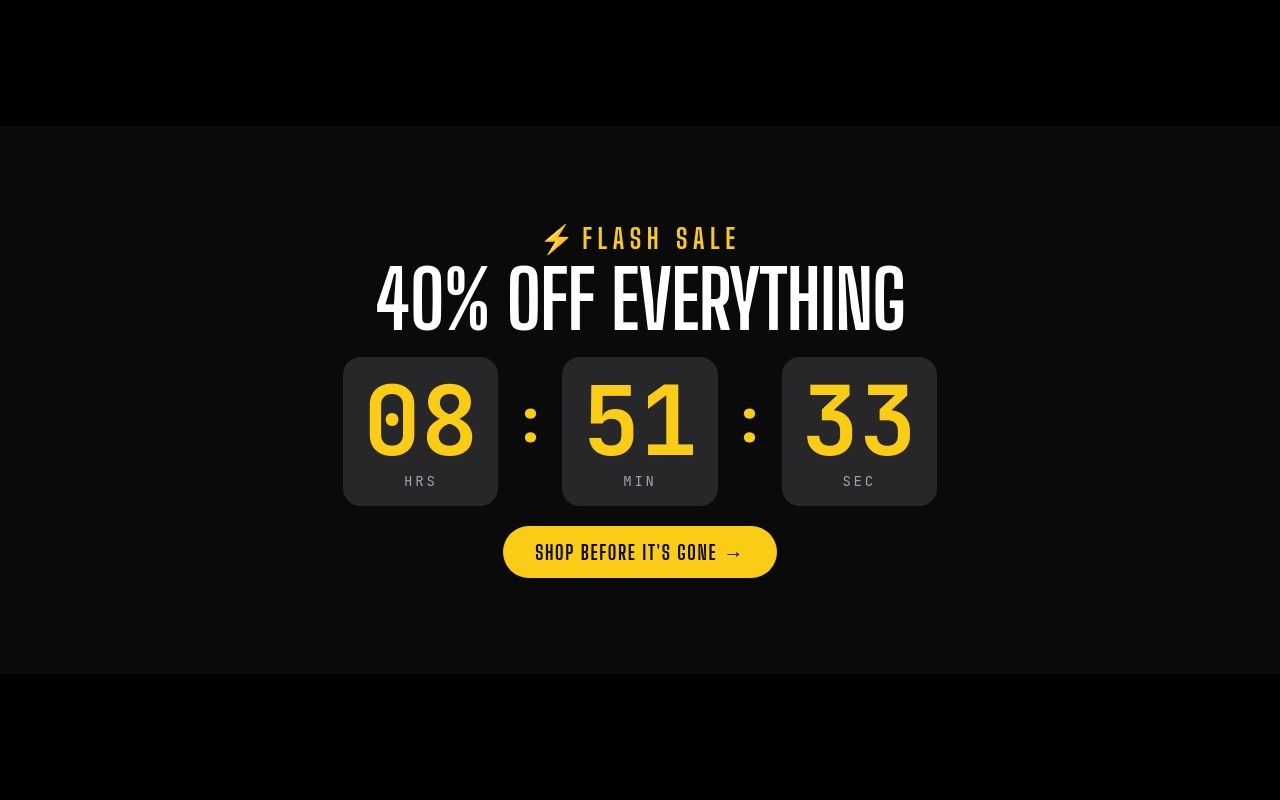
A flash sale needs one thing above everything else: the clock. In this template the countdown is the hero. The first slide stacks a pulsing lightning bolt and "FLASH SALE" label, a "40% OFF EVERYTHING" headline, and three large boxed digits for hours, minutes, and seconds, followed by a "SHOP BEFORE IT'S GONE" button. The second slide features one hero deal, and the third is a "LAST CALL" slide with the countdown repeated in a pill and the fine print.
The palette is black #0a0a0a, electric yellow #facc15, white, and dark zinc #27272a for the digit boxes and product tile, with gray #a1a1aa for unit labels and fine print. Big Shoulders Display carries the condensed headlines and buttons, and JetBrains Mono carries the digits, prices, and small print. The slider cross-fades between slides at 400ms with 5-second autoplay and loop, so the countdown never slides out of view mid-read.
#What Makes This Template Stand Out
Boxed Live Countdown as the Hero
Three rounded zinc boxes hold yellow JetBrains Mono digits for hours, minutes, and seconds, each with a small HRS / MIN / SEC label and yellow colons between them. They are live countdown texts sharing one target, so they keep ticking on your published store, and the boxes pop in when the slide enters.
Hours That Keep Counting
The countdown largest unit is set to hours, so a sale that ends in 30 hours shows 30:00:00 instead of wrapping to 06:00:00. That fits the flash sale format, where shoppers think in hours left, not days.
Hero Deal Slide With Price Drop
Slide 2 puts a yellow speaker cutout on a rounded zinc tile next to "TODAY'S HERO DEAL", "BOOM MINI SPEAKER", a $39 price that animates with number-roll, the old $65 struck through, a pulsing "-40%" pill, and a "GRAB IT NOW" button.
Last Call Slide With Fine Print
Slide 3 opens with "LAST CALL" in yellow at 88-112px with a letter-blur entrance, then "40% off everything. Hours left.", an "ENDS IN" countdown pill, and mono fine print ("Ends tonight at midnight · No code needed / Excludes gift cards") above a "SHOP THE SALE" button.
Motion That Adds Urgency
The lightning bolt and the discount pill pulse continuously, headlines use letter-scale, and the digit boxes and product tile pop in. Combined with the ticking seconds, every slide has something moving without the banner feeling cluttered.
#Who Should Use This Template
This template is built for ecommerce stores that run short, time-boxed promotions - 6-hour flash sales, one-day doorbusters, weekend-only deals, or extended Cyber Monday hours. The countdown carries the urgency, so the rest of the slider can stay simple: one headline, one hero product, one last call.
Shopify merchants preparing Black Friday and holiday campaigns can keep this slider in the theme all season and reuse it for each flash event by changing the headline, the product, and the countdown target, instead of designing a new banner every time.
Agencies and marketing teams get a holiday-neutral sale format that fits most brands after a color change, and that works as a homepage hero, a sale landing page header, or an email-linked promo page.
#Best Use Cases
- ✓6-hour and 24-hour flash sale homepage heroes
- ✓Black Friday doorbuster windows with a live countdown
- ✓Cyber Monday extension banners that end at midnight
- ✓Christmas last-chance and final-hours sale pages
- ✓Single hero product deals with a struck-through price
- ✓New Year clearance and end-of-season sales
- ✓App or SaaS launch discounts that end at a set time
- ✓Email campaign landing pages that repeat the same countdown
#How to Customize
- Open the Flash Sale template in Swiper Studio - you will see three slides: the countdown hero, the hero product deal, and the last-call slide.1
- Select any countdown text and set your real end date, time, and timezone. Update all four countdown texts (three boxes on slide 1 and the "ENDS IN" pill on slide 3) to the same target.2
- Choose what the countdown does at zero: keep 00:00:00, swap to custom text like "SALE OVER", or hide it.3
- Rewrite the "40% OFF EVERYTHING" headline and the "40% off everything. Hours left." line to match your discount.4
- Swap the speaker cutout for your own transparent product image, and update the product name, sale price, old price, and discount pill.5
- Edit the fine print on the last-call slide - end time, code requirements, and exclusions.6
- Point the three CTA link blocks at your sale collection or product page, and recolor the yellow accent if your brand uses a different signal color.7
- Publish to CDN and add it through the Shopify app, use Paste into Webflow, or export to HTML, React, Vue, Next.js, or Web Component.8
#Frequently Asked Questions
- Is the countdown live, or do I need to update it by hand?
- It is live. The three boxed digits on slide 1 and the "ENDS IN" pill on slide 3 are countdown texts that share one target, and they keep ticking after you export or publish, with no code. In the template the target is set a few hours from when you open it. In the editor, set your real end date and time plus a timezone, and choose what happens at zero: show 00:00:00, swap to your own text like "SALE OVER", or hide the countdown.
- What if my sale runs longer than 24 hours?
- The boxed countdown uses {hh}, {mm}, and {ss} with the largest unit set to hours, so hours keep counting past 24 (a 48-hour sale shows 47:59:59). If you prefer days, add a fourth box with {dd} and set the largest unit to days on all boxes.
- Is this template tied to a specific holiday?
- No. It is holiday-neutral on purpose - black, yellow, and white, no seasonal graphics. Use it for Black Friday doorbusters, a Cyber Monday extension, a Christmas last-chance sale, a New Year clearance, or any 6-hour or 24-hour promotion during the year.
- How does it look on mobile?
- The slider is 4:5 on phones, 16:9 from 768px, and a wide 21:9 banner from 1024px. The countdown digits grow from 56px to 88px to 96px, and on the product slide the image tile sits above the copy on phones and next to it from 768px. Navigation arrows appear from 768px up, and yellow bullets show at every size.
- Where can I publish it?
- On Shopify, install the official Swiper Studio app and add the published slider as a native theme block from the theme editor. On Webflow, use Paste into Webflow to add it as native elements. On Squarespace, Wix, WordPress, or any other site, publish to CDN and paste the embed snippet. You can also export to HTML, React, Vue, Next.js, or Web Component.
#Related Templates
#Related Resources
- Swiper Studio for E-commerce Stores
- Swiper Studio for Shopify
- Swiper Studio for Hero Sections
- Swiper Studio for Landing Pages
Ready to Build Your Slider?
Pick a template, customize it visually, and export production-ready code to React, Vue, Next.js, HTML, Webflow, and more. No coding required.