
Portfolio Gallery Slider Template
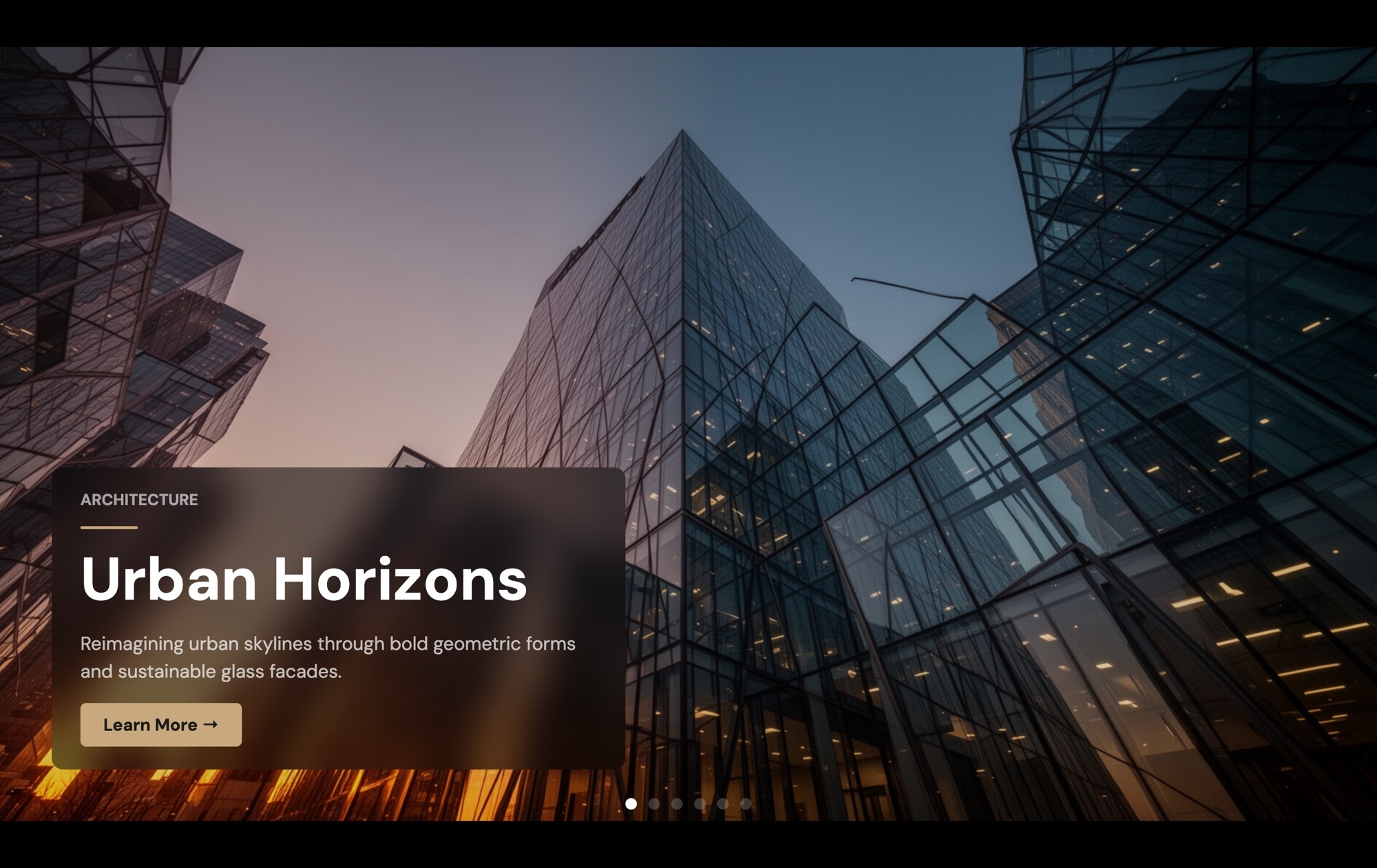
A full-screen portfolio slider that puts your best work center stage. Each slide fills the entire viewport with a dramatic project photo, overlaid with a category label ("Architecture"), a large project title ("Urban Horizons"), a brief description, and a "Learn More" call-to-action button. Pagination dots at the bottom let viewers navigate between projects at their own pace. Open this template in Swiper Studio, replace the imagery with your own portfolio pieces, and have a stunning project showcase ready to ship in minutes.
#What Makes This Template Stand Out
Full-Screen Immersive Layout
Every slide fills the entire viewport, creating a gallery experience that feels more like a curated exhibition than a web page. Your project imagery gets the full attention it deserves — no sidebars, no distractions, just visual impact from edge to edge.
Structured Project Information
Each slide layers a category label, bold project title, descriptive text, and CTA button over the background image. This hierarchy gives viewers context about each piece while keeping the visual focus on the work itself.
Call-to-Action on Every Slide
A 'Learn More' button on each slide creates a direct path from impression to engagement. Link it to a project detail page, a case study, a contact form, or an external client site — every portfolio piece becomes a conversion opportunity.
Pagination Dot Navigation
Clean pagination dots at the bottom let viewers see how many projects are in the gallery and jump to any slide. This pattern is familiar, unobtrusive, and works well on both desktop and touch devices.
Cinematic Background Photography
The template is designed around full-bleed photography — architecture, landscapes, interiors, or any visual work. Background images automatically fill and crop to the viewport, so your photos always look stunning regardless of screen size or aspect ratio.
#Who Should Use This Template
This template is built for creative professionals who want their portfolio to make an immediate, full-screen impression. Whether you are an architect, photographer, interior designer, or graphic designer, the full-viewport layout gives each project the visual weight it deserves. Instead of shrinking your work into a grid of thumbnails, this slider presents each piece as a standalone experience that commands attention.
Freelancers and studios looking to convert portfolio visitors into clients will benefit from the built-in CTA button on every slide. Each project is not just a showcase — it is a gateway to a case study, inquiry form, or client site. The combination of striking visuals and a clear call to action means visitors engage with your work and take the next step, rather than passively browsing and leaving.
Agencies and design firms can use this template as a high-impact homepage section or a dedicated portfolio page. The category labels (Architecture, Branding, Web Design, etc.) help organize diverse project types within a single gallery, and the descriptive text gives context that helps prospective clients understand the scope and quality of your work before they reach out.
#Best Use Cases
- ✓Architecture and interior design portfolios showcasing completed projects with dramatic photography
- ✓Photography portfolio sites presenting full-screen galleries of editorial, landscape, or commercial work
- ✓Creative agency homepages featuring a curated selection of top client projects with case study links
- ✓Freelancer portfolio pages designed to convert visitors into clients with built-in CTAs on every project
- ✓Design studio websites highlighting branding, packaging, or digital design work in an immersive format
- ✓Art and illustration galleries where full-viewport presentation does justice to the scale and detail of the work
#How to Customize
- Open the Portfolio Gallery template in Swiper Studio by clicking 'Use This Template' above1
- Replace the background images — select each slide and upload your own project photos or choose from the built-in demo image library2
- Edit the text overlays — update the category label, project title, and description on each slide to reflect your actual portfolio pieces3
- Customize the CTA button — change the label ('Learn More', 'View Project', 'Contact Me'), set the destination URL, and adjust the button styling to match your brand4
- Add or remove slides by duplicating existing ones for consistent layout or deleting projects you want to exclude5
- Add entry animations to the text elements — apply fade, blur, typewriter, slide-up, or other effects with custom delays to create a cinematic reveal as visitors navigate between projects6
- Adjust responsive breakpoints — fine-tune text sizes, element positioning, and spacing for mobile, tablet, and desktop to ensure the gallery looks stunning at every screen size7
- Export to your preferred format (HTML, React, Vue, Next.js, Web Component, or Webflow) or publish to CDN for instant embedding on your portfolio site8
#Frequently Asked Questions
- Can I use this template for photography portfolios?
- Yes. The full-screen layout is ideal for photography. Each slide fills the viewport with your image, and you can adjust the text overlay — add a project title, remove the description, or hide all text entirely to let the photography speak for itself. The pagination dots let viewers browse through your gallery at their own pace.
- How do I add more projects to the gallery?
- Duplicate an existing slide to keep the layout and styling consistent, then replace the background image, project title, category label, description, and CTA button link. There is no limit to the number of slides — add as many portfolio pieces as you need.
- Can I replace the CTA button with a different action?
- Absolutely. Change the button label to anything — "View Project", "See Details", "Contact Me", "Buy Print" — and set the link to any URL. You can also remove the button entirely, add multiple buttons, or replace it with a different element like a text link or icon.
- Does the full-screen layout work on mobile devices?
- Yes. The template is fully responsive with pre-configured breakpoints for mobile, tablet, laptop, and desktop. On smaller screens, text sizes scale down, spacing adjusts, and the layout remains full-screen. You can customize each breakpoint independently to optimize the mobile experience.
- What export formats are available?
- You can export the portfolio gallery as standalone HTML, a React component, a Vue component, a Next.js project, a Web Component, or a native Webflow element. You can also publish to CDN for instant iframe embedding on any portfolio site, including Squarespace, WordPress, or a custom domain.
#Related Templates
#Related Resources
- Swiper Studio for Portfolios
- Swiper Studio for Photographers
- Swiper Studio for Freelancers
- Swiper Studio for Agencies
Ready to Build Your Slider?
Pick a template, customize it visually, and export production-ready code to React, Vue, Next.js, HTML, Webflow, and more. No coding required.








