
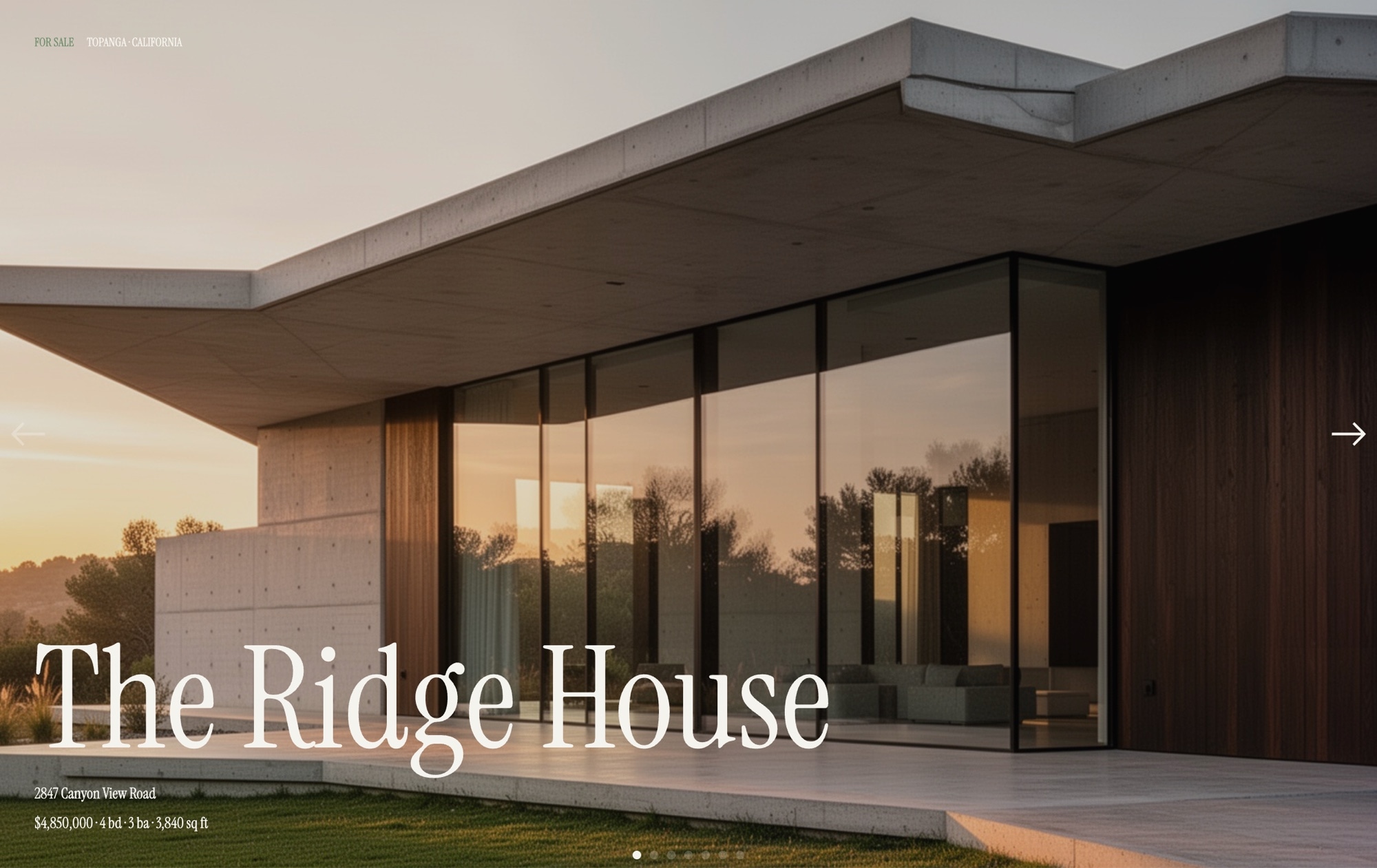
Real Estate Property Showcase Template
A calm, editorial walkthrough for a single property listing. This template guides buyers through a modern architectural home across seven considered slides: a cover card introducing "THE RIDGE HOUSE" with its address and price, an exterior hero, living room, kitchen, primary bedroom, a pool and outdoor shot at dusk, and a final floor plan slide with a Schedule Viewing link. The palette pairs off-white with charcoal and a sage accent, and Instrument Serif sets the tone alongside Inter for interface text. Open it in Swiper Studio, replace the imagery with your own photography, and publish a polished listing in minutes.
#What Makes This Template Stand Out
Editorial Property Walkthrough
Seven slides are sequenced like a curated house tour - cover, exterior, living spaces, primary bedroom, outdoor, and floor plan. The order mirrors how buyers actually want to experience a listing, so every property feels intentional instead of a generic gallery.
Refined Architectural Palette
Off-white, charcoal, and a single sage accent keep the focus on the architecture. There is no visual noise competing with the photography, which makes interiors, exteriors, and floor plans all read cleanly on desktop and mobile.
Instrument Serif Plus Inter Typography
Instrument Serif handles the property name, pricing, and slide titles with the quiet confidence of a print real estate brochure. Inter covers the UI labels, captions, and the Schedule Viewing button, so everything stays readable at any size.
Subtle Parallax on Every Image
Images move with a gentle parallax on slide transitions, adding a cinematic feel without pulling attention from the property itself. The effect is tuned for performance and works smoothly on phones, tablets, and laptops.
Schedule Viewing Call to Action Built In
The final floor plan slide includes a clear Schedule Viewing link that you can point at a booking URL, email address, or phone number. It turns the slider into a lead capture tool instead of a passive gallery.
#Who Should Use This Template
This template is made for real estate agents and luxury brokerages who sell through storytelling as much as spec sheets. If you list architectural homes, new developments, or premium properties, a generic photo grid undersells the work. This template treats each listing like an editorial feature - cover, context, interiors, outdoor, plan - and gives buyers a reason to linger on your page instead of bouncing back to a portal.
Property developers and architecture firms will find it useful for project sales and post-completion marketing. Use it to walk prospective buyers through a single unit, a show home, or a finished project in a portfolio. The Instrument Serif display type and sage accent make even compact listings feel like a considered piece of design, which matches the audience that buys from you.
Agencies and web designers building real estate sites can drop this in as a listing detail module. It pairs well with map views and spec tables on a listing page, and it exports cleanly to Webflow, React, Vue, and plain HTML. Duplicate the template per listing, swap the photography, and scale a whole catalog without building from scratch.
#Best Use Cases
- ✓Single property listing pages for luxury, architectural, or new-build homes where photography carries the sale
- ✓Show home and sales gallery pages for property developers launching a new residential project
- ✓Architecture firm project pages presenting a completed residence as part of a portfolio
- ✓Agent portfolio sites that feature a rotating selection of premium listings with a consistent visual style
- ✓Email embeds and private viewing pages sent to shortlisted buyers ahead of an in-person tour
- ✓Listing microsites for off-market or pre-launch properties where a bespoke walkthrough replaces a portal listing
- ✓Vacation rental and second home marketing where the atmosphere of the property needs to sell the stay
- ✓Interior design and staging portfolios that want to present a full home rather than isolated room shots
#How to Customize
- Open the Real Estate Property Showcase template in Swiper Studio - click 'Use This Template' above to load it directly into the editor1
- Update the cover slide with your property name, address, and price - replace 'THE RIDGE HOUSE' and the supporting details with the real listing copy2
- Replace the exterior, living room, kitchen, bedroom, and pool images with your own photography by selecting each slide and uploading new media in the background panel3
- Swap the floor plan image on the final slide, then update the Schedule Viewing link to point at your booking page, email, or phone number4
- Adjust the sage accent color if you need to match your agency brand, and tweak the Instrument Serif and Inter sizes for your preferred hierarchy5
- Fine-tune the subtle parallax amount per image, or disable it on specific slides where you want a perfectly still composition6
- Switch to tablet and mobile previews to review text sizing, image cropping, and spacing on smaller screens, and adjust any breakpoint independently7
- Export to Webflow, React, Vue, Next.js, Web Component, or standalone HTML, or publish to CDN and embed the listing via iframe on your existing site8
#Frequently Asked Questions
- Can I use this template for a property I am actively listing?
- Yes. The template is designed as a complete single-property walkthrough, from the cover card with address and price all the way to the floor plan and Schedule Viewing link. Swap the photography, update the property name, address, and pricing, adjust the copy on each slide, and publish it as a listing page, an email embed, or a section on your agency site.
- How many slides are included, and what does each one show?
- The template ships with seven slides: a cover slide with the property name, address, and price; an exterior hero; a living room interior; a kitchen interior; the primary bedroom; a pool and outdoor dusk shot; and a final floor plan slide with a Schedule Viewing call to action. You can reorder, duplicate, or remove slides to match the property you are presenting.
- Can I change the sage accent color and typography to match my brand?
- Absolutely. The template uses an off-white background, charcoal text, and a sage accent by default, with Instrument Serif for display and Inter for UI. Every color swatch and font is editable in the visual editor, so you can align the palette with your agency brand or a specific development in minutes.
- Does the subtle parallax effect on the images hurt performance?
- No. The parallax is a lightweight transform tied to the slide effect, not a heavy scroll animation. Swiper handles it natively, images are served through Swiper Studio CDN, and everything stays smooth on mobile and desktop. You can tune the parallax amount per slide or turn it off entirely from the editor.
- What export formats work best for a real estate website?
- Most agents publish to CDN and embed the slider via iframe on their listing platform, or export a Webflow element to drop into a listing page. If you run a custom site, the React, Vue, Next.js, Web Component, and standalone HTML exports all work. Every export is production-ready, responsive, and keeps the parallax and typography intact.
#Related Templates




#Related Resources
- Swiper Studio for Portfolios
- Swiper Studio for Image Galleries
- Swiper Studio for Web Designers
- Swiper Studio for Agencies
Ready to Build Your Slider?
Pick a template, customize it visually, and export production-ready code to React, Vue, Next.js, HTML, Webflow, and more. No coding required.








