
Products - Apparel Template
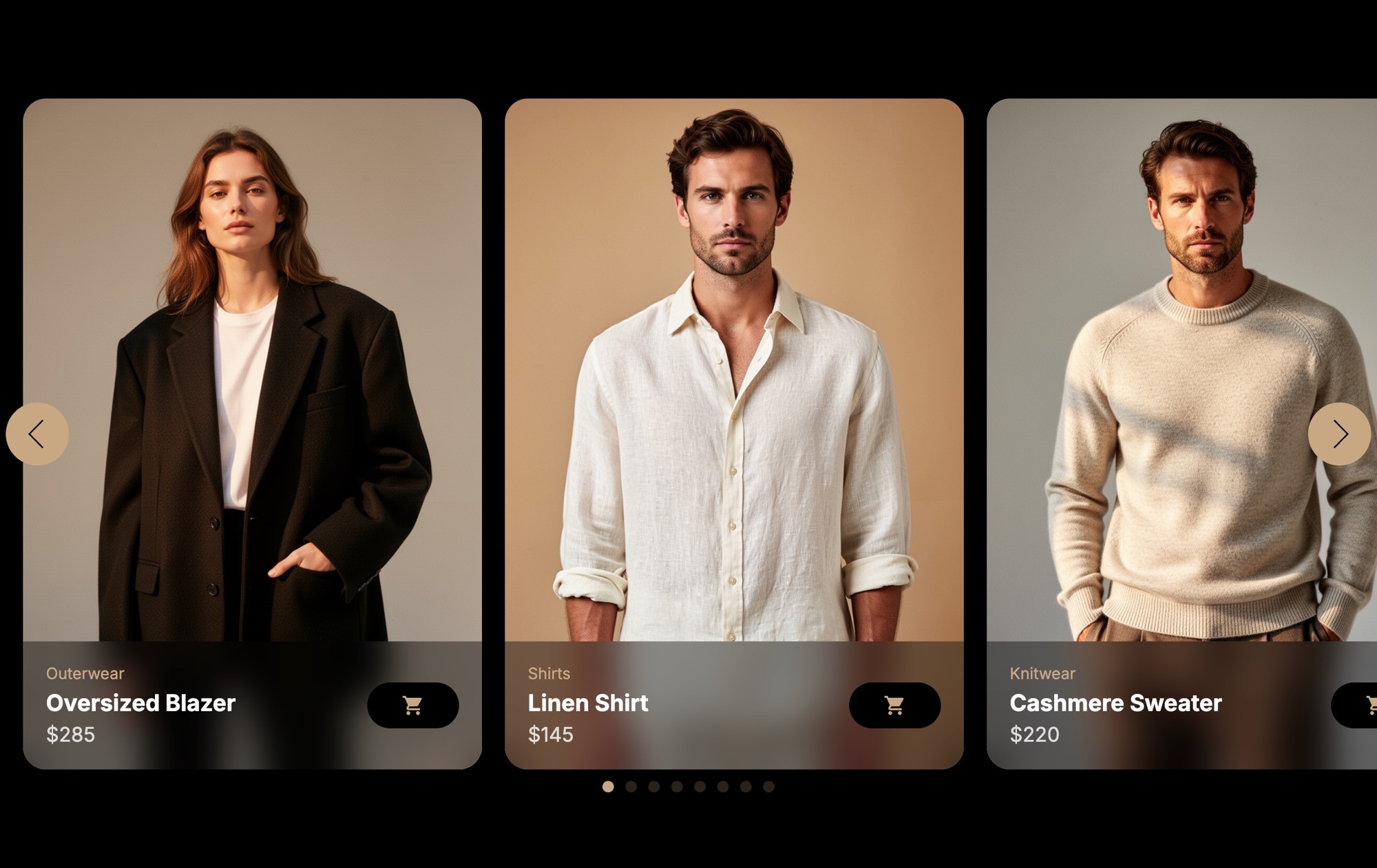
Fashion sells through imagery. When a shopper sees your apparel on a model against a clean dark background — with the product name, category, and price right there on the card — the path from browsing to buying gets shorter. The Products - Apparel template puts your fashion line into a polished, swipeable card carousel that looks like it belongs on a high-end retail site.
Each card features a full-bleed model photo, a subtle category label (like "Outerwear" or "Knitwear"), the product name, price, and a wishlist heart icon. The dark background makes every outfit pop, keeps attention locked on the clothing, and gives the entire section a boutique-quality feel. Three cards display side by side on desktop, inviting shoppers to browse your collection without leaving the page.
#What Makes This Template Stand Out
Dark Background for Fashion Photography
The dark color scheme is a deliberate choice for apparel. Model photos look sharper, fabric textures are more visible, and colors appear richer against a dark canvas. The result is a presentation that feels editorial — closer to a lookbook than a product grid.
Product Card Layout with Key Details
Each card combines a model photo with a category label, product name, price, and wishlist icon in a compact, scannable format. Shoppers can evaluate multiple items at a glance without clicking into individual product pages first.
Wishlist Icon for Engagement
The heart icon on each card adds a familiar interaction pattern that fashion shoppers expect. It signals save-for-later functionality and creates a visual cue that encourages browsing and collection building — even before a visitor commits to a purchase.
Multi-Card Browsing Experience
Displaying three cards simultaneously on desktop gives shoppers a catalog-style overview of your collection. The swipeable carousel encourages exploration, and on mobile the layout adapts to show fewer cards with touch-friendly swiping.
Category Labels for Collection Organization
Each card includes a category label like Outerwear, Tops, or Knitwear. These small details help shoppers orient themselves within your product line and make the carousel feel organized and intentional rather than random.
#Who Should Use This Template
This template is built for fashion brands, clothing retailers, and DTC apparel companies that want a visually striking way to feature products on their website. Whether you are showcasing a new seasonal collection, highlighting bestsellers on your homepage, or building a curated section for a specific category, the card carousel format gives your clothing the presentation it deserves. The dark theme works particularly well for brands that position themselves as premium, contemporary, or streetwear-focused.
Shopify store owners and e-commerce managers will find this template especially useful. Instead of relying on your theme's default product grid — which often looks generic and flat — you can drop in a custom apparel carousel that feels intentional and on-brand. Publish from Swiper Studio, add it to your homepage as a native theme block with our official Shopify app, and it instantly looks more polished. On WooCommerce, BigCommerce, Squarespace, and any platform that supports embed snippets, use the CDN embed instead.
Web designers and agencies working with fashion clients can use this as a production-ready starting point. The card structure, dark theme, and information hierarchy follow e-commerce best practices. Swap in your client's product photography, update the brand colors and typography, and export clean code in React, Vue, HTML, or any other supported format. It saves hours of design and development time compared to building a product carousel from scratch.
#Best Use Cases
- ✓Fashion brand homepages featuring new arrivals or seasonal collections
- ✓Shopify and WooCommerce stores looking for a premium product carousel section
- ✓Lookbook-style product presentations for apparel and accessories
- ✓Curated product collections organized by category — outerwear, knitwear, footwear, and more
- ✓Campaign landing pages for product launches, holiday sales, or limited-edition drops
- ✓Boutique and DTC brand websites that need a visually elevated alternative to standard product grids
#How to Customize
- Open the Products - Apparel template in Swiper Studio by clicking 'Use This Template' above1
- Replace the default model photos — select each card's image and upload your own product photography or choose from the built-in demo image library2
- Update the text on each card — edit the category label, product name, and price to match your inventory3
- Customize the card styling — adjust background colors, text colors, font choices, and spacing to align with your brand guidelines4
- Add or remove slides to match the number of products you want to feature — duplicate an existing card for consistent styling, then swap the content5
- Configure carousel behavior — set slides per view, spacing, autoplay, loop, and navigation options from the editor panel6
- Preview across breakpoints — adjust card count and sizing for mobile, tablet, and desktop to ensure a polished experience on every device7
- Export to your preferred format (HTML, React, Vue, Next.js, Web Component, or Webflow) or publish to CDN for instant embedding on your store8
#Frequently Asked Questions
- Can I change the product images, names, and prices?
- Yes. Every element on each card is fully editable in the visual editor. Click any product image to replace it with your own model photography, select the product name or price to update the text, and change the category label to match your collections. You can also adjust colors, fonts, and card styling to match your brand.
- Does this template work on mobile devices?
- Yes. The template includes responsive breakpoints for mobile, tablet, laptop, and desktop. You can control how many product cards display at each screen size — for example, one card on mobile, two on tablet, and three on desktop — and adjust font sizes, spacing, and card dimensions independently for each breakpoint.
- Can I add a link to each product card?
- Absolutely. You can wrap each card or any element within it in a link block that points to your product detail page, shopping cart, or any URL. The wishlist icon can also be linked or styled as needed for your storefront integration.
- How do I embed this slider on my Shopify or e-commerce store?
- After customizing the template, publish it from Swiper Studio. On Shopify, install our official Shopify app and add the slider to any page as a native theme block from the theme editor. On WooCommerce, paste the CDN embed snippet into a Custom HTML block - the same snippet works on any platform that supports embed code.
- What export formats are available?
- You can export this template as standalone HTML, a React component, a Vue component, a Next.js project, a Web Component, or paste it into Webflow as native elements. You can also publish directly to CDN for iframe or script-based embedding on any website.
#Related Templates
#Related Resources
Ready to Build Your Slider?
Pick a template, customize it visually, and export production-ready code to React, Vue, Next.js, HTML, Webflow, and more. No coding required.








