Singles' Day 11.11
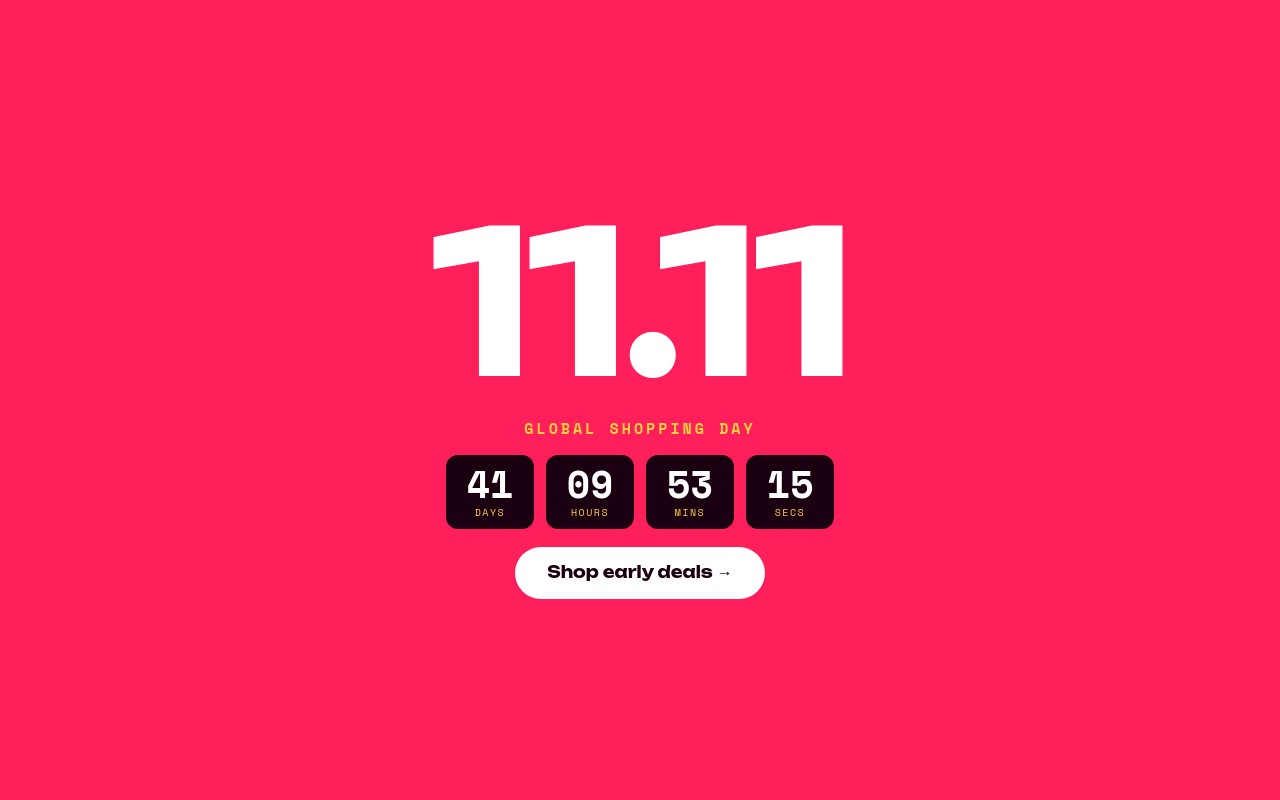
Singles' Day on November 11 is the first big sale of the holiday season, and it keeps growing outside China. This template makes the date itself the design: a massive white "11.11" on hot pink, a "GLOBAL SHOPPING DAY" label, and a live boxed countdown to midnight. Three more slides carry the offers - a spend-more-save-more ladder, a sneaker deal on a yellow circle, and a serum deal in a pink pill-shaped frame on deep plum.
The palette is hot red-pink #ff1f5a, deep plum #1a0010, badge yellow #ffd23f, and white. Unbounded carries the numbers, headlines, and buttons, while Space Mono handles labels, countdown digits, and fine print. Slides alternate pink and plum and transition with Swiper's creative effect at 600ms: the outgoing slide scales down to 0.8 and fades, the incoming one scales down from 1.2 as it fades in. Autoplay runs every 5 seconds with loop on.
#What Makes This Template Stand Out
11.11 at Hero Scale
The date is the headline: "11.11" in white Unbounded at 120px on phones, 160px at 768px, and 200px at 1024px, animating in with letter-scale so each digit pops in on its own. Nothing else competes with it on the first slide.
Live Boxed Countdown to Midnight
Four plum boxes show days, hours, minutes, and seconds, each a separate live countdown text sharing one target, with small yellow DAYS / HOURS / MINS / SECS labels. Set the target to November 11 at midnight in your timezone and it keeps ticking after publishing, with no code.
Spend More, Save More Ladder
Slide 2 lays out three tiers on plum: Spend $50 save $11, Spend $111 save $33, and Spend $211 save $66. The first two cards are white with pink savings, the top tier is yellow so it stands out, and all three savings figures animate with number-roll.
Two Product Deal Slides
Slide 3 puts a pink sneaker cutout on a yellow circle with "11% OFF", "EVERYTHING + FREE SHIPPING", and "Cloud Runner $88.11" with the old $99 struck through. Slide 4 frames a serum bottle in a pink pill shape with a pulsing "ONLY ON 11.11" badge, "Rose Glow Serum", "$11.11" (was $32), and an "Add to bag" button.
Creative Scale-and-Fade Transition
Instead of a sideways slide, the creative effect scales and fades between slides at 600ms, which makes the pink and plum backgrounds flash in and out like a sale countdown. Yellow bullets show at every size and white arrows appear from 768px.
#Who Should Use This Template
This template is for ecommerce stores selling to shoppers who already know 11.11 - fashion, beauty, sneakers, and electronics brands with customers in Asia or in the growing international Singles' Day audience. It gives you a ready homepage hero for the first week of November, before the Black Friday banners go up.
Marketplaces and cross-border sellers can use the ladder slide for tiered spend promotions, which are the standard Singles' Day mechanic, and the two product slides for hero deals.
Agencies preparing a full Q4 campaign can ship this as the first beat of the season, then follow it with Black Friday and Christmas sliders from the same library.
#Best Use Cases
- ✓Singles' Day 11.11 homepage hero with a live countdown to midnight
- ✓Tiered spend-more-save-more promotions
- ✓Beauty and skincare hero deals with a pulsing limited-time badge
- ✓Sneaker and fashion single-product deal banners
- ✓12.12, 9.9, and other date-named sales
- ✓Store anniversary sales that use the date as the headline
- ✓Cross-border and marketplace seller storefronts
- ✓Pre-Black Friday early deals campaigns
#How to Customize
- Open the Singles' Day 11.11 template in Swiper Studio - you will see four slides: the 11.11 countdown hero, the savings ladder, a sneaker deal, and a serum deal.1
- Select any of the four countdown boxes and set the target to November 11, 2026 at 00:00 with your timezone, then choose what the boxes do when the countdown ends.2
- Update the ladder tiers - spend thresholds, savings amounts, and the "Auto-applied at checkout" line - to match your real promotion.3
- Swap the sneaker and serum cutouts for your own transparent product images in the media panel.4
- Retype the product names, sale prices, struck-through prices, and the "65% off · limit 2 per order" fine print.5
- Adjust the pink, plum, and yellow colors if you want the sale to match your brand palette.6
- Point each CTA link block ("Shop early deals", "Start shopping", "Shop the sale", "Add to bag") at the right collection or product page.7
- Publish to CDN and add it through the Shopify app, use Paste into Webflow, or export to HTML, React, Vue, Next.js, or Web Component.8
#Frequently Asked Questions
- Is the countdown on the hero slide live?
- Yes. The four boxes are live countdown texts ({dd}, {hh}, {mm}, {ss}) that share one target and keep ticking after you export or publish, with no extra code. In the template the target is set about 11 days, 11 hours, and 11 minutes from when you open it. Set it to November 11, 2026 at 00:00 in your store's timezone, and choose what happens at zero: show zeros, swap to your own text like "SALE IS LIVE", or hide the countdown.
- Can I change the spend thresholds and savings on the ladder slide?
- Yes. The three tier cards (Spend $50 save $11, Spend $111 save $33, Spend $211 save $66) are plain text inside rounded blocks, and the savings animate in with number-roll on every slide change. Retype the amounts, recolor the top tier, and update the "Auto-applied at checkout · Nov 11 only" line to match your real discount rules.
- Can I use this for sales other than Singles' Day?
- Yes. The layout is a date-as-hero sale banner, so it adapts well to 12.12, a 9.9 sale, a store anniversary, or any date-named promotion. Replace "11.11" with your date, update the countdown target, and adjust the pink, plum, and yellow palette to your brand.
- How tall is the slider on desktop?
- On phones the slider is 4:5. From 768px it switches to a full-width banner with a fixed 420px height, and from 1024px to 480px. The 11.11 headline scales from 120px to 160px to 200px across those breakpoints, and the tier cards stack on phones and sit side by side from 768px.
- How do I put it on my Shopify store?
- Install the official Swiper Studio Shopify app, publish the slider, and add it to your homepage or a sale collection page as a native theme block from the theme editor. For other platforms, publish to CDN and paste the embed snippet, use Paste into Webflow, or export to React or Vue for a headless storefront.
#Related Templates
#Related Resources
- Swiper Studio for E-commerce Stores
- Swiper Studio for Product Carousels
- Swiper Studio for Shopify
- Swiper Studio for Landing Pages
Ready to Build Your Slider?
Pick a template, customize it visually, and export production-ready code to React, Vue, Next.js, HTML, Webflow, and more. No coding required.