Promo Code Reveal
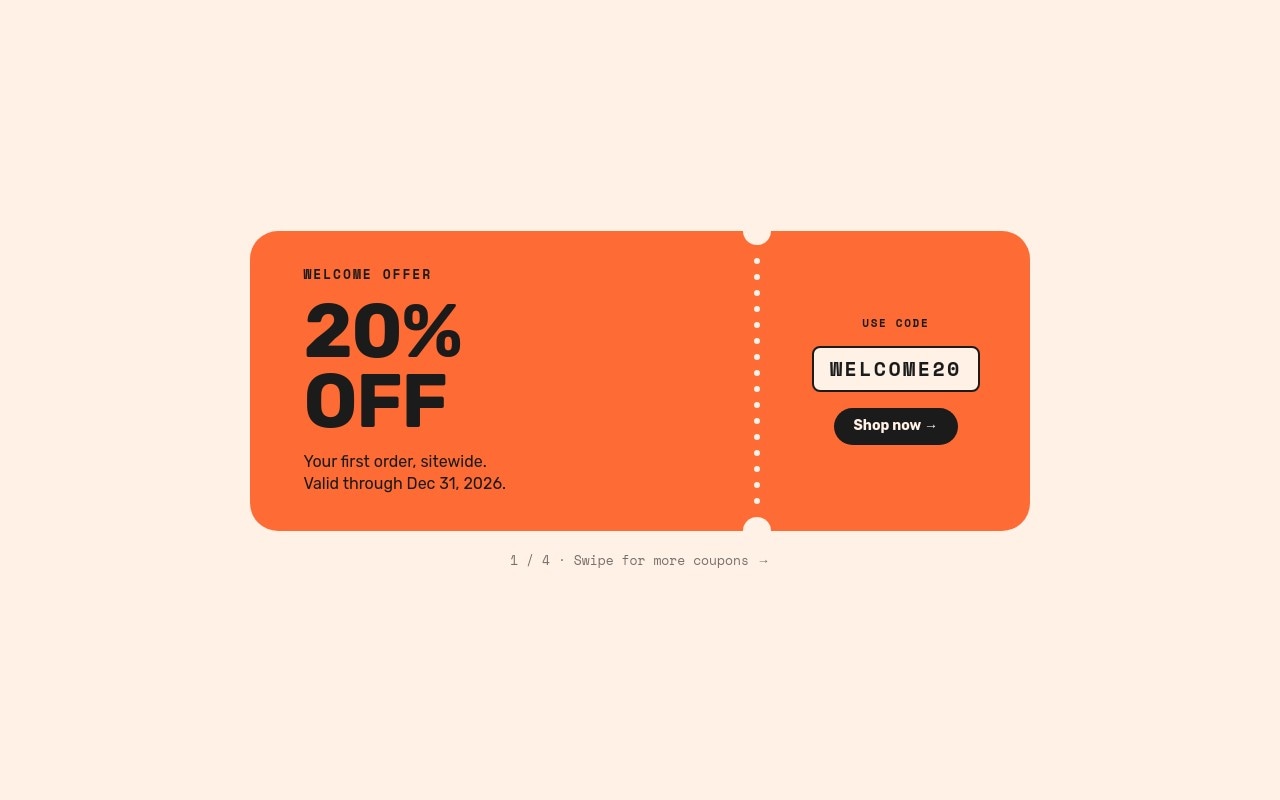
A coupon slider that treats each promo code like a ticket. Four perforated tickets sit on a warm cream background, and visitors swipe them away one at a time: an orange "20% OFF" welcome offer, a teal "FREE SHIPPING" ticket, a purple "$15 OFF", and a black "BUY 1 GET 1". Each ticket has a small label, a big offer in Rubik, a two-line condition, and on the other side of the perforation, a "USE CODE" box and a "Shop now" button.
The template is not tied to one holiday, so it works for Black Friday, Christmas, a spring sale, or a welcome offer all year. Fonts are Rubik for the offers and body copy and Space Mono for labels and codes. The colors are cream #fff1e6, ink #1b1b1b, orange #ff6b35, teal #2ec4b6, and purple #9b5de5. The slider uses the Tinder effect at 500ms with no autoplay, no arrows, and no pagination: the swipe is the navigation.
#What Makes This Template Stand Out
Tickets Built From Blocks
Each coupon is a rounded block with a 16-dot perforated line and two cream punch notches at its top and bottom edges. No images are used, so the tickets reskin by changing a few colors, and they stay sharp at any size.
Swipe to Pull the Next Coupon
The Tinder effect lets visitors drag the top ticket off the stack to reveal the next one. With autoplay off, the code stays in place until someone chooses to move on, which is what you want when people need time to read or copy it.
Clear Offer Anatomy
Every ticket follows the same order: a tracked Space Mono label ('WELCOME OFFER', 'HOLIDAY SHIPPING', 'TREAT YOURSELF', 'DOUBLE UP'), a large Rubik offer with a letter-scale entrance, the conditions, and the code in a bordered box. Visitors can compare the four coupons at a glance.
Code Box and Button That Land Last
The code sits in a cream box with a 2px ink border and 0.12em letter spacing, and pops in at 400ms. The 'Shop now' pill fades in at 700ms, so the offer is read first and the action comes right after.
Swipe Hint Under Every Ticket
A small Space Mono line under each ticket shows the position ("1 / 4 · Swipe for more coupons") and drifts sideways with the drift-x animation. The last ticket ends with "That's every coupon" so visitors know they have seen them all.
#Who Should Use This Template
This template is built for Shopify merchants and online stores that run several discount codes at once. Instead of listing codes in a paragraph or an announcement bar, each one gets its own ticket with the conditions spelled out, which cuts down on "my code didn't work" support emails.
Brands running Black Friday, Cyber Monday, or holiday promotions can load the four tickets with their tiered offers, then swap them for a spring or summer set later. The ticket structure and colors are neutral enough to fit any season.
Agencies and Webflow designers get a reusable coupon module for client stores. It works on a homepage, a dedicated "offers" page, a cart upsell section, or a landing page for an email campaign.
#Best Use Cases
- ✓Black Friday and Cyber Monday pages listing every active promo code
- ✓Welcome offer sections for first-time visitors
- ✓Free shipping threshold promotions next to the cart
- ✓Holiday coupon pages linked from email and SMS campaigns
- ✓Buy one get one and bundle offers on collection pages
- ✓Loyalty and member-only code pages
- ✓Restaurant and cafe voucher promotions
- ✓Seasonal sale landing pages reused throughout the year
#How to Customize
- Open the Promo Code Reveal template in Swiper Studio - you will see four ticket slides: 20% OFF, FREE SHIPPING, $15 OFF, and BUY 1 GET 1.1
- Retype the label, offer, and conditions on each ticket to match your real promotions and their limits.2
- Replace the codes WELCOME20, SHIPFREE, TREAT15, and BOGO with the discount codes you have set up in your store.3
- Change the ticket colors in the block settings - keep the perforation dots and notches the same color as the slide background so they read as holes.4
- Point each "Shop now" link block at the collection or product the code applies to.5
- Update the "1 / 4 · Swipe for more coupons" hints if you add or remove tickets.6
- Check the column layout on phones and the horizontal ticket at 768px and 1024px, and adjust the ticket width if your offers are longer.7
- Publish to CDN and add it to Shopify with the Swiper Studio app, use Paste into Webflow, or export to HTML, React, Vue, Next.js, or Web Component.8
#Frequently Asked Questions
- What offers and codes come with the template?
- Four coupons: "20% OFF" with code WELCOME20 for a first order, "FREE SHIPPING" with SHIPFREE on orders over $40, "$15 OFF" with TREAT15 on orders over $100, and "BUY 1 GET 1" with BOGO on selected items. Every offer, condition line, and code is plain text, so retype them to match the discount codes you have set up in your store.
- How does the swipe interaction work?
- The slider uses the Tinder effect: visitors drag or swipe the top coupon away and the next one comes forward, like pulling tickets off a stack. Autoplay is off on purpose so people can read the code before moving on. A small line under each ticket ("1 / 4 · Swipe for more coupons") drifts sideways as a hint, and the last one reads "That's every coupon".
- How are the ticket perforations made?
- The tickets are built from blocks. A column of 16 small cream dots forms the perforated line between the offer and the code, and two cream circles at the top and bottom of that line look like punched notches. Because everything is blocks, changing the ticket color or the slide background only takes a few edits.
- Does the ticket layout work on mobile?
- Yes. On phones the ticket stacks as a column (offer on top, code and button below) inside a 4:5 slider. From 768px it becomes a wide horizontal ticket with the code on the right, and the slider height is fixed at 400px at 768px and 440px at 1024px.
- How do I add it to Shopify, Webflow, or another site?
- On Shopify, install the official Swiper Studio Shopify app and add the published slider to any page as a native theme block from the theme editor. In Webflow, use Paste into Webflow to add it as native elements. For Squarespace, Wix, WordPress, or any other site, publish to CDN and paste the embed snippet, or export to HTML, React, Vue, Next.js, or Web Component.
#Related Templates

#Related Resources
- Swiper Studio for Shopify
- Swiper Studio for E-commerce Stores
- Swiper Studio for Marketers
- Swiper Studio for Landing Pages
Ready to Build Your Slider?
Pick a template, customize it visually, and export production-ready code to React, Vue, Next.js, HTML, Webflow, and more. No coding required.