Cyber Monday Glitch
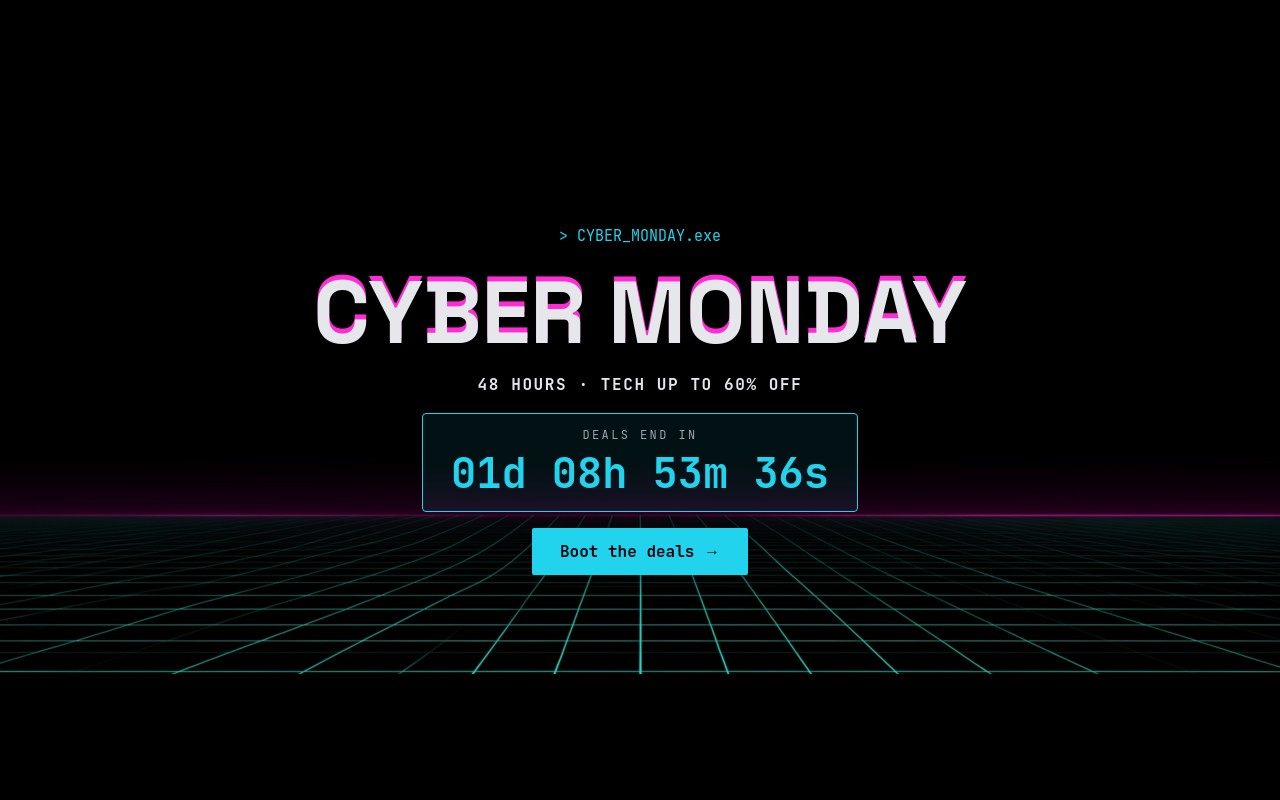
A Cyber Monday banner for tech deals, styled like a boot screen: a neon cyan and magenta horizon grid, a typewriter "> CYBER_MONDAY.exe" prompt, and a faux-glitch "CYBER MONDAY" headline with a magenta copy offset behind it. The first slide adds "48 HOURS · TECH UP TO 60% OFF", a live "DEALS END IN" countdown in a thin cyan terminal box, and a "Boot the deals" button. Three deal slides follow - laptop, earbuds, and controller - each with a product cutout floating on a two-ring glowing circle.
Space Grotesk bold carries the headline, product names, and prices, and JetBrains Mono handles everything else: labels like "// DEAL_01 · LAPTOPS", old prices, badges, the countdown, and buttons. The palette is cyan #22d3ee, magenta #ff2bd6, and light grey #e5e7eb over the dark grid. Slides change with a WebGL pixelize shader at 700ms and autoplay every 5 seconds, pausing on hover.
#What Makes This Template Stand Out
Terminal-Style Live Countdown
A cyan-bordered box with a mono 'DEALS END IN' label and a large {dd}d {hh}h {mm}m {ss}s countdown. It is live after export or publish, keyed to your date and timezone, and switches to 'SESSION ENDED' when time runs out. Perfect for a 48-hour Cyber Monday window.
Faux-Glitch Headline and Typewriter Prompt
The '> CYBER_MONDAY.exe' line types itself out with the typewriter animation, then two stacked CYBER MONDAY texts - magenta behind, light grey in front - scale in letter by letter for a chromatic glitch split. It is built from plain text, so it stays editable.
Pixelize Shader Transitions
The WebGL pixelize shader breaks each slide into blocks and rebuilds the next one over 700ms, which fits the retro-tech look far better than a plain slide. The grid background image sits on every slide so the horizon stays put while the content changes.
Glowing Product Circles and Pulsing Badges
Each cutout sits in a two-ring circle - a 12% tint ring around a 25% tint core - in cyan for the laptop and controller and magenta for the earbuds. Prices roll up with number-roll, the magenta -31% / -45% / -40% badges pulse, and old prices sit struck through below.
Promo Code That Stacks With the Sale
The controller slide ends with a magenta outlined 'CODE CYBER10' chip and a 'stacks with sale prices' note - a simple way to push an extra code without adding another slide. Retype the code to match your checkout.
#Who Should Use This Template
This template is built for electronics, gaming, and gadget stores running Cyber Monday deals. The terminal countdown, neon palette, and glowing product circles speak the language of the audience, and the three deal slides are ready for your biggest discounts on November 30, 2026.
Software, SaaS, and online course sellers can reuse it for a Cyber Monday subscription offer: swap the product cutouts for app icons or device mockups, change the prices to plan prices, and point "Boot the deals" at checkout.
Agencies and Webflow designers get a Cyber Monday banner that looks different from the Black Friday one they already shipped for the same client. It reskins well for other tech launches too - a hardware drop, a game release, or a year-end tech clearance with a new countdown date.
#Best Use Cases
- ✓Cyber Monday homepage banners with a live 48-hour countdown
- ✓Electronics and gaming store deal rotators for laptops, audio, and controllers
- ✓Shopify tech store hero sections added through the Swiper Studio app
- ✓SaaS and app Cyber Monday plan discounts with a promo code
- ✓Gaming launches and hardware drops with a countdown to release
- ✓Tech clearance banners reusing the same grid and neon palette
- ✓Paid ad landing pages for Cyber Monday tech offers
- ✓Agency holiday campaigns that need a distinct Cyber Monday look
#How to Customize
- Open the Cyber Monday Glitch template in Swiper Studio - you will see four slides: the countdown hero, Ultrabook 14", ANC Earbuds Pro, and Wireless Controller.1
- Select the countdown text, open the Countdown setting, and set your deadline and timezone - for example 23:59 on November 30, 2026. Choose what happens on expiry: "SESSION ENDED", zeros, or hide.2
- Retype the "> CYBER_MONDAY.exe" prompt, both stacked "CYBER MONDAY" texts, and the "48 HOURS · TECH UP TO 60% OFF" line.3
- Replace the laptop, earbuds, and controller cutouts with your own transparent product images in the media panel.4
- Update each product name, price, struck-through old price, and percentage badge, plus the "// DEAL_0X" labels.5
- Change the CYBER10 code and point "Boot the deals" and each "Grab the deal" link block at the right product or collection.6
- Keep the pixelize shader or switch to another effect, then check the 4:5, 2:1, and 21:9 banner layouts in the responsive preview.7
- Publish to CDN and add it to Shopify with the Swiper Studio app, paste it into Webflow, or export to HTML, React, Vue, Next.js, or a Web Component.8
#Frequently Asked Questions
- Is the "DEALS END IN" countdown a real timer?
- Yes. The countdown text uses the Countdown setting with the tokens {dd}d {hh}h {mm}m {ss}s, so it ticks live after you export or publish - no code needed. In the template it starts about a day and a half from when you open it. Set your real deadline, for example 23:59 on Cyber Monday, November 30, 2026, plus your store timezone. When it expires the text swaps to "SESSION ENDED", or you can choose zeros or hide.
- How is the glitch headline made?
- It is two "CYBER MONDAY" texts in Space Grotesk bold stacked inside one block - a magenta #ff2bd6 copy behind a light #e5e7eb copy, slightly offset. Both use the letter-scale animation with a small delay between them, so the headline builds in with a chromatic split. Retype both texts to change the word and the effect stays.
- What is the pixelize transition, and will it slow down my page?
- The slider uses Swiper Studio's WebGL shader effect with the pixelize shader at 700ms, so slides break into blocks and resolve into the next one. It only runs during the transition. If you prefer a plainer look, switch the effect to fade or slide in the editor - the layouts do not depend on it.
- Can I swap the products and prices?
- Yes. The three deal slides ship with an Ultrabook 14" at $899 (was $1,299, -31%), ANC Earbuds Pro at $82 (was $149, -45%), and a Wireless Controller at $59 (was $99, -40%). Replace the transparent cutouts in the media panel and retype the name, price, struck-through old price, and badge. The new price rolls up with number-roll and the magenta badge pulses.
- How do I add it to my store?
- On Shopify, install the official Swiper Studio Shopify app and add the published slider to any page as a native theme block from the theme editor. In Webflow, use Paste into Webflow to add it as native elements. On WordPress, Squarespace, Wix, or any other site, publish to CDN and paste the embed snippet, or export to HTML, React, Vue, Next.js, or a Web Component.
#Related Templates
#Related Resources
- Swiper Studio for Ecommerce Stores
- Swiper Studio for Shopify
- Swiper Studio for Hero Sections
- Swiper Studio for Landing Pages
Ready to Build Your Slider?
Pick a template, customize it visually, and export production-ready code to React, Vue, Next.js, HTML, Webflow, and more. No coding required.