Announcement Bar Ticker
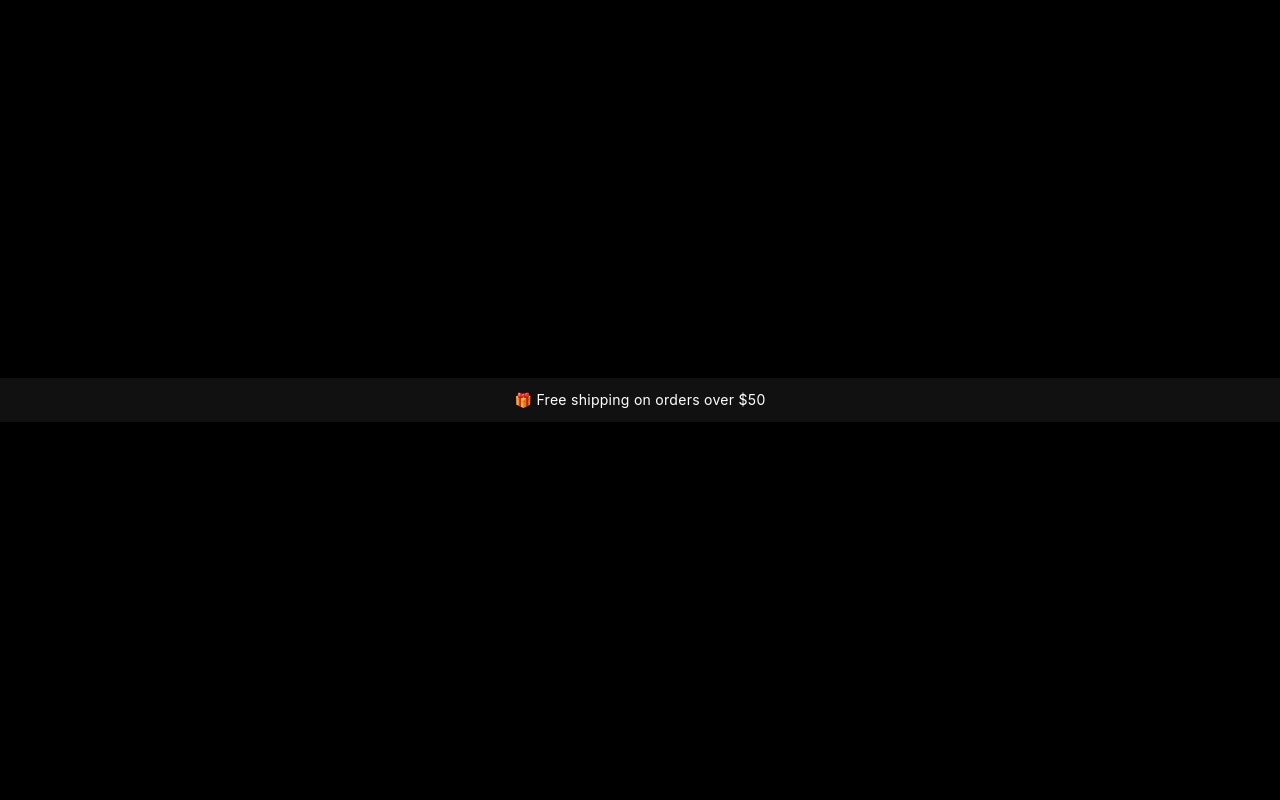
The thin bar above a store header is one of the most-used pieces of ecommerce UI, and one of the least-designed. This template is a ready announcement bar: 40px tall on phones, 44px from 768px up, full width, rotating four messages with a vertical slide. The messages are "Free shipping on orders over $50" (with a gift emoji), "Use code HOLIDAY20 for 20% off", "Holiday sale ends in" followed by a live countdown, and "Order by Dec 18 for Christmas delivery →" as an underlined link.
The bar is #111111 with white text and a rose accent #f43f5e for the promo code and countdown. Inter at 13px on phones and 14px from 768px (tracked 0.02em) carries the messages, and JetBrains Mono in bold carries the code and the digits so they read as something to copy or watch. The code sits in a 1px rose outlined box. Messages rotate every 3 seconds with a 400ms vertical slide, loop continuously, and pause on hover. There are no arrows and no bullets, just the messages.
#What Makes This Template Stand Out
Vertical Message Rotation
Messages roll up from below with a 400ms vertical slide instead of sliding sideways or fading. It is the motion people expect from a ticker, it takes no extra horizontal space, and it keeps the bar calm enough to sit above every page of the store.
Live Countdown in One Line
The third message pairs plain text with a bold rose countdown in JetBrains Mono. It is a live countdown text, so it keeps ticking on your published store. Hours are not capped at 24, which keeps a multi-day sale readable in the small space.
Promo Code That Stands Out
"HOLIDAY20" is set in bold JetBrains Mono inside a 1px rose outlined box with 4px corners, between plain "Use code" and "for 20% off" text. Shoppers spot the code instantly, even at 13px on a phone.
Clickable Shipping Deadline
The fourth message is a link block with underlined text: "Order by Dec 18 for Christmas delivery →". Point it at your shipping policy, a gift guide, or a last-chance collection. Any other message can be wrapped in a link block the same way.
Fixed Height at Every Breakpoint
The bar uses a fixed height rather than an aspect ratio - 40px on phones and 44px from 768px - with the slider at 100% width. It fits above any header without pushing the layout around, and text steps from 13px to 14px at the same breakpoint.
#Who Should Use This Template
This template is for Shopify and ecommerce stores that want a rotating announcement bar without installing a separate announcement app. Free shipping thresholds, promo codes, sale deadlines, and shipping cutoffs all fit in one bar that you edit visually and publish alongside your other sliders.
Stores preparing Black Friday and holiday campaigns get the four messages that matter most in November and December already written: a shipping threshold, a code, a countdown, and a Christmas delivery cutoff. Change the numbers and dates and it is ready.
Webflow designers and agencies can paste the bar into a site as native elements and reuse it across client builds. It is also a good pattern for SaaS and content sites that want a short rotating notice above the navigation.
#Best Use Cases
- ✓Shopify announcement bar above the store header
- ✓Free shipping threshold and returns policy messages
- ✓Black Friday and Cyber Monday promo code bars
- ✓Live sale countdown in a single line
- ✓Christmas shipping cutoff and last-order-date reminders
- ✓New collection and restock announcements with a link
- ✓Welcome discount bars for first-time visitors
- ✓SaaS and app sites with a rotating notice above the navigation
#How to Customize
- Open the Announcement Bar Ticker template in Swiper Studio - you will see four slides, one per message.1
- Edit the free shipping message with your real threshold, or replace it with any other short message.2
- Change "HOLIDAY20" and "for 20% off" to your own promo code and discount.3
- Select the countdown text and set your sale end date, time, and timezone, then choose what happens when it reaches zero.4
- Update the shipping deadline copy and point the link block at your shipping page, gift guide, or sale collection.5
- Duplicate, delete, or reorder slides to change the set of messages, and adjust the 3-second autoplay delay if your messages are longer.6
- Recolor the bar background, text, and rose accent to match your header.7
- Publish to CDN and add it through the Shopify app above your header, use Paste into Webflow, or export to HTML, React, Vue, Next.js, or Web Component.8
#Frequently Asked Questions
- Is the "Holiday sale ends in" countdown live?
- Yes. The {hh}:{mm}:{ss} text is a live countdown that keeps ticking after you export or publish, with no code. In the template it counts down a few hours from when you open it. In the editor, set your real end date, time, and timezone, and choose what happens at zero: show zeros, swap to custom text like "Sale ended - thanks for shopping", or hide it. Hours keep counting past 24, so a sale ending in three days shows 72 hours.
- How do I put it above my Shopify header?
- Install the official Swiper Studio Shopify app, publish the bar, and add it as a native theme block from the theme editor in the section above your header (many themes call it the announcement or header group). On other platforms, publish to CDN and paste the embed snippet at the top of your page template, or use Paste into Webflow to add it as native elements.
- Can I add or remove messages?
- Yes. Each message is one slide. Duplicate a slide to add a new message, delete the ones you do not need, and reorder them by dragging. The bar loops, so the last message rolls straight back to the first. One or two messages work fine, and five or six work too if each is short.
- How fast does it rotate, and does it stop on hover?
- Messages change every 3 seconds with a 400ms vertical slide, and autoplay pauses while the pointer is over the bar so shoppers can read the code or click the link. Change the delay and speed in the autoplay and slider settings if your messages are longer.
- Can I use it outside the holiday season?
- Yes. The bar has no seasonal graphics - just a dark background, white text, and a rose accent for the code and countdown. Swap the copy for a returns policy, a new collection link, a welcome discount, or a store event, and it works all year.
#Related Templates

#Related Resources
- Swiper Studio for Shopify
- Swiper Studio for E-commerce Stores
- Swiper Studio for Webflow
- Swiper Studio for Marketers
Ready to Build Your Slider?
Pick a template, customize it visually, and export production-ready code to React, Vue, Next.js, HTML, Webflow, and more. No coding required.