Bundle & Save
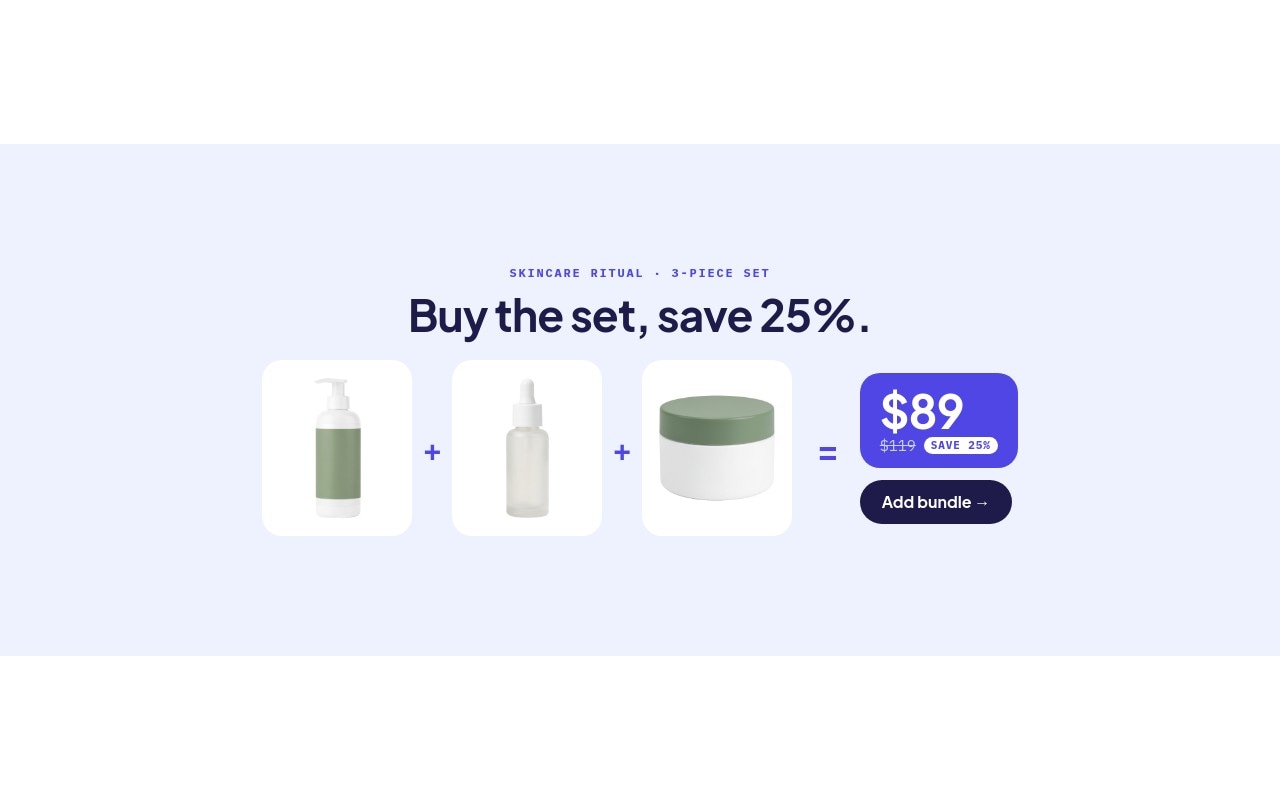
A bundle banner that explains the deal with an equation anyone can read in a second. Three white product tiles are joined by indigo "+" signs, followed by "=" and an indigo price card: "$89" in large type, "$119" struck through, and a pulsing "SAVE 25%" pill, with a dark "Add bundle" button underneath. The first slide sells a skincare ritual (cleanser, serum, moisturizer), the second a coffee set (beans, pour-over dripper, mug), and the third a "Build your own" offer: any 3 for $60 with free gift wrap.
The palette is soft periwinkle #eef2ff for the background, ink #1e1b4b for headlines and the button, indigo #4f46e5 for the price card and signs, and white product tiles. Plus Jakarta Sans handles headlines and prices, and IBM Plex Mono carries the labels, old prices, and savings badge. It uses Swiper's slide effect at 600ms with autoplay every 5 seconds, pausing on hover. There is nothing holiday-specific in the layout, so it works for Black Friday, Christmas gifting, or any month of the year.
#What Makes This Template Stand Out
A Visual Equation Merchants Already Understand
Product + product + product = price. Shoppers see what is in the set and what it costs without reading a paragraph, and the struck-through old price next to the new one shows the saving immediately.
Tiles That Fit Any Product Shape
Each product sits in a fixed-size white tile with 16px rounded corners, and the image is set to contain. Tall bottles, wide mugs, and square boxes all fit without cropping, so you can drop in your own cutouts without adjusting the layout.
Staggered Pop, Rolling Price, Pulsing Badge
The three tiles pop in at 0, 150, and 300ms, the headline fades in letter by letter, and the bundle price rolls up with number-roll. The white SAVE badge pulses to draw the eye, and the button fades in at 600ms so it lands last.
Three Ready-Made Bundles
Skincare ritual at $89 (was $119), Coffee lover at $66 (was $88), and Build your own at $60 (was $87, SAVE 31%). The third slide reuses one product from each of the other sets to show a mix-and-match offer.
Responsive Wrap on Mobile
On phones the equation wraps onto two rows inside a 4:5 banner. From 768px everything sits in one row at 2:1, and at 1024px the banner widens to 5:2 so it reads like a store hero, not a full-screen poster.
#Who Should Use This Template
This template is built for Shopify merchants selling sets, kits, and bundles: skincare routines, coffee and tea sets, grooming kits, stationery, or any products that are bought together. It turns a bundle discount into a banner that explains itself, which works for Black Friday gift sets as well as everyday upsells.
Beauty, food and drink, and home brands planning holiday gift sets can use the three slides as they are: two fixed bundles and a mix-and-match offer. Swap the cutouts, retype the names and prices, and link each button to the bundle product.
Agencies and Webflow designers get a reusable bundle module for client stores. The equation layout and neutral colors adapt to any brand by changing the indigo accent and the background.
#Best Use Cases
- ✓Black Friday and holiday gift set banners
- ✓Skincare and beauty routine bundles on a homepage
- ✓Coffee, tea, and kitchen starter kits
- ✓"Any 3 for" mix-and-match promotions
- ✓Grooming, stationery, and hobby kits with a set price
- ✓Cross-sell sections on product and cart pages
- ✓Subscription box previews showing what is inside
- ✓Back-to-school and seasonal bundle campaigns
#How to Customize
- Open the Bundle & Save template in Swiper Studio - you will see three slides: Skincare ritual, Coffee lover, and Build your own.1
- Retype the label and headline on each slide, such as "SKINCARE RITUAL · 3-PIECE SET" and "Buy the set, save 25%.", for your own bundles.2
- Swap the product cutouts in each white tile with your own transparent PNGs in the media panel.3
- Update the bundle price, the struck-through old price, and the SAVE badge so the numbers match your real discount.4
- Point each "Add bundle" or "Build yours" link block at the bundle product, collection, or cart link in your store.5
- Change the indigo accent and periwinkle background to your brand colors if needed, and check the white tiles still stand out.6
- Check the two-row layout on phones and the one-row layout at 768px and 1024px, and add or remove slides for more bundles.7
- Publish to CDN and add it to Shopify with the Swiper Studio app, use Paste into Webflow, or export to HTML, React, Vue, Next.js, or Web Component.8
#Frequently Asked Questions
- What bundles are included in the template?
- Three slides. "Skincare ritual" adds a cleanser, serum, and moisturizer up to $89 (was $119, SAVE 25%). "Coffee lover" adds a bag of beans, a pour-over dripper, and a mug up to $66 (was $88, SAVE 25%). "Build your own" mixes the serum, beans, and mug for "Any 3 for $60" (was $87, SAVE 31%) with free gift wrap. Every price, label, and product is editable.
- Will my own product photos fit the tiles?
- Yes. Each product sits in a fixed-size white tile with the image set to contain, so a tall bottle, a wide mug, or a square box all fit without cropping. Transparent PNG cutouts look best on the white tiles. Swap them in the media panel.
- How does the layout change on mobile?
- On phones (4:5) the equation wraps into two rows so the tiles stay readable. From 768px the banner is 2:1 and the tiles, "+" and "=" signs, price card, and "Add bundle" button sit in one row; at 1024px it widens to 5:2. Navigation arrows appear from 768px, and indigo pagination bullets show at every size.
- Can the "Add bundle" button add the bundle to the cart?
- The CTA is a link block, so it can point at any URL: a bundle product page, a collection, or a cart link your store platform supports. On Shopify, many merchants create the bundle as its own product and link straight to it.
- How do I add it to Shopify, Webflow, or another site?
- On Shopify, install the official Swiper Studio Shopify app and add the published slider to any page as a native theme block from the theme editor. In Webflow, use Paste into Webflow to add it as native elements. For Squarespace, Wix, WordPress, or any other site, publish to CDN and paste the embed snippet, or export to HTML, React, Vue, Next.js, or Web Component.
#Related Templates
#Related Resources
- Swiper Studio for Shopify
- Swiper Studio for E-commerce Stores
- Swiper Studio for Product Carousels
- Swiper Studio for Small Businesses
Ready to Build Your Slider?
Pick a template, customize it visually, and export production-ready code to React, Vue, Next.js, HTML, Webflow, and more. No coding required.