
Photo Gallery - Minimal Slider Template
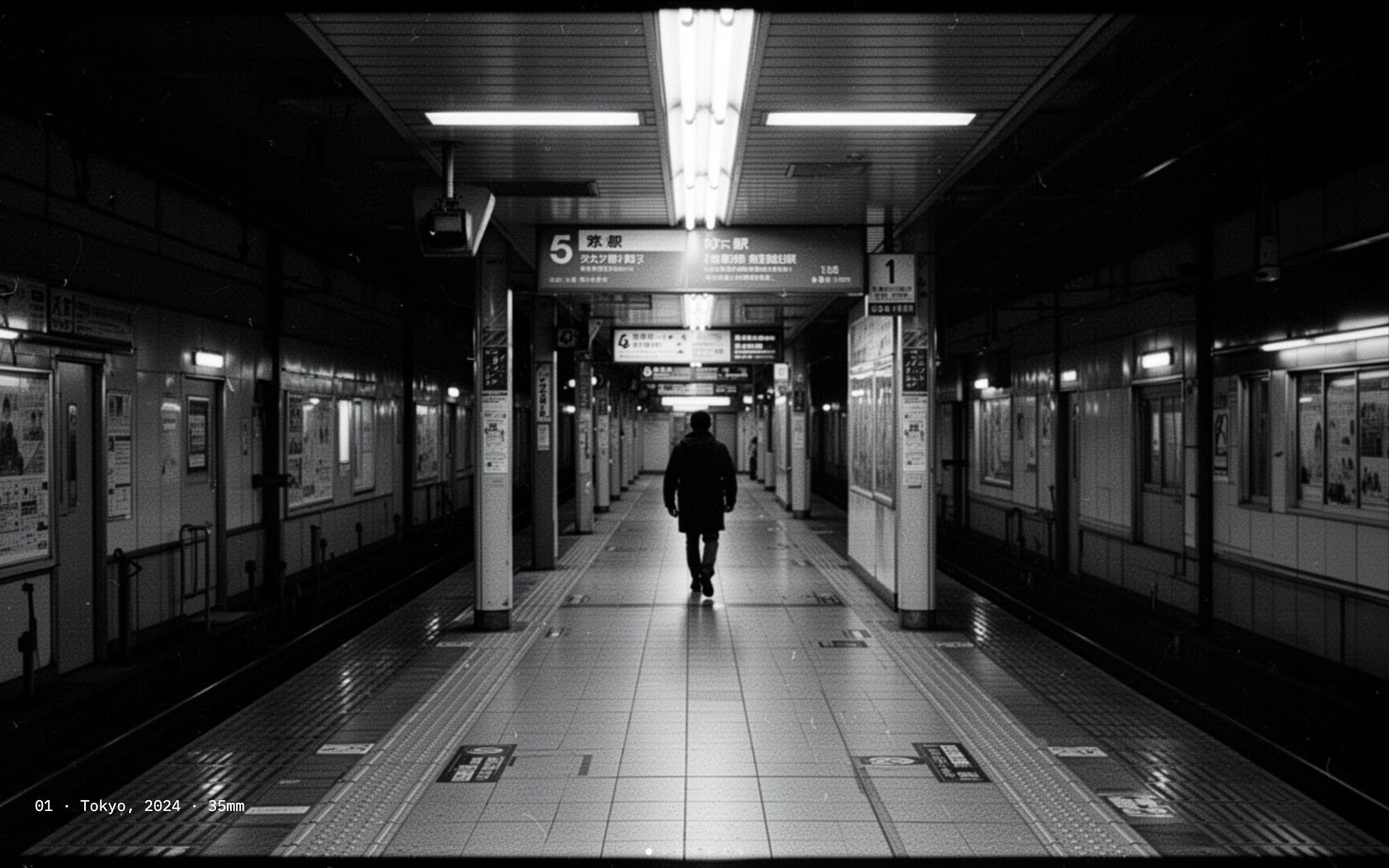
An image-first photo gallery built for photographers who want their work to do all the talking. Seven slides, each a full-bleed photograph against a jet-black canvas, with the only typography on the page a small IBM Plex Mono caption tucked into the bottom corner - the kind that reads "01 - Reykjavik, 2024 - 35mm". No headlines, no buttons, no navigation chrome. Just the photographs, paginated with subtle dots.
A 1200ms fade transition with parallax enabled gives each image room to breathe and lets the next photograph emerge rather than cut in. Open it in Swiper Studio, drop in your own portfolio frames, set the captions to your locations and formats, and ship a gallery that respects the photography.
#What Makes This Template Stand Out
No Chrome, No Distractions
There are no headlines, body paragraphs, buttons, or call-to-action overlays anywhere in the gallery. The only typography is a small mono caption per slide, and even pagination is reduced to subtle dots. The result is a slider where every pixel of attention lands on the photograph.
Jet-Black Canvas
The jet backdrop is a deliberate choice for photographic work. Color photographs feel saturated, black-and-white frames carry their full tonal range, and the black border around each image reads as a gallery mat rather than a website. Every color is still editable if you prefer a bone or paper canvas.
Parallax Fade Transition
A 1200ms fade with parallax enabled gives each photograph time to settle and lets the next image emerge from underneath rather than push the current one off screen. The pacing feels closer to a slideshow projection than a web carousel, which is exactly what portfolio work calls for.
Mono-Only Captions
IBM Plex Mono at 12px handles every caption in the gallery. The mono treatment reads as technical metadata - location, year, format, frame number - rather than marketing copy, which keeps the focus on the photograph and gives the gallery a documentary feel.
Mixed Orientation Support
The seven demo slides include landscape and portrait frames, color and black-and-white work, documentary and editorial subjects. The fade transition and full-bleed sizing handle the mix without forcing every photograph into the same crop, so you can drop in a real portfolio without re-shooting.
#Who Should Use This Template
This template is built for photographers, photo editors, and visual storytellers who want the portfolio site to look like a portfolio and not a marketing page. The image-first layout, mono-only captions, and absence of chrome communicate that the work is the work. Drop in your strongest seven frames, write the captions in the format you use on the back of a print, and the slider becomes a focused entry point to your full portfolio - on a personal site, an agency directory listing, or a print-sales page.
Documentary, fine art, and street photographers will find the jet canvas and parallax fade especially well-suited to long-form bodies of work. The same structure works for a single project series, a year-end edit, or a recurring "selected works" page that you update each season. Replace the captions with project titles, dates, and formats, and the gallery becomes a clean way to publish a body of work without rebuilding the site.
Creative agencies, photo editors, and gallery directors building a representation page or a curated show can use this as a production-ready starting point. The visual editor means an editor can rework the sequence with the photographer in real time, the export to clean HTML, React, Vue, or Webflow keeps the final result fast on any platform, and the absence of chrome means the gallery integrates cleanly into a larger site without fighting the existing design.
#Best Use Cases
- ✓Photographer portfolio sites that need a focused selected-works gallery on the homepage
- ✓Documentary, photojournalism, and street photography series presented as a sequenced edit
- ✓Fine-art photography pages for print sales, gallery shows, or open-edition releases
- ✓Year-end and seasonal "selected works" pages that get refreshed on a regular cadence
- ✓Agency representation pages featuring a single photographer with a curated set of frames
- ✓Photo essay and longform editorial pages for magazines, journals, and personal publications
- ✓Wedding and event photographer portfolio sliders for a single shoot or a highlight reel
- ✓Architecture and interiors photography pages where a clean canvas matters more than headlines
#How to Customize
- Open the Photo Gallery - Minimal template in Swiper Studio - click 'Use This Template' above to load the full seven-slide gallery into the editor1
- Replace each slide background with your own photograph - upload directly through the media panel and the full-bleed sizing handles landscape and portrait orientations automatically2
- Edit the IBM Plex Mono caption on each slide - rewrite the demo metadata with your own location, year, format, frame number, or project title3
- Decide whether to keep, simplify, or remove the captions - some photographers prefer pure image, others use the mono caption for a print-style credit line4
- Tune the fade transition speed and parallax depth in the effect panel - the 1200ms default is calm, but you can pull it tighter or looser to match the pace of your work5
- Confirm pagination styling - the default subtle dots stay out of the way, but you can switch to bullets, fraction, or progress, or hide pagination entirely from the swiper params panel6
- Preview mobile and tablet breakpoints - check that portrait frames still read well on phones and adjust caption placement per breakpoint if it overlaps a critical part of the image7
- Export to HTML, React, Vue, Next.js, Web Component, or Webflow - or publish to CDN to embed on a Squarespace portfolio, an agency directory listing, or a personal photography site8
#Frequently Asked Questions
- Can I replace the photographs with my own work?
- Yes. Every slide in the gallery is a single full-bleed photograph with no overlay graphics, so swapping in your own work is a one-click operation per slide. Open the template in Swiper Studio, select a slide background, and upload your photograph. Color, black-and-white, landscape, and portrait orientations all read well against the jet-black canvas.
- How do I change the captions?
- The only typography in the gallery is a small IBM Plex Mono caption in the bottom corner of each slide, set at 12px. Click the caption text in the visual editor and rewrite it with your own location, date, frame number, or technical metadata. The format used in the demo - "01 - Reykjavik, 2024 - 35mm" - is a starting point; you can drop the numbering, change the separator, or remove the captions entirely if you want pure image.
- Will the parallax fade slow down on mobile?
- No. The 1200ms fade with parallax is tuned to feel calm rather than heavy, and Swiper handles the animation efficiently across mobile, tablet, laptop, and desktop. You can adjust transition speed, parallax depth, or disable parallax per breakpoint in the effect panel if you prefer a different feel on specific devices.
- Can I add navigation arrows or autoplay?
- Yes. By default the gallery uses pagination dots only - no arrows, no chrome, no buttons - to keep visitor attention on the photographs. You can enable navigation arrows, autoplay, loop, or keyboard control from the swiper params panel in the editor. Each control can be styled to stay subtle so the photography remains the dominant element.
- What export formats does this template support?
- You can export the Photo Gallery - Minimal as standalone HTML, a React component, a Vue component, a Next.js project, a Web Component, or a native Webflow element. You can also publish to CDN for instant iframe embedding on a Squarespace portfolio, a personal site, or a photographer agency directory page.
#Related Templates
#Related Resources
- Swiper Studio for Photographers
- Swiper Studio for Image Galleries
- Swiper Studio for Portfolios
- Swiper Studio for Web Designers
Ready to Build Your Slider?
Pick a template, customize it visually, and export production-ready code to React, Vue, Next.js, HTML, Webflow, and more. No coding required.








