
Editorial Magazine Portfolio Gallery Template
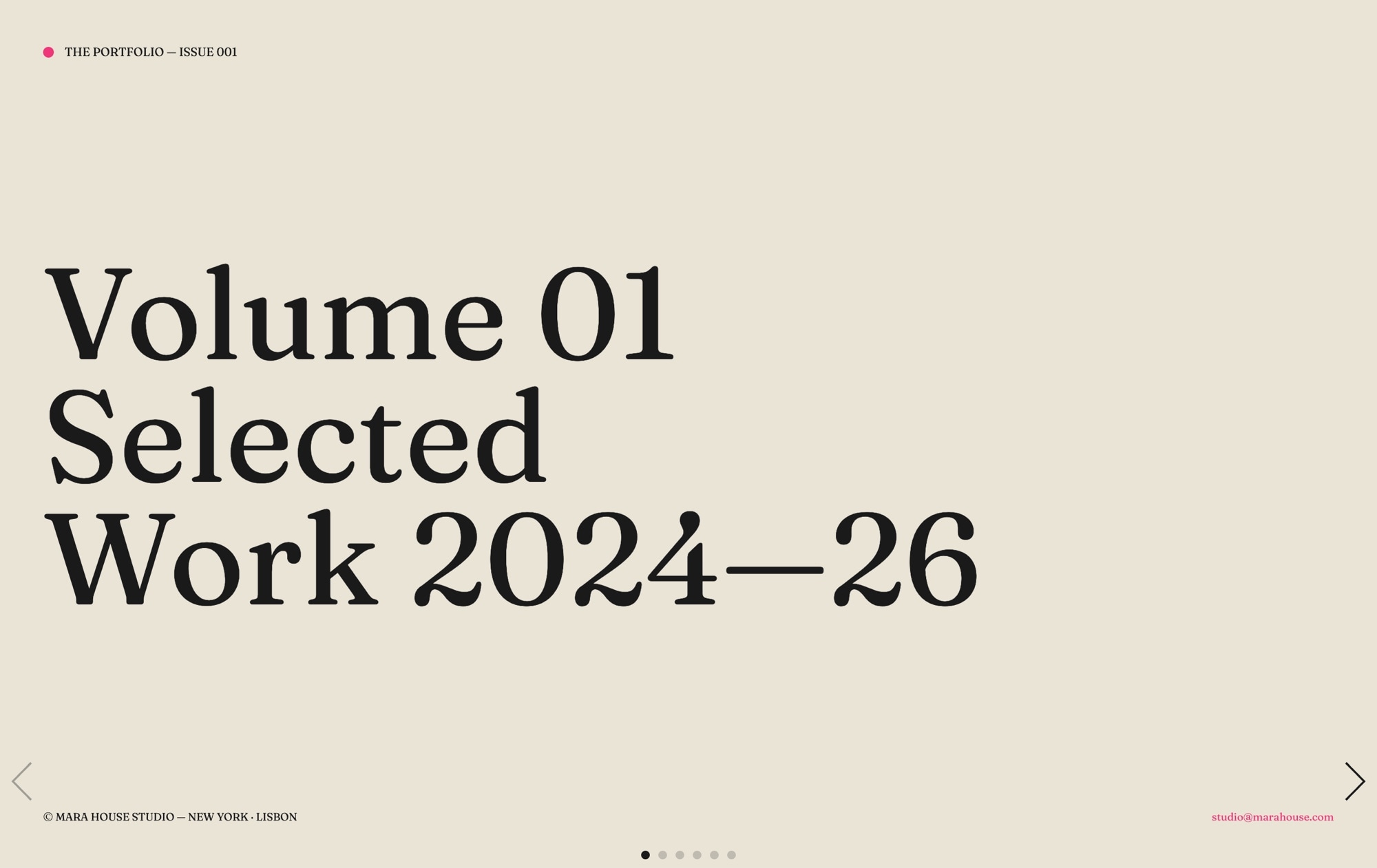
A designer and photographer portfolio styled like a printed magazine issue. Six spreads flip through a bone-colored paper stock - an issue cover with a "VOLUME 01 - WORK 2024-26" lockup, three featured works with alternating photo-and-caption compositions, a behind-the-scenes page with a mono caption list, and a colophon signing off with an "Available for new commissions" link. Fraunces supplies the serif display type, IBM Plex Mono handles the captions and credits, and a single hot-pink accent cuts through the near-black ink. Open the template in Swiper Studio, replace the imagery and copy with your own practice, and ship an editorial portfolio that reads like a monograph.
#What Makes This Template Stand Out
Printed Magazine Feel in the Browser
The bone background, generous margins, and deliberate typographic rhythm give every slide the weight of a printed spread. Fraunces display type carries headlines with real personality, while IBM Plex Mono grounds captions and credits in an editorial voice. It reads less like a website and more like a monograph you would pull off a shelf.
Six Distinct Editorial Spreads
Each slide is designed as a different composition - an issue cover lockup, a photo-with-caption featured work, a reversed spread with a pullquote, a text-driven layout with an inset image, a behind-the-scenes page with a mono caption list, and a final colophon. The variety keeps viewers engaged the way turning pages in a print magazine does.
Restrained Hot-Pink Accent
A single accent color - hot pink #ee3678 - runs through the issue as a quiet signal: section numbers, rule marks, and the commission link on the final spread. The restraint makes the accent feel intentional rather than decorative, and swapping it to your own brand color rethemes the whole issue in one click.
Creative Page-Turn Transition
The slide effect uses a soft horizontal offset paired with an opacity fade, which reads like turning the page of a glossy magazine without resorting to a cliched 3D flip. It is calm, sophisticated, and keeps the focus on the work rather than the motion.
Typography Pairing That Does the Heavy Lifting
Fraunces brings warmth, contrast, and a hint of revival-era character to the display type. IBM Plex Mono adds a quiet technical precision to captions, credits, and the behind-the-scenes list. Together they create a hierarchy that feels considered without needing ornament, icons, or heavy UI chrome.
#Who Should Use This Template
This template is built for designers, photographers, and illustrators who want their portfolio to feel like a considered editorial object rather than a standard grid of thumbnails. If your practice values craft, pacing, and restraint, the magazine format lets you present work the way you would in a printed monograph - one spread at a time, with room to breathe and a clear point of view.
Creative directors and art directors can use this as a leave-behind after a pitch, a press kit link, or a homepage hero that signals taste before a visitor even reaches the case studies. The mixture of cover, featured work, pullquote, behind-the-scenes, and colophon mirrors the structure of a real issue, so prospective clients get narrative context instead of a flat portfolio dump.
Studios, freelancers, and independent practices who book work through word-of-mouth and referrals will appreciate the closing colophon with an "Available for new commissions" link. It turns the final spread into a soft, editorial call to action that feels natural rather than pushy, and directs serious inquiries straight to your inbox or booking form.
#Best Use Cases
- ✓Designer and illustrator portfolios that want the pacing and craft of a printed monograph
- ✓Photographer websites presenting a curated body of work as a bound issue rather than a gallery grid
- ✓Creative director and art director case study decks shared after a pitch or with prospective clients
- ✓Independent studio homepages that open with an editorial spread before deeper case studies
- ✓Seasonal lookbook pages for fashion, interiors, or lifestyle practices with a strong art-direction pov
- ✓Commission booking pages where the final colophon doubles as a soft call to action for new work
- ✓Agency about pages that introduce the team and philosophy through a magazine-style narrative
- ✓Print-to-web promotional pieces for zines, art books, and self-published issues
#How to Customize
- Open the Editorial Magazine Portfolio Gallery template in Swiper Studio by clicking 'Use This Template' above1
- Update the issue cover - edit the 'VOLUME 01 - WORK 2024-26' lockup with your own volume number, year range, studio name, and cover credits2
- Replace the featured work photography on slides 2, 3, and 4 with your own project images, keeping the alternating left and right photo placements or flipping them to match your compositions3
- Rewrite the captions, pullquote, and body copy - swap the demo project descriptions with your own client names, briefs, and reflections, keeping IBM Plex Mono for captions and Fraunces for display lines4
- Edit the behind-the-scenes spread - update the mono caption list with your own process notes, tools, locations, and dates, or replace it with a contact sheet of thumbnails5
- Customize the colophon - update the credits, set your own social handles, and point the 'Available for new commissions' link to your inquiry form, email, or calendar booking page6
- Retune the palette and type if desired - swap the bone background, near-black ink, or hot-pink accent with your own brand tokens, and try alternate serif and mono pairings from the font library7
- Export to HTML, React, Vue, Next.js, Web Component, or Webflow, or publish to CDN and embed the issue as an iframe on your portfolio or about page8
#Frequently Asked Questions
- Is this template suitable for photography portfolios as well as design work?
- Yes. The editorial magazine format works beautifully for photographers, illustrators, art directors, and designers. Every spread is built to frame a single image or a tight pair, with generous negative space and restrained typography that lets the work lead. Replace the demo photography with your own shots and the layout adapts without losing its print feel.
- Can I change the bone background and hot-pink accent to match my brand?
- Absolutely. The palette uses three tokens - bone #e9e4d7, near black #1a1a1a, and hot-pink #ee3678 - and you can swap any of them with the visual color picker. Change the accent to a deep green, electric blue, or a warm orange and the entire issue rethemes instantly. Slide backgrounds, text colors, and rule lines all update in real-time.
- Do I have to use Fraunces and IBM Plex Mono, or can I use my own fonts?
- The template ships with Fraunces for display type and IBM Plex Mono for captions, but both are easy to replace. Swiper Studio includes a large library of Google Fonts plus custom font upload, so you can switch to any serif, sans, or mono pairing you prefer. The typographic hierarchy stays intact as you swap faces.
- How does the creative slide effect feel between spreads?
- Slides use a subtle creative transition that combines a small horizontal offset with an opacity fade, mimicking the feel of turning a magazine page without the gimmick of a 3D flip. It is restrained, editorial, and works equally well with mouse, touch, and keyboard navigation.
- What export formats are available for this template?
- You can export the editorial portfolio as standalone HTML, a React component, a Vue component, a Next.js project, a Web Component, or a native Webflow element. You can also publish to CDN for instant iframe embedding on Squarespace, WordPress, Framer, or any custom portfolio site.
#Related Templates
#Related Resources
- Swiper Studio for Portfolios
- Swiper Studio for Photographers
- Swiper Studio for Freelancers
- Swiper Studio for Image Galleries
Ready to Build Your Slider?
Pick a template, customize it visually, and export production-ready code to React, Vue, Next.js, HTML, Webflow, and more. No coding required.








