
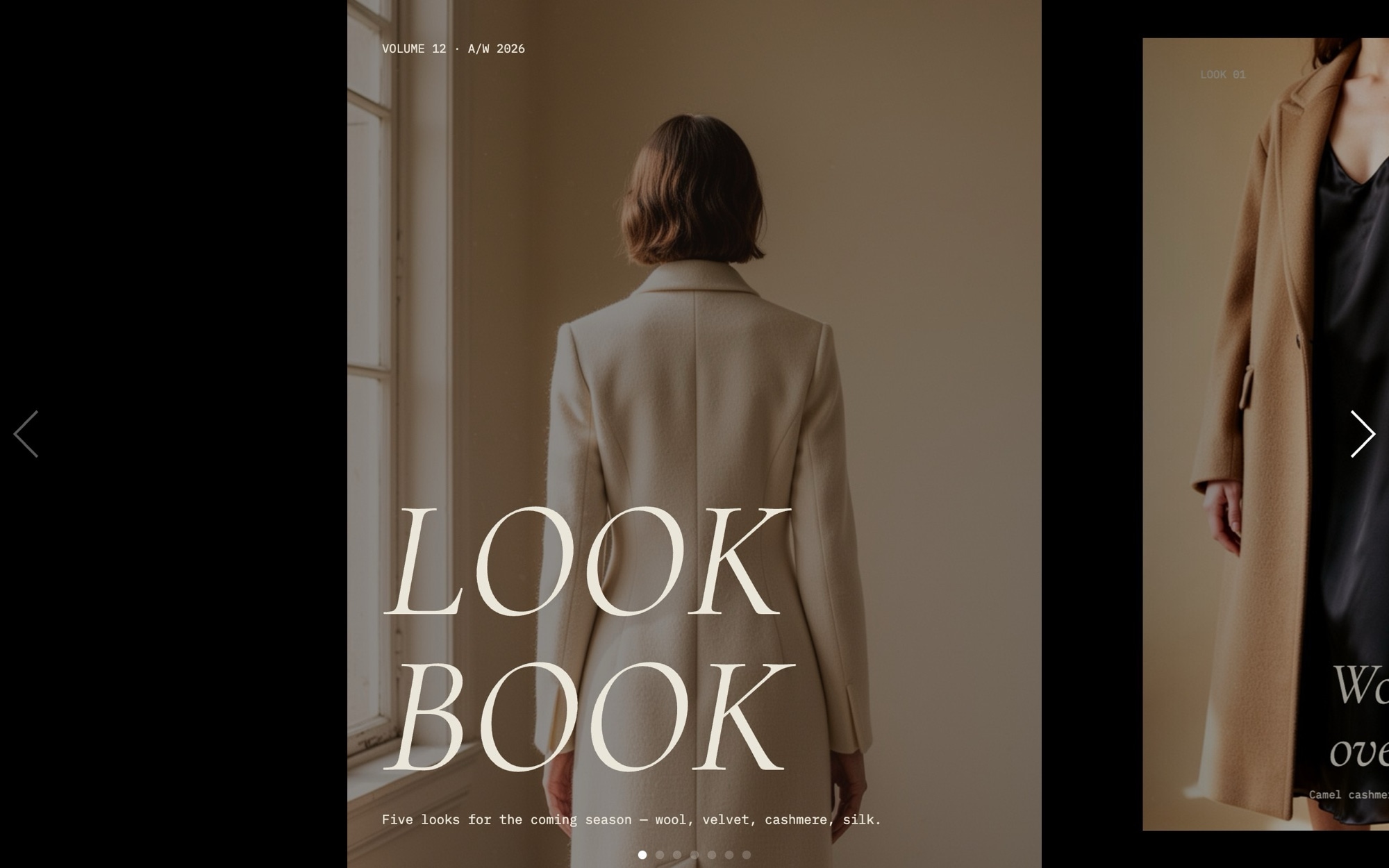
Fashion Lookbook Slider Template
A tall portrait fashion lookbook built for brands that want their collection presented like a magazine spread, not a product grid. Seven slides carry the sequence from a cover ("LOOK BOOK - A/W 2026") through five full-bleed portraits, each marked with a small mono caption like "LOOK 01 - Wool overcoat / silk slip", to a final shop-the-looks call to action. Cormorant Garamond italics handle display copy and IBM Plex Mono carries the look numbers and garment credits, all set against a bone-colored backdrop with oxblood accents.
A creative slide effect with a horizontal slide and a slight scale moves each look in with poise, and parallax on the images keeps the pacing cinematic. Open it in Swiper Studio, drop in your own campaign photography, and ship a lookbook that lives up to the collection.
#What Makes This Template Stand Out
Tall Portrait Frame for Editorial Photography
The slides are sized for portrait imagery, the way real lookbooks are shot. Visitors see one full look at a time with a partial preview of the next, which encourages browsing and gives every garment the room it needs to read on screen.
Creative Slide Effect With Subtle Scale
The lookbook uses Swiper's creative effect with a horizontal slide and a small scale step, set to 800ms. Each look drifts in rather than snaps, which feels closer to turning the page of a print issue than swiping through a carousel.
Bone, Ink, and Oxblood Palette
The palette pairs a bone backdrop with deep ink type and an oxblood accent for tags, captions, and the CTA. It flatters skin tones, neutral knitwear, and saturated tailoring alike, and every color is editable if you need to match an existing brand system.
Cormorant Garamond and IBM Plex Mono Pairing
Cormorant Garamond italic 400 carries the cover and editorial display copy, while IBM Plex Mono handles look numbers and garment credits. It is the same display-plus-mono pairing used in contemporary fashion print and digital editorial.
Look-Credit Caption Pattern
Each look slide carries a small bottom-corner caption with the look number, key pieces, and optional designer or stylist credits. The pattern is borrowed from print editorials and gives the lookbook a finished, magazine-grade feel without crowding the image.
#Who Should Use This Template
This template is built for fashion brands and design houses preparing a seasonal lookbook, capsule reveal, or collection refresh. The portrait frame, italic display type, and look-credit captions communicate a level of intent that standard product carousels cannot match. Drop in your own campaign portraits, set the look numbers and garment credits, and the slider becomes an on-brand lookbook you can publish on your homepage, a dedicated collection page, or a press microsite.
Stylists, fashion editors, and creative directors putting together a portfolio or pitch deck will find the same structure works for editorial test shoots, styling reels, and brand-direction decks. Replace the look numbers with shoot titles, swap the garment credits for "STYLED BY" or "PHOTOGRAPHED BY" lines, and the lookbook turns into a portable showcase you can send to brands, agencies, and publications.
Boutique retailers and independent designers without an in-house team can use this as a production-ready starting point. The visual editor means you can iterate on imagery and copy in real time without rebuilding the layout, and the export to clean HTML, React, Vue, or Webflow keeps the final result fast and embed-friendly on any platform.
#Best Use Cases
- ✓Seasonal lookbook landing pages for ready-to-wear, knitwear, or capsule collection drops
- ✓Designer collection reveals tied to fashion week or a press release window
- ✓Stylist and fashion editor portfolios showcasing test shoots and editorial work
- ✓Boutique brand homepages that need an editorial alternative to a standard product grid
- ✓Press kits and digital lookbooks distributed to fashion editors, buyers, and influencers
- ✓Campaign microsites for a single shoot, hero garment, or limited-edition collaboration
- ✓Shop-the-look pages on Shopify or headless ecommerce that pair editorial imagery with product links
- ✓Agency case study pages for branding and art-direction work in the fashion vertical
#How to Customize
- Open the Fashion Lookbook template in Swiper Studio - click 'Use This Template' above to load the full seven-slide sequence into the editor1
- Replace the cover wordmark and update the season tag - swap "A/W 2026" for your actual collection name, drop, or issue number2
- Drop your own campaign portraits into each look slide and adjust the slide background to keep the model centered across breakpoints3
- Edit the look-credit captions - update the look number and garment list on each slide, and add stylist, photographer, or designer credits if you want them on the page4
- Tune the creative effect offset, scale, and duration in the effect panel to dial the cinematic pacing up or down to taste5
- Wrap each look in a link block if you want shoppers to click through to a product page, full outfit page, or stockist directory6
- Preview mobile and tablet breakpoints, tighten the italic display type and mono caption sizes where needed, and fine-tune slides per view per breakpoint7
- Export to HTML, React, Vue, Next.js, Web Component, or Webflow - or publish to CDN for instant embedding on your collection page or press microsite8
#Frequently Asked Questions
- Can I swap the editorial photos for my own collection imagery?
- Yes. Every look in the lookbook is fully editable. Open the template in Swiper Studio, click any portrait, and upload your own campaign photography or studio shots. The tall portrait frame and creative slide effect adapt to any imagery you drop in, so your own collection will look just as editorial as the demo.
- How do I update the look numbers and credit captions?
- Each slide carries a small IBM Plex Mono caption like "LOOK 01 - Wool overcoat / silk slip". Select the caption text in the visual editor and rewrite it with your own look number, garment names, designer credits, or styling notes. You can also change the font, size, and position of the caption to fit your house style.
- Does the tall portrait layout work on mobile?
- Yes. The template includes tuned breakpoints for mobile, tablet, laptop, and desktop. The portrait slides are sized so 1.2 cards show on mobile, 1.4 on tablet, and 1.6 on laptop and desktop, giving visitors a partial preview of the next look at every screen size. You can fine-tune slides per view, gap, and caption type scale per breakpoint.
- Can I add shop links to each look?
- Yes. Wrap any element on a look slide in a link block to point shoppers at the relevant product page, a category landing page, or a full styled outfit. The "Shop the looks" CTA slide at the end of the sequence is also fully editable, so you can link it to your collection page, lookbook PDF, or stockist directory.
- What export formats does this template support?
- You can export the Fashion Lookbook as standalone HTML, a React component, a Vue component, a Next.js project, a Web Component, or a native Webflow element. You can also publish to CDN for instant iframe embedding on a Shopify storefront, editorial site, or press kit page.
#Related Templates
#Related Resources
- Swiper Studio for Ecommerce Stores
- Swiper Studio for Shopify
- Swiper Studio for Image Galleries
- Swiper Studio for Web Designers
Ready to Build Your Slider?
Pick a template, customize it visually, and export production-ready code to React, Vue, Next.js, HTML, Webflow, and more. No coding required.








