
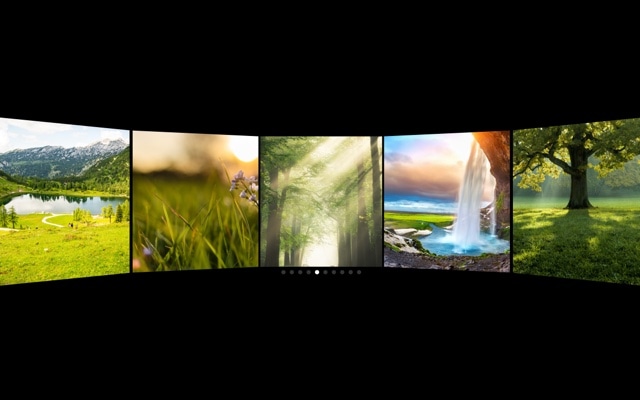
Panorama Slider with Curved Perspective
A sweeping panoramic image slider that arranges photos along a curved virtual surface, creating a wide, immersive viewing experience with natural depth. The center image faces the viewer directly while images on either side curve away into the distance, as if displayed on the inside of a cylinder. Combined with responsive breakpoints and autoplay, this template delivers a cinematic gallery that adapts to every screen size and keeps moving to showcase your full collection.
The panorama effect transforms a standard image slider into something that feels spatial and expansive. Multiple images are visible at once, but the curved arrangement creates clear visual hierarchy — the center image is prominent and undistorted, while peripheral images provide context and continuity. Swiping moves the entire panoramic view smoothly, with each image taking its turn at center stage. The autoplay adds gentle, continuous motion that draws the eye and invites exploration.
#What Makes This Template Stand Out
Curved Panoramic Perspective
Slides are arranged along a curved virtual surface that mimics the inside of a cylinder. This is not a flat row of images with a gap between them — each slide is perspective-transformed to create a continuous, sweeping arc. The curve adds depth and spatial context that makes visitors feel like they are looking through a wide-angle lens at an expansive scene.
Wide Multi-Slide View
Multiple images are visible simultaneously, giving visitors an overview of your entire collection at a glance. The panoramic arrangement shows what is coming next on either side of the center image, creating anticipation and encouraging exploration. This wide view is especially effective for galleries where context and continuity between images matter.
Responsive Breakpoints for Every Device
The template includes preconfigured breakpoints that adjust the number of visible slides, spacing, and curve intensity for desktop, tablet, and mobile. On large screens, the panorama stretches wide with five or more images visible. On mobile, it tightens to a focused view with the curve still apparent. Every breakpoint is customizable in the editor.
Smooth Autoplay with Continuous Motion
Autoplay scrolls the panorama at a steady pace, creating a gentle sweeping motion that showcases every image in the collection. The continuous movement catches the eye of passive visitors while the hover-to-pause behavior lets engaged users take control. It is the perfect balance between passive showcase and interactive gallery.
Immersive Landscape Photography Display
The curved perspective was made for landscape photography, travel imagery, and wide-format visual content. The panoramic arrangement amplifies the sense of space and environment that these images already convey. A row of landscape photos on a curved surface feels like a window into another place, not just a grid of thumbnails.
#Who Should Use This Template
If you work with landscape photography, travel imagery, or any wide-format visual content, the panorama slider presents your images with the spatial treatment they deserve. Flat grids and horizontal carousels compress the sense of space that makes landscape images powerful. The curved panoramic arrangement restores that expansiveness — visitors feel surrounded by the scene, not just looking at a picture. It is the closest you can get to an immersive gallery experience without VR.
Photographers and visual artists will find the panorama effect elevates their portfolio from a standard gallery to an exhibition-like experience. The curved perspective adds a sense of curation and intentionality — images are not just displayed, they are presented in a spatial context that creates flow and narrative between shots. The autoplay adds gentle motion that draws visitors into the visual story.
Travel brands, real estate agencies, and hospitality businesses can use this template to showcase destinations, properties, and venues with the visual impact they deserve. A panoramic slider of a resort, a city skyline, or a luxury property creates an emotional connection that static images in a grid cannot match. The responsive breakpoints ensure the experience is equally immersive on mobile, where most travel browsing happens.
#Best Use Cases
- ✓Photography portfolio galleries displaying landscape, travel, and architectural images with panoramic depth
- ✓Travel and tourism sites showcasing destinations, resorts, and scenic locations in an immersive curved layout
- ✓Real estate property pages presenting wide-angle interior and exterior shots with spatial continuity
- ✓Hotel and hospitality sites displaying rooms, amenities, and grounds in a sweeping visual tour
- ✓Nature and outdoor brands showcasing environments, trails, and adventure photography with panoramic impact
- ✓Event venue galleries presenting spaces from multiple angles in a continuous, curved viewing experience
#How to Customize
- Click "Use This Template" to open the panorama slider in Swiper Studio's visual editor1
- Replace the default images — click each slide and upload your own landscape photos, travel images, or wide-format visuals2
- Adjust the panorama curve intensity to control how dramatically slides bend away from the center3
- Configure autoplay timing — set the delay between advances and choose whether to pause on hover or touch interaction4
- Customize responsive breakpoints to control the number of visible slides and curve behavior on desktop, tablet, and mobile5
- Add or remove slides to match your collection size — duplicate existing slides for fast expansion6
- Export to HTML, React, Vue, Next.js, Webflow, or publish to CDN and embed the panorama slider on your site with a single snippet7
#Frequently Asked Questions
- How does the panorama curved perspective effect work?
- The panorama effect arranges slides along a curved virtual surface, like images displayed on the inside of a cylinder. Each slide is transformed with perspective rotation so that the center slide faces the viewer directly while slides on either side curve away into the distance. The result is a wide, sweeping view that shows multiple images simultaneously with a natural sense of depth and continuity.
- Does the panorama slider include responsive breakpoints?
- Yes. The template is preconfigured with breakpoints for desktop, tablet, and mobile viewports. Each breakpoint adjusts the number of visible slides, the spacing between them, and the panorama curve intensity. You can customize every breakpoint in the visual editor to match your design requirements at each screen size.
- How does autoplay work with the panorama effect?
- Autoplay scrolls the panorama at a configurable interval, smoothly advancing the center position along the curved surface. The motion creates a gentle, continuous sweep that showcases all images without user interaction. Autoplay pauses when a visitor hovers or touches the slider and resumes automatically afterward.
- What types of images work best with the panorama effect?
- Wide, landscape-oriented images with strong visual subjects work best — landscapes, cityscapes, architectural photography, travel destinations, and wide product shots. The curved perspective adds drama to images with horizontal depth, and the panoramic arrangement creates a sense of being surrounded by a scene. Portrait images work too, but the effect is most impactful with wide compositions.
- What export formats does this template support?
- All Swiper Studio export formats are available: standalone HTML, React component, Vue component, Next.js project, Web Component, and native Webflow element. You can also publish to CDN and embed the panorama slider on any website with a single code snippet.
#Related Templates
#Related Resources
Ready to Build Your Slider?
Pick a template, customize it visually, and export production-ready code to React, Vue, Next.js, HTML, Webflow, and more. No coding required.








