
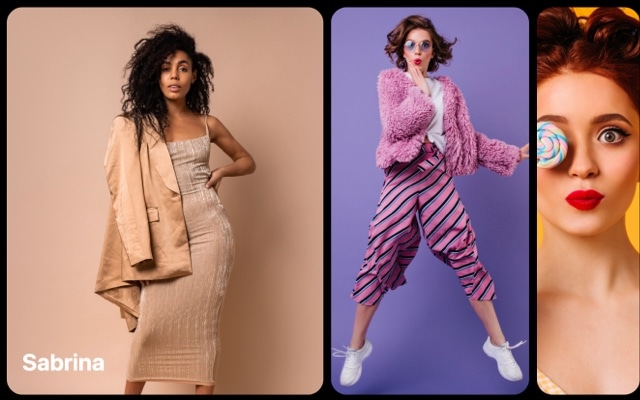
Material Slider Template
A carousel built around the material effect — a smooth, layered transition inspired by Material Design 3 where slides move over each other like elevated surfaces. The incoming slide glides on top of the outgoing one with subtle shadow and depth, creating a physical, tactile feel that is immediately recognizable to anyone familiar with Material You interfaces. It is clean, modern, and satisfying to interact with on both touch and pointer devices.
The material effect brings the core Material Design metaphor — surfaces as physical layers — directly into your slider transitions. Instead of slides simply replacing each other with a crossfade or horizontal scroll, each transition conveys depth and elevation. The active slide feels like it sits on top, casting a soft shadow on the content beneath it. This small detail makes a significant difference in perceived quality, signaling to visitors that the interface was designed with intention and care.
#What Makes This Template Stand Out
Material Design Layered Transitions
Slides transition by overlapping like physical surfaces — the incoming slide glides over the outgoing one with natural elevation and shadow. This layered motion is the hallmark of Material Design and gives the carousel a premium, app-like feel that flat horizontal scrolling cannot match.
Smooth Elevation and Shadow Cues
Subtle shadow effects during transitions reinforce the sense of depth and physical surface hierarchy. The active slide appears elevated above neighboring slides, creating a clear visual focus point. These elevation cues are not just decorative — they guide the eye and communicate interactive state.
Material You Aesthetic Consistency
The template's visual treatment aligns with Material Design 3 principles — clean surfaces, purposeful motion, and respectful use of space. If your product or site already uses a Material Design system, this slider fits seamlessly into that visual language without looking like a third-party widget bolted on.
Touch-First Gesture Physics
The material effect is designed for touch interaction. Slides follow your finger with appropriate resistance, momentum carries through naturally, and the layered transition plays in sync with your drag gesture. On desktop, click-and-drag and keyboard navigation feel equally polished.
Clean, Minimal Visual Framework
The material effect emphasizes content through restraint. There are no flashy 3D rotations or exaggerated animations — just clean, confident surface transitions that let your images, text, and media do the talking. This makes it versatile enough for product showcases, portfolios, dashboards, and editorial content alike.
#Who Should Use This Template
If you are building a product or app that follows Material Design guidelines, this slider is a natural fit. Android apps, web apps using Material UI or Vuetify, and any interface that speaks the Material Design visual language will benefit from a carousel that shares the same motion principles. The material effect does not just look like Material Design — it behaves like it, with layered surfaces, elevation cues, and gesture physics that feel native to the ecosystem.
Web designers working on modern, minimal interfaces will appreciate the restraint of the material effect. It is sophisticated without being showy. The smooth, layered transition adds polish to hero sections, product galleries, and feature tours without overwhelming the content. If your design philosophy leans toward clean surfaces, generous whitespace, and purposeful motion, this template matches that sensibility.
Developers who need a production-ready slider component can export directly to React, Vue, or HTML and integrate the material effect into existing projects. The exported code is clean, well-structured, and easy to customize programmatically. Use it as a starting point for product carousels, onboarding flows, dashboard widgets, or any UI component that benefits from a premium slide transition.
#Best Use Cases
- ✓Android and Material Design web apps that need a carousel matching the existing Material You visual system
- ✓Product showcase sliders on SaaS landing pages where clean, professional transitions build trust and credibility
- ✓Portfolio and gallery sections that benefit from a modern, layered transition without the visual complexity of 3D effects
- ✓E-commerce product image sliders where smooth, app-like transitions enhance the browsing experience
- ✓Onboarding and feature tour carousels in web apps where each slide introduces a capability with polished transitions
- ✓Dashboard and admin panel widgets that display data cards, charts, or reports in a swipeable carousel format
#How to Customize
- Click "Use This Template" to open the material slider in Swiper Studio's visual editor1
- Replace the slide content — upload your own images, update text elements, and adjust the layout for each slide to match your content2
- Customize the material effect settings — adjust the slide overlap depth, shadow intensity, and transition speed to dial in the exact feel you want3
- Match your Material Design tokens — update background colors, typography, and spacing to align with your product's design system4
- Configure responsive behavior — adjust slides per view, spacing, and card sizing across desktop, tablet, and mobile breakpoints5
- Add navigation elements — enable pagination dots, arrow buttons, or a scrollbar to complement the swipe interaction6
- Export to HTML, React, Vue, Next.js, Web Component, or Webflow, or publish to CDN and embed the slider directly on your site or app7
#Frequently Asked Questions
- What is the material effect in Swiper?
- The material effect is a transition style inspired by Material Design principles. Slides overlap and transition with a smooth, layered motion where the incoming slide slides over the outgoing one with a subtle shadow and depth effect. It creates the feeling of physical surfaces moving on top of each other — consistent with the Material Design metaphor of elevated paper layers.
- Does this template follow Material Design 3 guidelines?
- The template is inspired by Material Design 3 (Material You) visual language — the smooth layered transitions, elevation cues, and clean surface treatment reflect MD3 principles. You can further align it with your Material Design system by customizing colors, typography, and spacing to match your design tokens.
- Can I use this with Material UI or other component libraries?
- Yes. Export the slider as a React component and integrate it directly into a Material UI, Vuetify, or Angular Material project. The exported code is framework-native, so it works alongside your existing component library without conflicts. Style overrides can be applied through your design system's theming layer.
- How does the material effect handle touch gestures?
- The material effect responds to swipe gestures with physics that feel natural and consistent with Material Design motion guidelines. The slide follows your finger with appropriate resistance and momentum, and the layered transition plays smoothly as you drag. Releasing mid-swipe either snaps forward or bounces back depending on velocity and distance.
- What export formats does this template support?
- You can export as standalone HTML, a React component, a Vue component, a Next.js project, a Web Component, or a native Webflow element. You can also publish to CDN and embed the slider anywhere with a single code snippet.
#Related Templates



#Related Resources
Ready to Build Your Slider?
Pick a template, customize it visually, and export production-ready code to React, Vue, Next.js, HTML, Webflow, and more. No coding required.








