
Expo Slider Template
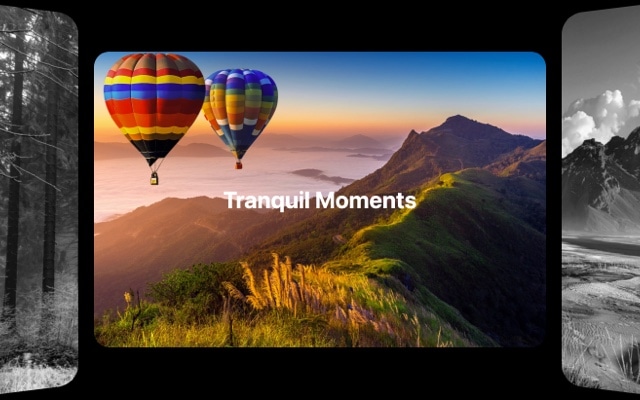
An exhibition-style slider where the active slide commands the center stage at full scale while neighboring slides recede — scaling down and fading out as they move away from the focal point. The expo effect creates a gallery-like viewing experience where each slide gets its moment of full attention, framed by soft previews of what comes before and after. It is the digital equivalent of walking through a curated exhibition where one piece is spotlighted while the rest wait in the periphery.
The power of the expo effect lies in its simplicity. There are no dramatic 3D rotations or complex transforms — just thoughtful scaling and opacity changes that guide the viewer's eye to what matters. The active slide is unmistakably the focus, and the gradual fade of surrounding slides creates a natural visual hierarchy. This restraint makes the expo effect one of the most versatile Swiper transitions — it enhances content without competing with it, working equally well for photography, product showcases, testimonials, and editorial layouts.
#What Makes This Template Stand Out
Exhibition-Style Focal Presentation
The active slide sits at full scale in the center while surrounding slides progressively shrink and fade. This creates a clear visual hierarchy — visitors know exactly where to look. The effect mimics gallery and exhibition display principles where a single piece receives the spotlight, making it ideal for content that deserves undivided attention.
Scale and Fade Transitions
As slides move away from center, they smoothly scale down and lose opacity in a coordinated animation. The transition feels organic and unhurried — content does not snap or jump, it flows. The scaling creates depth perception while the fading reduces visual clutter, keeping the viewer anchored on the active slide.
Content-Friendly Flat Perspective
Unlike 3D effects that rotate or tilt slides, the expo effect keeps all slides parallel to the screen. This means text, images, and UI elements remain perfectly sharp and readable on the active slide. There is no perspective distortion to work around, making the expo effect suitable for content-rich slides with detailed copy, product specs, or data visualizations.
Elegant Peripheral Previews
The faded, scaled-down neighboring slides serve as teasers that hint at upcoming content. Visitors can see just enough of the next and previous slides to build curiosity and encourage navigation. This preview mechanism is more sophisticated than simple arrows or dots — it gives spatial context about the slider's content without revealing everything at once.
Configurable Scale and Opacity Curves
Fine-tune exactly how much slides shrink and fade as they leave center. A steep scale curve creates a dramatic spotlight effect; a gentle curve maintains a more even gallery feel. Combined with opacity adjustments, you have precise control over the visual weight distribution across your slider — from a tight single-focus spotlight to a wide, browsable gallery.
#Who Should Use This Template
If you are a photographer, artist, or creative professional building an online portfolio, the expo effect presents your work the way it deserves to be seen — one piece at a time, with full attention. The scaling and fading of peripheral slides eliminates distracting visual competition, so each photograph, illustration, or design gets its own spotlight moment. Visitors browse your work like they would walk through a gallery, pausing on each piece before moving to the next.
Product teams and e-commerce businesses will find the expo effect ideal for showcasing products, features, or case studies where each item needs focused attention. The exhibition-style layout gives every product or feature slide the visual weight of a hero section while maintaining the navigability of a carousel. It is particularly effective for high-value items — luxury goods, SaaS feature tours, real estate properties — where the presentation quality needs to match the product quality.
Agencies, studios, and freelancers creating client showcase pages or case study galleries can use the expo effect to present their portfolio with a curated, editorial feel. Each project gets the spotlight treatment, and the smooth transitions between slides communicate craftsmanship and attention to detail. Export to React, Vue, or HTML and integrate the slider into any client site or personal portfolio with clean, production-ready code.
#Best Use Cases
- ✓Photography and art portfolio galleries where each image needs a focused, gallery-style presentation with minimal distraction
- ✓Product showcase sliders for e-commerce or SaaS sites where features, plans, or items deserve individual spotlight treatment
- ✓Case study and project galleries for agencies and studios presenting client work with a curated, editorial feel
- ✓Real estate and property listing carousels where each property image gets full attention with gentle previews of the next listing
- ✓Testimonial and review sliders where each quote or customer story is displayed prominently with a clean, uncluttered layout
- ✓Exhibition and event pages showcasing featured works, speakers, or installations with a gallery-inspired browsing experience
#How to Customize
- Click "Use This Template" to open the expo slider in Swiper Studio's visual editor1
- Replace the slide content — upload your own images, update text elements, and arrange each slide's layout to feature your content2
- Adjust the expo effect parameters — configure the scale factor and opacity values for off-center slides to control how dramatically the focal effect appears3
- Customize the spacing between slides to control how much of the neighboring slides is visible in the peripheral preview4
- Style the overall slider — update background colors, add padding, and configure pagination or navigation arrows to match your site design5
- Test responsive behavior — adjust the expo effect intensity, slide sizing, and spacing across desktop, tablet, and mobile breakpoints6
- Export to HTML, React, Vue, Next.js, Web Component, or Webflow, or publish to CDN for instant embedding on your portfolio, product page, or gallery7
#Frequently Asked Questions
- What is the expo effect in Swiper?
- The expo effect creates an exhibition-style transition where the active slide is displayed at full scale in the center, and neighboring slides progressively scale down and fade out as they move away from the focal point. The result is a gallery-like presentation that draws attention to the current slide while giving a subtle preview of what comes next. It is named after the exhibition or expo display style where items are arranged with a central focal piece.
- How does the expo effect differ from coverflow?
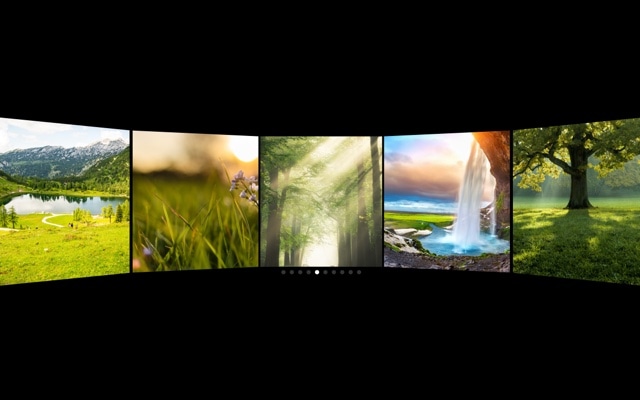
- The coverflow effect tilts neighboring slides at an angle along the Y-axis, creating a perspective rotation similar to album art browsing. The expo effect keeps slides flat and facing forward — instead of rotating, it scales them down and reduces their opacity as they move from center. The expo effect feels more like a museum or gallery display, while coverflow has a more dynamic, jukebox-like feel.
- Can I control how much slides scale and fade?
- Yes. You can adjust the scale factor and opacity values for off-center slides in the Swiper Studio editor. Increase the scale difference for a more dramatic focal effect, or reduce it for a subtler transition. The opacity curve is also configurable — you can have neighboring slides barely visible or clearly present, depending on the mood you want.
- Is the expo effect suitable for text-heavy slides?
- Yes. Because the expo effect keeps slides flat and facing forward (no 3D rotation), text remains perfectly legible on the active slide. The scaling and fading of neighboring slides actually helps by reducing visual noise around the focused content. It works well for testimonials, feature descriptions, case studies, and any content where readability matters.
- What export formats are supported?
- You can export as standalone HTML, a React component, a Vue component, a Next.js project, a Web Component, or a native Webflow element. You can also publish to CDN and embed the slider on any website with a single code snippet — perfect for portfolio sites, galleries, product showcases, and exhibition pages.
#Related Templates



#Related Resources
- Swiper Studio for Developers
- Swiper Studio for Image Galleries
- Swiper Studio for Portfolios
- Swiper Studio for Web Designers
Ready to Build Your Slider?
Pick a template, customize it visually, and export production-ready code to React, Vue, Next.js, HTML, Webflow, and more. No coding required.








