
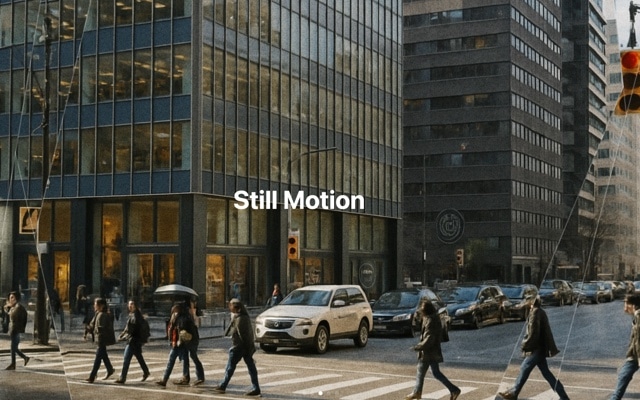
Super Flow Header Gallery with Autoplay and Parallax
A smooth, flowing header gallery that combines autoplay with parallax depth for a cinematic hero section experience. Images glide through the slider with continuous motion while background layers shift at different speeds, creating an illusion of three-dimensional space. Super Flow takes the header gallery concept and elevates it — smoother transitions, deeper parallax, and a rhythm that feels effortless and mesmerizing. It is the kind of hero section that makes visitors pause and watch before they start scrolling.
The autoplay keeps the gallery in constant, gentle motion, cycling through images at a pace that feels unhurried and intentional. The parallax effect adds a layer of sophistication that static hero images cannot match — as each slide transitions, the background moves independently of the foreground, creating depth that draws the eye into the image. Combined, these two effects produce a header section that feels alive and dynamic without being distracting or overwhelming.
#What Makes This Template Stand Out
Parallax Depth on Every Transition
Background images and foreground content move at different speeds during each slide transition, creating a layered depth effect. This parallax motion transforms flat image transitions into something that feels three-dimensional and cinematic. Visitors perceive the slider as a window into a deeper scene rather than a flat sequence of images.
Smooth Continuous Autoplay
The autoplay is tuned for fluid, continuous motion — slides advance at a steady rhythm with eased transitions that feel organic rather than mechanical. The timing creates a mesmerizing flow where one image dissolves smoothly into the next, keeping the hero section alive and dynamic without demanding user interaction.
Enhanced Header Gallery Concept
Super Flow builds on the Header Gallery template with refined transition curves, deeper parallax intensity, and optimized timing. The improvements are subtle but cumulative — the overall effect feels more polished, more immersive, and more visually striking. It is the header gallery concept taken to its full potential.
Full-Width Hero Impact
Designed to span the entire viewport width, the gallery creates a bold first impression that fills the screen with imagery. Large, full-bleed photos combined with smooth motion and parallax depth make the hero section feel premium and intentional. It sets the visual tone for the entire page from the very first frame.
Touch-Friendly with Manual Override
While autoplay keeps the gallery moving, visitors can take control at any time by swiping, clicking arrows, or using keyboard navigation. Autoplay pauses during interaction and resumes afterward. This ensures the experience is never frustrating — the gallery flows beautifully on its own but respects user intent.
#Who Should Use This Template
If you are a web designer or creative director looking for a hero section that makes an immediate impression, Super Flow delivers the kind of motion and depth that static images cannot achieve. The parallax effect adds a cinematic quality that elevates portfolio sites, creative agency pages, and brand homepages. Clients notice the difference — this is the kind of hero section that gets comments in review meetings.
Photographers, travel brands, and visual storytellers will find Super Flow ideal for showcasing their best work above the fold. The continuous autoplay means every image in the gallery gets screen time without requiring visitor interaction. The parallax depth makes each photo feel immersive, drawing viewers into the scene. It transforms a simple image gallery into an experience that communicates the quality and artistry of the work.
Marketing teams and product owners building high-converting landing pages benefit from the template's ability to hold attention. A flowing, parallax hero section increases time-on-page and creates an emotional connection with visitors before they encounter the first line of copy. Use it for product launches, seasonal campaigns, or any page where the visual first impression needs to be exceptional.
#Best Use Cases
- ✓Website hero sections for creative agencies, studios, and design firms that need a visually striking first impression
- ✓Photography portfolio headers showcasing landscape, architecture, or editorial work with cinematic depth
- ✓Travel and hospitality websites featuring destination imagery with immersive parallax transitions
- ✓Product launch pages where large hero imagery builds anticipation and emotional connection
- ✓Real estate and luxury brand sites where full-width property or lifestyle photography sets the premium tone
- ✓Event and conference websites with speaker photos or venue imagery flowing through the header
#How to Customize
- Click "Use This Template" to open Super Flow in Swiper Studio's visual editor1
- Replace the gallery images — click each slide background and upload your own photos or paste image URLs from your media library2
- Adjust autoplay settings — set the delay between transitions and the transition speed to match the rhythm you want for your header3
- Fine-tune the parallax depth — increase or decrease the parallax intensity to control how pronounced the 3D depth effect feels during transitions4
- Add text overlays, headlines, or CTA buttons to any slide if you want content layered on top of the flowing imagery5
- Configure responsive breakpoints to ensure the gallery height, image cropping, and text sizing look correct across all devices6
- Export to HTML, React, Vue, Next.js, Webflow, or publish to CDN and embed the Super Flow gallery as your website header with a single snippet7
#Frequently Asked Questions
- How does the parallax effect create depth in this template?
- The parallax effect moves background images at a different speed than foreground content as slides transition. This creates an illusion of depth — backgrounds appear to recede while text and UI elements float closer to the viewer. The result is a layered, three-dimensional feel that makes the header section feel immersive rather than flat.
- Can I control the autoplay speed and behavior?
- Yes. You can set the autoplay delay (time between transitions), transition speed (how fast slides animate), and whether autoplay pauses on hover or touch interaction. You can also disable autoplay entirely and let visitors navigate manually with swipe gestures, arrows, or keyboard controls.
- How does Super Flow differ from the Header Gallery template?
- Super Flow is an enhanced version of the Header Gallery concept. It adds parallax depth to the transitions, uses smoother timing curves for a more fluid feel, and is tuned for continuous autoplay motion. The result is a header gallery that feels more cinematic and immersive — like a slow, flowing showcase rather than a standard image slideshow.
- Does this template work well as a full-width hero section?
- Yes. The template is designed to span the full viewport width, making it ideal for website hero sections, page headers, and above-the-fold showcases. The combination of large images, parallax depth, and smooth autoplay creates an immediate visual impact that captures attention the moment a visitor lands on the page.
- What export formats does this template support?
- You can export as standalone HTML, a React component, a Vue component, a Next.js project, a Web Component, or a native Webflow element. CDN publishing lets you embed the Super Flow gallery on any website with a single code snippet or iframe embed.
#Related Templates




#Related Resources
- Swiper Studio for Hero Sections
- Swiper Studio for Image Galleries
- Swiper Studio for Web Designers
- Swiper Studio for Photographers
Ready to Build Your Slider?
Pick a template, customize it visually, and export production-ready code to React, Vue, Next.js, HTML, Webflow, and more. No coding required.








