New Year Sale
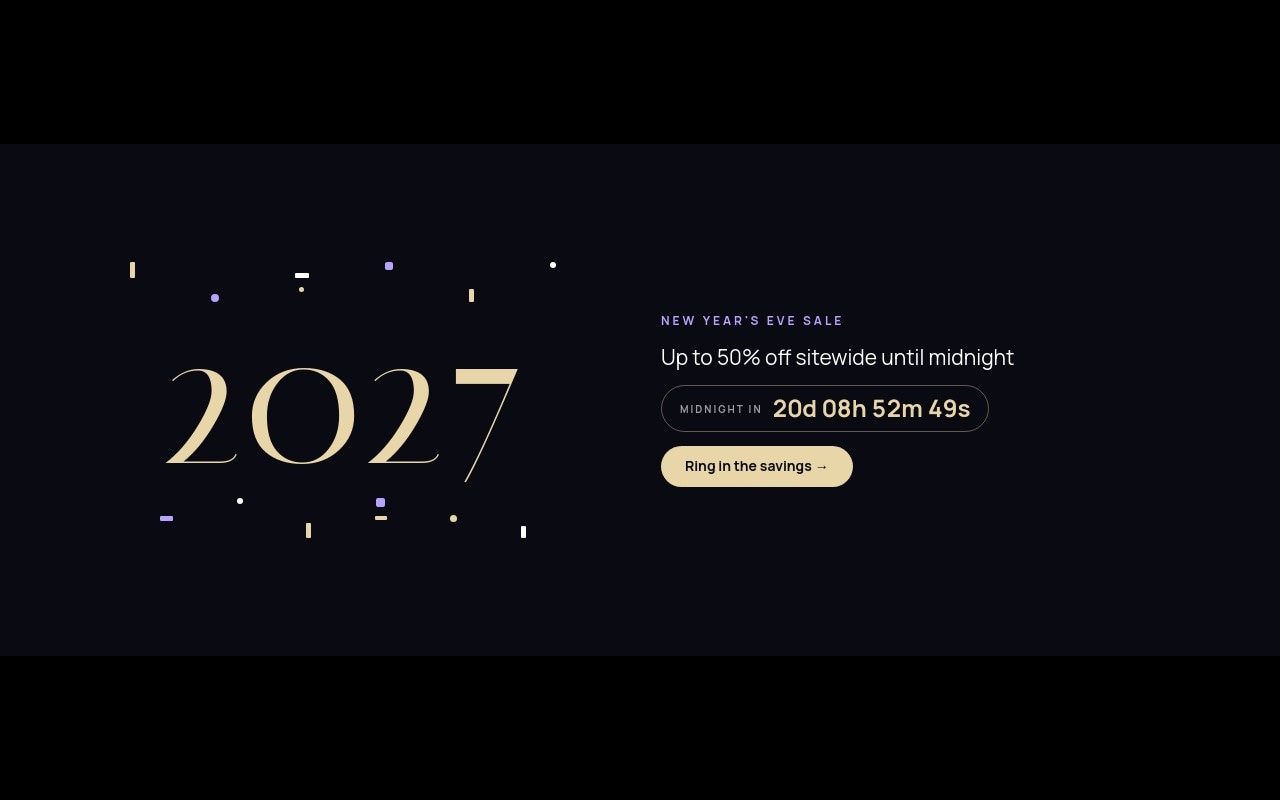
A New Year sale banner for the last week of December: midnight black, champagne type, and a live countdown to 2027. The first slide rolls "2027" up in large Italiana numerals between two rows of popping confetti, next to "Up to 50% off sitewide until midnight", a "MIDNIGHT IN" countdown pill, and a "Ring in the savings" button. The next slides cover Boxing Day with a champagne flutes cutout, a champagne-colored "Last chance at 2026 prices" slide with the code CHEERS27, and a gold bokeh "New year, new collection" teaser for January 5.
The palette is midnight #0a0a12, champagne #e8d5a8, soft violet #b8a1ff, and white. Italiana handles the display type, Manrope the offers and buttons, and JetBrains Mono the promo code. Slides cross-fade over 800ms and autoplay every 5 seconds, pausing on hover. The banner is 4:5 on phones, 2:1 at 768px, and 5:2 at 1024px.
#What Makes This Template Stand Out
Live Countdown to Midnight
The 'MIDNIGHT IN' pill counts down in days, hours, minutes, and seconds. Set the target to January 1, 2027 at 00:00 in your timezone and it ticks on your live site after export or publish. At zero it switches to 'Happy New Year!' instead of sitting at 00:00.
Rolling 2027 With Popping Confetti
'2027' rolls up with the number-roll animation while 14 small confetti blocks in champagne, violet, and white pop in with staggered delays from 50ms to 700ms. The offer, countdown, and CTA fade in after it, so the cover reads in order.
Boxing Day Slide With a Cutout
Two champagne flutes sit in a violet-tinted circle next to 'BOXING DAY · DEC 26', a large 'Up to 60% off' with number-roll, 'Coats, knitwear & winter boots. Online and in store.' and a 'Shop Boxing Day' pill. Swap the cutout for your own product PNG.
Final Markdowns With a Promo Code
The third slide flips to a champagne background with 'Last chance at 2026 prices', 'Extra 20% off everything already on sale', the code CHEERS27 in an outlined box that pops in, a black 'Shop final markdowns' pill, and 'Ends Dec 31 at 11:59 pm ET · While stocks last' in small print.
New Collection Teaser
The closing slide uses a gold bokeh and confetti photo with a slow zoom, 'COMING JAN 5', 'New year, new collection' with a letter-blur entrance, and an outlined 'Get early access' button. It keeps the banner useful after the sale ends.
#Who Should Use This Template
This template is built for Shopify merchants and online stores running end-of-year sales from Boxing Day (December 26) through New Year's Eve 2026. It gives you one banner that covers the countdown to midnight, the Boxing Day markdowns, the last-chance code, and the January collection, so you do not need to redesign the homepage every other day.
Fashion, beauty, and home brands that clear winter stock at the end of December can use the Boxing Day and final markdowns slides as they are. Retype the categories, swap the cutout, and point the links at your sale collections.
Agencies and Webflow designers preparing holiday campaigns get a dark, restrained New Year design that can be reused for other countdowns. Change "2027" and the target date and it works for an anniversary sale, a launch night, or a Lunar New Year promotion.
#Best Use Cases
- ✓New Year's Eve sale banners with a live countdown to midnight
- ✓Boxing Day and after-Christmas markdown campaigns
- ✓Last-chance promo code banners for the final days of December
- ✓January new collection teasers with an early access link
- ✓Bars, restaurants, and venues promoting New Year's Eve bookings
- ✓Event and ticket sites counting down to a New Year party
- ✓Anniversary or launch-night sales reusing the countdown cover
- ✓Lunar New Year promotions reskinned in your own colors
#How to Customize
- Open the New Year Sale template in Swiper Studio - you will see four slides: the 2027 countdown, Boxing Day, final markdowns, and the new collection teaser.1
- Select the "MIDNIGHT IN" countdown text and set its target to January 1, 2027 at 00:00 in your timezone, and change the expiry text if you want something other than "Happy New Year!".2
- Update the offers - "Up to 50% off sitewide until midnight", "Up to 60% off" for Boxing Day, and "Extra 20% off everything already on sale" - to match your real discounts.3
- Replace the champagne flutes cutout with your own product PNG, and swap the bokeh photo on the last slide for your new collection imagery.4
- Change the promo code CHEERS27 and the "Ends Dec 31 at 11:59 pm ET" line to your real code and deadline.5
- Recolor the confetti blocks or remove the rows if you want a cleaner cover.6
- Point each CTA link block at the right collection, sale page, or early access signup.7
- Publish to CDN and add it to Shopify with the Swiper Studio app, use Paste into Webflow, or export to HTML, React, Vue, Next.js, or Web Component.8
#Frequently Asked Questions
- Is the countdown to midnight a real timer?
- Yes. The "MIDNIGHT IN" pill is a live countdown text using the tokens {dd}d {hh}h {mm}m {ss}s. In the template it starts about 20 days from when you open it; select the text, turn to the Countdown setting, and set the target to January 1, 2027 at 00:00 with your timezone. When it reaches zero it swaps to "Happy New Year!", and you can change that text, show zeros, or hide it instead. It keeps ticking after you export or publish, with no code.
- Can I use this banner for Boxing Day or a January sale?
- Yes. It already covers the whole stretch: a New Year's Eve countdown slide, a "BOXING DAY · DEC 26 / Up to 60% off" slide, a "Last chance at 2026 prices" slide with code CHEERS27, and a "COMING JAN 5 / New year, new collection" teaser. Remove the slides you do not need, or reorder them as the season moves on.
- How is the confetti made?
- The confetti on the first slide is 14 tiny blocks in champagne, violet, and white, arranged in two rows above and below "2027". Each piece pops in with its own delay between 50ms and 700ms, so they land in a scattered order. Change their colors to your brand or delete the rows for a cleaner cover.
- What fonts and colors does the template use?
- Italiana is the display face for "2027" and the headlines, Manrope carries the body copy and buttons, and JetBrains Mono sets the promo code. The palette is midnight #0a0a12, champagne #e8d5a8, soft violet #b8a1ff, and white. The navigation arrows (768px and up) and pagination bullets are violet.
- How do I add it to Shopify, Webflow, or another site?
- On Shopify, install the official Swiper Studio Shopify app and add the published slider to any page as a native theme block from the theme editor. In Webflow, use Paste into Webflow to add it as native elements. For Squarespace, Wix, WordPress, or any other site, publish to CDN and paste the embed snippet, or export to HTML, React, Vue, Next.js, or Web Component.
#Related Templates

#Related Resources
- Swiper Studio for Shopify
- Swiper Studio for E-commerce Stores
- Swiper Studio for Hero Sections
- Swiper Studio for Marketers
Ready to Build Your Slider?
Pick a template, customize it visually, and export production-ready code to React, Vue, Next.js, HTML, Webflow, and more. No coding required.