Black Friday Luxe
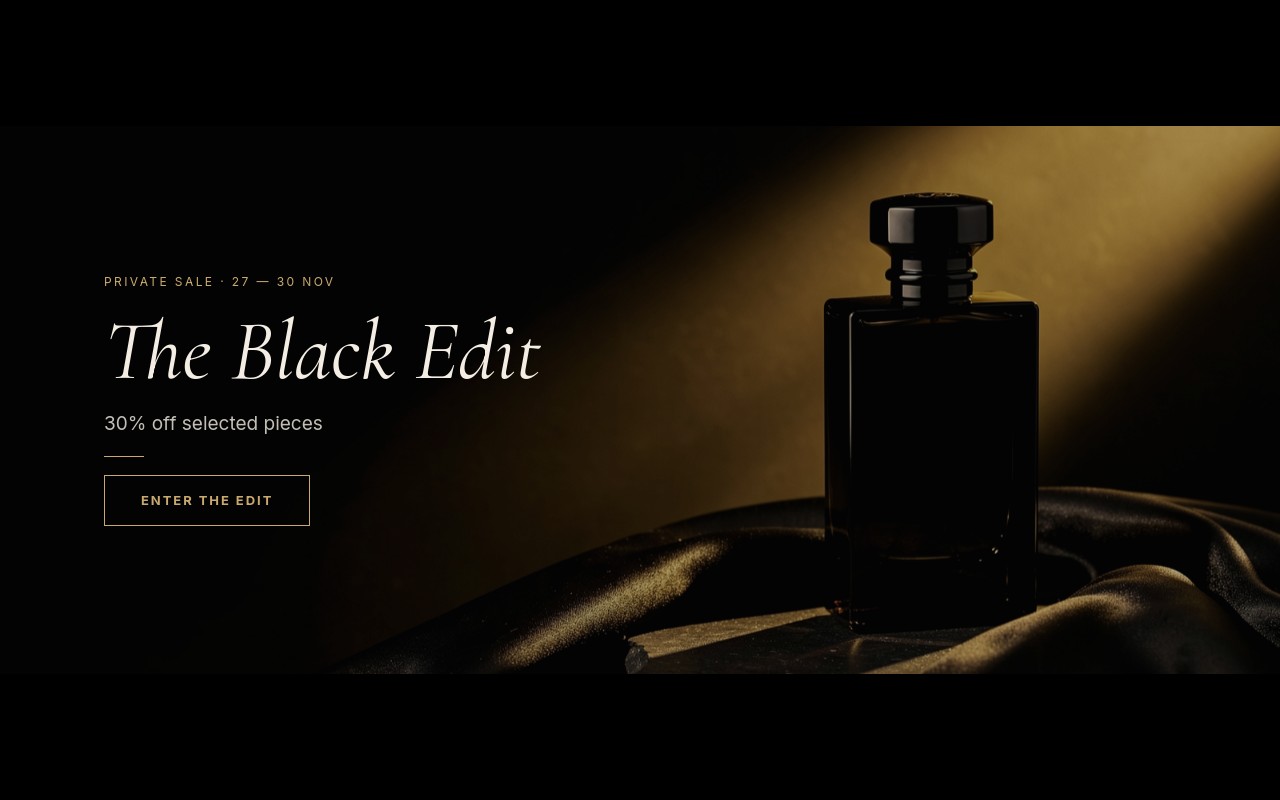
The premium-brand take on Black Friday: a private sale called "The Black Edit", told in a quiet voice. The cover is a full-bleed still life of a black perfume bottle on draped silk under a single gold light, with a tracked "PRIVATE SALE" label for 27-30 Nov, an italic "The Black Edit" headline, "30% off selected pieces", a thin gold rule, and an outlined "ENTER THE EDIT" button. Three product slides follow - fragrance, leather goods, and fine jewelry - each with a gold "THE BLACK EDIT · 30% OFF" label and its own outlined CTA.
Cormorant Garamond sets the italic headlines and the prices, Inter sets everything small and tracked. The palette stays at three colors: black #0b0b0b, champagne gold #c9a96e, and ivory #f3ede3. The slider cross-fades slowly at 1000ms and autoplays every 6 seconds, pausing on hover - a pace that feels like flipping a lookbook, not scrolling a flyer.
#What Makes This Template Stand Out
A Black Friday Banner That Does Not Shout
No countdown, no stickers, no red. The offer is still clear - 30% off selected pieces, dates in the label, a price with the old price struck through - but it reads as an invitation. For brands whose full-price customers are watching, this is the safer way to run a sale.
Cormorant Garamond Italic With Tracked Inter Labels
The italic serif headlines (The Black Edit, Fragrance, Leather Goods, Fine Jewelry) fade in letter by letter with letter-fade. Small Inter labels tracked at 0.2em and buttons at 0.15em give the fashion-house feel that a bold sans headline never does.
55/45 Split Editorial Slides
From 768px the fragrance and leather goods slides split into a 55% photo and a 45% text column: gold label, italic product category, a one-line description (Ambre Nuit eau de parfum, 100 ml; The Maison top-handle bag in black calf), the price pair, and an outlined CTA. The leather slide mirrors the split to keep the rhythm.
Jewelry Cutout on an Ivory Circle
The closing slide switches from photography to a gold diamond ring cutout on an ivory #f3ede3 circle that pops in, next to 'Fine Jewelry' and a 'Members get early access Nov 26' line - a natural place to push a loyalty sign-up before the public sale opens.
Outlined Gold CTAs
Every call to action is a link block with a 1px champagne gold border, transparent fill, and tracked uppercase text. They fade in last on each slide. Point ENTER THE EDIT, SHOP FRAGRANCE, SHOP LEATHER, and SHOP JEWELRY at your own collections.
#Who Should Use This Template
This template is built for fragrance, fashion, leather goods, and jewelry stores that take part in Black Friday but do not want their homepage to look like a doorbuster flyer. The private-sale framing, serif italic, and gold on black keep the brand premium while still stating the discount and the dates.
Boutiques and multi-brand concept stores can swap the four product stories for their own categories - knitwear, eyewear, home fragrance, watches - and keep the same pacing. The split slides accept any portrait product photo, and the jewelry slide accepts any transparent cutout.
Agencies and Webflow designers with luxury clients get a ready-made alternative to the loud Black Friday banner. After the weekend it reskins easily into a holiday gift edit, a members-only preview, or a January private sale by changing the label and headline.
#Best Use Cases
- ✓Black Friday private sale banners for fragrance and beauty brands
- ✓Fashion and leather goods homepages running a restrained 30% off edit
- ✓Fine jewelry stores announcing member early access before the public sale
- ✓Shopify luxury theme hero sections added through the Swiper Studio app
- ✓Holiday gift edits reusing the same split editorial layout
- ✓Members-only preview pages linked from an email campaign
- ✓Concept store homepages featuring three or four curated categories
- ✓January private sale or end-of-season edit banners
#How to Customize
- Open the Black Friday Luxe template in Swiper Studio - you will see four slides: The Black Edit cover, Fragrance, Leather Goods, and Fine Jewelry.1
- Update the cover label with your sale dates (it ships with 27-30 Nov, which matches Black Friday November 27 through Cyber Monday November 30, 2026), then retitle "The Black Edit" and the "30% off selected pieces" line if needed.2
- Replace the cover still life and the fragrance and handbag photos with your own dark, moody product photography in the media panel.3
- Retype each product line and price pair - $126 / $180 and $1,260 / $1,800 - keeping the old price struck through.4
- Swap the ring cutout on the ivory circle for your own transparent product image and edit the "Members get early access Nov 26" line.5
- Point each outlined link block (ENTER THE EDIT, SHOP FRAGRANCE, SHOP LEATHER, SHOP JEWELRY) at the matching collection URL.6
- Adjust the champagne gold #c9a96e to your brand metal or accent color, and preview the 4:5, 16:9, and 21:9 layouts.7
- Publish to CDN and add it to Shopify with the Swiper Studio app, paste it into Webflow, or export to HTML, React, Vue, Next.js, or a Web Component.8
#Frequently Asked Questions
- Who is this template for if I do not want a loud sale banner?
- That is exactly the point of it. Black Friday Luxe frames the sale as a private edit instead of a clearance: no countdown, no flashing badges, just an italic serif headline, tracked small labels, thin outlined gold buttons, and dark editorial photography. It suits fragrance, fashion, leather goods, and jewelry stores that want to run a Black Friday offer without looking like a discount warehouse.
- Which fonts and colors does it use?
- Cormorant Garamond carries the italic headlines and the prices, and Inter handles the small labels (tracked 0.2em), descriptions, and buttons (tracked 0.15em). The palette is black #0b0b0b, champagne gold #c9a96e for labels, prices, and CTAs, and ivory #f3ede3 for headlines and body copy. Change any of them in the style panel.
- How do the split product slides behave on mobile?
- On phones each product slide stacks the photo and the copy in a single column inside a 4:5 banner. From 768px the slide becomes a row, with the image taking 55% and the text column 45%, and the banner widens to 16:9 at 768px and 21:9 at 1024px. The leather goods slide mirrors the layout so the image sits on the right.
- Can I show sale prices with the original price crossed out?
- Yes, that is how the template ships. The fragrance slide shows $126 in gold serif next to a struck-through $180, and the leather goods slide shows $1,260 against $1,800. Retype both values for your own products. The strikethrough is a text style, so it stays in place when you edit.
- How do I publish it on Shopify or Webflow?
- On Shopify, install the official Swiper Studio Shopify app and add the published slider to any page as a native theme block from the theme editor. In Webflow, use Paste into Webflow to add it as native elements. On Squarespace, Wix, WordPress, or any other site, publish to CDN and paste the embed snippet, or export to HTML, React, Vue, Next.js, or a Web Component.
#Related Templates

#Related Resources
- Swiper Studio for Ecommerce Stores
- Swiper Studio for Shopify
- Swiper Studio for Hero Sections
- Swiper Studio for Webflow
Ready to Build Your Slider?
Pick a template, customize it visually, and export production-ready code to React, Vue, Next.js, HTML, Webflow, and more. No coding required.