Hanukkah - Festival of Lights
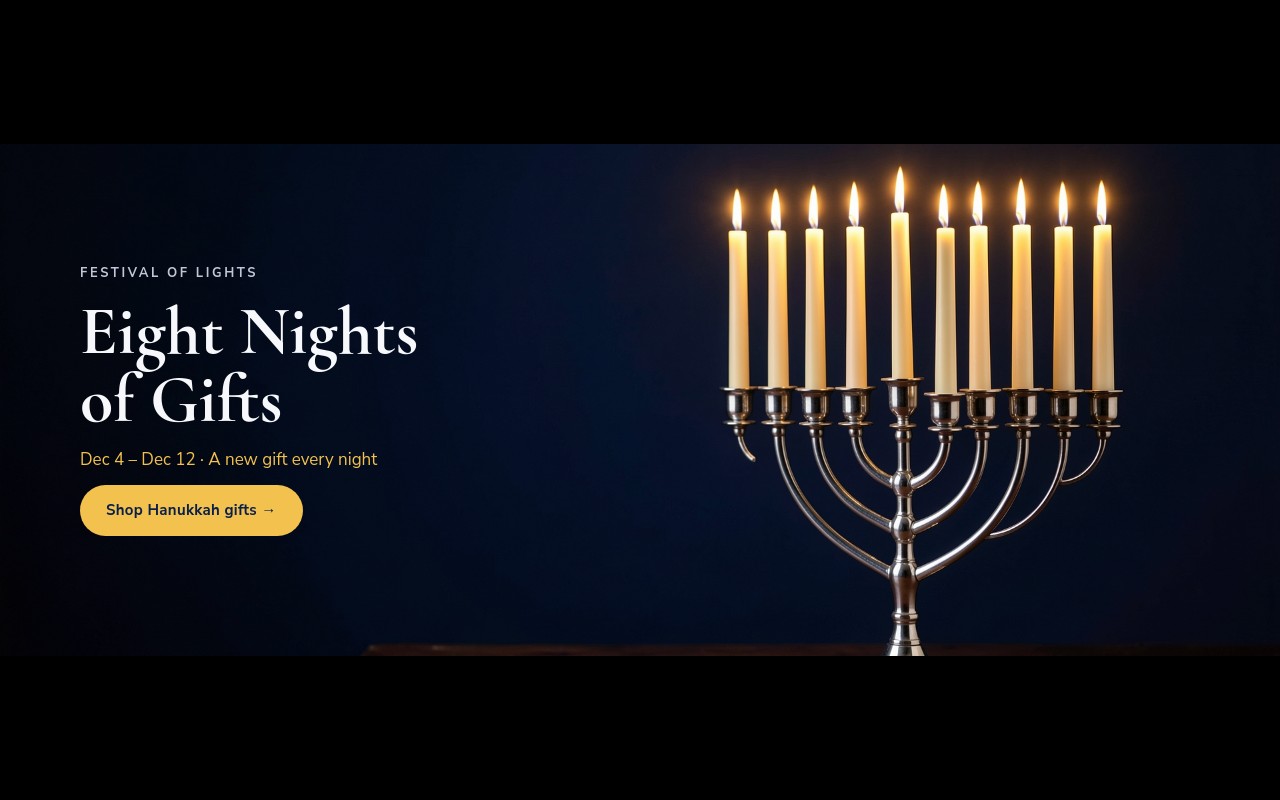
A Hanukkah store banner that stays respectful and quiet: deep navy, silver, and warm candle gold, with one real photograph and no cartoon imagery. The cover opens on a candlelit silver menorah with "Eight Nights of Gifts" set in Cormorant and a gold "Shop Hanukkah gifts" pill. The second slide counts the nights with a row of eight circles, the third offers free blue and silver gift wrap with a gift box cutout, and the last slide switches to ivory for a "Happy Hanukkah from all of us" greeting.
The palette is deep navy #0b1f4b, silver #c0c7d6, candle gold #f2c14e, and ivory #f7f8fb. Cormorant in bold carries the headlines and Nunito Sans handles labels, body copy, and buttons. Slides cross-fade over 1000ms and autoplay every 5 seconds, pausing on hover. The banner is 4:5 on phones, 2:1 at 768px, and 5:2 at 1024px, so it sits at the top of a store homepage without taking over the page.
#What Makes This Template Stand Out
Candlelit Menorah Cover
A photograph of a silver menorah with lit candles against deep navy fills the cover. The headline 'Eight Nights of Gifts' fades in letter by letter, followed by the dates line in gold and the CTA. On phones the text sits in a navy glass panel; from 768px it moves to the dark left side of the photo.
Eight-Night Candle Count
Eight small circles show where you are in the holiday: three filled in candle gold, the third pulsing, and five silver outlines still to come. Below them, "NIGHT 3 OF 8 · TONIGHT'S GIFT" and a large "20% off candles" offer with a number-roll animation make a nightly deal easy to rotate.
Free Gift Wrap Slide
A blue gift box with a silver ribbon sits on a silver circle next to 'Wrapped in blue & silver, free' and 'On every order through Dec 12, with a handwritten note'. The cutout pops in, the headline fades in letter by letter, and the layout becomes a row from 768px.
Ivory Greeting Slide
The closing slide flips to ivory with a navy headline, eight gold circles for eight nights, and a navy 'Shop the collection' pill. It works as a warm sign-off and gives the order-by date ('Order by Dec 1 for delivery before the first candle') its own space.
Cormorant and Nunito Sans
Cormorant brings a classic serif for the headlines, and Nunito Sans keeps the tracked labels, body copy, and buttons clean and easy to read at small sizes. Gold pills on the navy slides and a navy pill on the ivory slide keep every CTA visible.
#Who Should Use This Template
This template is built for Judaica shops, gift stores, and online retailers running a Hanukkah promotion from December 4 to 12, 2026. It covers the whole campaign in four slides: the launch cover, a nightly deal, a service perk, and a greeting.
General stores that sell to a mixed holiday audience can run it alongside their Christmas banners. The structure is a plain sale banner underneath, so the same slides can be reskinned for another festival or a winter sale by changing the colors, photo, and copy.
Agencies and Webflow designers building holiday campaigns for clients get a restrained, respectful design that is ready to publish. Most of the work is swapping the photo, updating the nightly offer, and pointing the links.
#Best Use Cases
- ✓Hanukkah homepage banners for Judaica, gift, and home decor shops
- ✓Eight-night deal campaigns with a new offer each evening
- ✓Free gift wrap and handwritten note promotions
- ✓Candle, menorah, and tableware collection launches
- ✓Bakery and specialty food stores promoting holiday orders
- ✓Community centers and synagogue gift shops announcing holiday hours
- ✓Holiday greeting banners for brands with a mixed December audience
- ✓Winter festival or light-themed sales reskinned in your own colors
#How to Customize
- Open the Hanukkah - Festival of Lights template in Swiper Studio - you will see four slides: the menorah cover, the nightly offer, the gift wrap slide, and the ivory greeting.1
- Replace the menorah photo in the media panel, and adjust the custom CSS object-position if your subject is not on the right side of the image.2
- Update the dates line and the nightly offer - change "NIGHT 3 OF 8" and "20% off candles" to the current night and deal.3
- Fill or empty the eight circles on the offer slide to match the night, and move the pulse animation to the current circle.4
- Swap the blue gift box cutout for your own product PNG, and rewrite the gift wrap offer if you run a different perk.5
- Change the "Order by Dec 1" line on the greeting slide to match your real shipping cutoff.6
- Point each CTA link block ("Shop Hanukkah gifts", "Unwrap tonight's gift", "Shop gifts", "Shop the collection") at the right collection or product.7
- Publish to CDN and add it to Shopify with the Swiper Studio app, use Paste into Webflow, or export to HTML, React, Vue, Next.js, or Web Component.8
#Frequently Asked Questions
- What are the Hanukkah 2026 dates in this template?
- Hanukkah 2026 runs from the evening of December 4 to December 12, and the template copy uses those dates: "Dec 4 - Dec 12 · A new gift every night" on the cover, "through Dec 12" on the offer slides, and "Order by Dec 1 for delivery before the first candle" on the closing slide. Update the order-by date to match your own shipping times.
- How does the eight-night candle count work?
- The second slide has a row of eight small circle blocks. Three are filled candle gold (#f2c14e), the third one pulses, and the remaining five are silver outlines. It reads "NIGHT 3 OF 8". To show a different night, change which circles are filled and move the pulse animation to the current one, then update the offer line ("20% off candles") and the label.
- Can I use my own menorah or product photos?
- Yes. Replace the cover photo and the blue gift box cutout in the media panel. The cover uses a small custom CSS rule to position the background so the menorah on the right stays in frame on phones - adjust the percentages if your photo has its subject somewhere else. The gift box sits on a silver circle, so any transparent PNG product will fit.
- Does the cover text stay readable on mobile?
- Yes. On phones (4:5) the cover text sits in a navy panel at 85% opacity over the photo. From 768px the banner switches to 2:1 and then 5:2 at 1024px, the panel becomes transparent, and the text sits in a column on the dark left side of the photo.
- How do I add it to my Shopify or Webflow store?
- On Shopify, install the official Swiper Studio Shopify app and add the published slider to any page as a native theme block from the theme editor. In Webflow, use Paste into Webflow to add it as native elements. For Squarespace, Wix, WordPress, or any other site, publish to CDN and paste the embed snippet, or export to HTML, React, Vue, Next.js, or Web Component.
#Related Templates
#Related Resources
- Swiper Studio for Shopify
- Swiper Studio for E-commerce Stores
- Swiper Studio for Hero Sections
- Swiper Studio for Small Businesses
Ready to Build Your Slider?
Pick a template, customize it visually, and export production-ready code to React, Vue, Next.js, HTML, Webflow, and more. No coding required.