
Cards Stack Slider Template
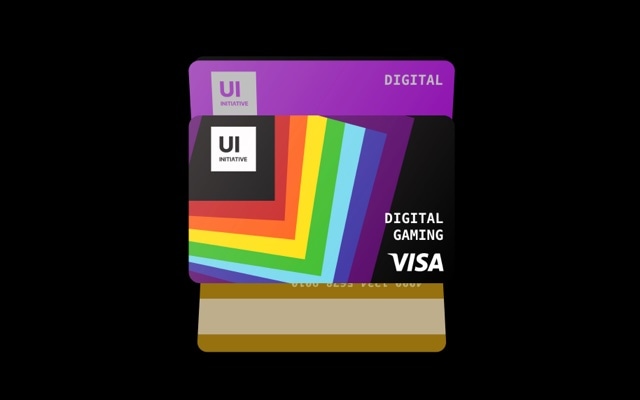
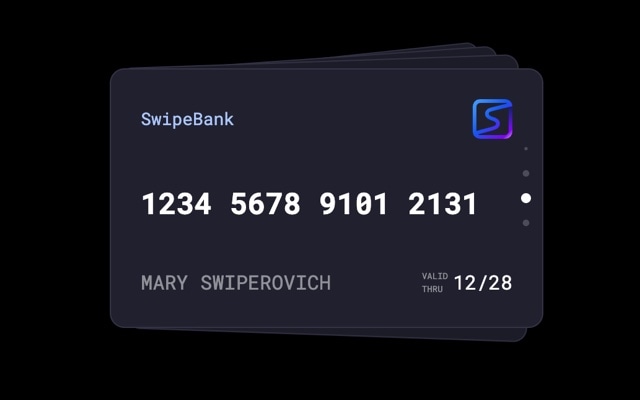
A vertical card stack carousel that fans cards outward from a central pile as you swipe through them. The default design showcases credit cards with gradient backgrounds, card numbers, chip icons, and cardholder names — stacked on top of each other with visible edges peeking out behind the active card. Swiping dismisses the top card to reveal the next, creating a satisfying, physical interaction that feels like sorting through a wallet or deck. The effect is compact, focused, and unmistakably premium.
The cards stack effect turns a standard carousel into something visitors want to interact with. The vertical stacking creates natural depth — you can see there are more cards behind the active one, which builds curiosity and encourages swiping. The fanning motion as cards transition adds a dynamic, playful quality without sacrificing elegance. It is the kind of interaction pattern that fintech apps, product showcases, and membership platforms use to make their UI feel polished and intentional.
#What Makes This Template Stand Out
Vertical Stack with Visible Depth
Cards are layered vertically with slight offsets and scale differences, so the edges of upcoming cards are visible behind the active one. This depth cue is a powerful signal — visitors immediately understand there is more content to discover and are drawn to swipe. It creates anticipation that a flat horizontal carousel cannot.
Fanning Transition Animation
As you swipe, cards fan outward from the stack with a smooth, arc-like motion before settling into the next position. The fanning effect adds personality to the transition — it feels dynamic and physical, like spreading a hand of playing cards. The animation is hardware-accelerated and runs at 60fps on all modern devices.
Credit Card Design Language
The default template uses a credit card layout — gradient backgrounds, chip icons, masked card numbers, and cardholder names — that immediately reads as premium fintech. This design language signals trust, security, and sophistication. Of course, every element is customizable, so you can adapt it to loyalty cards, gift cards, membership tiers, or any card-based concept.
Compact Centered Layout
The stack occupies a focused area in the center of the viewport rather than stretching edge to edge. This centered placement draws the eye to the active card and makes the stacking depth effect more pronounced. It also means the slider integrates cleanly into layouts with surrounding content — sidebars, text blocks, or other UI elements.
Touch-Optimized Swipe Interaction
The swipe-to-dismiss gesture is the primary interaction, and it feels great on touch devices. Cards follow your finger with natural physics, snap forward or bounce back based on swipe velocity, and the fanning animation plays in sync with your gesture. On desktop, click-and-drag and keyboard navigation are equally polished.
#Who Should Use This Template
If you are building a fintech product, banking app, or payment platform, this template gives you a production-ready card stack component that your users already understand intuitively. People are accustomed to swiping through cards in their digital wallets — Apple Pay, Google Pay, and every banking app uses this pattern. The cards stack effect replicates that familiar interaction, making your interface feel native and trustworthy. Display account cards, payment methods, or transaction summaries in a format that users navigate instinctively.
E-commerce and subscription businesses can use the cards stack to present product tiers, membership levels, gift cards, or loyalty rewards in an interactive format that encourages comparison. Instead of laying options out in a static grid, the stack invites visitors to swipe through each option, giving every tier its moment of focus. The premium feel of the stacking animation reinforces the value of what you are selling.
Designers and developers creating interactive showcases will find the cards stack effect is a natural fit for any content that benefits from a focused, one-at-a-time presentation with visible depth. Profile cards, recipe cards, flashcards, event tickets, game items — any content with a card metaphor works beautifully in this template. Export to React or Vue and integrate it into your project with minimal effort.
#Best Use Cases
- ✓Fintech and banking dashboards displaying payment cards, account summaries, or transaction cards in a swipeable stack
- ✓E-commerce sites showcasing gift cards, loyalty cards, or membership tiers with a premium, interactive presentation
- ✓Product comparison sections where visitors swipe through feature cards for different plans, packages, or configurations
- ✓Portfolio and profile showcases presenting team members, speaker bios, or contributor cards in a stacked format
- ✓Interactive educational tools like flashcard decks, quiz cards, or study sets with swipe-to-next navigation
- ✓Event and ticketing platforms displaying available tickets, passes, or VIP tiers in a compact stack layout
#How to Customize
- Click "Use This Template" to open the cards stack slider in Swiper Studio's visual editor1
- Replace the card content — edit text for card numbers, names, and labels, or swap them entirely for product names, profile information, or any content that fits your use case2
- Customize the card backgrounds — change the gradient colors, upload background images, or apply solid colors to match your brand palette3
- Adjust the stack effect settings — modify the number of visible cards behind the active one, the offset distance, and the scale difference to control the depth appearance4
- Add or remove cards — duplicate existing slides to maintain consistent card styling, then update the content on each new card5
- Fine-tune the fanning animation speed, easing, and arc to control how cards move during transitions6
- Export to HTML, React, Vue, Next.js, Web Component, or Webflow, or publish to CDN for instant embedding on your fintech dashboard, product page, or app7
#Frequently Asked Questions
- How does the cards stack effect work?
- The cards stack effect arranges slides in a vertical stack, with each card slightly offset and scaled to create visible depth behind the active card. Swiping dismisses the top card and brings the next one forward, similar to flipping through a physical stack of cards. The fanning animation spreads cards outward as they transition, adding a dynamic, tactile quality to the interaction.
- Can I change the cards to display content other than credit cards?
- Absolutely. The credit card design is just the default content. Every element on each card — background, images, text, colors, borders, and layout — is fully editable. Replace the card number with a product name, swap the chip icon for a profile photo, change the gradient to a solid color. The stack effect works with any card content: profiles, recipes, product cards, flashcards, or anything else.
- How many cards can the stack hold?
- There is no limit. Add as many slides as your content requires. The stack effect displays a configurable number of visible card edges behind the active card to suggest depth, while the rest wait out of view. Swiping smoothly cycles through the full deck regardless of size.
- Does the stack effect work well on mobile?
- Yes. The cards stack effect is optimized for touch interaction. The swipe-to-dismiss gesture feels natural on phones and tablets, and the stacking animation is hardware-accelerated for smooth 60fps performance. The compact, centered layout also scales well to smaller screens without requiring significant responsive adjustments.
- What export formats are available?
- You can export this template as standalone HTML, a React component, a Vue component, a Next.js project, a Web Component, or a native Webflow element. You can also publish to CDN and embed the slider on any website with a single code snippet — ideal for fintech dashboards, product pages, or interactive showcases.
#Related Templates



#Related Resources
Ready to Build Your Slider?
Pick a template, customize it visually, and export production-ready code to React, Vue, Next.js, HTML, Webflow, and more. No coding required.








