
Now Streaming Movie Cards Slider
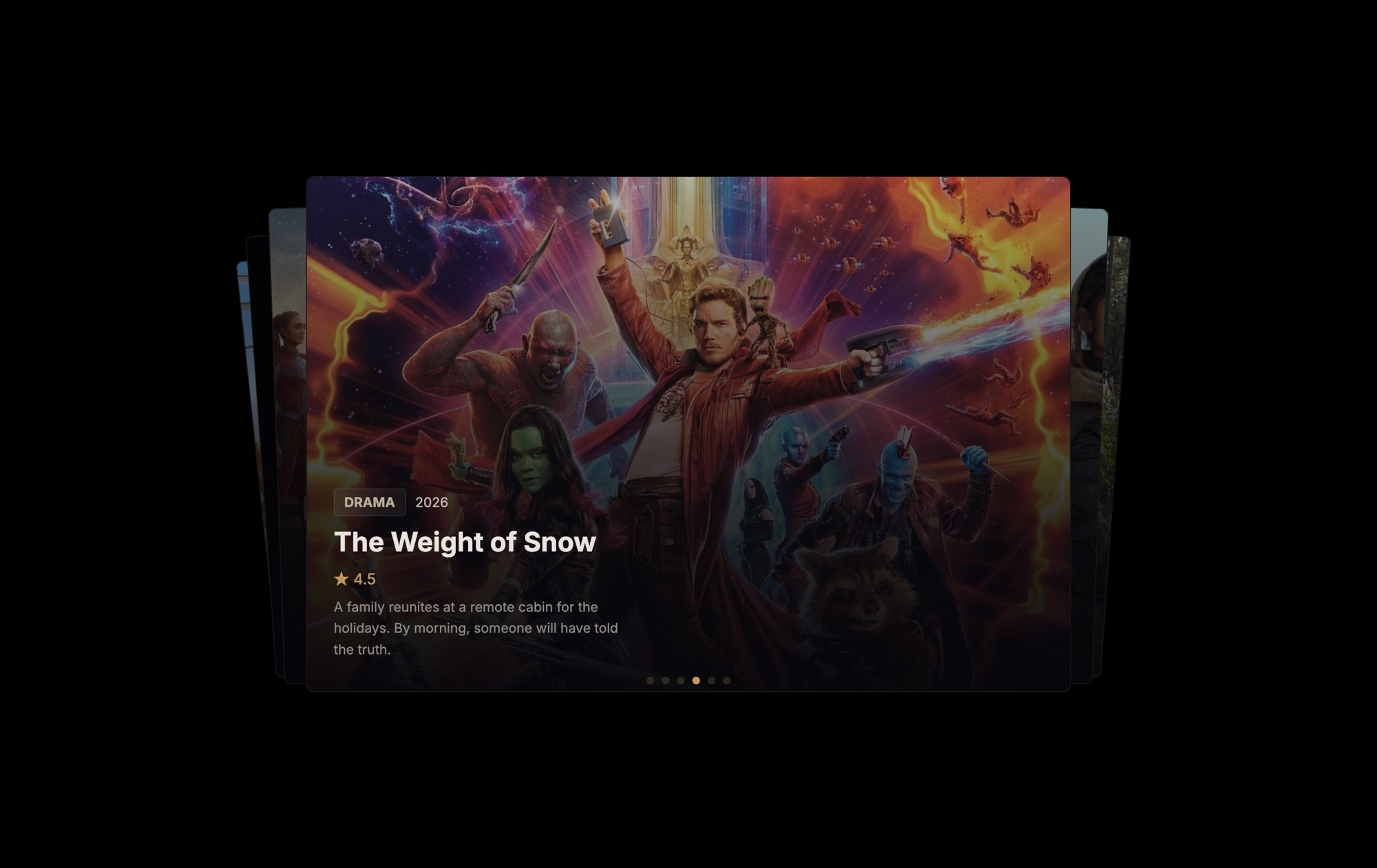
A cinematic movie card slider built for entertainment sites, streaming platforms, and film blogs. Stacked movie cards float against a dark background using the cards effect — the top card displays a full movie poster with a genre badge ("DRAMA"), release year, title ("The Weight of Snow"), a 4.5-star rating, and a brief synopsis. Pagination dots at the bottom track progress as users swipe through the deck. It looks and feels like something you would find on Netflix or Letterboxd, and it is yours to customize in minutes.
The dark background and cards stacking create an atmosphere that is unmistakably cinematic. Each card is a self-contained movie presentation — poster art dominates the visual space, while metadata elements (genre, year, rating, description) are layered on top with careful typography and spacing. Visitors do not just scroll through a list. They interact with a deck of films, swiping to discover the next title, which makes browsing feel like an experience rather than a chore.
#What Makes This Template Stand Out
Cards Effect with Stacked Depth
The cards effect stacks movie cards like a physical deck, with visible edges behind the active card hinting at more titles to discover. Swiping dismisses the top card to reveal the next — a tactile, satisfying interaction pattern borrowed from the best mobile apps. It turns passive browsing into active exploration.
Dark Cinematic Atmosphere
The dark background is not just aesthetic — it is functional. Movie posters are designed to be seen against dark surfaces, just like in a theater. Colors in your poster art appear richer and more saturated, text overlays remain legible without heavy drop shadows, and the overall mood signals entertainment and premium content.
Rich Metadata Layout
Each card packs genre badges, release year, star ratings, and synopsis text into a clean hierarchy. Visitors can evaluate a film at a glance — the poster catches the eye, the genre and rating provide quick context, and the synopsis seals the interest. Every data point earns its place on the card.
Star Rating Display
A visual star rating on each card gives viewers an instant quality signal. Ratings are one of the most influential elements in entertainment content — they guide discovery and build trust. The 4.5-star display is fully editable, so you can match ratings from any review source or aggregator.
Genre Badges for Quick Scanning
Bold genre badges ('DRAMA', 'ACTION', 'SCI-FI') at the top of each card let viewers filter mentally as they swipe. When browsing a deck of films, genre is often the first decision point. The badge makes that information instantly accessible without requiring a click or hover.
#Who Should Use This Template
If you run a streaming platform, entertainment blog, or movie review site, this template gives your content the visual treatment it deserves. Flat lists and grid layouts treat every title the same. The cards effect creates a curated, editorial presentation where each film gets its moment — poster art front and center, metadata thoughtfully arranged, and a satisfying swipe interaction that encourages browsing.
Content creators and media publishers covering film, TV, or entertainment will find this template elevates listicles and recommendation articles. Instead of embedding YouTube trailers or linking to IMDb, you present your picks in an interactive format that keeps readers on your page. A "Top 10 Films of the Year" article with a cards slider is far more engaging than a numbered list with thumbnail images.
Developers building entertainment apps can use this as a starting point for a content discovery component. The cards effect, poster layout, and metadata structure are production-ready patterns used by major streaming services. Export to React or Vue, integrate with your data layer, and you have a polished browsing interface without designing it from scratch.
#Best Use Cases
- ✓Streaming platform homepages featuring trending, new release, or recommended movie cards
- ✓Film blog and review site articles presenting curated movie picks in an interactive format
- ✓Entertainment news sites showcasing upcoming releases with poster art and release details
- ✓Personal movie diary or watchlist pages with ratings and short reviews on each card
- ✓Video rental or purchase platforms displaying available titles with pricing and genre filters
- ✓Film festival websites highlighting selections with synopsis, director, and screening schedule
#How to Customize
- Click "Use This Template" to open the movie cards slider in Swiper Studio's visual editor1
- Replace the poster images — click each card's background image and upload your own movie poster art or paste image URLs from your media library2
- Edit the text elements on each card — update the movie title, genre badge, release year, star rating, and synopsis to match your content3
- Adjust the cards effect settings — modify the stack depth, card rotation, and per-slide offset to control how the deck appears4
- Add or remove cards by duplicating existing slides to maintain consistent layout, or deleting films you do not need5
- Fine-tune the dark background tone and typography colors to align with your site's brand or the mood of your content6
- Export to HTML, React, Vue, Next.js, Webflow, or publish to CDN and embed the slider on your streaming site, blog, or app with a single snippet7
#Frequently Asked Questions
- How does the cards effect differ from a standard carousel?
- The cards effect stacks slides on top of each other like a deck of cards, with the active slide on top and subsequent slides peeking out behind it. Swiping dismisses the top card to reveal the next one. This creates a tactile, app-like interaction that feels more engaging than a horizontal scroll — especially for content like movie cards where users are browsing and making a selection.
- Can I change the movie data to feature my own content?
- Yes. Every element on each card is fully editable. Click the poster image to upload your own artwork, edit the title text, change the genre badge label, update the year, adjust the star rating display, and rewrite the synopsis. You can also add new elements like director credits, runtime, or a watch button.
- Does the cards effect support touch and swipe gestures?
- Yes. The cards effect is designed for touch interaction. Users can swipe the top card left or right to dismiss it and reveal the next card. The physics feel natural on mobile devices, and the effect is hardware-accelerated for smooth 60fps performance on all modern browsers.
- Can I add more than the default number of movie cards?
- There is no limit. Duplicate any existing slide to keep the card layout consistent, then swap in your own poster image, title, genre, and details. Each new card automatically joins the deck and inherits the cards effect stacking behavior.
- What export formats does this template support?
- You can export as standalone HTML, a React component, a Vue component, a Next.js project, a Web Component, or a native Webflow element. You can also publish to CDN and embed the slider anywhere with a single code snippet — on a streaming platform, entertainment blog, or movie review site.
#Related Templates
#Related Resources
Ready to Build Your Slider?
Pick a template, customize it visually, and export production-ready code to React, Vue, Next.js, HTML, Webflow, and more. No coding required.








