
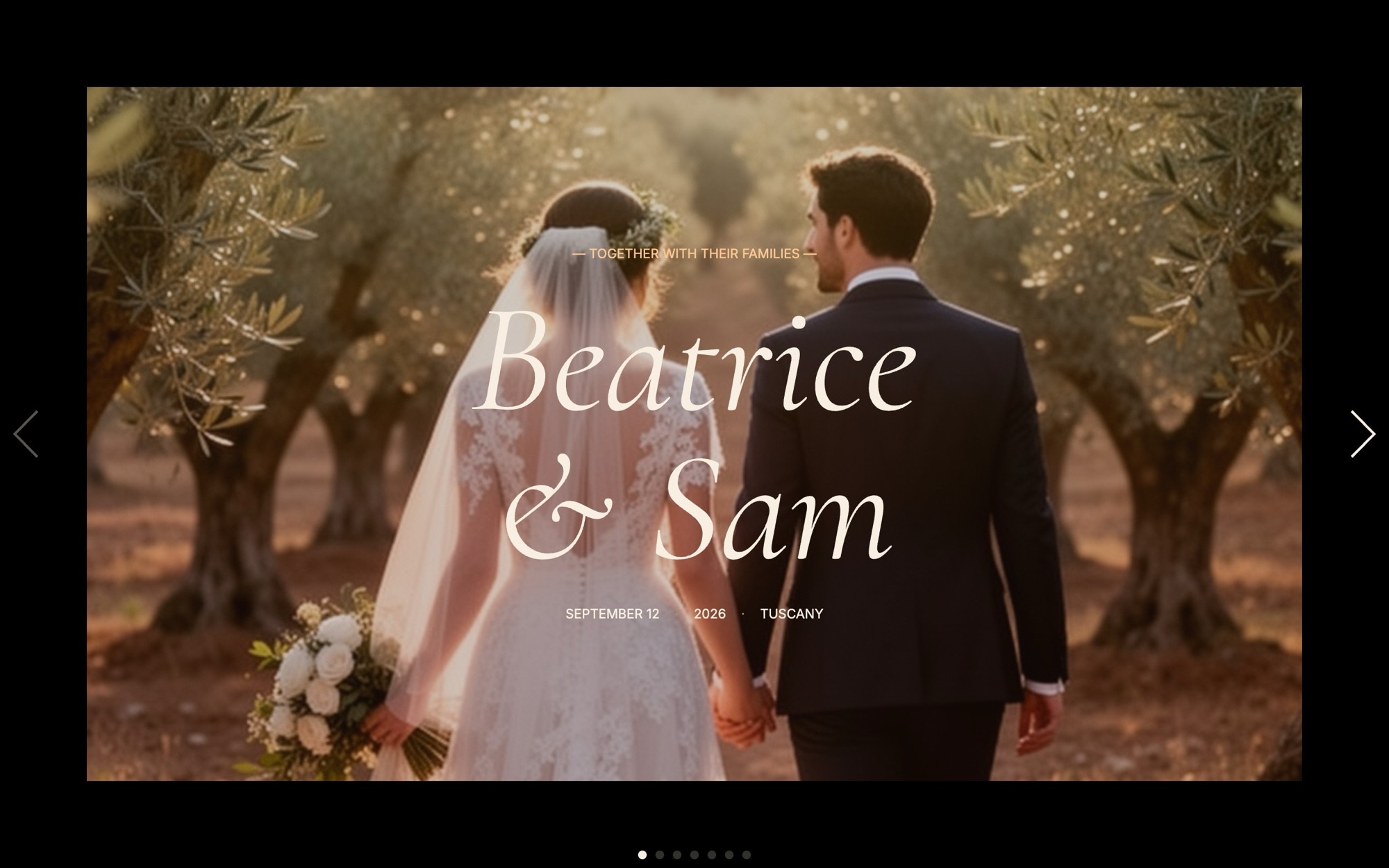
Wedding and Event Slider Template
A warm editorial wedding and event slider built for couples, planners, and venues who want the website to feel like the invitation. Seven slides carry the story from a cover ("BEATRICE & SAM - 09 - 2026") through the venue, ceremony arch, reception space, dinner table detail, and first dance, ending on a clear RSVP call to action. Cormorant Garamond italics handle the display type and Inter keeps body copy clean, all set in a palette of cream, espresso, warm gold, and sage.
The slider uses a fade transition at 1000ms with parallax enabled, so each slide settles in like a turn of the album page rather than a hard cut. Open it in Swiper Studio, drop in your own venue and ceremony photography, and publish a wedding or event page that feels considered from the first scroll.
#What Makes This Template Stand Out
Romantic Cream, Gold, and Sage Palette
The palette pairs a cream background with espresso type, warm gold accents, and sage details. It flatters outdoor venues, candlelit interiors, and floral palettes that lean toward white, blush, terracotta, or olive, and every color is editable if you need to match a stationery suite.
Fade Transition With Parallax
A 1000ms fade transition with parallax enabled keeps the pacing slow and editorial. Each photograph settles in rather than snaps, which feels right for a wedding website where the goal is mood, not motion.
Cormorant Garamond Italic Display Type
Cormorant Garamond italic 400 carries the couple names, date, and section labels, while Inter handles body copy and small UI like the RSVP button. The pairing reads as warm and editorial without leaning into cliched script fonts.
Seven-Slide Wedding Narrative
Cover, venue, ceremony, reception, dinner table, first dance, and RSVP. The sequence is pre-structured to walk guests through the day in the order they will experience it, ending on a single clear action.
Editorial Detail Slides Mixed With Wide Shots
Wide venue and ceremony shots are paired with intimate detail slides like a place setting and a bouquet flat lay. The mix keeps the slider visually rich and gives guests, planners, and stockists multiple ways to read the day's aesthetic.
#Who Should Use This Template
This template is built for couples planning a wedding who want a website that feels as considered as the stationery. The seven-slide flow walks guests through the venue, the ceremony, the reception, and the RSVP without forcing them to scroll through a long page, and the editorial pacing communicates that real care has gone into the day. Drop in your own engagement and venue photography, set the date, and the slider becomes the centerpiece of the wedding website.
Wedding planners, designers, and stylists can use the template as a deliverable for clients or as a portfolio piece for their own studio. The visual editor means a planner can iterate on the layout with the couple in real time, swap the imagery between venue options, and export the finished slider to whatever website builder the couple is using - no developer required.
Venues, estates, and private hospitality teams marketing themselves to engaged couples and event planners can use this as a venue showcase. Replace the couple names with the venue brand, swap the day-of photography for marketing imagery, and the slider becomes a walkthrough of the property that captures the experience better than a static gallery.
#Best Use Cases
- ✓Wedding websites that pair an editorial save-the-date page with practical RSVP and venue details
- ✓Engagement party and rehearsal dinner microsites for the weekend before the wedding
- ✓Vow renewal and anniversary celebration pages for milestone events
- ✓Wedding planner and stylist portfolios showcasing past events and signature aesthetics
- ✓Venue marketing pages for estates, vineyards, country houses, and private dining rooms
- ✓Floral designer and event stylist case studies for a single curated event
- ✓Corporate hospitality and gala event landing pages for fundraisers, anniversaries, and brand celebrations
- ✓Photographer and videographer portfolio pages featuring a single wedding or event story
#How to Customize
- Open the Wedding and Event template in Swiper Studio - click 'Use This Template' above to load the full seven-slide sequence into the editor1
- Update the cover slide - replace the couple names, the date, and any tag line with the actual details for your wedding or event2
- Swap the venue and ceremony photographs with your own engagement, venue scout, or styled-shoot imagery, and adjust slide backgrounds to keep focal points centered3
- Edit the reception and dinner slides - rename the section labels to match your day-of program, and update detail captions for the place setting and table styling4
- Rework the first dance slide with your own twilight or evening photography, and adjust the parallax depth in the effect panel to taste5
- Edit the RSVP slide - rewrite the call to action, point the button at your RSVP form or wedding website, and adjust the warm gold accent if it conflicts with your stationery palette6
- Preview mobile and tablet breakpoints, tighten the italic Cormorant Garamond display type where needed, and confirm body copy stays legible on phones7
- Export to HTML, React, Vue, Next.js, Web Component, or Webflow - or publish to CDN to embed on your wedding website builder, Squarespace, Wix, or Notion invitation8
#Frequently Asked Questions
- Can I replace the venue and ceremony photos with my own?
- Yes. Every photograph in the slider is fully editable. Open the template in Swiper Studio, select any slide, and upload your own venue, ceremony, or reception imagery. The fade transitions and parallax effect work with any photography, so a Tuscan villa, a coastal estate, a city loft, or a backyard ceremony will all read as editorial.
- How do I change the couple names, date, and RSVP details?
- Click any text on the cover or RSVP slides to edit it directly in the visual editor. Replace "BEATRICE & SAM - 09 - 2026" with the real names and date, rewrite the venue and dinner details, and point the RSVP button at your wedding website, registry, or RSVP form. Cormorant Garamond italics carry the romantic display type and stay legible at every size.
- Will the slider look good on the phones guests use to read invitations?
- Yes. The template includes tuned breakpoints for mobile, tablet, laptop, and desktop. The italic display type scales down cleanly on small screens, the parallax effect respects mobile performance, and you can adjust type size, line height, and image positioning per breakpoint so the cover slide reads beautifully whether guests open it on a phone or a laptop.
- Can I use this for events other than weddings?
- Yes. The seven-slide narrative - cover, venue, ceremony, reception, dinner, dance, RSVP - adapts to engagement parties, anniversary celebrations, milestone birthdays, vow renewals, gala dinners, and corporate hospitality events. Swap the slide labels and imagery, keep the warm palette and editorial pacing, and the slider works for any high-touch private event.
- How do I share the finished slider with guests?
- After customizing the template, export it as HTML, React, Vue, Next.js, Web Component, or Webflow, or publish directly to CDN. Publishing gives you an embed snippet you can paste into a wedding website builder, a Squarespace or Wix page, a Notion invitation, or any platform that supports embed code - no app or plugin install required.
#Related Templates

#Related Resources
- Swiper Studio for Photographers
- Swiper Studio for Image Galleries
- Swiper Studio for Landing Pages
- Swiper Studio for Small Businesses
Ready to Build Your Slider?
Pick a template, customize it visually, and export production-ready code to React, Vue, Next.js, HTML, Webflow, and more. No coding required.








