
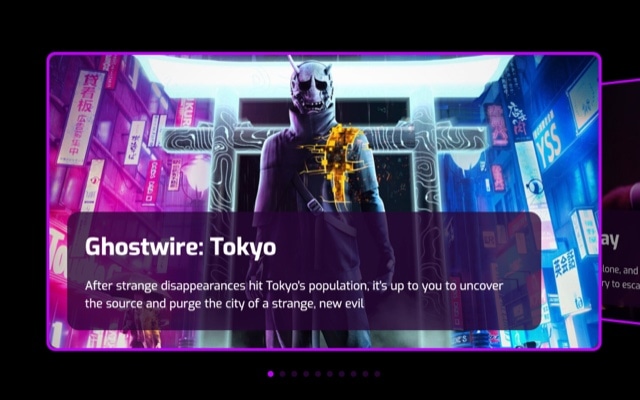
Video Games Slider with Custom Content
A bold, content-rich slider built around game-themed visuals with custom typography and layered text overlays. Each slide features a full-bleed background image paired with large titles, descriptive text, and content blocks — creating the kind of immersive, information-dense presentation you see on game storefronts and entertainment platforms. The layout is designed to make every slide feel like a feature showcase, where the imagery sets the atmosphere and the typography delivers the story.
This is not a simple image carousel. Each slide is a composed scene — background art establishes the visual mood, while headline text, supporting copy, and content elements are layered on top with intentional spacing and hierarchy. The result is a slider where visitors absorb both the visual and the textual content simultaneously, making it far more effective at communicating complex messages than a gallery of images with captions underneath. The game-themed styling demonstrates the approach, but the underlying layout pattern works for any content that demands visual impact and rich detail.
#What Makes This Template Stand Out
Rich Multi-Element Slide Layout
Each slide combines a full-bleed background image with multiple text elements — titles, subtitles, descriptions, and content blocks — all positioned with flexbox-based layout. This is not a single image with a caption. It is a composed content card where every element has its own styling, positioning, and animation. The layout supports complex information architecture within each slide.
Bold Custom Typography
Large, impactful titles dominate each slide with custom font sizes, weights, and colors. The typography is designed to be read at a glance — visitors absorb the headline before they process the background image. Supporting text is sized and positioned to complement the title without competing, creating a natural reading flow from primary message to details.
Full-Bleed Game Art Backgrounds
Background images stretch edge to edge on every slide, creating an immersive visual foundation. The game-themed artwork demonstrates how atmospheric imagery — dark environments, dramatic lighting, rich color palettes — sets the emotional tone for each slide. Replace with your own visuals to achieve the same cinematic impact for any content category.
Choreographed Content Animations
Text elements can be animated with over 20 entry effects — fade, blur, typewriter, letter-by-letter reveals, pop, bounce, and more. Each element supports independent delay and duration, so you can sequence the title appearing first, the subtitle fading in a beat later, and a CTA sliding up last. These choreographed reveals turn static slides into storytelling moments.
Dark, Atmospheric Visual Style
The dark color scheme and game-themed aesthetic create an immersive, high-contrast environment where both imagery and text stand out sharply. Dark backgrounds increase perceived richness of colors in the artwork and improve text legibility without heavy overlays. The atmosphere is immediately engaging — visitors feel like they are entering an experience, not viewing a slideshow.
#Who Should Use This Template
If you work in the gaming industry — game studios, publishers, esports organizations, or gaming media — this template speaks your audience's visual language. Gamers expect bold typography, immersive imagery, and information-rich layouts. The template delivers exactly that, with a slider format that mirrors the feature showcases on Steam, PlayStation Store, and Xbox Game Pass. Replace the demo artwork with your own game assets and you have a professional storefront component ready for production.
Creative professionals and agencies building landing pages, portfolios, or campaign sites for entertainment, tech, or lifestyle brands will find this template's rich content layout highly versatile. The multi-element slide structure — background plus title plus description plus supporting elements — is a pattern that works whenever you need to communicate more than a single image can convey. Music artists, film productions, product launches, and event promotions all benefit from this level of visual and textual density.
Developers building content-heavy web applications can export this template to React, Vue, or HTML and use it as a feature showcase, onboarding carousel, or content discovery interface. The pre-built layout with custom typography, content animations, and responsive breakpoints saves hours of component development. The slider is production-ready and integrates into any modern frontend stack.
#Best Use Cases
- ✓Game studio and publisher websites showcasing featured titles with cover art, descriptions, and platform details
- ✓Entertainment and media landing pages presenting featured content with immersive background imagery and rich text overlays
- ✓Product feature showcases where each slide highlights a capability with a hero image and detailed description
- ✓Music artist and label pages featuring album releases, tour dates, or track previews with bold visual treatment
- ✓Tech startup landing pages presenting product features or use cases with atmospheric visuals and clear messaging
- ✓Event and conference sites showcasing speakers, sessions, or highlights with full-bleed imagery and layered content
#How to Customize
- Click "Use This Template" to open the video games slider in Swiper Studio's visual editor1
- Replace the background images on each slide — click the slide background to upload your own artwork, photos, or graphics2
- Edit the title and text elements — click each text layer to update the copy, adjust font size, weight, color, and letter spacing3
- Reposition content elements using the flexbox layout controls — change alignment, spacing, and stacking direction to match your content structure4
- Add entry animations to each text element — select from fade, blur, typewriter, pop, bounce, or other effects with custom delay and duration for sequenced reveals5
- Switch to mobile and tablet previews to fine-tune responsive layouts — adjust text sizes, element visibility, and spacing per breakpoint6
- Export to HTML, React, Vue, Next.js, Web Component, or Webflow, or publish to CDN for instant embedding on your site7
#Frequently Asked Questions
- Can I use this template for content other than video games?
- Yes. The video game theme is a starting point that demonstrates the template's rich content layout. The structure — full-bleed background images with custom typography, text overlays, and content blocks — works for any industry. Replace the game artwork with your own visuals and update the text, and you have a premium content slider for products, services, events, portfolios, or any content that benefits from bold imagery and layered information.
- How do the custom text overlays work?
- Each slide contains independently editable text elements positioned over the background image. You can add titles, subtitles, descriptions, badges, and labels — each with its own font size, weight, color, position, and entry animation. Text elements are arranged using flexbox layout, so you control alignment, spacing, and stacking direction without writing CSS.
- Can I add animations to the slide content?
- Yes. Swiper Studio includes over 20 entry animation types — fade, blur, typewriter, letter-by-letter effects, pop, bounce, drop, slide, scale, and more. Each text and image element can have its own animation with independent delay and duration settings, allowing you to choreograph sequenced reveals where the title appears first, followed by the subtitle, then a CTA button.
- Does this template support navigation and pagination?
- Yes. You can enable navigation arrows, pagination dots, pagination bullets, progress bars, or fraction indicators. The template supports all Swiper navigation options, and each element is styled and positioned through the visual editor. Enable what you need, disable what you do not — every combination works.
- What export formats does this template support?
- You can export the video games slider as standalone HTML, a React component, a Vue component, a Next.js project, a Web Component, or a native Webflow element. You can also publish to CDN and embed the slider on any website with a single code snippet.
#Related Templates


#Related Resources
Ready to Build Your Slider?
Pick a template, customize it visually, and export production-ready code to React, Vue, Next.js, HTML, Webflow, and more. No coding required.








