
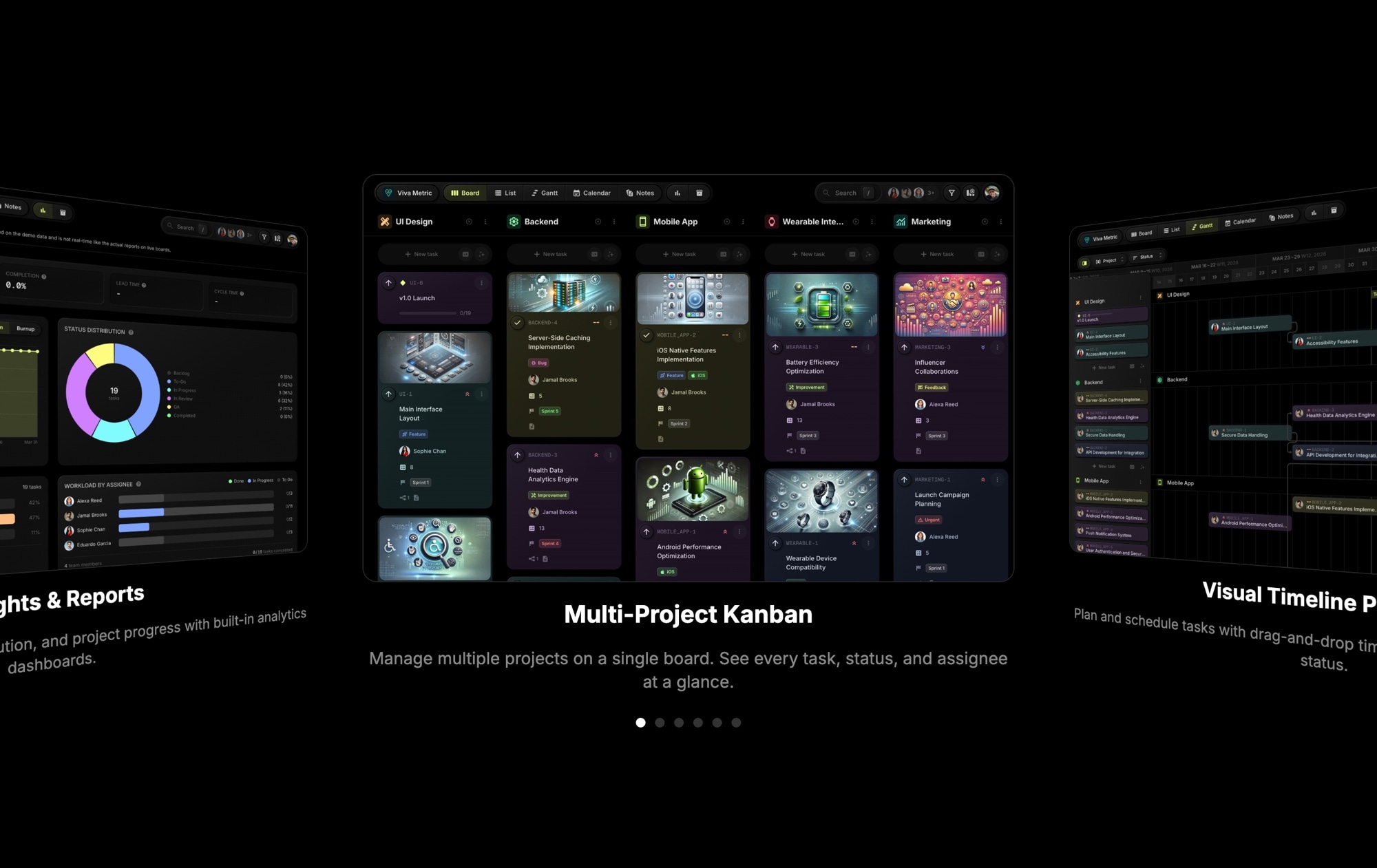
App Screenshots Coverflow Carousel
Show your app the way it deserves to be seen. This template presents app UI screenshots in a dramatic coverflow 3D carousel against a dark background, with the active screen front and center and neighboring slides angling away in perspective. It is the kind of presentation you see on the best app landing pages - immersive, interactive, and impossible to scroll past without engaging.
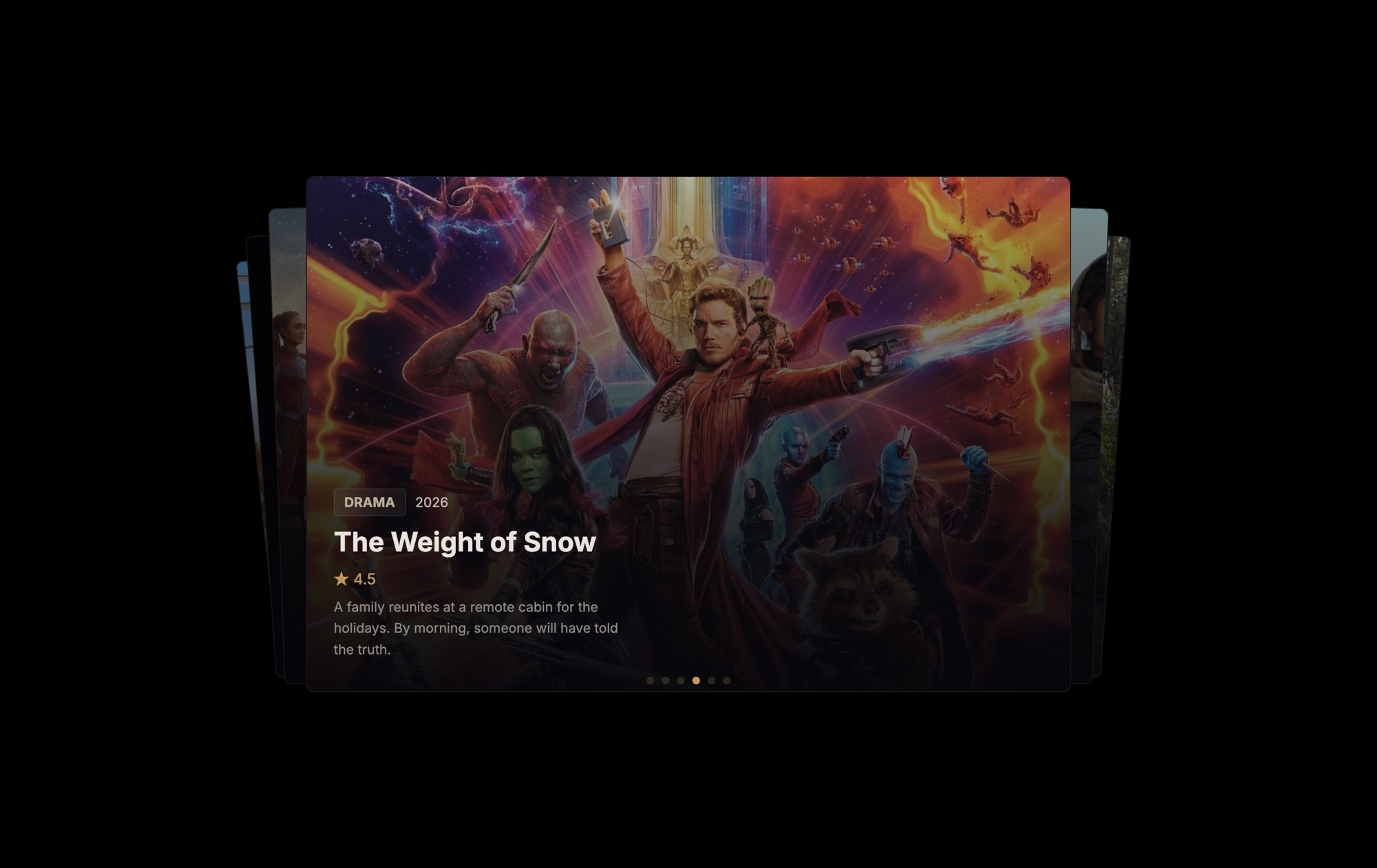
The dark background makes your UI pop. Multiple app screens are visible simultaneously - project management dashboards, kanban boards, timeline views - with the center slide enlarged and prominent. Text overlays on the active slide provide context (a title and description), and pagination dots at the bottom let visitors track their position. The overall effect communicates that your product is polished, feature-rich, and worth exploring.
#What Makes This Template Stand Out
Coverflow 3D Effect
The signature coverflow transform creates a depth-of-field illusion where the active screenshot sits front and center while adjacent slides rotate and recede in perspective. This is not a flat image carousel - it is a spatial, cinematic presentation that makes visitors want to swipe through every screen.
Dark Background for Maximum UI Contrast
App UI screenshots contain dense visual information - buttons, text, charts, navigation. The dark background eliminates competing visual noise from the page, letting every pixel of your interface stand out clearly. Colors appear more vibrant and details are easier to read.
Text Overlays on Active Slide
The center slide includes title and description text overlays that provide context for each screen. Visitors do not just see your UI - they understand what they are looking at. Add feature names, value propositions, or callouts that guide the viewer through your product story.
Pagination Dots for Navigation
Dots at the bottom of the carousel show visitors how many screens are available and which one they are viewing. This subtle UI element encourages exploration - visitors see there are more screens to discover and swipe through the full set.
Hardware-Accelerated Performance
The 3D transforms use GPU-accelerated CSS, so the coverflow effect runs at 60fps on desktops and mobile devices alike. There is no jank, no lag, and no compromise - your app presentation feels as polished as the app itself.
#Who Should Use This Template
If you are building a landing page for a web app, mobile app, or SaaS product, this template solves one of the hardest design challenges: showing your product's interface in a way that is both informative and visually compelling. Static screenshots in a grid feel flat. A single hero image only tells part of the story. The coverflow carousel lets you show multiple screens in context, with depth and motion that hold attention.
Product teams and developers launching a new app or feature will find this template invaluable. Instead of describing your UI in bullet points, you can show it. The 3D presentation communicates quality and attention to detail before a visitor reads a single word of copy. It works for SaaS dashboards, mobile apps, developer tools, and any product where the interface is a selling point.
Marketers and growth teams can use this on landing pages, Product Hunt launches, and app store marketing sites. The coverflow effect is eye-catching in a way that flat carousels are not - it creates a moment of delight that keeps visitors engaged and increases the chance they click through to sign up or download. And because it exports to any format, you can deploy it on your main site, a campaign page, or an embedded widget simultaneously.
#Best Use Cases
- ✓SaaS and web app landing pages showcasing dashboard views, feature screens, and workflow steps
- ✓Mobile app marketing pages displaying UI screens in an interactive, app-store-style presentation
- ✓Product Hunt and launch pages where a compelling product demo increases upvotes and signups
- ✓Developer tool documentation pages that walk users through key interface screens
- ✓Portfolio sites for UI/UX designers presenting app design work with cinematic flair
- ✓Startup pitch decks and investor pages where product screenshots demonstrate traction and polish
#How to Customize
- Click "Use This Template" to open the app screenshots carousel in Swiper Studio's visual editor1
- Replace each default screenshot with your own app UI screens - click the image element and upload your screenshots or paste image URLs2
- Edit the text overlays on the active slide to add feature names, descriptions, or callouts that match each screen3
- Adjust coverflow settings - modify the depth, rotation angle, and stretch values to control how dramatic the 3D effect appears4
- Add or remove slides to match the number of screens you want to showcase - duplicate existing slides for a quick starting point5
- Fine-tune the dark background color and text styling to align with your app's brand palette6
- Preview on mobile and tablet breakpoints to ensure the coverflow effect scales well and text overlays remain readable7
- Export to HTML, React, Vue, Next.js, Webflow, or publish to CDN and embed on your landing page with a single snippet8
#Frequently Asked Questions
- How does the coverflow 3D effect work?
- The coverflow effect applies a perspective transform and rotation to slides on either side of the active slide, creating a depth illusion where the center slide appears closest to the viewer and neighboring slides recede at an angle. The effect is hardware-accelerated and runs smoothly on all modern browsers and devices.
- Can I use my own app screenshots instead of the defaults?
- Yes. Click any screenshot image element in the editor and replace it with your own app UI screens. Upload from your computer, paste an image URL, or use the built-in asset library. The coverflow layout and 3D transforms apply automatically to whatever images you provide.
- Does the coverflow carousel work on mobile devices?
- Yes. The 3D transforms are fully hardware-accelerated and perform smoothly on mobile browsers. Touch swiping is enabled by default, and you can adjust the coverflow depth, rotation, and slide sizing at each responsive breakpoint for the best mobile experience.
- Can I add text overlays to each screenshot slide?
- Yes. The template includes text overlay elements on the center slide for a title and description. You can add text, buttons, badges, or any other child element to any slide. Text overlays can have their own entry animations, colors, and positioning.
- What export formats does this template support?
- All Swiper Studio export formats are available: standalone HTML, React component, Vue component, Next.js project, Web Component, and native Webflow element. You can also publish to CDN for instant embedding on any website, app store listing, or documentation page.
#Related Templates

#Related Resources
Ready to Build Your Slider?
Pick a template, customize it visually, and export production-ready code to React, Vue, Next.js, HTML, Webflow, and more. No coding required.








