
Conference Speakers Template
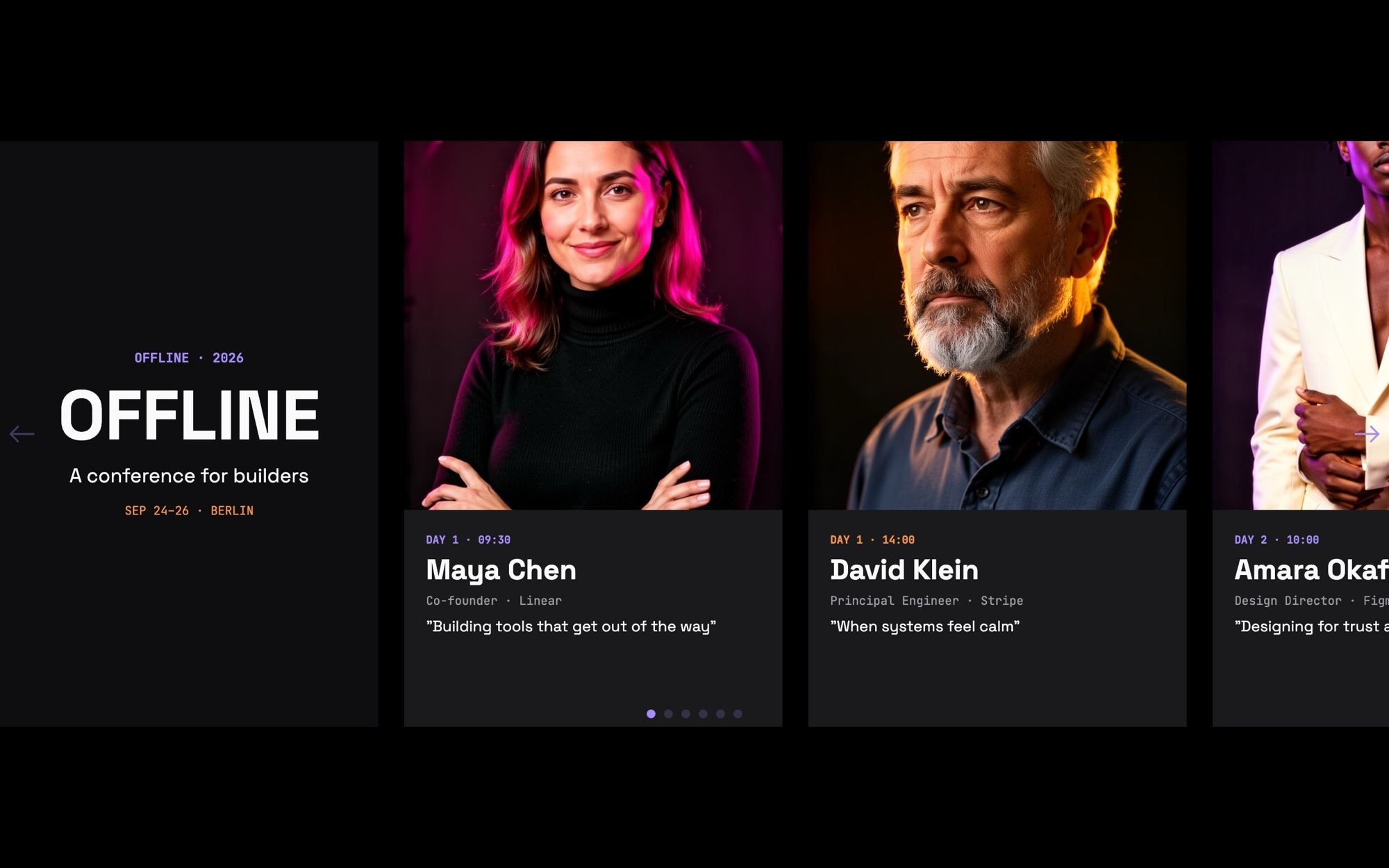
A speaker lineup carousel built for tech, design, and product conferences. The cover slide opens the program - "OFFLINE - 2026 - A conference for builders" by default - and six speaker cards line up after it, each with an editorial rim-lit portrait, name, role and company, talk title, and day plus time slot. A get-tickets CTA closes the sequence so visitors can browse the lineup and convert without leaving the section.
The near-black background, lavender and signal-orange rim lights, Space Grotesk display, and JetBrains Mono talk titles read as a confident, modern conference - the visual register of OFFLINE, Config, Smashing Conf, or Web Directions, not a generic event template. Open it in Swiper Studio, drop in your real speakers, and the carousel becomes the centerpiece of your event site.
#What Makes This Template Stand Out
Editorial Rim-Lit Speaker Portraits
Each portrait is treated with a dramatic rim light against a near-black backdrop - a familiar treatment from modern tech and design conference branding. The look flatters real headshots and signals serious editorial production rather than a stock attendee grid.
Speaker Card Information Hierarchy
Each card stacks portrait, name, role and company, talk title, and day plus time in a clear scannable order. Attendees get everything they need to decide if a session is for them - speaker, topic, when - in a single glance.
Space Grotesk And JetBrains Mono Pairing
Names and section titles use Space Grotesk 700 display for a confident modern voice, while talk titles, times, and tags use JetBrains Mono. The pairing has become the de facto type system for technical conferences and developer events because it reads precise without being cold.
Lavender And Signal-Orange Accents
Two rim-light accents - electric lavender and signal orange - alternate across the speaker portraits to differentiate sessions visually. The result is a lineup that feels designed rather than templated, with enough variation to keep the eye moving down the carousel.
Full Program Sequence Out Of The Box
Cover slide, six speaker cards, get-tickets CTA - the default eight slides match the rhythm of a real event landing page. Add or remove speakers to fit your program, and the structure stays coherent without redesigning the section.
#Who Should Use This Template
This template is built for conference organizers, event teams, and event producers running tech, design, product, or developer conferences. The lineup section is one of the highest-leverage parts of an event site - it is what convinces a visitor to register - and the rim-lit editorial treatment makes a confirmed lineup feel curated rather than crowdsourced. Drop in your real speakers, and the section does the persuasion work for you.
Marketing leads at event-driven companies and developer relations teams running flagship conferences (Config, Reactathon, Render, internal user conferences) can ship a polished lineup section in an afternoon instead of a sprint. The template reads as on-brand for serious technical events out of the box, and the visual editor means program changes - new speaker confirmations, time-slot tweaks, talk title updates - happen in real time.
Agencies and event production studios building conference sites for clients can use this as a production-ready starting point. The structure, hierarchy, and type system follow modern conference best practices, and the export options (Webflow, React, Vue, Next.js, plain HTML) match whatever stack the client already runs. It saves hours of design and development time compared to building a custom speakers carousel for each engagement.
#Best Use Cases
- ✓Tech and developer conference lineup sections - Config, Reactathon, Render-style events
- ✓Design and product conference speaker pages with talk titles and schedule slots
- ✓Internal company user conferences and customer summits with curated speaker tracks
- ✓Workshop, retreat, and small-format event pages spotlighting featured instructors
- ✓Hackathons and student conferences highlighting keynote speakers and judges
- ✓Webinar series and virtual event pages building the same lineup feel online
- ✓Industry summits and trade shows with named program tracks
- ✓Speaker bureau and agency sites showcasing rosters of available talent
#How to Customize
- Open the Conference Speakers template in Swiper Studio by clicking 'Use This Template' above to load the cover, six speaker cards, and tickets CTA into the editor1
- Update the cover slide with your conference name, year, and tagline - the default reads "OFFLINE - 2026 - A conference for builders"2
- Replace each portrait with your confirmed speaker headshots - the dark backdrop and rim-light treatment forgive most professional photography3
- Edit each card's text - speaker name in Space Grotesk, role and company, talk title in JetBrains Mono, and the day plus time slot4
- Recolor the lavender and orange rim-light accents to your conference brand if needed - every color is editable from the visual editor5
- Wrap each card or the speaker name in a link block pointing to a full bio page, a Sched listing, or a session detail page6
- Update the get-tickets CTA copy and link to your registration platform - Tito, Hopin, Eventbrite, Luma, or your own checkout7
- Preview each breakpoint, tighten the type scale on mobile, and export to HTML, React, Vue, Next.js, Web Component, or Webflow - or publish to CDN for an instant embed on the event site8
#Frequently Asked Questions
- Can I replace the speaker portraits and bios with our actual lineup?
- Yes. Every portrait, name, role, talk title, and time slot is fully editable in the visual editor. Upload professional headshots from your confirmed speakers - the dark backdrop and rim-lit treatment in the template are forgiving, so portraits shot against any neutral background tend to fit cleanly.
- How do I update talk titles, days, and time slots as the schedule firms up?
- Click any text element on a speaker card to edit it inline. Talk titles and times use JetBrains Mono for a programmatic, schedule-like rhythm, while names and roles use Space Grotesk display. You can update slots, add or remove speakers, and reorder cards as your program evolves - no developer needed.
- Will the speaker carousel work on phones for attendees checking the schedule on the go?
- Yes. The template ships with breakpoints showing roughly 1.2 cards on mobile, 2.5 on tablet, and 3.5 on desktop with 24px spacing. Portrait sizes, type scale, and rim-light accents stay balanced across screens, so attendees browsing the lineup on a phone get the same editorial feel as on desktop.
- Can I match the colors to our conference brand?
- Absolutely. The default palette - near black, lavender, and signal orange - reads as a modern tech or design conference, but every color is editable. Swap the rim-light accents to your conference brand colors, change the background, and the entire carousel inherits the new palette without rebuilding cards.
- How do I embed the speaker lineup on our event site?
- After customizing in Swiper Studio, publish to CDN to get an embed snippet you can paste into a Webflow event site, a WordPress page, a Notion-backed site, or a custom Next.js app. You can also export native code as React, Vue, Next.js, a Web Component, or static HTML for self-hosting.
#Related Templates

#Related Resources
- Swiper Studio for Team Showcases
- Swiper Studio for Landing Pages
- Swiper Studio for Agencies
- Swiper Studio for Marketers
Ready to Build Your Slider?
Pick a template, customize it visually, and export production-ready code to React, Vue, Next.js, HTML, Webflow, and more. No coding required.








