
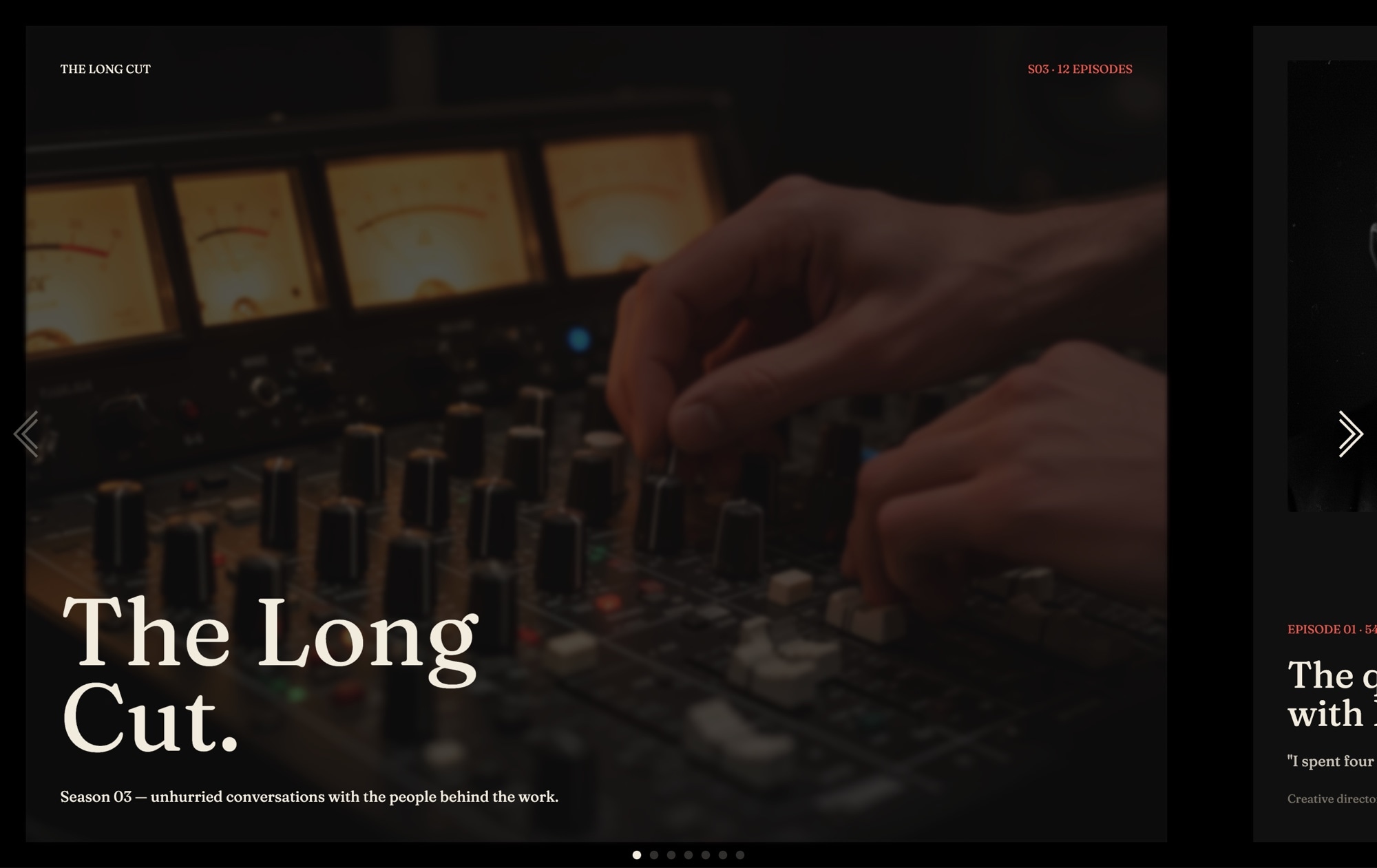
Podcast Audio Series Slider Template
A magazine-style slider built to promote an interview podcast season. The template opens with a bold cover reading "THE LONG CUT - SEASON 03", rolls through three episode slides with guest portraits and pullquotes in alternating layouts, surfaces listen-on platform tags, introduces the host, and closes with a subscribe CTA. Fraunces italic display type paired with Inter UI, a true black background, ivory cream, and warm coral accents give the whole series the feel of an editorial print feature.
#What Makes This Template Stand Out
Editorial Magazine Type Treatment
Fraunces 700 italic handles every headline and pullquote, paired with clean Inter for metadata and UI. The pairing reads like a print feature - confident, warm, and unmistakably editorial - without feeling old-fashioned.
Alternating Episode Layouts
Episodes 1-3 flip the portrait between left and right on each slide, keeping the pacing visually interesting as listeners swipe through the season. The rhythm mimics how a magazine lays out a feature package across a spread.
Coral Accent on True Black and Ivory
A tight three-color palette - true black, ivory #f2ecde, and warm coral #e85a4f - gives the series a signature look. The coral lands on episode numbers, pullquote marks, and the subscribe CTA so the eye always knows where to go.
Listen-On Platform Tags Built In
A dedicated slide surfaces Apple Podcasts, Spotify, YouTube, Overcast, and Pocket Casts as linkable tags. Drop in your show URLs, edit the labels, and the subscribe path is live - no custom code required.
Partial Next-Card Preview
The slide effect uses 60px of spaceBetween with a partial preview of the next card peeking in from the edge. It signals 'there is more to read' without autoplay, which suits long-form podcast storytelling.
#Who Should Use This Template
This template is built for podcasters and independent audio creators who want a season announcement page that looks like it belongs in a design magazine. If you are launching a new season of an interview show, the cover slide, three episode slides, host bio, and subscribe CTA map directly to how most podcasts promote a run. Swap the portraits, rewrite the pullquotes, and you have a production-ready promo page without commissioning custom design.
Media networks and podcast studios will find this useful for showcasing individual shows inside a larger brand. The editorial type treatment scales across a catalog - use the same template for every series you produce, change the palette per show, and you have a consistent yet distinct presentation for each.
Marketing teams, agencies, and creators promoting sponsored or branded podcasts can use it for campaign landing pages, press kits, and sponsor decks. The visual editor means producers and marketers can update episodes week to week without involving developers, and the multi-format export means the same slider drops into a Next.js site, a Webflow page, or a Substack embed.
#Best Use Cases
- ✓Season announcement pages for interview podcasts, narrative audio, and documentary series
- ✓Podcast network show pages where each series needs a distinct editorial look
- ✓Press kits and media one-pagers for pitching shows to sponsors, guests, and press
- ✓Newsletter and Substack embeds promoting a new season to existing subscribers
- ✓Agency landing pages for branded podcast productions and client case studies
- ✓Live event and festival recaps highlighting recorded conversations from a lineup
- ✓Audio book and audio documentary launches that benefit from portrait-led storytelling
- ✓Creator portfolio pages showcasing interview work for hosts, journalists, and producers
#How to Customize
- Open the Podcast Audio Series template in Swiper Studio - click 'Use This Template' above to load it directly into the editor1
- Edit the cover slide - update the show name, season label, and tagline, then tune the Fraunces italic sizing to fit longer or shorter titles2
- Replace the three guest portraits by selecting each image child and uploading your own photography, or pull from the built-in demo image library3
- Rewrite each episode's number, title, pullquote, and guest name - the alternating left-right layouts will keep the rhythm as you edit4
- Update the listen-on slide with your Apple Podcasts, Spotify, YouTube, Overcast, and Pocket Casts URLs, and adjust tag labels to match each platform5
- Customize the host bio slide with your photo, name, short bio, and social or website link - keep the ivory and coral accents or restyle to your brand6
- Add element animations to the pullquotes and episode numbers - letter-fade, typewriter, and blur all suit the editorial feel7
- Switch to mobile and tablet previews to restack the portraits into single-column layouts, then export to HTML, React, Vue, Next.js, Web Component, or Webflow8
#Frequently Asked Questions
- Can I try the podcast audio series template before buying?
- Yes. You can open the template in Swiper Studio, customize it, and preview it in the demo editor. Exporting production-ready code requires a paid plan, but you can test-drive the full editor, swap portraits, rewrite episode titles, and try every feature before committing.
- Can I change the guest portraits, pullquotes, and episode titles?
- Absolutely. Every slide is fully editable. Replace the guest portrait photos, update the episode number and title, rewrite the pullquote copy, change the season label, adjust the listen-on platform tags, and tweak host bio copy - all visually in the editor with no code required.
- Does the editorial layout adapt to mobile screens?
- Yes. The template ships with breakpoint settings for mobile, tablet, laptop, and desktop. The Fraunces display headlines scale down, the alternating portrait layouts restack into a single column on phones, and spacing adjusts so the editorial feel holds up at every size.
- Can I link the subscribe CTA to Apple Podcasts, Spotify, and other platforms?
- Yes. The listen-on platform tags and the subscribe CTA on the final slide are fully linkable. Point them at your show on Apple Podcasts, Spotify, YouTube, Overcast, Pocket Casts, or any RSS feed. You can edit labels, colors, and hover states to match each platform.
- What export formats does this template support?
- You can export the podcast slider as standalone HTML, a React component, a Vue component, a Next.js project, a Web Component, or a native Webflow element. You can also publish to CDN for instant iframe embedding on Substack, Ghost, WordPress, or any other podcast landing page.
#Related Templates

#Related Resources
- Swiper Studio for Landing Pages
- Swiper Studio for Marketers
- Swiper Studio for Small Businesses
- Swiper Studio for Agencies
Ready to Build Your Slider?
Pick a template, customize it visually, and export production-ready code to React, Vue, Next.js, HTML, Webflow, and more. No coding required.








