
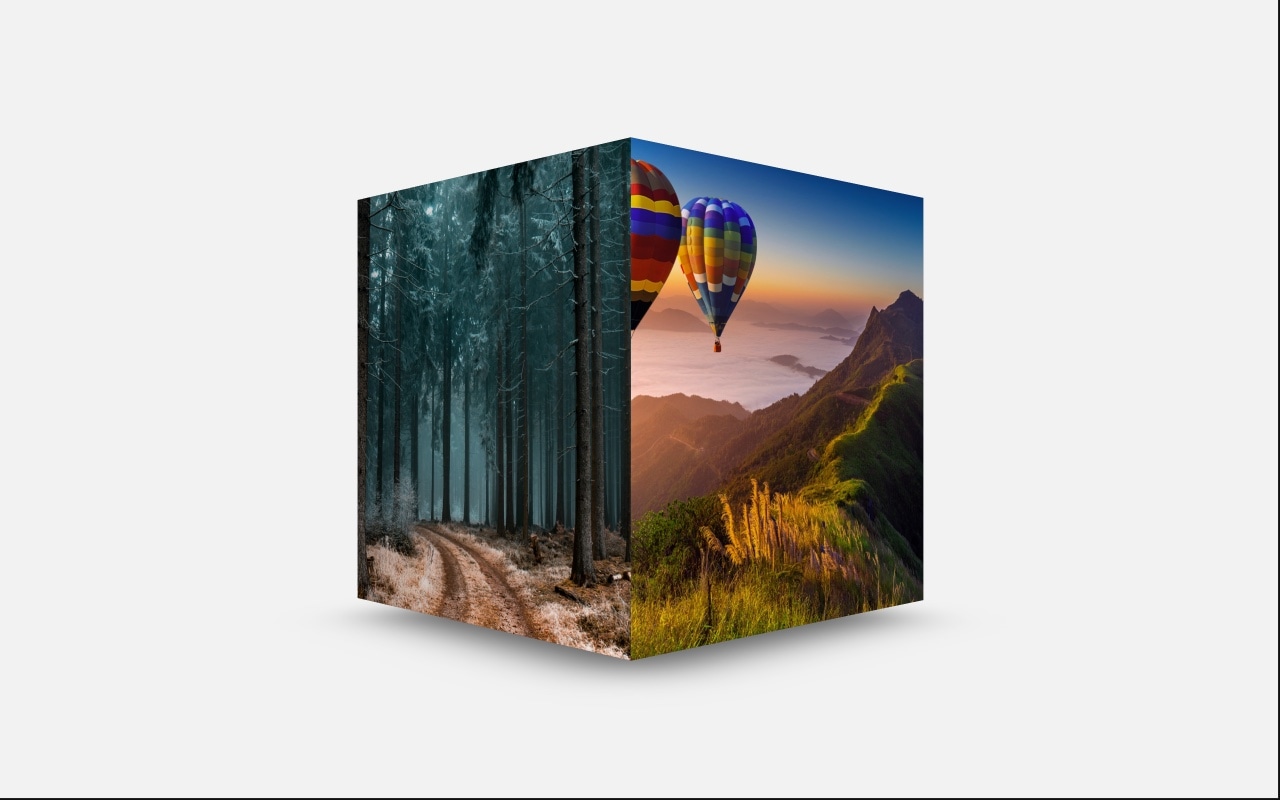
Cube Slider with 3D Rotation Effect
A striking 3D cube slider that rotates between slides like a spinning box in three-dimensional space. Each slide occupies one face of the cube, and swiping triggers a smooth rotation that reveals the next face with real perspective and depth. It is one of the most visually dramatic transition effects available in Swiper, and this template gives you a ready-to-use starting point with a fixed-size layout that keeps the cube geometry pixel-perfect.
The cube effect transforms an ordinary image slider into something visitors stop and interact with. Instead of slides sliding left or right, they rotate in 3D — complete with shadows that reinforce the spatial illusion. The fixed dimensions ensure the cube proportions are correct, and every face transition feels physically convincing. Whether you are showcasing product images, portfolio pieces, or hero content, the cube effect makes the presentation memorable.
#What Makes This Template Stand Out
True 3D Cube Rotation
This is not a simulated depth effect or a flat animation with a shadow. The cube effect uses genuine CSS 3D transforms to place each slide on a face of a rotating cube. You see two faces during the transition, perspective foreshortening, and realistic shadow casting. The result is a slider that feels like a physical object rotating in space.
Fixed-Size Layout for Perfect Geometry
The cube slider uses a fixed-size container that ensures every face has identical dimensions. This creates a geometrically correct cube rotation where edges align precisely during transitions. No stretching, no aspect ratio distortion — just clean, satisfying 3D rotation that looks right from every angle.
Dynamic Shadow Effects
As the cube rotates, shadows shift and move to reinforce the illusion of a solid object turning in 3D space. The shadow offset, opacity, and scale are all configurable in the editor, letting you dial in a subtle shadow for elegance or a dramatic shadow for maximum visual impact.
Touch-Driven Rotation
On mobile and touchscreen devices, swiping the cube feels natural and responsive. The rotation follows your finger in real time, not just triggering a preset animation. This direct-manipulation interaction is deeply satisfying and encourages visitors to explore every face of the cube.
Hardware-Accelerated Performance
The 3D transforms are GPU-accelerated, delivering smooth 60fps rotation on desktops, tablets, and phones. There is no JavaScript animation loop — the browser's compositing engine handles the heavy lifting, so the cube effect has zero impact on your page's main thread performance.
#Who Should Use This Template
If you need a hero section or feature showcase that immediately grabs attention, the cube slider delivers visual impact that flat carousels cannot match. The 3D rotation creates a "wow" moment — visitors stop scrolling, interact with the cube, and engage with your content. It is especially effective for landing pages, product launches, and portfolios where first impressions matter.
Designers and creative professionals showcasing portfolio work will find the cube effect adds a layer of craft to their presentation. Each face of the cube becomes a miniature stage for an image or design piece. The rotation between faces feels intentional and curated, turning a simple gallery into an interactive experience that demonstrates your attention to detail.
Product teams and marketers can use the cube slider to present a small number of hero images or key messages with maximum impact. The cube naturally limits the number of visible faces, which forces you to be selective — four to six of your best images or value propositions, each given the full-face treatment. This constraint actually improves communication by eliminating filler slides.
#Best Use Cases
- ✓Hero sections on landing pages where a dramatic 3D effect captures visitor attention immediately
- ✓Product showcase displays rotating through key product images or angles with spatial depth
- ✓Portfolio presentations for designers and photographers who want an interactive gallery experience
- ✓Feature highlight sections cycling through four to six key value propositions or screenshots
- ✓Event and conference pages showcasing speakers, venues, or agenda highlights with visual flair
- ✓Creative agency homepages where the cube effect demonstrates technical and design capabilities
#How to Customize
- Click "Use This Template" to open the cube slider in Swiper Studio's visual editor1
- Replace the default images on each cube face — click the slide background and upload your own images or paste image URLs2
- Adjust the cube effect settings including shadow visibility, shadow offset, and shadow scale to match your visual style3
- Modify the transition speed to control how fast the cube rotates between faces — slower for dramatic reveals, faster for snappy navigation4
- Add or remove slides to control the number of cube faces — each slide becomes one face of the rotating cube5
- Set different cube dimensions per breakpoint to ensure the slider looks proportional on desktop, tablet, and mobile screens6
- Export to HTML, React, Vue, Next.js, Webflow, or publish to CDN and embed the cube slider on your site with a single snippet7
#Frequently Asked Questions
- How does the 3D cube rotation effect work?
- The cube effect maps each slide onto the face of a 3D cube. When you swipe or navigate, the cube rotates to reveal the next face. The rotation is powered by hardware-accelerated CSS 3D transforms, so it runs at 60fps on desktops and mobile devices without any performance impact. The effect creates a genuine sense of depth and spatial movement that flat transitions cannot achieve.
- Can I change the cube rotation speed and direction?
- Yes. In the Swiper Studio editor, you can adjust the cube effect settings including shadow visibility, shadow offset, and shadow scale. You can also control the overall transition speed, enable or disable touch swiping direction, and add autoplay with a custom delay to control how fast the cube rotates automatically.
- Does the cube slider work on mobile devices?
- Yes. The 3D cube transforms are fully hardware-accelerated and perform smoothly on iOS and Android browsers. Touch swiping feels natural — a horizontal swipe rotates the cube to the next face. The fixed-size layout also ensures the cube renders crisply on smaller screens without overflow or clipping issues.
- Why is the cube slider fixed size instead of responsive?
- The cube effect requires equal-dimension faces to create a geometrically correct 3D cube. A fixed size ensures the rotation looks natural and the perspective math is accurate. You can still adjust the cube dimensions in the editor and set different sizes per breakpoint to optimize for desktop, tablet, and mobile viewports.
- What export formats does this template support?
- All Swiper Studio export formats are available: standalone HTML, React component, Vue component, Next.js project, Web Component, and native Webflow element. You can also publish to CDN for instant embedding on any website with a single code snippet.
#Related Templates





#Related Resources
Ready to Build Your Slider?
Pick a template, customize it visually, and export production-ready code to React, Vue, Next.js, HTML, Webflow, and more. No coding required.








