
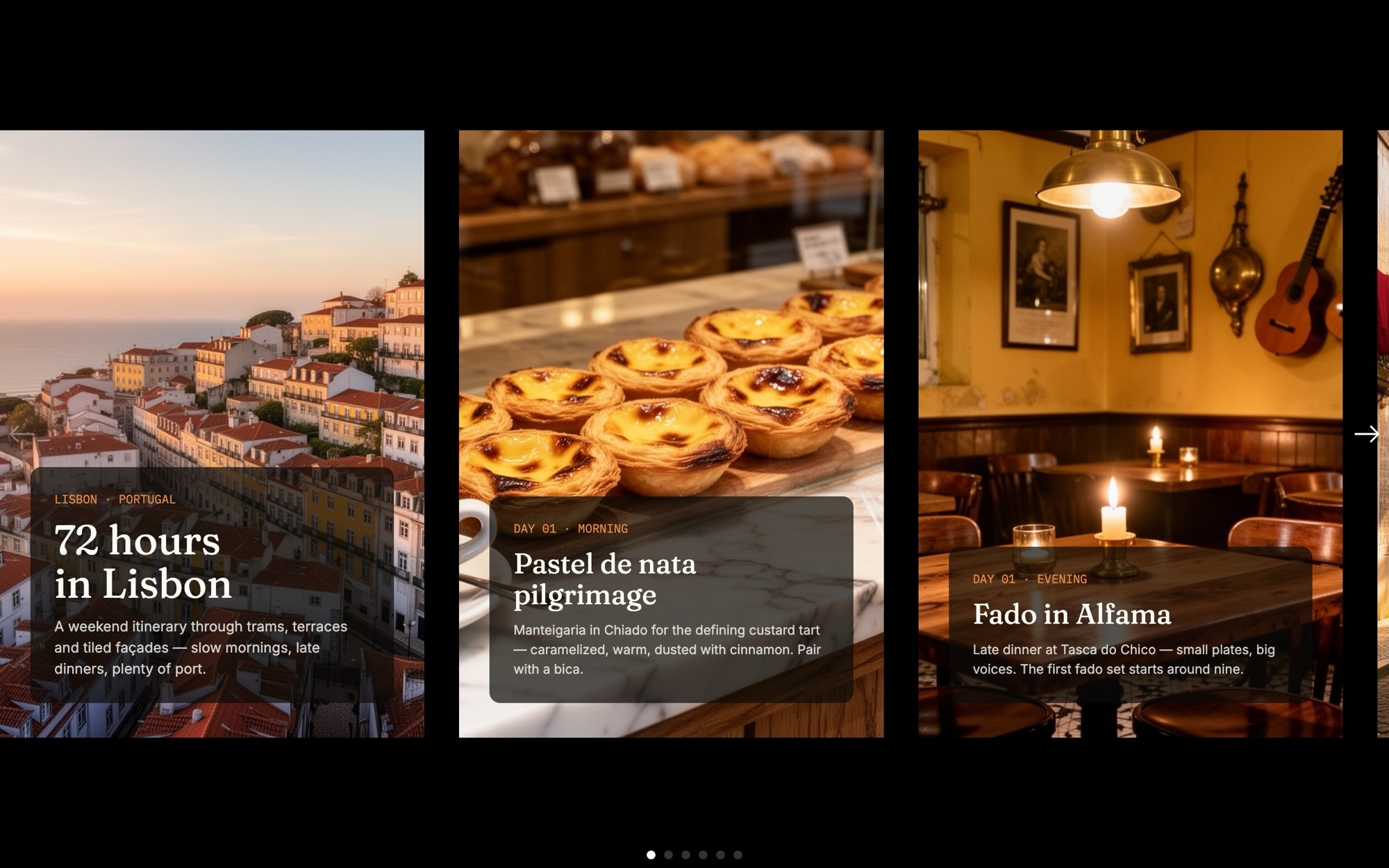
City Guide - 72 Hours Itinerary Slider Template
Travel readers do not want a wall of text. They want a route they can actually follow. The City Guide template puts a 72-hour itinerary into a swipeable card carousel - cover, day-by-day stops across morning and evening, a where-to-stay card, and a save-the-guide call to action - so a reader can flip through your picks the way they would flip through a magazine spread on the plane.
Fraunces sets the editorial display tone, IBM Plex Mono handles the day labels and timing tags, and Inter keeps body copy clean. The card layout shows roughly one stop on mobile, two on tablet, and three on desktop, with a peek of the next card to keep readers swiping. The template ships with Lisbon as the demo city, but it is built to adapt to anywhere - swap the imagery, rewrite the stops, and you have a guide for any destination.
#What Makes This Template Stand Out
Three-Day Itinerary Structure
Cover, Day 1 morning, Day 1 evening, Day 2 morning, Day 2 evening, Day 3, where to stay, and save the guide. The 72-hour arc is built in, so you only swap content. Re-label days for shorter or longer trips and the structure still holds.
Multi-Card Browsing With Peek
The slider shows 1.1 cards on mobile, 2.1 on tablet, and 3.1 on desktop. The fractional values show a peek of the next card so readers see there is more to swipe through, which boosts engagement compared to a single full-bleed card.
Fraunces, Inter, and IBM Plex Mono Pairing
Fraunces in the 600 weight handles editorial headlines and stop names. IBM Plex Mono carries day labels and timing tags so they read like a printed itinerary. Inter keeps body copy crisp at every size. The combination is proven for travel and editorial content.
Editorial Palette With Forest and Paprika Accents
Paper, ink, deep forest, and paprika - a palette borrowed from independent travel magazines. The forest accent grounds the cards, paprika picks out day labels and CTAs, and every color is editable to match your own publication.
Adaptable to Any City
The template ships with Lisbon as the demo city, but the structure is destination-agnostic. Swap the imagery and headlines and the same eight slides work for Tokyo, Mexico City, Marrakech, Porto, or a long weekend in your own town.
#Who Should Use This Template
This template is built for travel publications, independent guidebook writers, and destination marketing teams who need a way to publish itineraries that feels closer to a printed spread than a blog post. The card carousel format invites browsing, the day labels make the guide easy to skim, and the editorial type pairing reads as authored rather than auto-generated.
Hotels, tour operators, and city tourism boards can use the template as a content marketing asset on their site - a 72-hour neighborhood guide pinned to the homepage, a season-themed itinerary on a campaign page, or a property-adjacent guide that drives engagement and bookings. The save-the-guide CTA can link to a downloadable PDF, a newsletter signup, or a related booking flow.
Travel bloggers, content creators, and freelancers publishing on WordPress, Ghost, or Substack can drop this into a post and instantly elevate the look. Customize the palette to match your blog, swap the photos, write the stops, and the slider does work that a static numbered list never could.
#Best Use Cases
- ✓Destination guide articles published on travel magazines and editorial blogs
- ✓City tourism board landing pages introducing first-time visitors to a neighborhood or weekend route
- ✓Hotel and resort content marketing - a curated 72-hour guide to the area around the property
- ✓Tour operator and DMC sites turning a multi-day program into a swipeable preview
- ✓Newsletter and Substack posts where a printed-feel itinerary outperforms a numbered list
- ✓Personal travel blogs documenting a trip with a clear day-by-day structure
- ✓Press kits and trade content for tourism partners who want to share a curated itinerary
- ✓Internal corporate travel guides for new hires or visiting team members
#How to Customize
- Open the City Guide template in Swiper Studio - click 'Use This Template' above to load the eight slides into the editor1
- Replace the cover headline and city name with your destination - update the eyebrow tag to your trip length, season, or theme2
- Swap the photography on each day card with your own neighborhood, food, and cultural images through the media panel3
- Rewrite the day labels and stop headlines - keep the IBM Plex Mono day tag pattern (DAY 01, DAY 02, DAY 03) for editorial consistency or rename for shorter trips4
- Update each card body copy with your specific stops - cafes, restaurants, museums, viewpoints - keeping captions tight so the cards stay scannable5
- Edit the where-to-stay slide with your hotel picks or partner properties, and link the save-the-guide CTA to a PDF download, newsletter signup, or booking flow6
- Adjust the palette - paper, ink, forest, and paprika are editable across card backgrounds, day labels, and accents to match your publication brand7
- Preview mobile, tablet, and desktop breakpoints and export to HTML, React, Vue, Next.js, Web Component, or Webflow - or publish to CDN for embedding on your blog or CMS8
#Frequently Asked Questions
- Can I adapt this guide to a different city?
- Yes. The template ships with Lisbon as the demo city, but every label, headline, neighborhood name, and image is editable. Drop in your own city, swap the photography, rewrite the day-by-day stops, and the structure adapts to anywhere - from Tokyo to Mexico City to a small town with a weekend itinerary.
- Can I change the number of days or stops in the itinerary?
- Absolutely. The template includes eight slides covering a 72-hour itinerary across three days plus a where-to-stay slide and a save CTA. You can duplicate slides for a longer trip, remove slides for a shorter one, and re-label day tags to match any time window - a half-day walk, a long weekend, or a full week.
- Does the multi-card layout adapt to mobile?
- Yes. The slider shows roughly one card on mobile, two on tablet, and three on desktop, with a peek of the next card to invite swiping. Type sizes, card spacing, and layout reflow per breakpoint, so the guide reads cleanly on phones and gets richer on larger screens.
- Can I match the palette to my publication or brand?
- Yes. The default palette pairs paper, ink, forest, and paprika - editorial colors that suit travel content - but every color is editable. Update card backgrounds, day tags, headline color, and accents in the visual editor to match a magazine, blog, or destination marketing brand.
- How do I publish this guide to my travel blog or CMS?
- Publish to CDN from Swiper Studio and paste the embed snippet into your CMS. It works with WordPress, Webflow, Ghost, Substack embeds, Squarespace, and any platform that accepts an embed block. You can also export standalone HTML, React, Vue, Next.js, or a Web Component if you prefer to host the slider yourself.
#Related Templates
#Related Resources
- Swiper Studio for Landing Pages
- Swiper Studio for Marketers
- Swiper Studio for WordPress
- Swiper Studio for Webflow
Ready to Build Your Slider?
Pick a template, customize it visually, and export production-ready code to React, Vue, Next.js, HTML, Webflow, and more. No coding required.








