
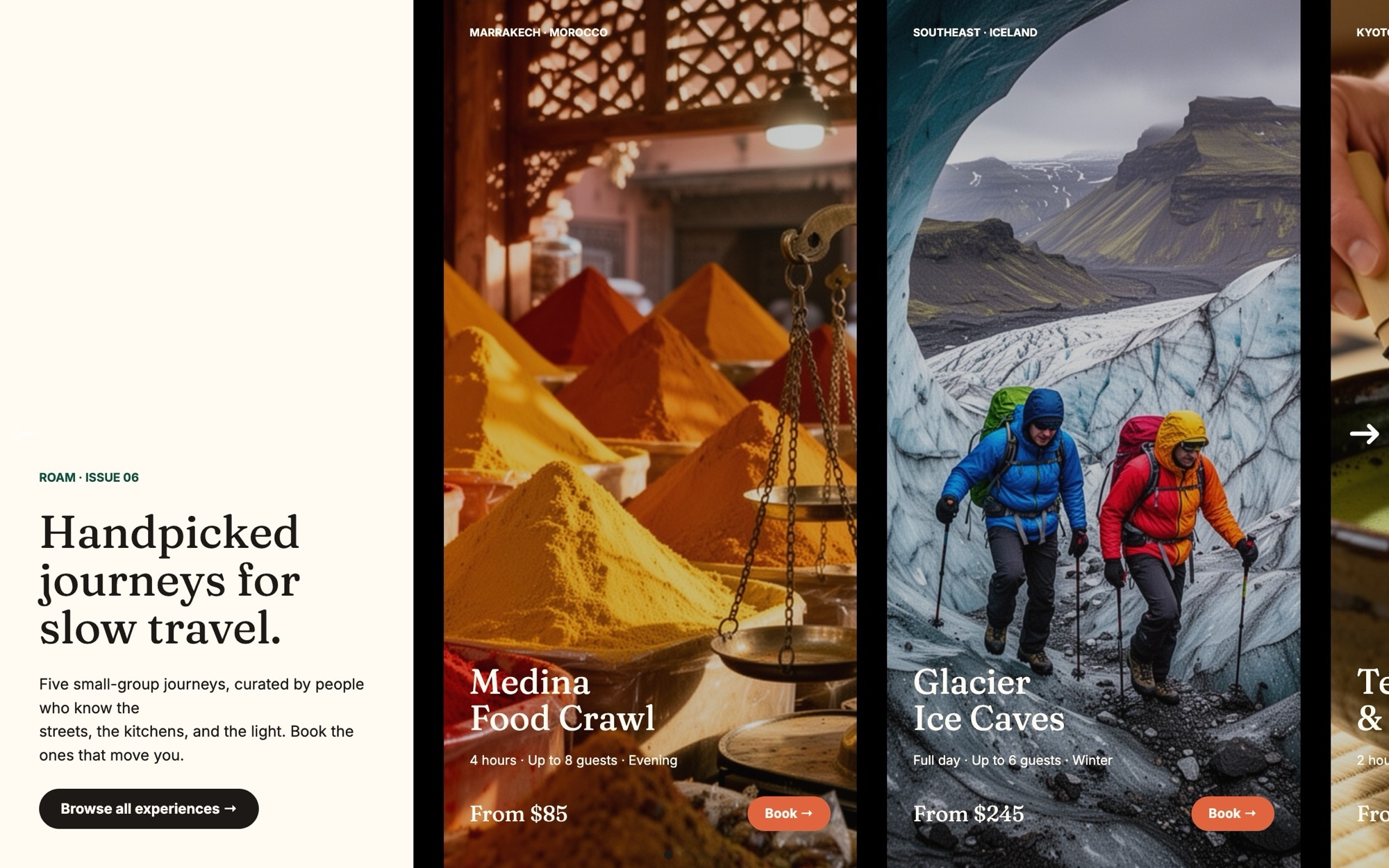
Tours and Experiences Slider Template
Travel buyers compare experiences. The Tours and Experiences template gives you a card carousel built for that comparison - a header slide that introduces the catalog, then five activity cards each with hero photo, tour name, duration, group size, price, and a Book link. Visitors swipe through your roster the way they would scroll a guidebook page, getting a clean read on each option without leaving the slider.
The card layout shows roughly one tour on mobile, two on tablet, and three on desktop, with a peek of the next card to keep visitors moving. Fraunces in 600 carries the tour names with editorial weight, Inter handles the detail rows and buttons, and a palette of cream, deep teal, and warm coral keeps the slider warm without leaning kitschy. Drop in your own photography and tour data and you have a bookable carousel ready to ship.
#What Makes This Template Stand Out
Activity Card Layout With All Booking Detail
Each card shows hero photo, tour name, duration, group size, price, and a Book button. The information is structured the way buyers actually evaluate experiences, so you do not need to redesign the card to match your booking flow.
Multi-Card Carousel With Peek
The slider displays 1.1 cards on mobile, 2.2 on tablet, and 3.2 on desktop. The fractional peek of the next card signals swipe-ability and gives visitors a sense of the catalog depth at a glance.
Fraunces and Inter Editorial Pairing
Fraunces in the 600 weight gives tour names an editorial feel that lifts them above a generic price list. Inter keeps duration, group size, and price legible at every breakpoint, making the cards scannable without looking utilitarian.
Cream, Teal, and Coral Travel Palette
Cream backgrounds, deep teal headlines, and warm coral accents on Book buttons - colors borrowed from independent travel brands. The palette is editable end to end if you need to match an existing booking platform.
Mixed-Category Demo Range
The five demo tours span food, adventure, cultural, cycling, and stargazing categories - covering the visual range an operator with a varied catalog actually needs. Replace each card with your own tours and the layout holds for any activity type.
#Who Should Use This Template
This template is built for tour operators, experience platforms, and DMCs that need a clean way to feature curated activities on a homepage, category page, or partner microsite. Whether you sell day tours, multi-day expeditions, or single-experience bookings, the activity card structure communicates duration, group size, and price in the format buyers expect.
Hotels, resorts, and concierge teams can use the template to feature partner experiences in the area - a five-card carousel of food walks, hikes, and cultural visits sits well on a property homepage or in a guest-only portal. The Book CTAs link out to operator pages or your own internal booking flow.
Marketplaces, content creators, and travel agencies building category pages or curated lists will find this a production-ready starting point. The card structure mirrors how Viator, GetYourGuide, and Airbnb Experiences present activities, but the editorial palette and typography make it feel like an authored editorial rather than a generic listing grid.
#Best Use Cases
- ✓Tour operator homepages featuring signature day tours and seasonal experiences
- ✓Hotel and resort partner-experience pages where activities drive guest spend
- ✓Destination marketing organization sites curating top regional experiences
- ✓Marketplace category pages presenting a hand-picked subset of tours
- ✓Content marketing posts and travel articles where activities are the conversion point
- ✓Press kits and trade pages distributed to travel agents and OTAs
- ✓Single-operator microsites for boutique or specialty experience brands
- ✓Loyalty and members-only pages featuring curated experiences for repeat travelers
#How to Customize
- Open the Tours and Experiences template in Swiper Studio - click 'Use This Template' above to load the six slides into the editor1
- Update the header slide brand name and tagline to match your tour operator or platform2
- Replace each tour card photo with your own activity photography through the media panel - hero shots that show people in the experience tend to convert best3
- Edit each tour card content - tour name, duration, group size, price, and any badges - keeping the detail rows tight and scannable4
- Link each Book button to your real booking engine, third-party booking platform, or activity detail page5
- Add or remove tour cards to match your catalog - duplicate an existing card for consistent styling, then swap the content6
- Customize the palette - cream, deep teal, and warm coral are editable across card backgrounds, headlines, and Book buttons to align with your brand7
- Preview across mobile, tablet, and desktop breakpoints, then export to HTML, React, Vue, Next.js, Web Component, or Webflow - or publish to CDN for embedding on your tour site8
#Frequently Asked Questions
- Can I edit the tour names, durations, group sizes, and prices?
- Yes. Every detail on each tour card is fully editable. Click any tour name, duration tag, group size, or price to update the text directly in the visual editor. You can also rearrange detail rows or add new ones to match how your booking system displays activity information.
- Can I add a real booking link to each Book button?
- Absolutely. Wrap each Book button in a link block pointing to your booking engine, checkout flow, or third-party platform. The same approach works for Bokun, FareHarbor, GetYourGuide, Viator, or your own custom booking system.
- Does the multi-card layout work on mobile?
- Yes. The slider shows roughly 1.1 cards on mobile, 2.2 on tablet, and 3.2 on desktop. The peek of the next card invites swiping, and font sizes, card spacing, and image dimensions adjust per breakpoint so the experience feels right on any screen.
- Can I swap the demo tours for my own activities?
- Yes. The template ships with five demo tours (Marrakech medina food, Iceland glacier hike, Kyoto tea ceremony, Tuscan vineyard cycle, Patagonia stargazing) that show category range. Replace each card with your own photography, tour name, and detail rows - the layout adapts to any activity type from city walks to multi-day expeditions.
- What export and embed options are available?
- Export as standalone HTML, a React component, a Vue component, a Next.js project, a Web Component, or via Paste into Webflow. You can also publish to CDN and paste the embed snippet into Shopify, WordPress, Squarespace, or any tour operator CMS that accepts an embed block.
#Related Templates

#Related Resources
- Swiper Studio for Product Carousels
- Swiper Studio for Landing Pages
- Swiper Studio for Small Businesses
- Swiper Studio for Marketers
Ready to Build Your Slider?
Pick a template, customize it visually, and export production-ready code to React, Vue, Next.js, HTML, Webflow, and more. No coding required.








