
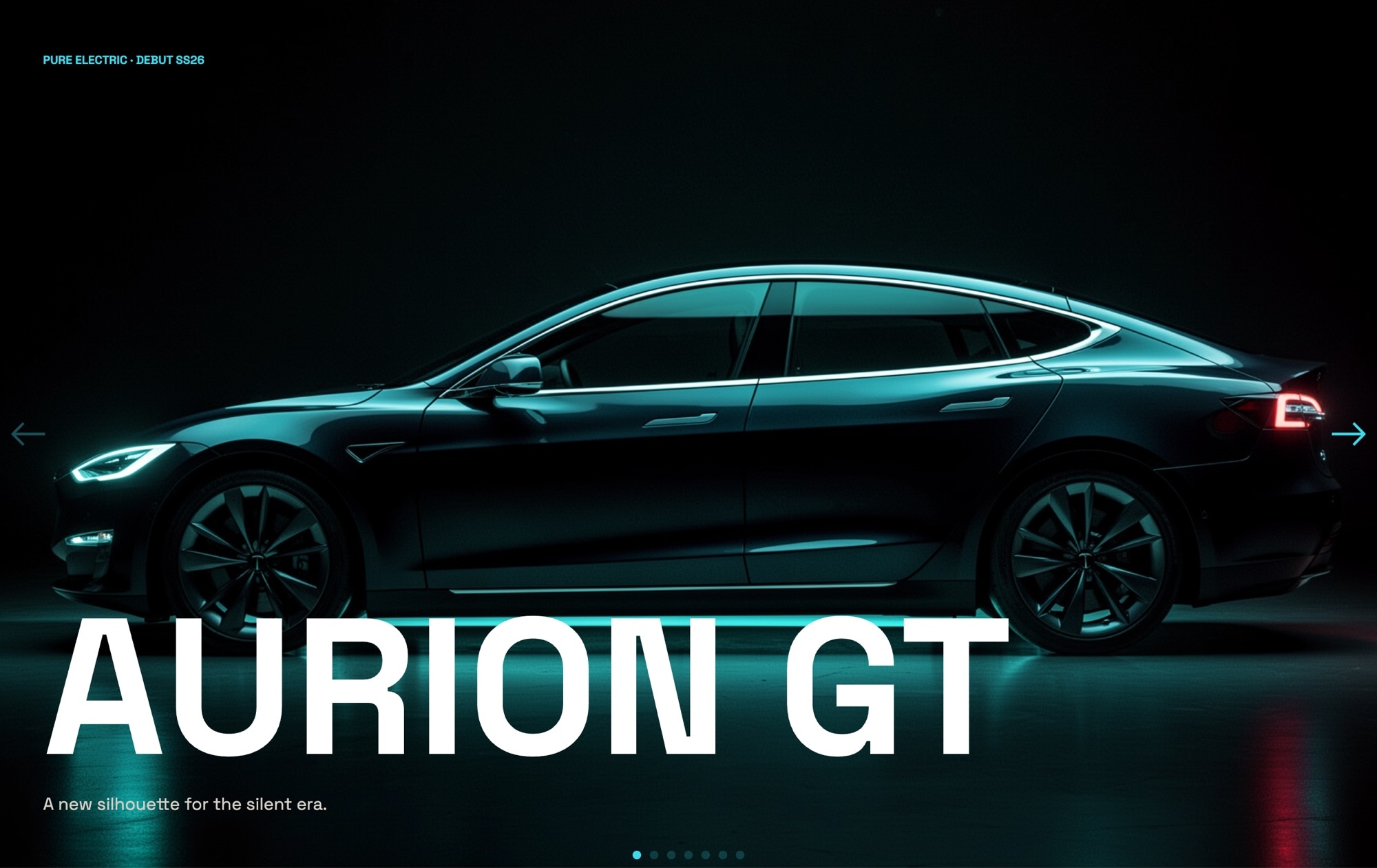
EV Automotive Reveal Slider Template
A cinematic, dark-mode electric vehicle launch slider built for product reveals that need to feel like a keynote. Seven slides carry the viewer from a moody model name hero silhouette through exterior, interior, tech macro, animated performance specs, a lifestyle night-charging frame, and a neon cyan reserve CTA over a mountain road aerial. Matte black, electric cyan, and warm silver set the tone; Space Grotesk and JetBrains Mono handle display type and spec numerics. Open it in Swiper Studio, drop in your own vehicle, and ship a launch page in an afternoon.
#What Makes This Template Stand Out
Cinematic Dark Palette
Matte black #0f0f10, electric cyan #3dd9eb, and warm silver #d4d0c8 combine into a premium dark aesthetic built for product reveals. The contrast is intentional - deep blacks make the cyan pop on the reserve CTA while silver keeps long-form copy readable without breaking the mood.
Seven-Slide Launch Narrative
The sequence is structured like a keynote reel: model name silhouette, exterior three-quarter hero, interior cockpit, tech detail macro, animated performance stats, lifestyle night charging, and a reserve CTA on a mountain road aerial. Each slide has a single job, so your story lands cleanly.
Number-Roll Spec Animation
The performance slide uses a number-roll animation to count up 0-60 time, range, and peak power as the slide enters view. JetBrains Mono gives the digits an engineered, instrument-cluster feel while Space Grotesk handles labels and units with a modern display weight.
900ms Fade Transition
A slow 900ms fade replaces the default slide transition so every frame feels like a cut in a launch film. No sideways motion, no distraction - just one image dissolving into the next while your viewer absorbs the product.
Reserve CTA Built In
The final slide features a neon cyan reserve button over a mountain road aerial, pre-wired for a link destination. Swap the label, link target, and background footage to point at your reservation form, waitlist, or dealer locator without rebuilding the layout.
#Who Should Use This Template
This template is built for automotive brands and EV companies preparing a model launch, concept reveal, or reservation campaign. The dark cinematic aesthetic matches the visual language used by modern EV makers, and the seven-slide structure maps cleanly onto the exterior, interior, tech, performance, and lifestyle story you already tell in press materials.
Product launch marketers and creative agencies working on automotive clients will find the template saves days of layout work. The spec slide with number-roll animation is the kind of detail that usually requires custom code; here it is a preset you can point at your own metrics. Swap photography, update copy, and the launch microsite is ready for review.
Luxury tech brands outside automotive can use this same structure for any high-consideration product reveal - electric bikes, consumer robotics, premium audio, or smart home flagships. The palette, the fade pacing, and the spec animation work for any product where the story lives in the details and the first impression has to feel premium.
#Best Use Cases
- ✓EV and automotive launch microsites featuring a new model, trim, or limited edition reveal
- ✓Reservation and waitlist pages for pre-order campaigns where the reserve CTA needs to convert
- ✓Auto show and press kit landing pages that need a self-running cinematic reel for media and buyers
- ✓Dealer and showroom digital displays running an ambient loop of the flagship vehicle
- ✓Luxury tech product launches - electric bikes, drones, smart home flagships - that need the same dark cinematic treatment
- ✓Investor and brand decks embedded as an iframe to give stakeholders a consistent, on-brand product tour
- ✓Concept car and design study reveals where exterior, interior, and tech macros tell the engineering story
- ✓Brand campaign pages tied to a specific launch date with countdown, specs, and a reserve action
#How to Customize
- Open the EV Automotive Reveal template in Swiper Studio - click 'Use This Template' above to load it directly into the editor1
- Replace the vehicle photography on each slide - upload your own silhouette, exterior three-quarter, interior cockpit, tech macro, lifestyle charging, and aerial road shots in the background panel2
- Update the model name and hero copy on the opening slide - adjust Space Grotesk weight between 500 and 700 to match your wordmark's optical feel3
- Edit the spec numbers on the performance slide - change 0-60 time, range, and peak power values, then confirm the number-roll animation timing matches the pacing of your reel4
- Recolor the accent system if needed - keep matte black and warm silver or swap the electric cyan #3dd9eb for your brand's signal color using the global style panel5
- Point the reserve CTA at your destination - update the button label, link URL, and link target so the final slide drives to your reservation form, waitlist, or dealer locator6
- Tune the 900ms fade effect and autoplay - adjust speed, autoplay delay, and loop behavior to match a keynote reel, a quiet showroom loop, or a self-paced press walkthrough7
- Export to your preferred format (HTML, React, Vue, Next.js, Web Component, or Webflow) or publish to CDN for instant embedding on your launch microsite8
#Frequently Asked Questions
- Can I try the EV Automotive Reveal template before buying?
- Yes. You can open the template in Swiper Studio, swap in your own vehicle imagery, and preview the full cinematic sequence in the demo editor. Exporting production-ready code for your launch site requires a paid plan, but the visual editor and every slide are available to test before you commit.
- Can I replace the vehicle photos and spec numbers?
- Absolutely. Every slide is fully editable. Drop in your own exterior three-quarter shot, interior cockpit render, tech macro, and lifestyle photography. The spec slide uses a number-roll animation for metrics like 0-60, range, and peak power - update the numbers, units, and labels directly in the editor without touching code.
- Does the dark cinematic look hold up on mobile devices?
- Yes. The template ships with breakpoints for mobile, tablet, laptop, and desktop. Hero silhouettes recompose, spec numbers restack vertically, and the neon cyan reserve CTA stays thumb-friendly on small screens. You can fine-tune each breakpoint independently in the visual editor.
- What export formats does this template support?
- Export the reveal as standalone HTML, a React component, a Vue component, a Next.js project, a Web Component, or a native Webflow element. You can also publish directly to CDN for instant iframe embedding on a launch microsite or press kit page.
- Can I change the fade effect and slide timing?
- Yes. The template uses a 900ms fade transition for a cinematic feel, but you can swap to slide, cube, coverflow, creative, or any other Swiper effect in one click. Autoplay, loop, speed, and per-slide duration are all adjustable from the editor, so you can match the pacing of a keynote reel or a quiet showroom walkthrough.
#Related Templates



#Related Resources
- Swiper Studio for Landing Pages
- Swiper Studio for Hero Sections
- Swiper Studio for Product Carousels
- Swiper Studio for Marketers
Ready to Build Your Slider?
Pick a template, customize it visually, and export production-ready code to React, Vue, Next.js, HTML, Webflow, and more. No coding required.








