
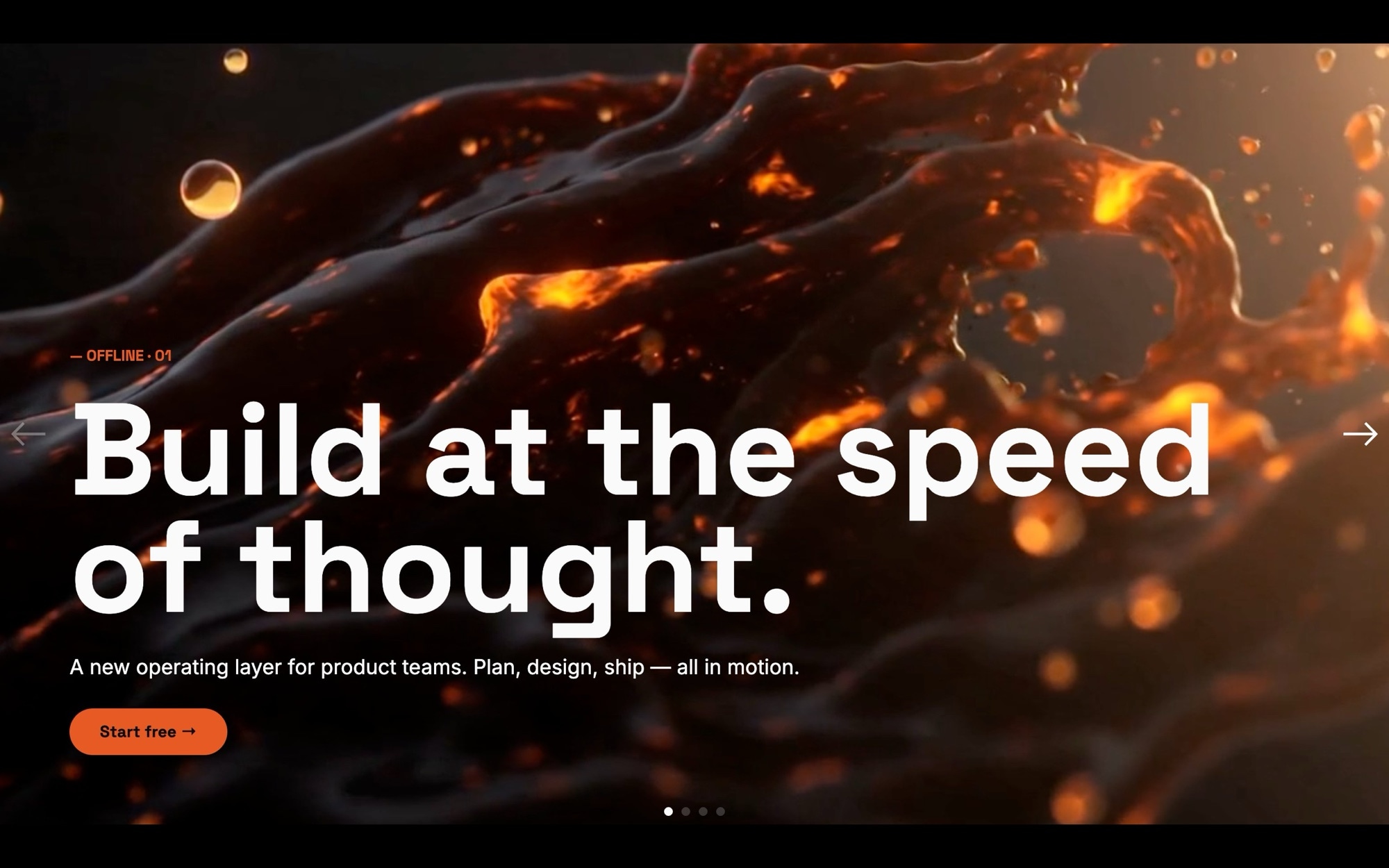
Hero - Video Template
A cinematic video hero is the fastest way to set tone on a landing page. The Hero - Video template gives you a full-bleed background slot per slide, a tight typography stack in Space Grotesk and Inter, and a single confident CTA - exactly the structure used by SaaS launch pages, agency homepages, and product marketing sites that want the first scroll to feel like a film opening.
The slider ships with four slides covering the standard hero arc: a hook headline, a trust signal, a brand promise, and a closing CTA. Each background uses an AI-generated cinematic still as a placeholder so the layout is visible immediately - the design assumption is that you will swap them for real video files (MP4 or WebM) once your footage is ready, using Swiper Studio's video media type. The fade transition at 1200ms with parallax keeps the cuts feeling intentional, not jumpy.
#What Makes This Template Stand Out
Built for Real Video, Ready Out of the Box
Each slide background is wired to accept a video file directly. The placeholder cinematic stills give you a working preview, and swapping in your own MP4 or WebM is a single field change in the editor. No re-layout, no template surgery - just upload and the hero becomes a true motion-led landing page.
Confident Typography Stack
Space Grotesk at 700 weight handles every display headline. Inter handles body copy. The pairing is modern, legible, and works equally well over dark video footage and abstract motion stills. The accent color #e85a23 highlights CTAs without competing with the imagery behind them.
Fade Transitions With Parallax Depth
A 1200ms fade between slides creates a film-cut feel rather than a slideshow snap. Parallax adds subtle depth so the background and foreground move at different rates - it is the small detail that makes a hero feel directed instead of templated.
One CTA Per Slide, No Clutter
The hero arc is built around a single action per slide: read more, sign up, watch the demo, start free. Resisting the temptation to stack buttons keeps the hero fast to scan and converts better in user testing. Every typography hierarchy choice supports that one decision.
Full-Bleed Edge to Edge
Every slide fills the entire viewport. There are no side margins, gutters, or stray container widths to fight with. The hero looks the same whether it sits inside a Next.js app, a Webflow site, a WordPress page, or a custom HTML build.
#Who Should Use This Template
This template is built for SaaS founders and product marketing teams preparing a launch or homepage refresh. The full-bleed video format is the genre standard for modern software companies - Linear, Vercel, Arc, and similar brands all use a cinematic hero as their opening move. Drop your product footage into the existing slot, keep the CTA copy tight, and you have a launch-ready hero in an afternoon instead of a week of design sprints.
Agencies and freelancers building client sites will find the template equally useful. The placeholder stills are designed to demo well in pitch meetings before any real video exists. Once the client signs off on the layout, you can swap in production footage without touching the structure. It compresses the gap between mockup and live build.
Creative studios, film production companies, and motion designers can use this as their own showreel front door. The fade-and-parallax pacing was tuned for cinematic content. Your work becomes the entire focal point, and the typography never fights the imagery.
#Best Use Cases
- ✓SaaS product launch pages with cinematic product video as the centerpiece
- ✓Agency and creative studio homepages opening with a brand reel
- ✓Film, motion, and production studio showreel front doors
- ✓App and platform marketing sites where motion communicates the product better than stills
- ✓Conference and event sites with atmospheric venue or speaker video
- ✓Brand campaign landing pages with a hero spot tied to paid media
- ✓Investor and pitch sites where tone needs to feel ambitious from frame one
- ✓Portfolio openers for directors, cinematographers, and motion artists
#How to Customize
- Click "Use This Template" to open the Hero - Video slider in Swiper Studio1
- Replace the placeholder cinematic stills with real video - select each slide background, switch media type to video, and upload your MP4 or WebM file2
- Edit the headlines and tagline on each slide to match your launch message, brand promise, or campaign copy3
- Update the CTA button text and link target on each slide - point them at signup, demo, pricing, or any URL4
- Adjust the accent color from the default vermilion #e85a23 to your brand color, and swap the background fallback color if needed5
- Tune the fade speed and parallax depth from the project params panel if you want a faster or slower cinematic pace6
- Set typography scale at the 768 and 1024 breakpoints so headlines stay readable on phones, tablets, and desktops7
- Publish to CDN for an instant embed, or export to HTML, React, Vue, Next.js, Web Component, or Webflow8
#Frequently Asked Questions
- Can I replace the placeholder images with real video files?
- Yes - and that is the intended use. The template ships with cinematic AI-generated stills as placeholders so the layout reads correctly out of the box. Once you have your own footage, swap each slide background to media type "video" and upload your MP4 or WebM file. The fade transition, parallax depth, and typography overlay all continue to work the same way with real video.
- How do I edit the headlines and CTA copy?
- Click any text element in the visual editor to edit it inline. The display headlines use Space Grotesk at 700 weight, body text uses Inter, and the orange accent color is #e85a23. You can change copy, font weights, and accent color from the editor panel - no code required.
- Is the slider responsive on phones and tablets?
- Yes. The hero is full-bleed on every viewport. Headline sizes scale through breakpoints at 768 and 1024 so titles stay readable on small screens without overflowing, and the orange CTA stays touch-friendly on mobile. You can fine-tune sizing per breakpoint in the editor.
- Can I change the dark color palette to match my brand?
- Absolutely. The default palette is near-black #0c0c0e with #fafafa text and a vermilion accent at #e85a23. Update the slide backgrounds, text colors, and accent in the editor to match any brand. The cinematic feel comes from the fade transition and parallax - not the specific colors - so the template still feels premium with any palette swapped in.
- How do I export or embed this hero on my site?
- Publish to CDN for an instant embed snippet that works in any HTML page, Webflow Custom Code block, WordPress block, or Shopify Liquid section. Or export as standalone HTML, a React component, a Vue component, a Next.js project, or a Web Component. Paste into Webflow drops it into your Webflow page as native elements.
#Related Templates



#Related Resources
- Swiper Studio for Hero Sections
- Swiper Studio for Video Sliders
- Swiper Studio for Landing Pages
- Swiper Studio for Marketers
Ready to Build Your Slider?
Pick a template, customize it visually, and export production-ready code to React, Vue, Next.js, HTML, Webflow, and more. No coding required.








