
Fitness Classes Slider Template
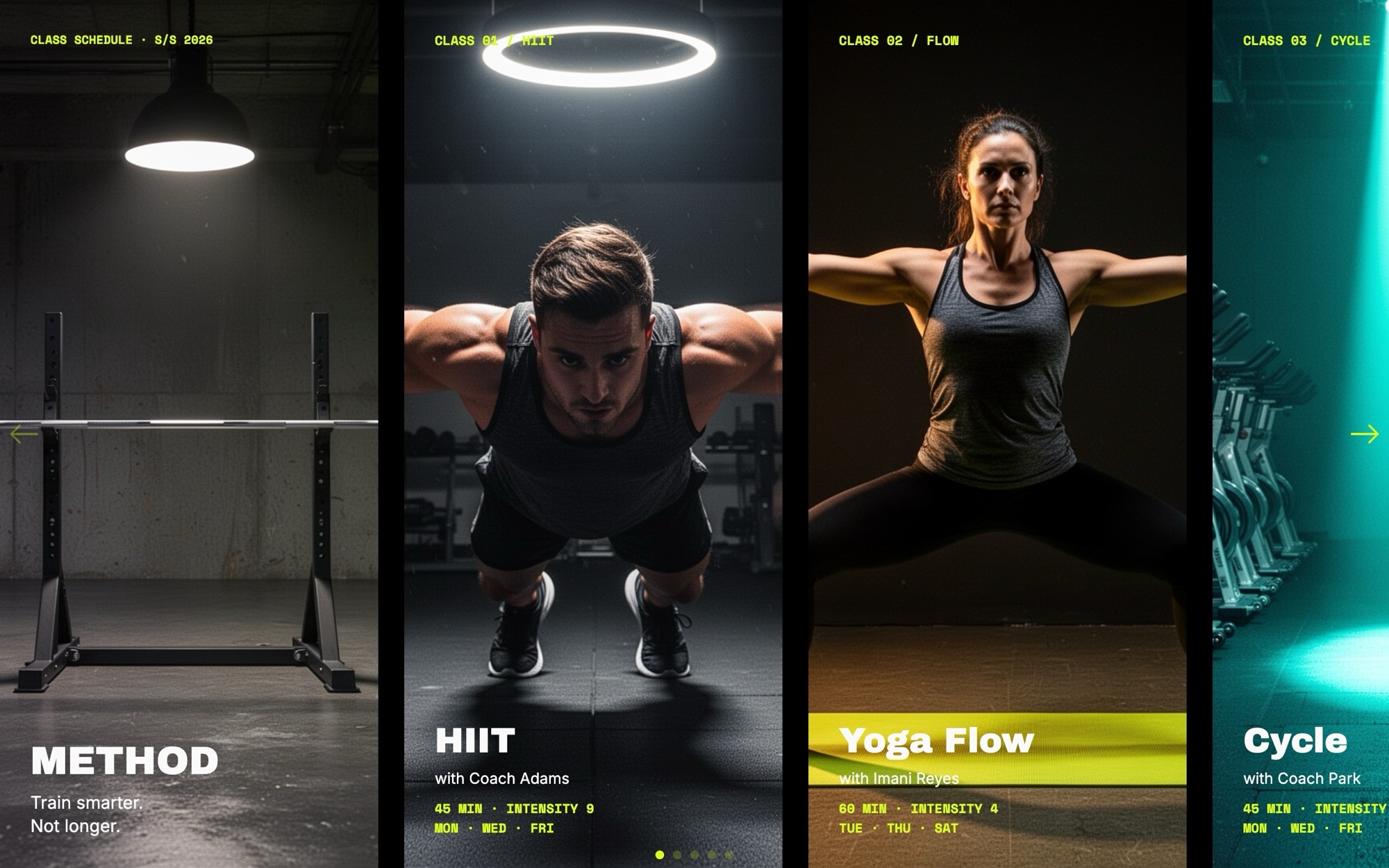
A class schedule does not need to read like a spreadsheet. The Fitness Classes template puts a studio program into a high-contrast card carousel - a brand cover, five class cards (HIIT, Yoga Flow, Cycle, Strength, Mobility), and a membership call to action. Each card carries the class name, instructor, duration, intensity, and schedule with the bold visual energy of a performance brand.
Archivo Black handles the display copy, Space Mono carries times and labels with a stopwatch feel, and Inter keeps body text legible. A jet black background, off-white type, and an electric lime accent give the slider the visual punch a studio brand needs. Open the template in Swiper Studio, drop in your real instructor names and schedule, and ship a class browser that converts.
#What Makes This Template Stand Out
Bold Performance-Brand Palette
Jet black, off-white, and electric lime - the high-contrast palette signals energy and intensity, the visual register that performance and boutique fitness brands rely on. Every color is editable if your studio sits in a softer wellness range.
Class Card With All Schedule Detail
Each card shows class name, instructor, duration, intensity, and schedule. The hierarchy is built for fast scanning - a member should know in two seconds whether the class fits their day. The structure works for any modality.
Archivo Black, Space Mono, and Inter Pairing
Archivo Black handles class names with weight and presence. Space Mono carries times and intensity tags with a stopwatch feel. Inter keeps body details legible. The combination reads as athletic without slipping into generic fitness clip-art.
Multi-Card Schedule Carousel
The slider shows 1.1 cards on mobile, 2.2 on tablet, and 3.5 on desktop. The peek of the next card invites browsing, and the dense desktop layout lets a member scan the whole week at a glance without scrolling.
Action-Driven Class Photography
The demo imagery is dark gym, dramatic light, real motion - the visual mood that members associate with results. The fade transitions between cards keep the energy high without overwhelming the schedule detail.
#Who Should Use This Template
This template is built for boutique fitness studios, gyms, and performance training brands that need a class browser as bold as the brand. Whether you run HIIT, cycle, strength, yoga, or a mixed-modality studio, the card carousel shows the week's range in a format members can read fast.
Studio marketing teams and front-desk leads can use it as the homepage hero or a dedicated schedule page. Update class names and times when the schedule changes, and the slider stays current without forcing a redesign. The membership CTA at the end channels traffic into your sign-up flow.
Personal trainers, online coaching brands, and at-home programs will find the same layout works for a digital class library, a program drop, or a coach's roster. Swap the photography, rewrite the class names, and the slider becomes a program browser instead of a studio schedule.
#Best Use Cases
- ✓Boutique fitness studio homepages featuring the weekly class lineup
- ✓Gym and performance training brand sites where modality variety drives sign-ups
- ✓Online coaching platforms displaying program tracks and live class options
- ✓New-class launch landing pages introducing a fresh modality to existing members
- ✓Mobile app landing pages converting browsers into app downloads or trial bookings
- ✓Multi-location studio sites where each location runs a different class roster
- ✓Membership and intro-pack landing pages with a clear class browser plus CTA
- ✓At-home fitness brands featuring a digital class library or live streaming schedule
#How to Customize
- Open the Fitness Classes template in Swiper Studio - click 'Use This Template' above to load the seven slides into the editor1
- Update the cover slide brand name and tagline to match your studio or fitness brand2
- Replace each class card photo with your own studio or class action photography through the media panel - dramatic lighting and real motion convert best3
- Edit class names, instructors, durations, intensity tags, and schedules - keep one class per card so the cards stay scannable4
- Link each card to your real booking system - Mindbody, ClassPass, Glofox, Mariana Tek, or your own flow5
- Update the membership CTA copy and link, and adjust the lime accent if your brand uses a different signal color6
- Tune the palette - jet black, off-white, and lime are editable across backgrounds, type, and accents to align with your studio brand7
- Preview across mobile, tablet, and desktop breakpoints and export to HTML, React, Vue, Next.js, Web Component, or Webflow - or publish to CDN for embedding on your studio site8
#Frequently Asked Questions
- Can I edit class names, instructors, durations, and schedules?
- Yes. Every field on every class card is fully editable. Update class name, instructor, duration, intensity, and schedule directly in the visual editor. You can also add new detail rows - rate, location, equipment - to match the information your members need before booking.
- Can I link each class card to a real booking page?
- Absolutely. Wrap each card or its CTA in a link block pointing to your booking system - Mindbody, ClassPass, Glofox, Mariana Tek, or your own custom flow. The wishlist or save-class affordance can be linked the same way.
- Does this template work for studios with different class types?
- Yes. The template ships with five demo classes (HIIT, Yoga Flow, Cycle, Strength, Mobility) but every card is independent. Replace any card with your own class - boxing, pilates, barre, swim, mobility - and the bold layout, lime accent, and energetic photography style adapt to any modality.
- Can I change the lime accent to match my studio brand?
- Yes. The default palette pairs jet black, off-white, and electric lime - high contrast that suits performance brands - but every color is editable. Update backgrounds, type, and accents to match your studio brand, whether that is a softer wellness palette or a different signal color.
- How do I embed this on my studio website or mobile app landing page?
- Publish to CDN from Swiper Studio and paste the embed snippet into your CMS or landing page builder. It works with Squarespace, Webflow, WordPress, Wix, and any platform that supports embed code. You can also export as React, Vue, Next.js, or a Web Component for direct integration into your site.
#Related Templates


#Related Resources
- Swiper Studio for Small Businesses
- Swiper Studio for Landing Pages
- Swiper Studio for Marketers
- Swiper Studio for Team Showcases
Ready to Build Your Slider?
Pick a template, customize it visually, and export production-ready code to React, Vue, Next.js, HTML, Webflow, and more. No coding required.








