
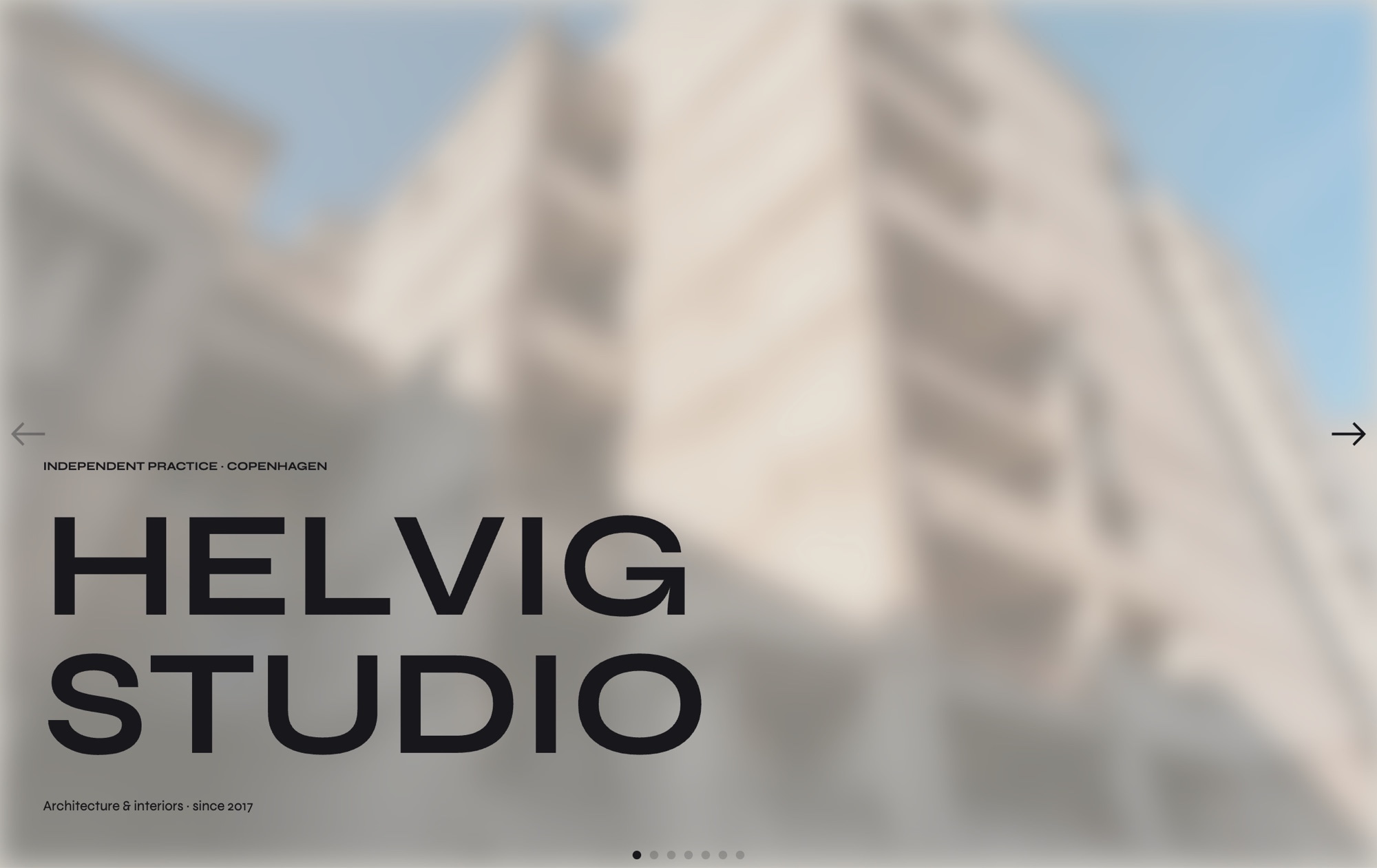
Architecture Studio Portfolio Template
A brutalist minimal portfolio template built for architecture firms and design studios that want their work to speak for itself. Seven slides carry you from a studio name hero with a softly blurred project behind, through three featured projects in distinct compositions, into process photography of sketches and physical models, a team and studio life slide, and a final contact slide with a link block. The palette of raw concrete, off-black, and clay accent is paired with Syne as the display face and Inter for body copy - confident, editorial, and quietly contemporary.
#What Makes This Template Stand Out
Brutalist Minimal Layout
Clean grids, generous negative space, and uncompromising typography. The layout borrows from architectural monographs and print editorial, giving each project room to breathe without decoration competing for attention.
Syne Display Typography
Syne at 700 and 800 weights headlines every slide with a sculpted, contemporary character, while Inter carries body copy and metadata. The pairing feels both editorial and studio-ready.
Three Featured Project Compositions
Projects 01, 02, and 03 use deliberately different compositions - full-bleed, split grid, and stacked caption - so your portfolio reads like a considered sequence rather than a repeating template.
Process and Studio Life Slides
Dedicated slides for sketches and physical models alongside a team and studio life scene give prospective clients context on how the work is made, not just the finished buildings.
Raw Concrete and Clay Palette
A warm concrete base, off-black type, and a single clay accent create a palette that photographs and imagery read cleanly against. Swap the accent to match a brand guideline in seconds.
#Who Should Use This Template
This template is built for architects and architecture firms who want a portfolio that reads like a monograph instead of a marketing brochure. The editorial pacing, considered typography, and restrained palette make it ideal for studios pitching residential, commercial, cultural, or civic work where quiet confidence matters more than visual noise.
Interior designers and design studios will find the layout just as useful. Swap architectural photography for interiors, replace the sketches with mood boards or material samples, and the structure carries straight through. The three featured project slides accommodate any spatial work, and the process slide is a natural fit for showing samples, renders, and technical drawings.
Boutique agencies, product designers, and creative directors who want a portfolio tool that signals craft can use this template as a personal or studio site. The contact slide with a link block closes every visit with a clear next step, and the whole slider exports clean to whichever framework your site is already running on.
#Best Use Cases
- ✓Architecture firm portfolios showcasing residential, commercial, and cultural projects
- ✓Interior design studios presenting completed spaces alongside material and mood boards
- ✓Urban planning and landscape architecture practices documenting large-scale work
- ✓Boutique design studios pitching to cultural institutions, galleries, and premium clients
- ✓Personal portfolios for principal architects, design directors, and independent practitioners
- ✓Competition entries and project monographs that need a polished, scrollable presentation
- ✓Studio about pages where process, team, and contact information live alongside work
- ✓Pitch decks and client-facing case studies embedded into proposals or meeting pages
#How to Customize
- Open the Architecture Studio template in Swiper Studio by clicking 'Use This Template' above - the seven slides load instantly into the visual editor1
- Update the studio name on the hero slide and swap the blurred background image for a project of your own to set the tone2
- Replace the imagery on each featured project slide (01, 02, 03), then edit the project title, location, year, and short description inline3
- Edit the process slide with your own sketches, technical drawings, or physical model photography and update the short caption copy4
- Update the team and studio life slide with a photograph of your team, workspace, or a behind-the-scenes moment that tells your studio story5
- Point the contact link block on the final slide to your email, phone, Instagram, or studio landing page and add extra link blocks if needed6
- Adjust the clay accent color, or swap Syne and Inter for other typefaces, to match your studio's brand identity across every slide at once7
- Preview the mobile, tablet, and laptop breakpoints, then export to HTML, React, Vue, Next.js, a Web Component, or Webflow - or publish to CDN for an instant embed8
#Frequently Asked Questions
- Can I use this template for my architecture firm before subscribing?
- Yes. Open the Architecture Studio template in Swiper Studio, swap in your own projects, and preview the full experience in the editor at no cost. A paid plan is only required when you want to export production-ready code or publish to the CDN.
- How do I replace the featured projects with my own buildings?
- Every slide is fully editable. Click the slide background to upload your own architectural photography or video walkthroughs, update the project number, title, location, and year, and edit the descriptive copy inline. The brutalist grid layout adapts automatically to whatever imagery you drop in.
- Will the raw concrete palette and Syne typography carry over on export?
- Yes. The concrete, off-black, and clay accent colors plus the Syne display and Inter body fonts are encoded in the exported CSS. Whether you export to React, Vue, HTML, or Webflow, your deployed slider looks identical to what you designed in the editor.
- Is the template responsive for phones and tablets?
- The template ships with configured breakpoints for mobile, tablet, laptop, and desktop. Display type scales down, the project grid restacks, and the process photography reflows into a single column on smaller screens. You can fine-tune any breakpoint independently in the visual editor.
- Can I add my studio logo, contact details, and social links?
- Absolutely. The final contact slide includes a link block you can point to email, phone, Instagram, or any URL you choose. Upload your studio wordmark or logomark to replace the placeholder, add more link blocks if you need them, and adjust colors to match your brand identity.
#Related Templates


#Related Resources
- Swiper Studio for Portfolios
- Swiper Studio for Web Designers
- Swiper Studio for Agencies
- Swiper Studio for Freelancers
Ready to Build Your Slider?
Pick a template, customize it visually, and export production-ready code to React, Vue, Next.js, HTML, Webflow, and more. No coding required.








