
Quotes Bold Pull-Quote Slider Template
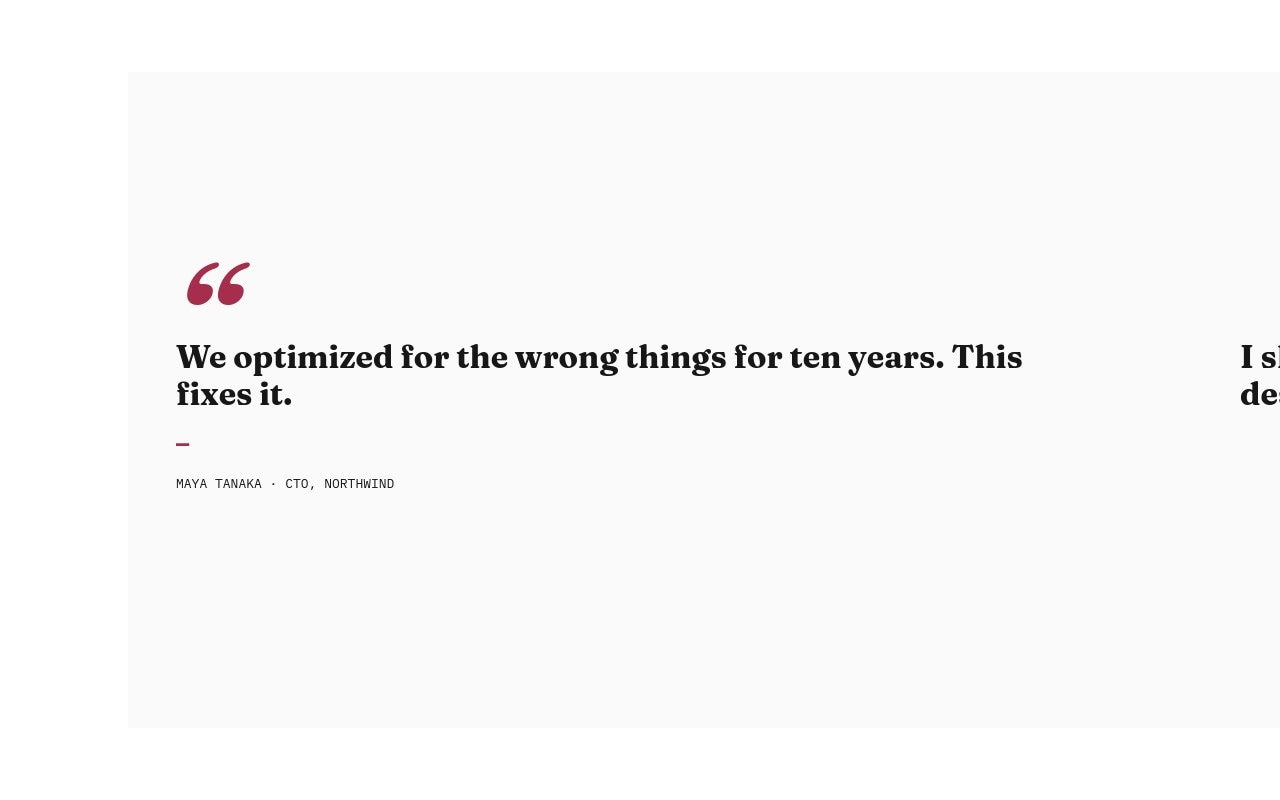
A testimonial reel that finally sounds like the people in it. This pull-quote carousel gives every customer voice the editorial treatment - an oversized claret quotation mark, the quote itself set in italic Fraunces at hero scale, a thin claret rule, and the attribution clipped underneath in IBM Plex Mono. Six slides, six quotes, no carousel cards or star ratings. The palette stays tight - paper white, ink black, and a single claret accent on the marks and rules - so the typography carries every slide.
The slider opens on a quote from a CTO about ten years of optimizing for the wrong things, walks through a creative director shipping a landing page in 14 minutes, a founder finding the first builder that does not fight her, a VP marketing replacing four tools, a design lead calling everything else 2018, and closes on an engineering manager explaining what "just works" actually means. The transitions run 800ms with parallax on the text, which gives each quote a moment to land before the next one slides in.
#What Makes This Template Stand Out
Editorial Italic at Hero Scale
Fraunces italic at 600 weight, scaled from 40px on mobile up to 96px on desktop, turns each testimonial into a magazine pull-quote. The italic carries the human voice, the size demands attention, and the editorial tone signals that these quotes were chosen on purpose - not scraped from a five-star review widget.
Claret Marks as the Whole Accent System
A single claret #a72d4d hue lives on the oversized opening quotation mark and the short horizontal rule above each attribution. Nothing else competes - no photo, no rating, no card chrome - so the accent reads as deliberate punctuation. Swap claret for any brand color and the system updates in two clicks.
Monospace Attribution Block
IBM Plex Mono carries the name, role, and company line under every quote. The mono treatment reads almost like a byline in a print magazine, gives every attribution the same visual weight, and contrasts cleanly against the italic Fraunces above without needing dividers or decoration.
One Quote per Slide, by Design
Each quote gets a full slide instead of competing with two others in a card grid. Visitors actually read the words, the parallax transition gives the next quote a deliberate entrance, and the pacing feels closer to a long-form testimonial article than a homepage carousel.
Six Slides That Stay Out of the Way
The whole template is two fonts, three colors, and six quotes. No imagery to source, no logos to upload, no avatar grid to maintain. You can swap the entire reel for your own customer language in fifteen minutes and ship a testimonial section that actually sounds like your customers.
#Who Should Use This Template
SaaS marketers and growth teams who already have great customer quotes but a generic testimonial section can use this template as a drop-in upgrade. The editorial scale forces a single quote per slide, which pushes you to pick the strongest five to eight lines and let them breathe. Conversion teams running social-proof experiments will find this template a useful counterpoint to the standard logo wall plus star-rating layout.
Agencies and studios showing trust on a homepage, pitch deck, or case study microsite will get a testimonial reel that reads like an article rather than a marketing widget. The Fraunces italic and IBM Plex Mono pairing flatters the language inside the quotes, and the slide-based pacing keeps a long roster of quotes from collapsing into a wall of text.
Founders and indie product builders who need to show validation without the budget for a customer photo shoot can lean on this template entirely. There are no portrait images required, no logo files to chase, and the typographic restraint signals confidence in the words themselves. Drop in real Twitter quotes, Slack DMs, or interview excerpts and the template treats every voice with the same editorial weight.
#Best Use Cases
- ✓SaaS homepage testimonial sections that need to feel less like a card grid and more like a magazine spread
- ✓Case study microsites and pitch decks where customer voice carries the narrative
- ✓Founder-led landing pages that show validation without portrait imagery or logo chrome
- ✓Agency and studio sites quoting clients across project pages and capability decks
- ✓Conference and event microsites featuring speaker or attendee quotes between sessions
- ✓Podcast and newsletter landing pages highlighting reviewer or guest pull-quotes
- ✓Recruiting and hiring pages where employee or alumni quotes anchor the culture story
- ✓Book, course, and creator pages presenting press blurbs and reader testimonials with editorial weight
#How to Customize
- Open the Quotes Bold template in Swiper Studio - the six pull-quote slides load directly into the visual editor.1
- Replace the quote text on each slide with a real customer line. Keep quotes between 6 and 18 words so the italic Fraunces type reads cleanly at hero scale on every breakpoint.2
- Update each attribution in IBM Plex Mono - name, role, and company - separated by the middle-dot character to preserve the editorial rhythm.3
- Adjust the claret accent if you want a different brand color on the quotation marks and rules. Select the mark or rule, then set a new hex value in the style panel.4
- Add or remove quote slides to match your real testimonial roster. Duplicate any slide to add another quote, or delete unused slides - pagination and navigation update automatically.5
- Tune the responsive type sizes if your real quotes run longer than the placeholder copy. The mobile breakpoint starts at 40px and the desktop breakpoint lands at 96px, both adjustable per slide.6
- Style the navigation arrows and pagination dots to match the claret accent if you want a single confident color anchoring the whole reel.7
- Publish to CDN and embed the slider on your homepage or testimonial page, or export to React, Vue, HTML, or Webflow to ship the section inside a larger project.8
#Frequently Asked Questions
- How is this different from a standard testimonial slider?
- A standard testimonial slider usually packs a photo, a star rating, a name, and a short blurb into a card. This template strips all of that away and gives each quote a full slide of room, an oversized claret quotation mark, and italic Fraunces type at editorial scale. The result reads like a magazine pull-quote spread, not a marketing carousel.
- Can I change the claret accent color to match my brand?
- Yes. The claret #a72d4d appears on the opening quotation mark and the short horizontal rule above each attribution. Select either element and update the color in the style panel. The rest of the palette stays neutral, so the accent can swap to brand red, forest green, navy, or any single confident hue without breaking the layout.
- Do Fraunces and IBM Plex Mono load automatically?
- Yes. Both fonts are wired up in the project style and included in every export. Fraunces handles the italic display quote at 600 weight, and IBM Plex Mono carries the attribution line. You can swap either typeface in the style panel if you prefer different display or mono pairings, and the editorial pacing still holds.
- How many quotes can I add or remove?
- The template ships with six quote slides, but you can duplicate or delete any slide to grow or shrink the reel. Pagination and navigation update automatically. Five to eight quotes is usually the sweet spot for a testimonial section, since viewers tend to swipe through the first few and skim the rest.
- Will the parallax text effect work on phones?
- Yes. The 800ms slide transition with text parallax is preserved across every breakpoint, and the quote font size scales from 40px on mobile up to 96px on desktop so quotes never feel cramped or oversized. You can fine-tune the per-breakpoint sizing in the responsive panel if your real quote copy runs longer or shorter.
#Related Templates
#Related Resources
- Swiper Studio for Testimonials
- Swiper Studio for Landing Pages
- Swiper Studio for Marketers
- Swiper Studio for Agencies
Ready to Build Your Slider?
Pick a template, customize it visually, and export production-ready code to React, Vue, Next.js, HTML, Webflow, and more. No coding required.








