
Editorial Magazine Spread Slider Template
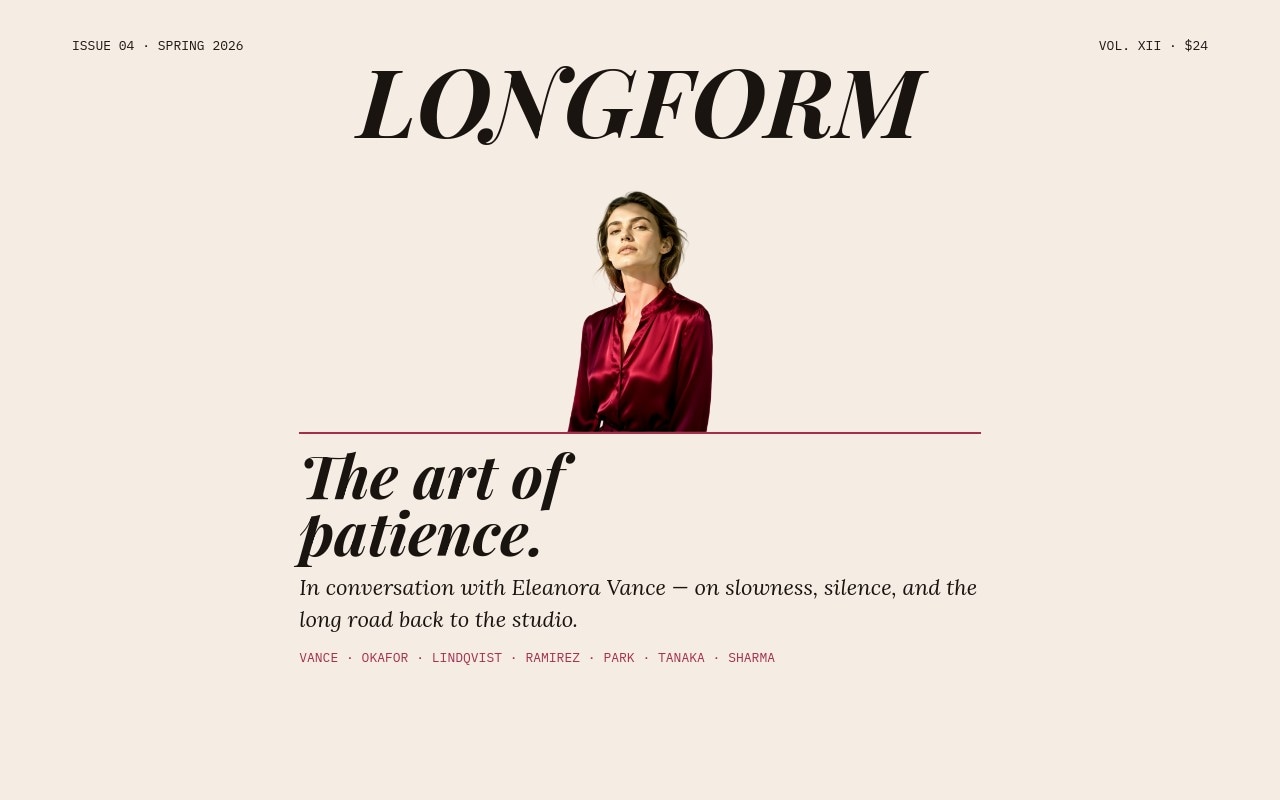
A two-column magazine spread translated into a slider. This template carries the same air as a Vogue or Harper's cover story - a hand-set masthead, a confident pull quote in Playfair Display italic, a claret drop cap leading the body in Lora, and a cutout cover-star portrait that breaks the column grid the way a real magazine cover does. Five spreads walk the reader through an issue: cover, feature opener, photo essay, pull-quote spread, and contributors masthead.
The cream #f5ede4 paper, ink #1a1410, and claret #a72d4d palette is paired with Playfair Display for headlines, Lora for body, and IBM Plex Mono for folios and captions. A slow 800ms slide transition keeps the cadence print-like, and the cutout portrait crossing in front of the masthead is the signature high-fashion move that turns the slider into a centerfold.
#What Makes This Template Stand Out
Cover-Star Portrait Crosses the Column Grid
The cutout portrait sits in front of the masthead on the cover and continues into the right column on the feature opener. This is the move that magazines have used for decades to make a cover feel composed instead of stamped, and the template builds it from child layering rather than absolute positioning so it stays responsive.
Playfair Display Italic, Lora Body, IBM Plex Mono Folios
Three typefaces handle three jobs: Playfair Display 700 italic carries headlines and the claret drop cap, Lora reads as comfortable body copy at long lengths, and IBM Plex Mono handles datelines, folios, and contributor labels. The pairing reads as serious editorial without veering into stuffy.
Cream, Ink, and Claret Print Palette
Cream paper, deep ink, and a single claret accent on rules, drop caps, and contributor labels give the slider the warmth of a printed page. The claret horizontal rule under the cover headline is borrowed straight from print art direction and anchors every spread to the same editorial system.
Five Spreads with a Real Narrative Arc
The reel opens with a cover, hands off to a feature opener with a drop cap, slows down on a full-bleed photo essay, peaks on a pull-quote spread, and lands on a contributors masthead. Each slide has a different job, so the reader is paced rather than served the same composition six times.
Drop Cap and Pull Quote Built as Editable Text
The claret drop cap and the hero pull quote are plain text elements you can rewrite, not flattened images. Change the opening letter, edit the quote, swap attribution, and the layout adjusts. This keeps the spread feeling hand-set every time the content changes.
#Who Should Use This Template
This template is built for independent magazines and longform publishers that want their digital reading experience to feel as considered as their print edition. The cover, feature opener, and pull-quote spreads map directly to print art direction, so editors can move a story between formats without losing the cover-star energy.
Editorial brands and content studios will find this useful for issue launches, masthead reveals, and feature announcements. The masthead and contributor slide give you a way to credit writers and photographers properly, and the claret accent system reads as a premium signal without leaning on stock gradients.
Photographers, designers, and creative directors can use the template as a portfolio cover - drop in a self-portrait as the cutout subject, replace the issue copy with a personal feature, and the slider becomes a one-page editorial about your own practice. The Vogue and Harper's cadence flatters individual work the same way a printed feature does.
#Best Use Cases
- ✓Independent magazines launching a new issue with a slider preview on the homepage
- ✓Longform publishers fronting a feature story with a cover-star portrait and pull quote
- ✓Editorial brand sites announcing a masthead change or contributor lineup
- ✓Photographer portfolios using the slider as a self-published cover feature
- ✓Designer and creative director sites that need a premium portfolio hero
- ✓Fashion and culture publications recreating their print cover in a swipeable format
- ✓Studio sites pairing a founder profile with a long-form practice statement
- ✓Niche newsletters and Substack publications adding a magazine-grade landing experience
#How to Customize
- Open the Editorial Magazine Spread template in Swiper Studio. The reel loads with five spreads: cover, feature opener with drop cap, photo essay, pull-quote spread, and contributors masthead.1
- Update the masthead text on the cover - swap LONGFORM for your publication name and keep the IBM Plex Mono issue number and price in the corners.2
- Replace the cutout cover star with your own subject. Upload a high-resolution portrait, remove the background, and drop the transparent PNG into the existing image slot so the head still crosses the masthead.3
- Rewrite the cover headline and standfirst in Playfair Display italic and Lora italic. Keep them short enough that the claret rule still anchors the slide.4
- Edit the feature opener body copy and the claret drop cap. The drop cap is its own text element, so you can change the opening letter independently of the paragraph it leads into.5
- Swap the photo essay landscape image with your own black and white photography. Update the caption and the "Where the work begins" headline to match the story.6
- Rewrite the pull quote on the fourth spread and update the attribution. Replace the small editorial portrait if you want a different interview subject anchoring the right column.7
- Edit the contributors masthead to credit your real writers, photographers, and editors. Then export to React, Vue, HTML, Web Component, or Webflow, or publish to CDN for embedding in any site.8
#Frequently Asked Questions
- Can I swap the cover-star portrait with my own photography?
- Yes. The cutout portrait is a child image inside the slide flex flow, not a baked-in background. Upload a high-resolution photo with a clean background, run it through any cutout tool (or use the built-in AI background removal), and drop the transparent PNG in place. The layout will keep the head crossing the masthead and the body extending into the right column.
- Do the drop caps and Playfair Display italics hold up at body-text sizes?
- They do. The drop cap is a separate Playfair Display 700 italic text element styled in claret, so it scales independently from the Lora body copy. You can tune the cap size, color, and offset per breakpoint without breaking the column flow underneath.
- How many feature spreads can I add to the issue?
- The template ships with five spreads (cover, feature opener, photo essay, pull-quote, and contributors), but you can duplicate any slide to extend the issue. The slide-by-slide navigation handles new spreads automatically and the masthead and folios stay consistent if you keep the IBM Plex Mono labels in place.
- Can I change the cream and claret palette to fit my brand?
- Yes. Cream, ink, and claret are stored as global colors. Swap claret for forest, ochre, or any accent, and the rules under headlines, drop caps, and contributor labels will follow. The two-column magazine geometry works equally well on a stark white background or a deeper midnight base.
- Will the two-column spread reflow correctly on phone and tablet?
- It will. Each column has its own width and the breakpoints are tuned so the columns collapse into a single readable stack on phones, hold a tight two-column rhythm on tablets, and open up into a full magazine spread on desktop. Adjust gutters and column widths per breakpoint from the responsive panel.
#Related Templates
#Related Resources
- Swiper Studio for Portfolios
- Swiper Studio for Photographers
- Swiper Studio for Web Designers
- Swiper Studio for Agencies
Ready to Build Your Slider?
Pick a template, customize it visually, and export production-ready code to React, Vue, Next.js, HTML, Webflow, and more. No coding required.








