
Social Proof Wall
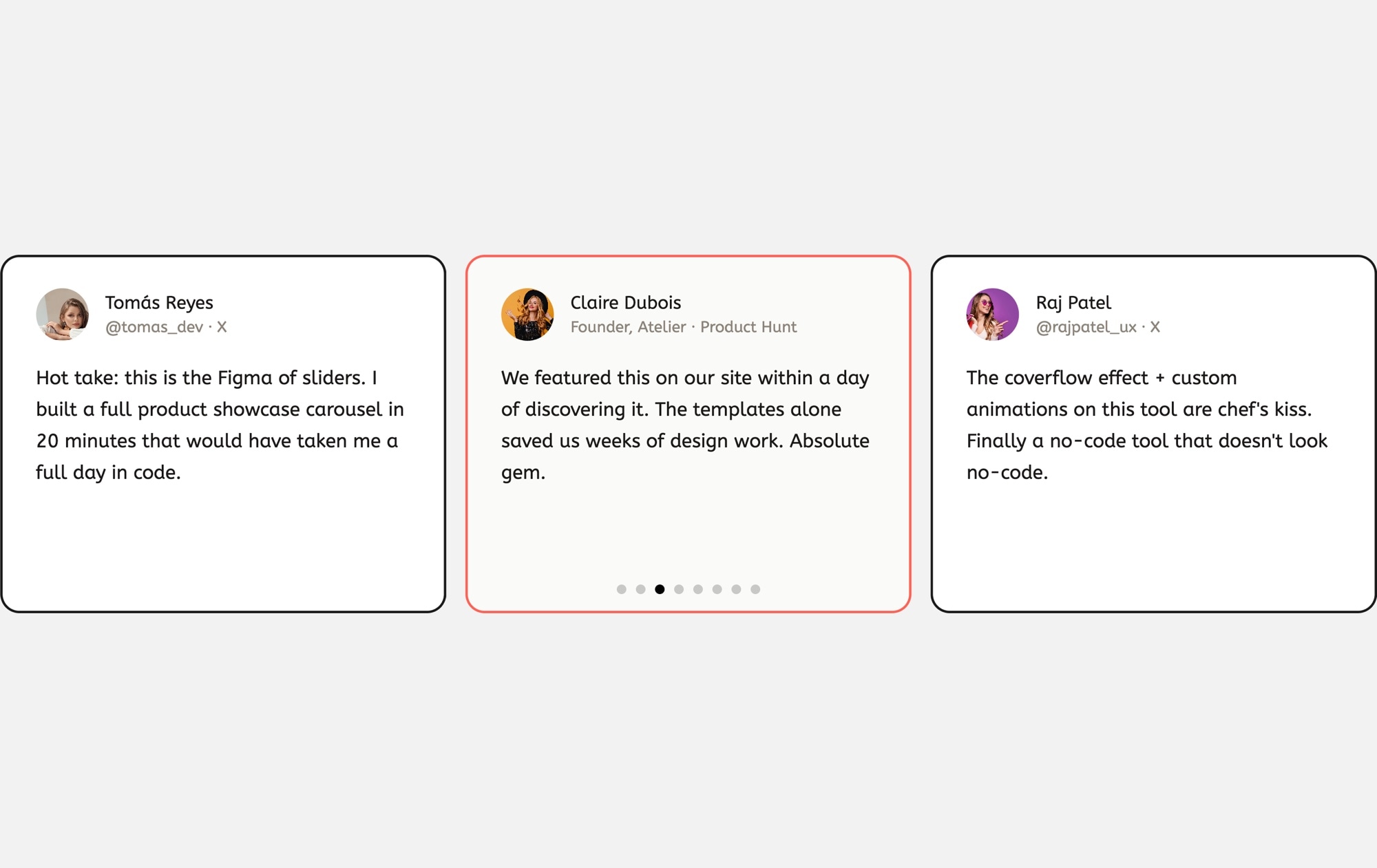
Social proof converts. When visitors see real people endorsing your product in their own words, trust forms faster than any marketing headline can achieve on its own. This template arranges user quote cards in a browsable carousel - each card shows an avatar, the person's name, their social media handle and platform, and a longer review or endorsement text. The result is a wall of authentic voices that does your selling for you.
Three cards are visible at once on desktop, each framed with a clean dashed border on a light background. The center card features a coral/red border accent that draws the eye to your strongest quote. Avatars and platform handles (like "@tomas_dev on X" or "Founder, Atelier on Product Hunt") give each testimonial a verifiable identity, which is far more persuasive than anonymous praise.
#What Makes This Template Stand Out
Social Media Handle Attribution
Each card includes the reviewer's platform handle and source - X, Product Hunt, LinkedIn, or any other channel. This level of attribution signals that the quotes are real and verifiable, which builds significantly more trust than anonymous testimonials.
Featured Card With Accent Border
The center card stands out with a coral/red border accent, naturally drawing the visitor's eye to your most compelling quote. This visual hierarchy ensures your strongest social proof gets read first, even when multiple cards are visible.
Dashed Border Card Design
The dashed border treatment gives each card a distinctive, modern look that feels lighter and more editorial than solid borders or heavy drop shadows. It creates clear card boundaries without visual heaviness, keeping the overall layout airy and approachable.
Avatar and Identity Block
Every card pairs a circular avatar photo with the person's name and platform handle. The combination of a face, a name, and a verifiable social identity creates a complete trust signal that anonymous text quotes simply cannot match.
Long-Form Quote Support
Unlike star-rating cards that favor short snippets, this template is designed for longer, more detailed endorsements. The card layout accommodates multi-sentence quotes comfortably, letting your advocates tell their full story.
#Who Should Use This Template
This template works best when you have genuine user quotes from social media, review platforms, or direct feedback and want to display them in a format that feels authentic rather than corporate. If your best marketing happens in user tweets, Product Hunt reviews, LinkedIn recommendations, or community forum posts, this template lets you showcase those voices exactly as they appear in the wild - with handles, avatars, and platform context intact.
SaaS companies and product teams will find this especially effective near pricing sections and signup forms. A wall of real user quotes from recognizable platforms like X and Product Hunt carries more weight than polished marketing copy. Visitors can mentally verify these endorsements, which removes friction from the conversion decision.
Marketers, founders, and growth teams benefit from how quickly the template updates. When a great new quote appears on social media, open the project, duplicate a card, paste in the new quote and handle, upload the avatar, and republish. The entire process takes minutes, keeping your social proof section fresh and current without developer involvement.
#Best Use Cases
- ✓SaaS landing pages displaying user endorsements from X, Product Hunt, and LinkedIn near the signup form
- ✓Product launch pages featuring early adopter quotes to validate the offering for new visitors
- ✓Marketing homepages that use a social proof section to bridge feature descriptions and the pricing table
- ✓Agency and freelancer websites showcasing client praise with verifiable social identities
- ✓Ecommerce stores highlighting customer reviews with profile photos and purchase context
- ✓Community-driven products displaying quotes from power users, moderators, and advocates
#How to Customize
- Click "Use This Template" to open the social proof wall in Swiper Studio's visual editor1
- Replace placeholder quote text with real user endorsements - click any text element to edit it inline2
- Update the name and social media handle on each card to match the actual reviewer and platform3
- Swap avatar images with real user photos - click the image element and upload from your computer or paste a URL4
- Adjust the accent border color on the featured center card to match your brand, or apply the accent to a different card5
- Add or remove cards by duplicating or deleting slides to match the number of quotes you want to showcase6
- Preview on mobile and tablet breakpoints to ensure cards stack properly and text remains readable on smaller screens7
- Export to HTML, React, Vue, Next.js, Webflow, or publish to CDN and embed anywhere with a single snippet8
#Frequently Asked Questions
- Can I add quotes from different social media platforms?
- Yes. Each card's handle text is fully editable. Change it to any platform format you need - "@username · X", "Founder, Company · Product Hunt", "@handle · LinkedIn", or any custom label. You can also add platform logo images next to the handle for extra visual context.
- How do I highlight a specific quote card?
- The template includes a center card with a coral/red border accent to draw attention to a featured review. You can apply this treatment to any card by editing its border color. You can also adjust border width, shadow, or background color to create your own highlight style.
- Can I use this template without social media handles?
- Absolutely. The handle text element can be edited to show anything - a company name, a product category, a date, or you can remove it entirely. The card layout adapts automatically when elements are added or removed.
- Does the slider support loop and autoplay?
- Yes. Enable loop in the parameters panel so the carousel cycles continuously, and turn on autoplay with a configurable delay between transitions. Combine both for a hands-free rotating display of social proof that runs indefinitely.
- Can I embed this on WordPress or Shopify?
- Yes. On WordPress, publish the slider to CDN and paste the embed snippet into a Custom HTML block - no plugin required. On Shopify, install our official Shopify app and add the slider to any page as a native theme block from the theme editor. The CDN embed also works on any other platform that supports embed code.
#Related Templates



#Related Resources
- Swiper Studio for Testimonials
- Swiper Studio for Marketers
- Swiper Studio for Landing Pages
- Swiper Studio for Agencies
Ready to Build Your Slider?
Pick a template, customize it visually, and export production-ready code to React, Vue, Next.js, HTML, Webflow, and more. No coding required.








