
Product Gallery - Single Product
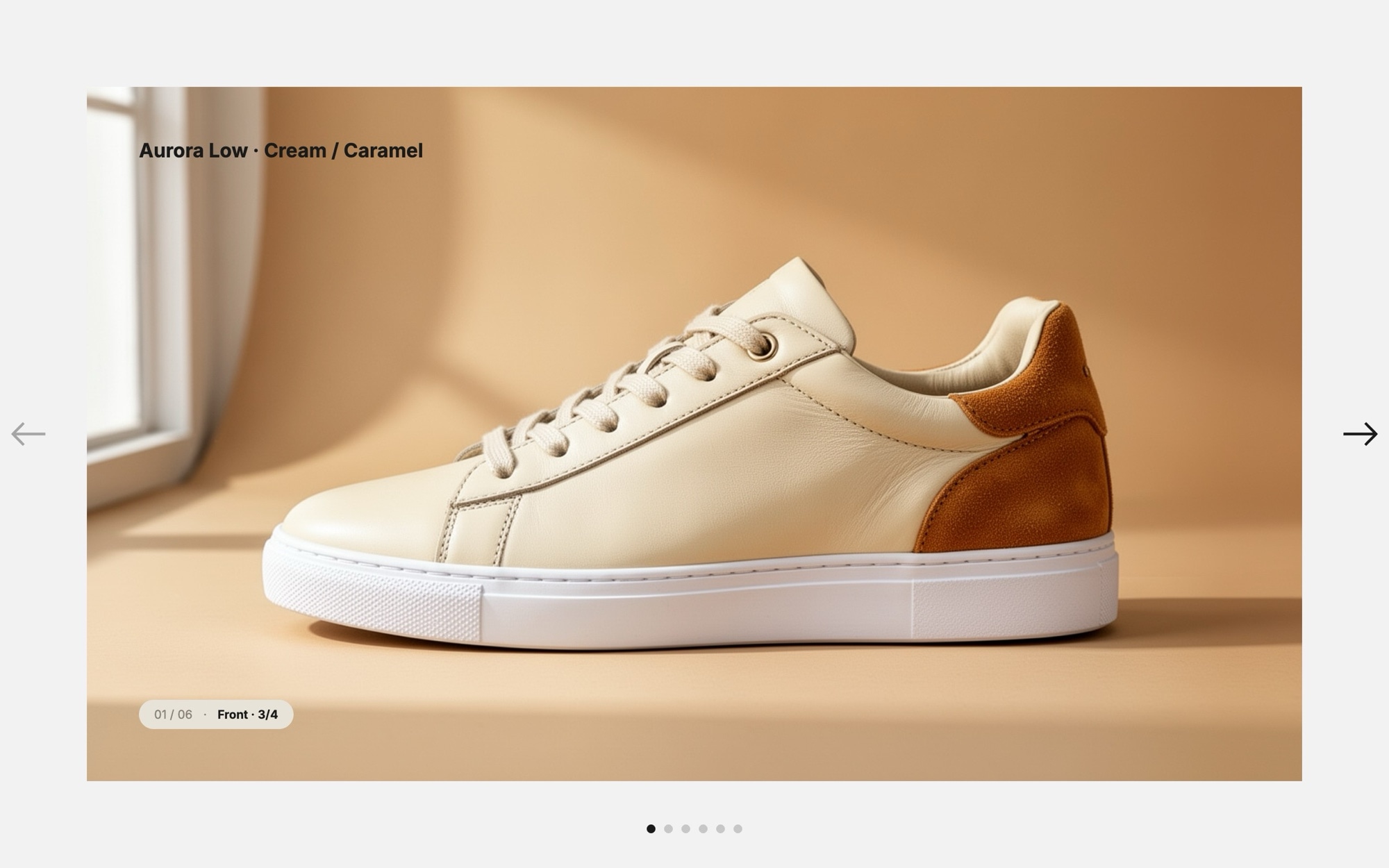
A detail-page gallery built around showing one product six different ways. The default slides walk through a premium cream and caramel leather sneaker - front three-quarter, pure side profile, top-down lacing detail, macro of the rubber sole tread, lifestyle on a model walking across warm wood, and a kraft shoebox unboxing - so shoppers can read the construction without leaving the page.
The main slider uses a fade transition so each angle resolves in place rather than sliding across, which is the right pacing for product photography. A small caption ("Front - 3/4", "Side", "Top", "Sole", and so on) sits in the corner of every slide and is useful for editing decisions but easy to remove before export. Parallax is wired in for the close-ups so the macro shots get a subtle bit of depth as they enter.
#What Makes This Template Stand Out
Six Angles of the Same Product
The slide sequence is deliberately structured for a product detail page - hero three-quarter, side profile, top-down, detail macro, on-foot lifestyle, and packaging. It is the same six angles photographers shoot for any premium PDP, so the layout drops in cleanly for shoes, bags, watches, electronics, or any considered purchase.
Fade Effect for Image-First Pacing
The main slider transitions with a fade rather than a slide so each image resolves cleanly in place. Eyes do not chase a moving frame, which is what you want when a shopper is studying a product before buying.
Light Off-White Background That Stays Out of the Way
The #fafafa background and #e8e3d8 thumbnail surface are tuned to read as white without the harsh edges of pure white. Product photography sits on a quiet stage, with #1a1a1a text and a true black accent for active states and primary actions.
Inter Type and Tiny Angle Captions
Inter in 400 and 700 handles every label, with tiny captions like 'Front - 3/4' and 'Side' sitting in the corner of each slide. Keep them while you build to track angles, or strip them out before publishing for a cleaner look.
Parallax on the Close-Up Angles
The macro sole-tread shot and detail crops use parallax so foreground product moves a touch slower than the backdrop on transition. It adds the kind of subtle depth that makes a detail gallery feel premium rather than mechanical.
#Who Should Use This Template
This template is built for e-commerce stores selling considered, photographable products - sneakers, bags, watches, jewelry, ceramics, electronics, and anything else where a shopper wants to look closely before buying. The six-angle structure is the same shape professional product photographers shoot to, so it slots cleanly into your existing photography workflow.
Shopify, WooCommerce, and headless storefront teams can use this as a richer replacement for the default product image gallery widget. Publish from Swiper Studio, paste the embed into the product detail template, and your PDPs gain a tight fade-driven gallery with thumbnail support without a custom theme build.
Web designers and product photographers working with retail clients will find the layout useful as a brief and a deliverable in one. Use the slot structure to plan a six-angle shoot, drop the photos in, and hand the client a working PDP gallery they can paste into their store the same day.
#Best Use Cases
- ✓Product detail page galleries for sneakers, bags, watches, and other premium goods
- ✓Headless commerce PDPs where the storefront needs a custom gallery component instead of a theme default
- ✓Limited drops and capsule collections where one product gets a dedicated landing page
- ✓Marketplace listings on Shopify, BigCommerce, and Squarespace that want a richer alternative to the built-in image widget
- ✓Lookbook spreads showing a single hero piece across multiple compositions
- ✓Maker and craft store pages where construction detail is part of the value proposition
- ✓Press kits and lookbooks distributed to editors that need a multi-angle product reference
- ✓Crowdfunding and pre-order campaign pages featuring a single hero product
#How to Customize
- Open the Product Gallery template in Swiper Studio by clicking 'Use This Template' above1
- Replace the six sneaker images with the same six angles of your own product - hero three-quarter, side, top-down, detail macro, lifestyle, packaging2
- Update or remove the angle captions ("Front - 3/4", "Side", "Top", "Sole", "On foot", "Box") depending on whether you want them visible in production3
- Adjust the off-white background and thumbnail surface colors if you need a darker editorial feel or a pure white catalog look4
- Tune the fade speed and parallax intensity on the close-up angles - speed up for snappier browsing or soften for a more cinematic detail page5
- Set up the thumbnail strip below the main slider, choosing alignment, gap, and active-state styling that match your storefront6
- Configure breakpoints so the main slider stays full-width on desktop and the captions and thumbs scale gracefully on mobile7
- Export to HTML, React, Vue, Next.js, Web Component, or Webflow, or publish to CDN for embedding into a Shopify or WooCommerce product template8
#Frequently Asked Questions
- Can I replace the sneaker photos with my own product?
- Yes. The six default slides show the same cream and caramel leather sneaker from front three-quarter, side, top-down, sole detail, on-foot lifestyle, and packaging angles. Swap each image with the equivalent angle of your own product through the media panel - the layout, captions, and fade timing will continue to work with any item.
- How does the gallery behave on mobile?
- The main slider uses a fade effect at every breakpoint so the focus stays locked on the hero image. Swipe gestures advance the angles on touch devices, and the angle caption ("Front - 3/4", "Side", "Top", and so on) adjusts in size for mobile so it never crowds the image. You can also remove the captions entirely before exporting.
- Can I add a thumbnail strip below the main slider?
- Yes. The template is designed for the main fade slider on top with thumbs underneath, and Swiper Studio supports linked sliders so you can let shoppers click a thumbnail to jump to that angle. Configure the thumbnail row spacing, alignment, and active-state styling from the editor panel.
- Can I change the parallax intensity on close-up shots?
- Absolutely. Parallax is enabled by default on the close-up angles to add subtle depth as slides transition. Open any slide and adjust the parallax distance per element, or disable parallax entirely if you want a flatter, more catalog-style presentation.
- Will the exported gallery work on a Shopify product page?
- Yes. Install our official Shopify app and add the published gallery to your product page as a native theme block - it can even render one slide per product image automatically, so the gallery always shows the photos of the product being viewed. You can also export the gallery as a React or Vue component for a headless storefront, or paste it into Webflow as native elements.
#Related Templates

#Related Resources
- Swiper Studio for Product Carousels
- Swiper Studio for E-commerce Stores
- Swiper Studio for Image Galleries
- Swiper Studio for Shopify
Ready to Build Your Slider?
Pick a template, customize it visually, and export production-ready code to React, Vue, Next.js, HTML, Webflow, and more. No coding required.








