
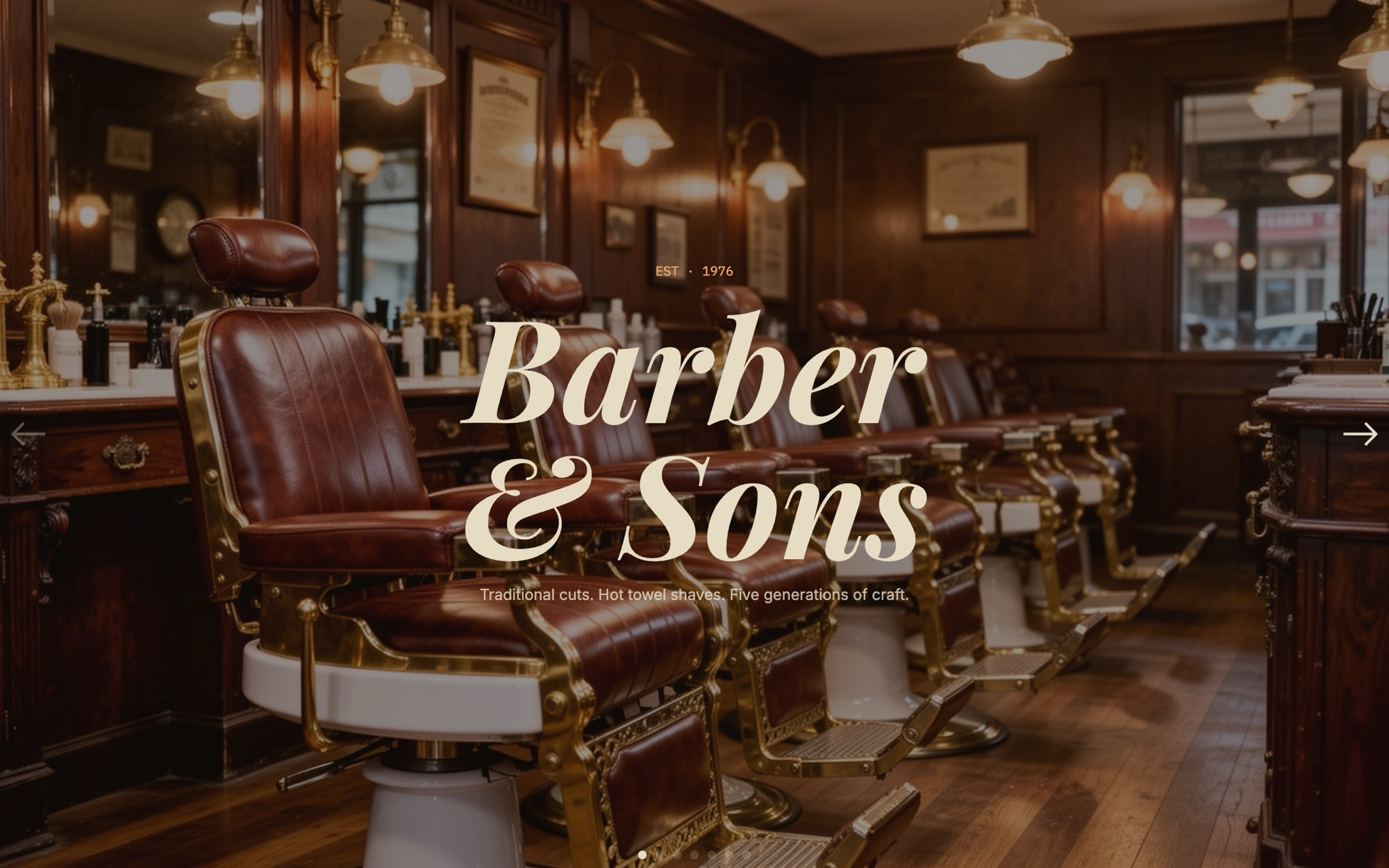
Barbershop Slider Template
A barbershop sells trust. The Barbershop template puts a heritage shop's identity into a seven-slide carousel - cover with the shop name and year established, cuts pricelist, hot shave, beard care, master barber portrait, shop interior, and a book chair call to action. The arc moves a new customer from name recognition to service detail to face behind the chair, the same path a recommendation would take in person.
Playfair Display in 700 carries the shop wordmark and headlines with editorial heft, IBM Plex Mono handles the pricelist with the feel of a printed menu, and Inter keeps body copy crisp. A palette of deep brown, cream, chestnut, and brass keeps the slider grounded in heritage without leaning into pastiche. Drop in your real shop photography and pricelist and you have a brand site that does the work of a recommendation.
#What Makes This Template Stand Out
Heritage Brand Cover With Established Year
The cover slide pairs a Playfair Display wordmark with an established-year tag (the demo reads 'Est. 1976'). The detail signals continuity and craft - the same signal a heritage shop sells in person - and sets the tone for the rest of the slider.
Pricelist Slide With Mono Type
The cuts pricelist uses IBM Plex Mono, which makes the line items align cleanly and read like a printed menu. Every price, service name, and duration is editable, so updating your menu takes minutes - no redesign required.
Service Detail Slides for Shave and Beard Care
Dedicated slides for hot shave and beard care give each premium service space to breathe. Use them to feature the ritual, the products, and the price - the kind of detail a customer wants before booking a service that costs more than a regular cut.
Master Barber Portrait Slide
A portrait slide for the master barber turns the brand human. Customers book the chair as much as the shop, and a quiet editorial portrait with name and tenure does the introduction work the way a face on a wall does in person.
Warm Tungsten Heritage Palette
Deep brown, cream, chestnut, and brass - tones that flatter wood paneling, leather chairs, and tungsten light. The palette is editable end to end if your shop runs cooler, more modern, or in an entirely different brand register.
#Who Should Use This Template
This template is built for independent barbershops, heritage shops, and shave parlors that need a website as confident as the chair work. The seven-slide structure is enough to introduce the shop, list services, feature the team, and channel walk-ins to bookings without bloating into a full multi-page site.
Modern barbershops, men's grooming brands, and grooming product lines can use the same template by swapping the palette and photography. The structure works whether you run a heritage spot with a 1976 founding year or a modern shop with a 2023 launch - the only thing that changes is tone, which the editor handles in minutes.
Local salon and beauty businesses in adjacent verticals - hair salons, men's spas, blowout bars - can adapt the template by editing service names and detail slides. The pricelist mono type and master practitioner portrait pattern work for any service-based local business where craft and people are the brand.
#Best Use Cases
- ✓Independent barbershop homepages introducing the shop, services, and team
- ✓Heritage shop sites featuring an established year and master barber portraits
- ✓Modern barbershop and grooming brand landing pages with a clear pricelist
- ✓Multi-location shop sites where each location runs its own slider with local team
- ✓Grooming product brand sites that pair a shop section with retail
- ✓Booking page hero sections that channel customers into Booksy, Square, or Squire
- ✓Adjacent local-service sites - hair salon, men_s spa, blowout bar - using the same structure
- ✓Press and trade pages for shops featured in local media or grooming publications
#How to Customize
- Open the Barbershop template in Swiper Studio - click 'Use This Template' above to load the seven slides into the editor1
- Update the cover slide shop name and established year to match your shop - swap the demo wordmark for your real brand mark2
- Edit the cuts pricelist - update service names, durations, and prices in the IBM Plex Mono mono type, keeping the line item rhythm consistent3
- Replace the shave and beard care service detail slides with your own service descriptions and photography through the media panel4
- Update the master barber portrait slide with a real photo and the barber name, tenure, and a short bio line5
- Swap the shop interior slide with your own interior photography - heritage shots tend to read warmer than wide-angle marketing photos6
- Link the Book Chair CTA to your booking system - Booksy, Square Appointments, Schedulicity, Squire, or a custom form7
- Adjust the palette and preview across mobile and tablet breakpoints, then export to HTML, React, Vue, Next.js, Web Component, or Webflow - or publish to CDN for embedding on your shop site8
#Frequently Asked Questions
- Can I edit the pricelist, services, and barber names?
- Yes. Every line on the cuts pricelist, the shave and beard care detail slides, and the master barber portrait slide is fully editable. Update prices, service names, durations, and barber names directly in the visual editor. You can also add new line items or remove ones you do not offer.
- Can I link the Book Chair CTA to my real booking system?
- Absolutely. Wrap the Book Chair button in a link block pointing to your booking system - Booksy, Square Appointments, Schedulicity, Squire, or your own custom form. The same approach lets you link individual service slides to their own booking flows if you take per-service deposits.
- Does the template work on mobile?
- Yes. The template includes responsive breakpoints for mobile, tablet, laptop, and desktop. Display headlines, the IBM Plex Mono price list, and detail slides reflow per breakpoint so the slider reads cleanly whether a customer pulls it up on a phone after work or on a desktop at home.
- Can I change the palette to match my own shop colors?
- Yes. The default palette pairs deep brown, cream, chestnut, and brass - heritage tones that suit traditional barbershops - but every color is editable. Update slide backgrounds, type, and accents in the editor to match your shop, whether you run a heritage spot, a modern shop, or a darker speakeasy-style brand.
- How do I embed this on my shop website or local business CMS?
- Publish to CDN from Swiper Studio and paste the embed snippet into your CMS. It works with Squarespace, Wix, WordPress, Webflow, GoDaddy site builders, and any platform that accepts an embed block. You can also export standalone HTML, React, Vue, Next.js, or a Web Component if you want to host the slider yourself.
#Related Templates

#Related Resources
- Swiper Studio for Small Businesses
- Swiper Studio for Landing Pages
- Swiper Studio for Team Showcases
- Swiper Studio for Web Designers
Ready to Build Your Slider?
Pick a template, customize it visually, and export production-ready code to React, Vue, Next.js, HTML, Webflow, and more. No coding required.








