
Awards Nominees Slider Template
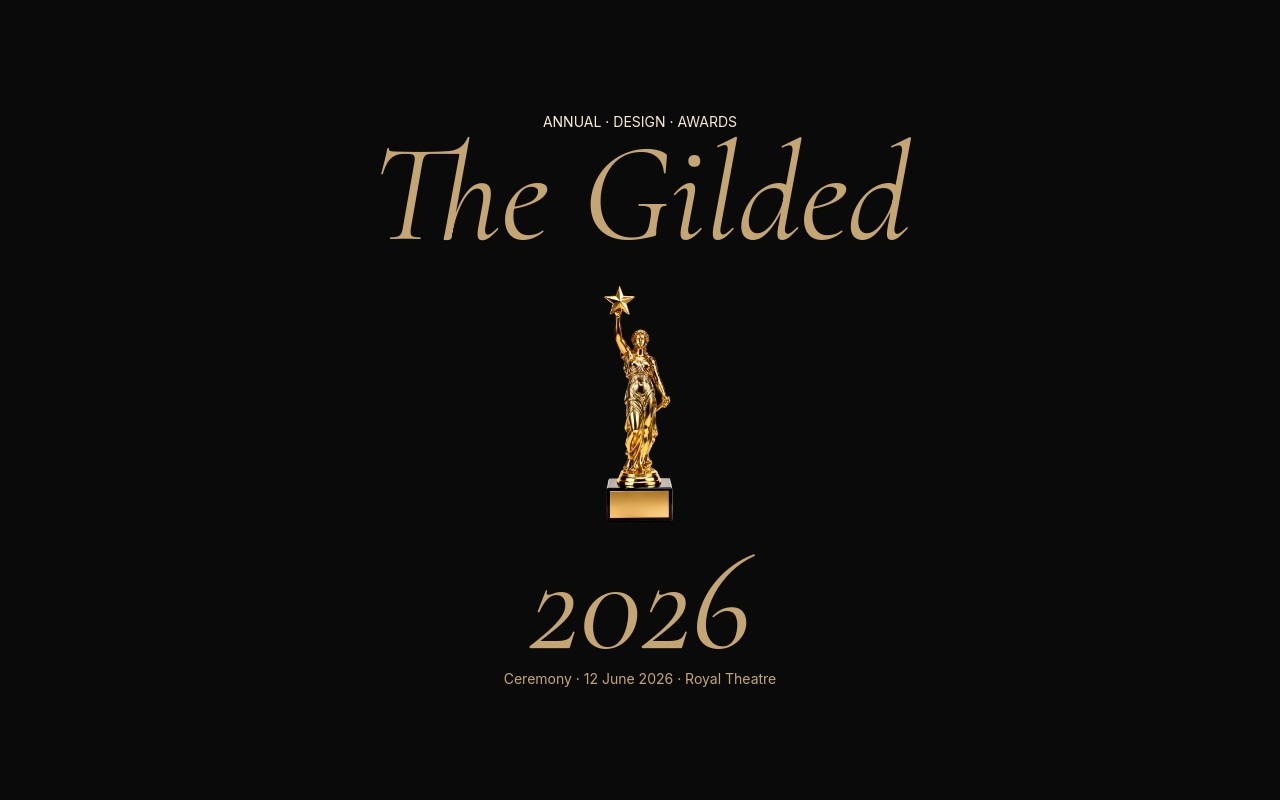
An awards ceremony slider built with the pacing of a real show - 1200ms ceremonial fades, champagne gold Cormorant italic on jet black, and a cutout gold trophy floating in a soft spotlight beam. Seven slides walk through "The Gilded / 2026" cover, five category-by-category nominee reveals, a lifetime achievement reveal with a returning trophy, and a champagne-gold RSVP closer with the ceremony date and venue. The template is built for design awards, film festivals, industry recognition shows, and year-end recap reels that want to feel as elegant as the work they're celebrating.
The palette stays tight: jet black #0a0a0a carries every category slide, champagne gold #c5a572 handles the trophy, category headers, and counter labels, and a soft cream surfaces only on nominee names and the final RSVP field. Cormorant Garamond italic carries the ceremony tone - the same serif used on red-carpet invitations and award show keys - and Inter handles the small caps category counters and "presented by" credits at the bottom of each slide.
#What Makes This Template Stand Out
Cutout Gold Trophy in a Spotlight Beam
The cover and lifetime achievement slides anchor on a cutout gold trophy floating dead-center, with a soft gold radial gradient built from background blocks creating the spotlight illusion. The trophy reads as the ceremony\'s logo and its hero image at once - swap it for any custom statuette and the spotlight still lands.
Cormorant Italic at Ceremony Scale
Category headers like "Best Direction" and "Studio of the Year" sit at hero italic scale, with a thin gold rule under each header and the five nominees stacked in cream Cormorant beneath. The serif tone is unmistakably ceremonial - no neon, no gradients, no shouting, just the typography you'd find on a printed program.
1200ms Fade for Real Ceremonial Pacing
The slider uses Swiper\'s fade effect at 1200ms - slow enough to feel like a host reading the next category, fast enough to keep a viewer engaged. Every category slide has time to breathe, which is what separates an awards reveal from a generic carousel.
Category Counter and Presenter Credit on Every Slide
Each category slide carries a small Inter "CATEGORY 01 / 05" counter at the top and a "PRESENTED BY FOUNDRY HOUSE" credit at the bottom. The small caps frame keeps the audience oriented inside the program without competing with the gold serif headlines - the same trick a real ceremony uses with lower thirds.
Lifetime Achievement Reveal With a Returning Trophy
Slide 6 breaks the nominee pattern - the trophy comes back at a smaller scale, an "Awarded to" italic line sits above a single name at hero scale, and a "Fifty Years of Practice · Tokyo" credit grounds the moment. It's the reveal beat the ceremony has been building toward, and it works for industry hall-of-fame, lifetime honors, or year-end recognition reels.
#Who Should Use This Template
This template is for design awards, film festivals, and industry recognition shows that want their nominee announcement, category reveal, or winners reel to feel as art-directed as the work being honored. The seven-slide sequence covers the full ceremony arc - title card, five category reveals, a lifetime honor, and an RSVP CTA - so you can embed the entire program on a single page or break it into a category drip across socials.
Beauty and fashion award programs, music industry honors, and food and hospitality awards can use the same structure for any black-tie category lineup. Swap the trophy cutout for a statuette, medal, or custom award, retype the categories to match your show, and the champagne gold and cream palette holds against any nominee photography you decide to add later.
Year-end recap pages, employee recognition reels, and internal company awards get a ceremony-grade reveal that finally treats internal honors with proper gravitas. Change "Best Direction" to "Engineer of the Year" or "Best Campaign", drop in your team members as nominees, and the same Cormorant italic carries the moment.
#Best Use Cases
- ✓Design awards programs announcing nominees by category before the ceremony
- ✓Film festivals and short-film competitions revealing official selections
- ✓Industry recognition shows for advertising, beauty, fashion, or hospitality
- ✓Music industry honors and album-of-the-year nominee reveals
- ✓Hall-of-fame announcements and lifetime achievement reveal pages
- ✓Year-end recap microsites celebrating standout work across categories
- ✓Internal company awards and employee recognition reveal reels
- ✓Conference best-talk or best-paper award announcement pages
#How to Customize
- Open the Awards Nominees template in Swiper Studio - you will see seven slides: the "The Gilded" cover, five category reveals, a lifetime achievement reveal, and the RSVP closer.1
- Rename the awards on the cover - retype "The Gilded" and "2026" in the italic Cormorant block, then update the "Annual Design Awards" small caps label and the ceremony date and venue line.2
- Swap the gold trophy cutout - upload your own statuette, medal, or custom award as a transparent PNG, or run a regular photo through Swiper Studio's AI background removal to get a clean isolated subject.3
- Edit the five category headers - retype "Best Direction", "Best Experience", "Studio of the Year", "Breakthrough", and category five to match your show. Update the "CATEGORY 01 / 05" counters if you add or remove categories.4
- Replace the nominee lists - click each cream Cormorant name and retype with your actual nominees. The vertical stack and slow letter-fade stagger handle three to seven names per category without breaking the layout.5
- Update the "presented by" credits at the bottom of each category - swap "Foundry House", "Halcyon & Hall", "The Athenaeum", and the other presenter labels for your real partners or sponsors.6
- Personalize the lifetime achievement slide - retype "Hiroshi Naitō" with your honoree and update the "Fifty Years of Practice · Tokyo" credit to match their career.7
- Retarget the RSVP closer - update the "12.06.26" date, the "The Royal Theatre · 20:00 GMT" venue, the dress code, and point the RSVP link to your real invite system. Then publish to CDN or export to React, Vue, HTML, or Webflow.8
#Frequently Asked Questions
- Can I change the awards name, categories, and nominees?
- Yes. The "The Gilded / 2026" cover, the five category headers (Best Direction, Best Experience, Studio of the Year, Breakthrough, Lifetime), the nominee lists, and the "presented by" lines are all plain Cormorant Garamond text in Swiper Studio. Click any element to retype and the ceremonial italic styling stays in place across every slide.
- How do I swap the gold trophy cutout for a different award?
- The trophy is a transparent PNG floating in a soft gold spotlight built from background blocks. Replace the image with your own trophy, statuette, medal, or custom award cutout - if your source has a background, Swiper Studio's AI background removal will give you a clean isolated subject that drops straight into the spotlight composition.
- What fonts and colors does this template use?
- The ceremony pairs Cormorant Garamond italic for category headers and nominee names with Inter for the small caps labels, category counters, and presenter credits. The palette is jet black `#0a0a0a`, champagne gold `#c5a572`, and a soft cream `#f5e9d3` accent on the final RSVP slide. All typography and colors are editable in the style panel.
- Can I add or remove categories to match my show?
- Yes. The template ships with five categories plus a lifetime achievement reveal and an RSVP closer. Duplicate any category slide to add a sixth or seventh category, or delete categories if your show is shorter. Swiper navigation and the "CATEGORY 01 / 05" counters update when you renumber the slide labels.
- How does the 1200ms fade transition affect performance?
- The 1200ms fade is a Swiper effect setting, not a video file - it crossfades between slides using CSS opacity, so it stays smooth on every device with no extra payload. The pacing is intentionally slow to feel ceremonial. If you want a sharper rhythm, drop the fade duration to 600-800ms in the slider settings panel.
#Related Templates


#Related Resources
- Swiper Studio for Hero Sections
- Swiper Studio for Landing Pages
- Swiper Studio for Marketers
- Swiper Studio for Agencies
Ready to Build Your Slider?
Pick a template, customize it visually, and export production-ready code to React, Vue, Next.js, HTML, Webflow, and more. No coding required.








