
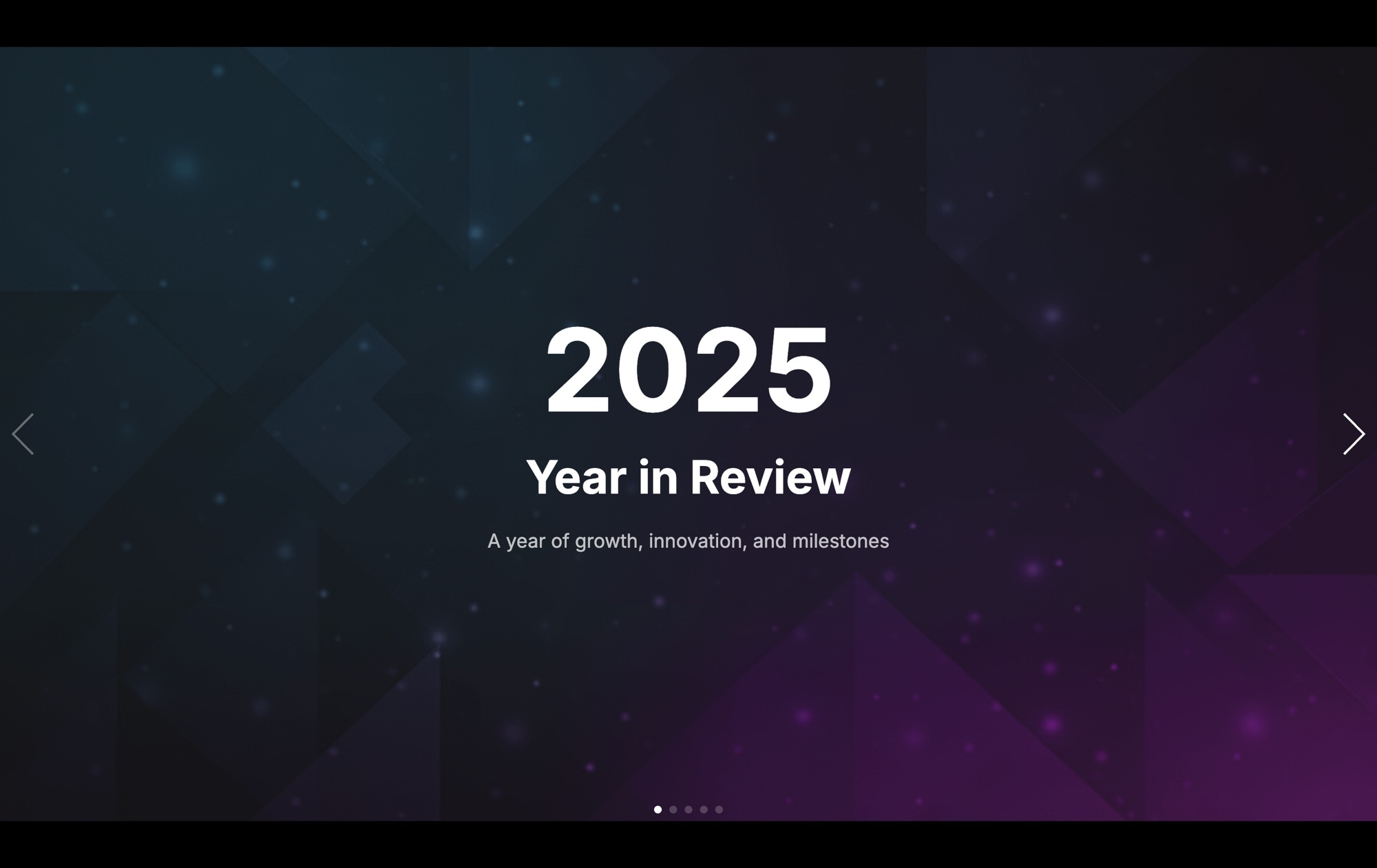
2025 Year in Review Presentation Slider
A full-screen annual recap presentation that turns your year-end highlights into a cinematic experience. The opening slide features a dramatic geometric background in deep blue and purple tones — diamond shapes and particles creating an abstract, futuristic atmosphere — with a bold centered "2025" headline, "Year in Review" subtitle, and the tagline "A year of growth, innovation, and milestones." Navigation arrows on both sides and pagination dots at the bottom guide viewers through the story. This is not a slide deck. It is a presentation that people actually want to click through.
The parallax background effect adds depth to every transition, making the geometric pattern shift behind your content as viewers navigate between slides. Each slide is a full-viewport canvas where you can place key metrics, milestones, team highlights, or strategic goals with bold typography and generous white space. The dark color palette keeps the focus on your content while signaling professionalism and ambition — exactly the tone a year-in-review should strike.
#What Makes This Template Stand Out
Parallax Background Depth
The parallax effect creates a layered, three-dimensional feel as viewers navigate between slides. The geometric background pattern moves at a different rate than the foreground content, producing a subtle but powerful sense of depth that makes every transition feel cinematic. It transforms a simple slideshow into a spatial experience.
Full-Screen Presentation Format
Every slide fills the entire viewport, eliminating distractions and focusing attention entirely on your content. This is the same immersive approach used by Apple keynotes and Spotify Wrapped — a format proven to hold attention through long-form narratives and data-heavy presentations.
Bold Typography Hierarchy
Large, centered headlines command attention on every slide. The template establishes a clear visual hierarchy — year, title, tagline — that scales naturally across devices. You do not need to be a designer to create slides that look polished. The typography does the heavy lifting.
Geometric Abstract Backgrounds
The dark blue and purple background with diamond shapes and particle effects creates a modern, futuristic aesthetic. It is distinctive enough to feel premium but abstract enough to work across industries — tech companies, creative agencies, nonprofits, and startups alike. Replace it with your own branded background or keep it as-is.
Navigation Arrows and Pagination
Side arrows and bottom pagination dots give viewers two intuitive ways to navigate. The arrows are visible on desktop for mouse-driven browsing, while the dots let viewers see how many slides remain and jump to any point in the presentation. On mobile, touch swiping is enabled by default.
#Who Should Use This Template
If you are a marketing or communications team preparing an annual recap, this template replaces the tired PDF report or PowerPoint deck. Year-in-review content performs exceptionally well on social media and company blogs — it is shareable, skimmable, and visually engaging. Publishing as an interactive web slider means your recap lives as a link, not a file attachment. Embed it on your homepage, share it on LinkedIn, or send it in a newsletter. Readers click through at their own pace, and every slide gets full-screen attention.
Startup founders and executives can use this for investor updates, board presentations, and all-hands meetings. The full-screen format with bold numbers and headlines communicates confidence and clarity. Key metrics (revenue growth, user milestones, team expansion) hit harder when they fill the entire screen. And because you can publish to CDN, your presentation is always a link away — no file versioning, no compatibility issues, no "can you share the deck?" follow-ups.
Content creators and social media managers looking for an engaging format for annual roundups will find this template immediately useful. Spotify Wrapped proved that year-in-review content is inherently viral — people love seeing their year summarized visually. This template gives you the same format for any brand, product, or community, with the flexibility to export it as a standalone page or embed it within an existing article.
#Best Use Cases
- ✓Company annual reports and year-end recaps published as interactive web presentations
- ✓Startup investor updates highlighting key metrics, milestones, and growth figures
- ✓All-hands meeting presentations displayed full-screen in a browser instead of PowerPoint
- ✓Marketing team year-in-review content for blogs, newsletters, and social media campaigns
- ✓Nonprofit impact reports showcasing donations, beneficiaries, and program outcomes
- ✓Personal year-in-review pages summarizing travel, reading, projects, or achievements
#How to Customize
- Click "Use This Template" to open the year-in-review slider in Swiper Studio's visual editor1
- Edit the opening slide — update the year, title, and tagline to match your recap theme and time period2
- Add new slides for each section of your recap: key metrics, milestones, team highlights, goals achieved, and looking-ahead slides3
- Replace the geometric background — keep the default for a modern look, or upload your own branded background images for each slide4
- Populate slides with your data — add large headline numbers for metrics, short paragraphs for narrative context, and images for visual evidence5
- Add entry animations to text elements — use fade, scale, blur, or slide-up effects with staggered delays to create a reveal sequence on each slide6
- Preview the parallax effect and adjust the parallax depth to control how dramatically the background shifts during transitions7
- Export to HTML, React, Vue, Next.js, Webflow, or publish to CDN and share the link with your team, investors, or audience8
#Frequently Asked Questions
- How does the parallax background effect work?
- The parallax effect moves the background image at a different speed than the foreground content as you navigate between slides. This creates a sense of depth and dimension — the geometric pattern shifts subtly while text and data elements transition at their own pace. The result is a cinematic, layered presentation that feels more like a motion graphics piece than a static slideshow.
- Can I customize this for a different year or time period?
- Absolutely. The "2025" and "Year in Review" text are standard editable elements. Change them to any year, quarter, or time period. You can also adapt the template for monthly reports, decade retrospectives, or event recaps — the full-screen layout and parallax effects work for any chronological narrative.
- Can I add data visualizations or charts to the slides?
- You can add images of charts, graphs, or infographics as child elements on any slide. Upload a pre-rendered chart image and position it alongside your text and metrics. For interactive charts, export the slider and integrate your charting library in the exported code.
- Does this template work for company-wide presentations?
- Yes. The full-screen format, bold typography, and cinematic transitions make it ideal for all-hands meetings, investor updates, and stakeholder reports. Publish to CDN and share a link, or export to HTML and present directly in a browser — no PowerPoint or Google Slides required.
- What export formats are available?
- All Swiper Studio export formats: standalone HTML, React component, Vue component, Next.js project, Web Component, and native Webflow element. You can also publish to CDN for instant embedding on any internal dashboard, company blog, or social media landing page.
#Related Templates
#Related Resources
Ready to Build Your Slider?
Pick a template, customize it visually, and export production-ready code to React, Vue, Next.js, HTML, Webflow, and more. No coding required.








